
Top 10 features coming to watchOS 27 – The Apple Watch continues to transform how we navigate daily health, fitness, and connectivity right from our wrists. With the announcement of watchOS 27, Apple introduces a wave of intuitive updates designed to make your smartwatch experience faster, smarter, and far more helpful. Whether you use your watch primarily to track your steps, stay in touch with family, or monitor your daily health, these upcoming features bring practical value without overwhelming you with complex technical jargon.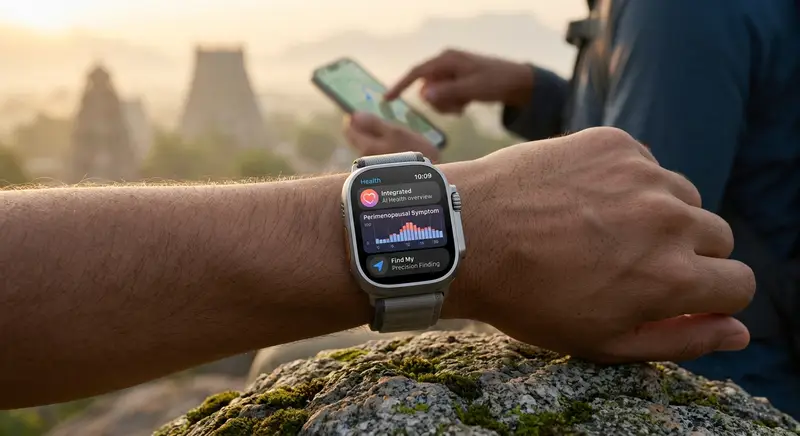
In this comprehensive overview, we examine the top 10 features coming to watchOS 27 and explain exactly how they will enhance your daily routine.

1. Next-Generation Siri AI and the Dedicated Siri App
For years, Siri on Apple Watch has served as a quick tool for setting alarms, starting timers, or checking the weather. With watchOS 27, Siri receives its most substantial upgrade yet through deep integration with Apple Intelligence.
What This Means for You
-
Natural Conversations: You can now speak to Siri in a much more fluid, conversational manner. Instead of repeating exact phrase commands, you can ask open-ended questions like, “What is a good 20-minute stretching routine for beginner runners?” and receive a detailed, contextual answer.
-
Personal Context Awareness: Siri can search across your personal data safely to locate details you might have forgotten. For example, you can ask Siri for a door lock code sent in a recent email or details from a saved note, and it will surface the information right on your wrist.
-
A Standalone Siri App: For the first time, watchOS includes a dedicated Siri app. This allows you to review previous conversations, pin important queries, and seamless sync interaction history across your iPhone, iPad, and Apple Watch.
2. The Dynamic App Grid
Navigating through dozens of tiny app icons on a small screen can sometimes feel frustrating. watchOS 27 replaces the rigid app display with a smart Dynamic App Grid that automatically adapts to your needs throughout the day.
When you press the Digital Crown, instead of seeing an overwhelming wall of icons, we now get a clean layout highlighting six intelligent app suggestions. These selections are calculated based on your location, time of day, and recent habits. If you frequently open the Workout app at 8:00 AM or check the Weather app before commuting home, those apps will automatically occupy primary positions. You can still access your full app library with a single tap, but the most relevant tools are always ready front and center.
3. Advanced Cycle Tracking: Perimenopause and Menopause Support
Apple has consistently expanded its focus on reproductive and overall health tracking. In watchOS 27, the Health app receives specialized cycle tracking features designed to support perimenopause and menopause.
How It Helps
-
Pattern Detection: Using wrist temperature data, historical cycle logs, and heart rate metrics, the system can notify you when logged patterns suggest transitions toward perimenopause.
-
Symptom Logging: You can easily record associated physical and emotional symptoms directly from your wrist, providing clear data to share with healthcare professionals.
-
Educational Resources: The accompanying Health experience delivers tailored guidance and expert-backed medical insights to help users navigate bodily changes with confidence and clarity.
4. Intuitive Single-Tap Gesture Controls
Gesture interactions allow you to control your Apple Watch even when your other hand is full. Following the popularity of double-tap gestures, watchOS 27 introduces a refined single-tap gesture specifically designed to make interacting with widgets instantaneous.
By performing a simple, subtle finger gesture on your watch hand, you can immediately trigger actions inside Smart Stack widgets. For example:
-
Heart Rate: Open a live measurement instantly from the heart rate widget.
-
Music & Audio: Play or pause current audio playback without physically touching the screen.
-
Fitness: Launch a suggested workout with zero screen tapping.
This friction-free gesture makes quick checks and basic controls far more effortless during active moments like cooking, carrying groceries, or running.
5. Smarter Workout Buddy and Improved Treadmill Accuracy
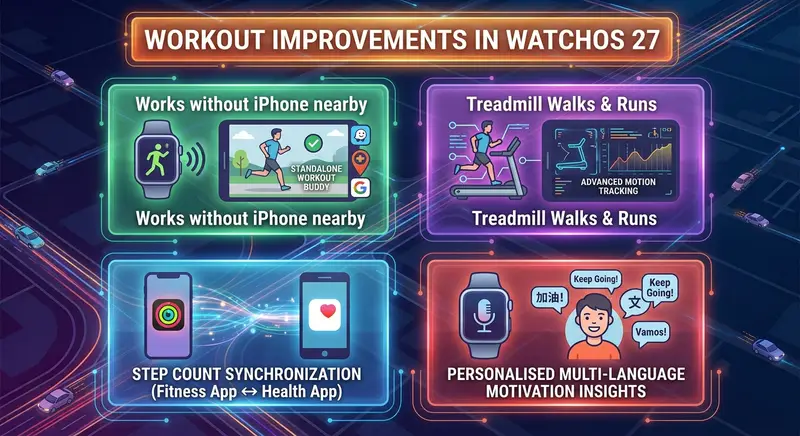
Staying motivated and getting reliable performance statistics are two primary reasons millions wear an Apple Watch. watchOS 27 introduces enhanced intelligence to the Workout app through Workout Buddy updates and recalibrated distance algorithms.
-
Standalone Functionality: Workout Buddy now operates independently on your watch without needing your iPhone connected nearby during a session.
-
Progressive Metric Tracking: The app evaluates your historical training data to provide actionable, real-time feedback—encouraging small, safe increases in speed, distance, or workout duration.
-
Enhanced Indoor Calibration: Improved motion-tracking algorithms deliver significantly higher precision when measuring indoor treadmill runs and walks.
-
Unified Step Counts: Step counting between the Fitness app and Health app is now fully synchronized, eliminating discrepancy confusion across devices.
6. Unified Find My App with Precision Finding
In earlier software versions, locating people, personal items, and devices on Apple Watch required opening three separate applications. watchOS 27 consolidates all tracking functions into a single, unified Find My app—mirroring the streamlined layout found on iPhone and Mac.
In addition to combining your contact list, connected gadgets, and tagged possessions in one spot, the updated app introduces Precision Finding support. When searching for a misplaced paired iPhone, AirTag, or AirPods, onscreen directional guidance and haptic vibrations steer you right to the exact spot where your item is resting.
7. Expanded Smart Stack Suggestions and Custom Wallet Passes
The Smart Stack—the collection of informative widgets accessible by rotating the Digital Crown from your watch face—gets a major boost in intelligence.
New Automatic Widget Triggers
-
Parked Car Location: Automatically appears when you finish driving and disconnect from your vehicle’s Bluetooth.
-
Pinned Messages & Birthdays: Highlights priority chats or family birth anniversary reminders right when they are relevant.
-
Custom Wallet Cards: Digital transit cards, identity passes, or event tickets generated on your iPhone can now automatically surface in your Smart Stack when you arrive at a venue or transit station.
8. Proactive Call Context for Business Communications
An innovative quality-of-life feature coming in watchOS 27 is Call Context. When you make or receive a call with a verified business—such as an airline, hotel, or customer service helpline—your Apple Watch proactively scans your relevant apps (like Mail or Wallet) to display relevant details right on screen.
Instead of scrambling to look up a confirmation code, flight number, or reservation detail while talking, Call Context presents the necessary reference number directly on your watch display.
9. Intelligent Battery Optimization Suggestions
Battery life is crucial for every Apple Watch owner. Rather than simply switching to a basic Low Power Mode when your battery reaches a critical level, watchOS 27 introduces proactive battery suggestions.
The system analyzes background app activity, screen brightness usage, and connection states to offer tailored recommendations. If a particular background feature is draining power unnecessarily before an upcoming scheduled workout or sleep session, your watch will suggest temporary setting adjustments to ensure your device stays powered throughout your entire day.
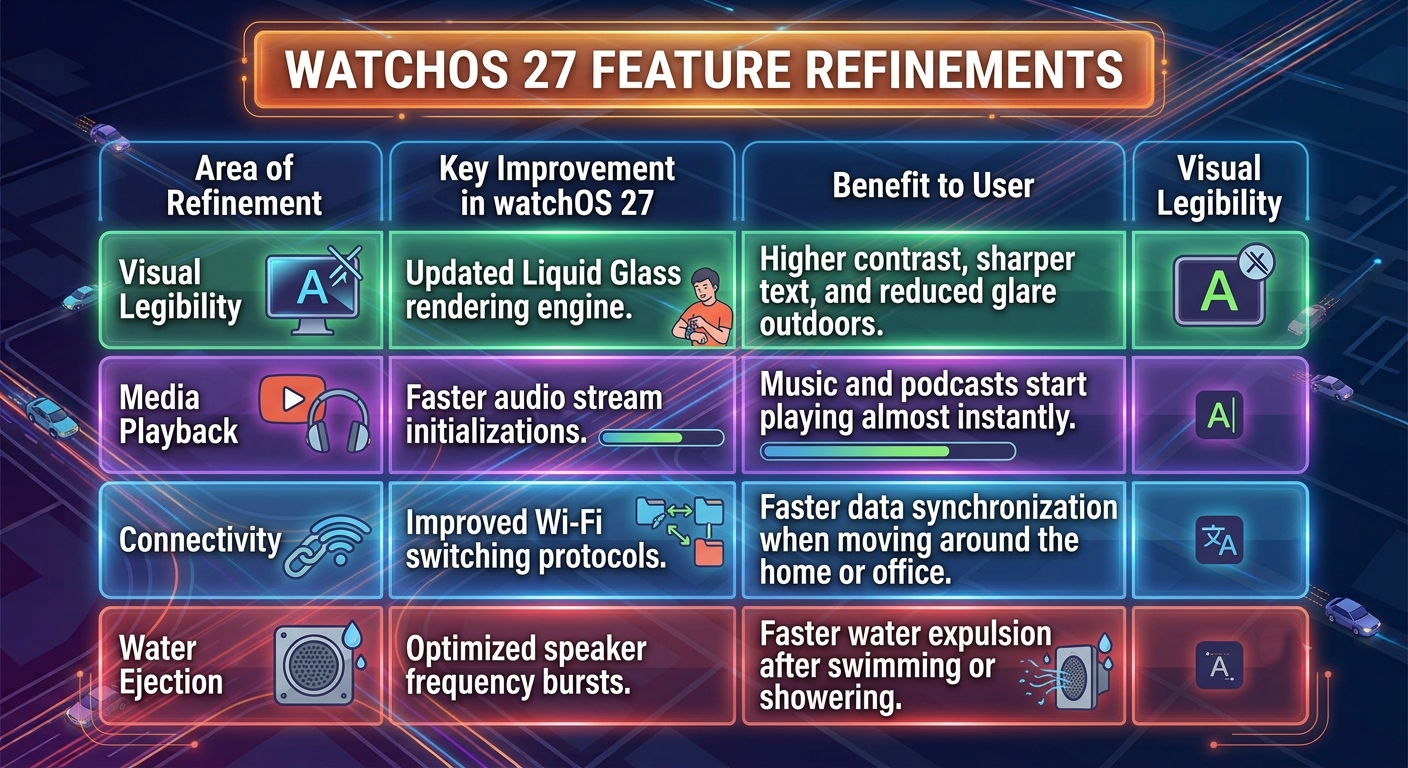
10. Design Refinements and Performance Speed Improvements
Beyond flagship features, watchOS 27 focuses heavily on overall system fluidity, visual readability, and app response times.
Summary: Device Compatibility and Release
watchOS 27 represents a thoughtful evolution that makes Apple Watch easier to navigate, more proactive, and significantly more helpful in everyday health and fitness scenarios. By combining conversational AI with practical physical gestures and streamlined app organization, we see Apple continuing to make complex technology accessible to everyone.
Compatible Apple Watch Models
To run watchOS 27, you will need a paired iPhone running iOS 27 alongside one of the following smartwatch models:
-
Apple Watch Series 9 and newer
-
Apple Watch SE (3rd generation)
-
Apple Watch Ultra 2 and Apple Watch Ultra 3
The official public release of watchOS 27 will be available as a free software update later this year.

Selva Ganesh is a Computer Science Engineer, Android Developer, and Tech Enthusiast. As the Chief Editor of this blog, he brings over 10 years of experience in Android development and professional blogging. He has completed multiple courses under the Google News Initiative, enhancing his expertise in digital journalism and content accuracy. Selva also manages Android Infotech, a globally recognized platform known for its practical, solution-focused articles that help users resolve Android-related issues.




Leave a Reply