
Use Google Wallet Kid Balances– We have witnessed a significant transformation in how households handle money, moving away from loose pocket change and crumpled paper bills toward streamlined digital transactions. Teaching children financial literacy has traditionally presented a major hurdle: hand over physical cash with zero visibility, or provide a debit card tied to an external banking institution with confusing interfaces and hidden service charges.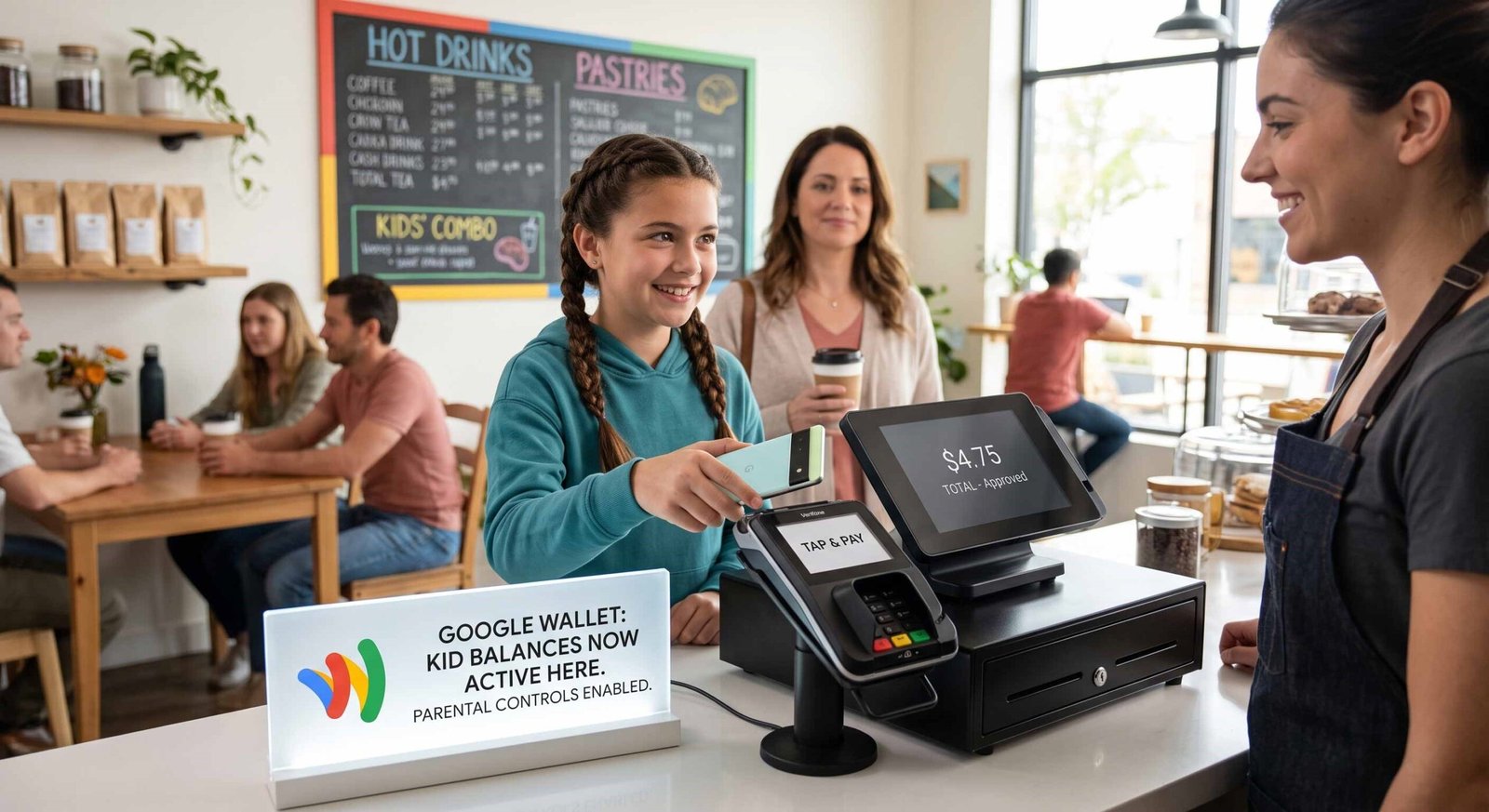
When Google Wallet rolled out dedicated kid balances, we integrated the feature directly into our family routine to test how effectively it bridges the gap between adolescent autonomy and strict parental oversight. Designed for children under 18 holding a supervised account through Google Family Link, this system converts standard Android and Wear OS hardware into secure, controlled contactless payment tools.

Core Architecture and Setup via Google Family Link
To implement this setup, we relied on our centralized Google Family Group. The architecture ensures that only the designated Family Manager holds administrative rights to initialize, fund, or close a child’s balance.
The balance functions as an isolated digital ledger. Unlike traditional co-signed student accounts, a kid’s balance in Google Wallet does not require opening an entirely new checking account or issuing a physical plastic debit card.
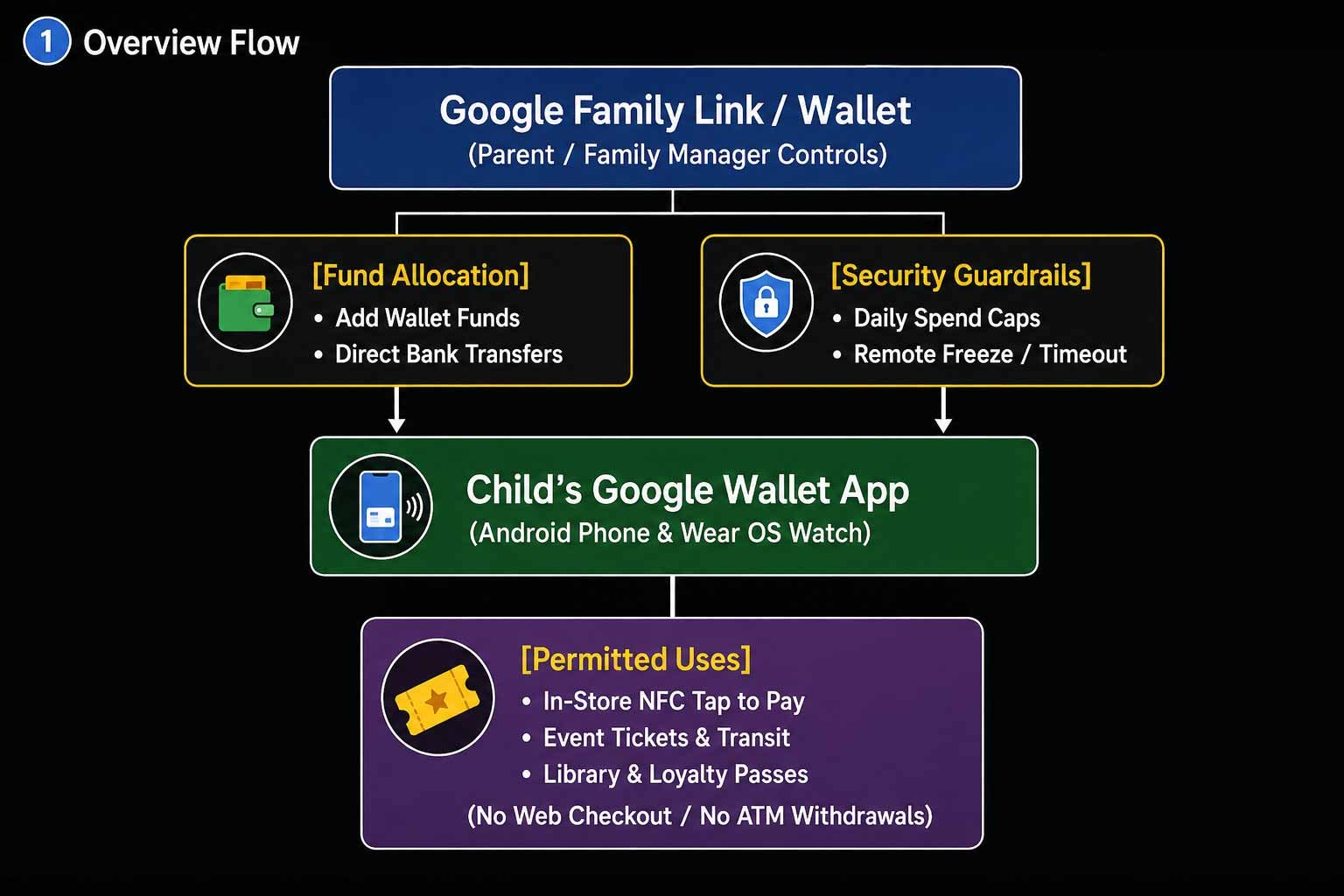
- Supervised Account Requirements: The child must operate a supervised Google Account managed under Family Link.
- Hardware Compatibility: The minor’s smartphone or smartwatch requires an active NFC chip and updated Google Play services.
- Role Distribution: While secondary parents in the Family Group can deposit allowance money, adjust spending thresholds, and monitor purchase feeds, the primary Family Manager retains sole authority over balance PIN resets, dispute resolution, and account closure.
Real-Time Parental Controls and Spending Guardrails
The defining strength of this payment system lies in its granular supervisory layer. Rather than passively waiting for monthly bank statements, we manage every financial parameter in real time through the Google Family Link dashboard.
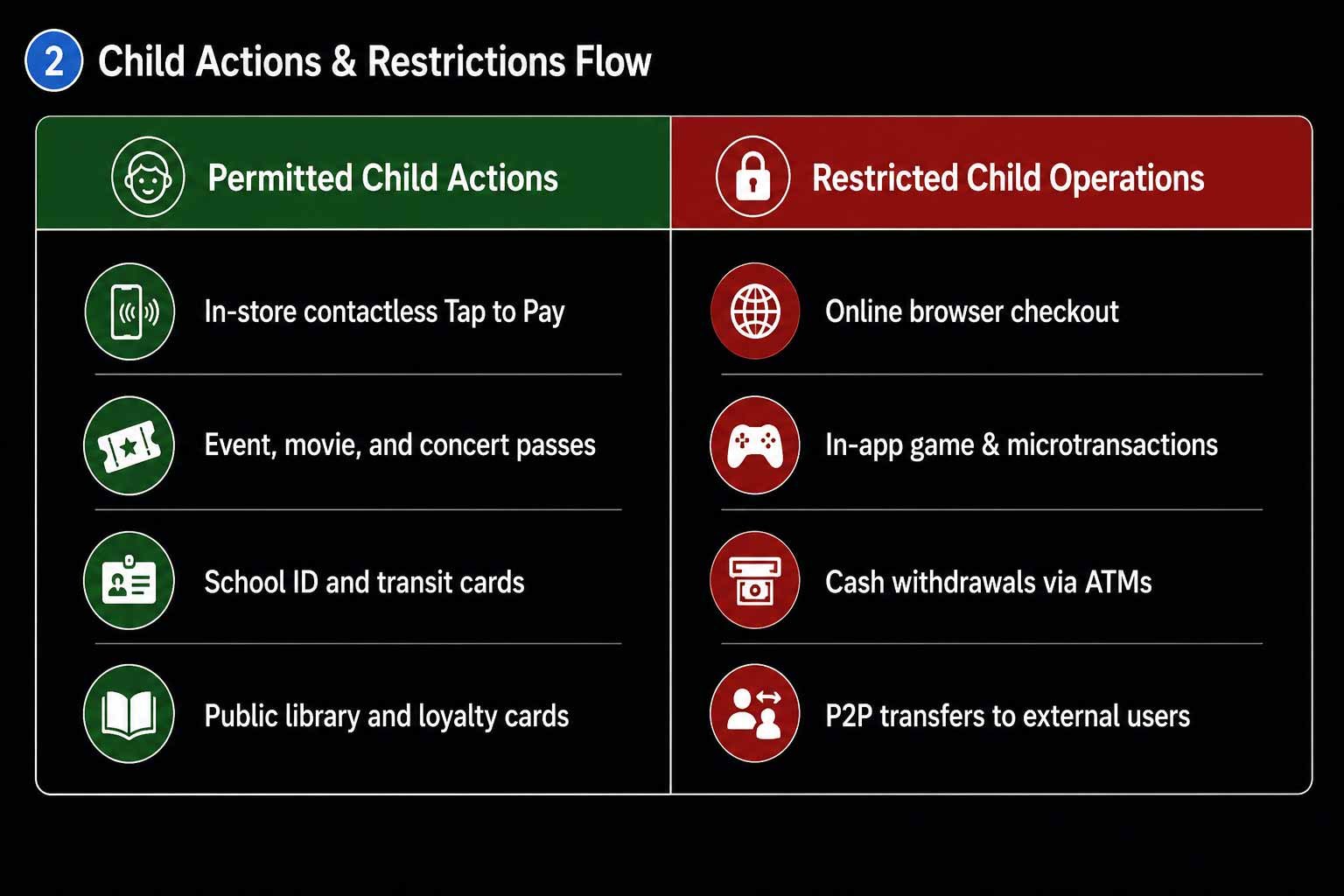
When our child reaches their preset daily limit, any subsequent payment attempt is automatically declined at the point-of-sale terminal, sending an instantaneous notification to both parent and child devices. This immediate feedback loop eliminates accidental overspending while encouraging active budgeting discussions.
The In-Store Payment Experience for Children
Giving children hands-on financial responsibility requires an intuitive, friction-free interface. On both Android phones and Wear OS smartwatches, Google Wallet presents a clean, simplified layout showing only the available balance, recent transactions, and active daily allowances.
By intentionally turning off web-based checkouts, in-app microtransactions, and ATM cash withdrawals, Google creates a safe sandbox environment. Children gain the real-world experience of buying lunch, transit fares, or school supplies without exposing the balance to impulsive digital purchases or unverified online merchants.
Google Wallet Versus Competing Family Finance Platforms
To understand where Google Wallet kid balances fit within the broader financial technology ecosystem, we compared its capabilities against prominent alternatives like Apple Cash Family, Greenlight, and FamZoo.
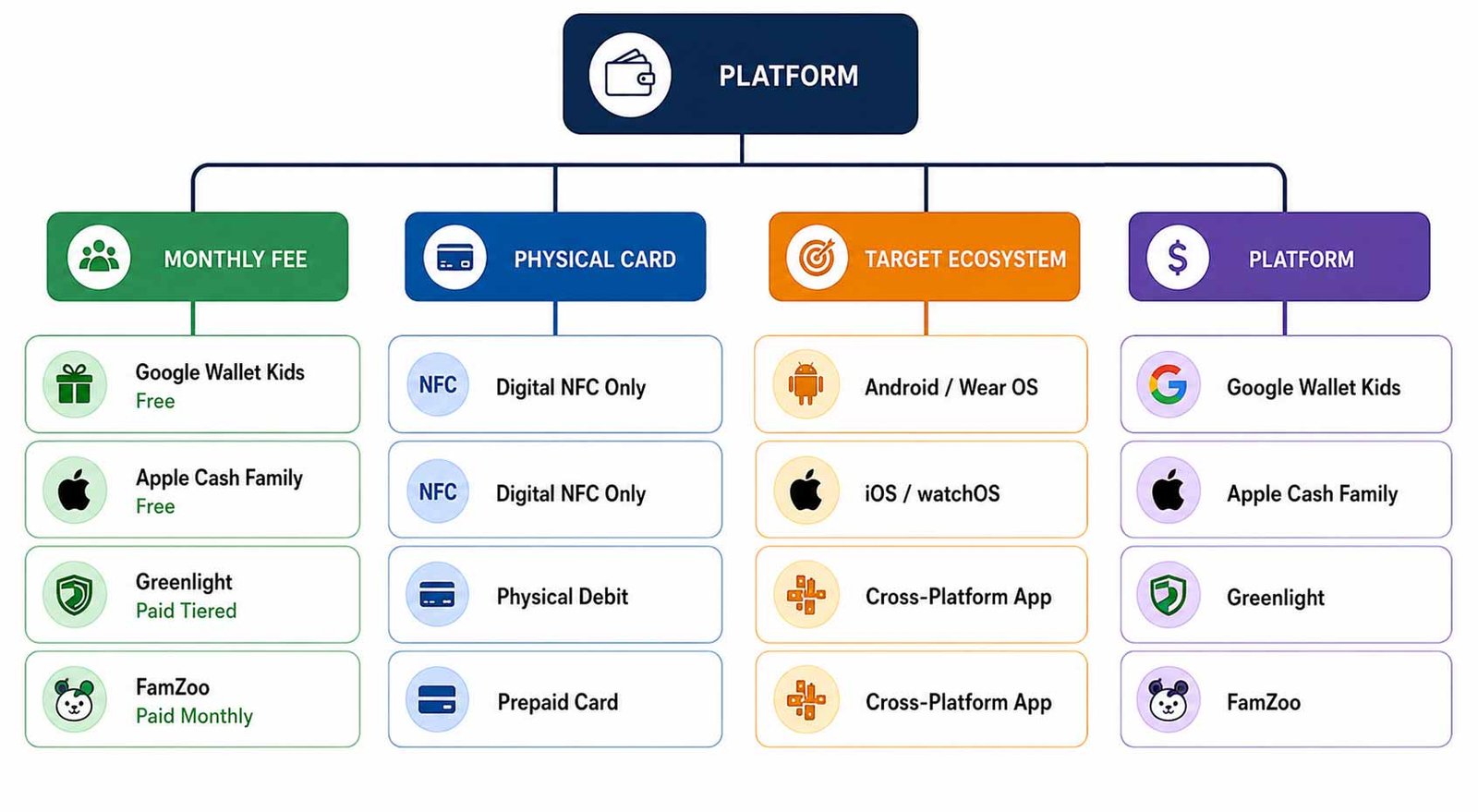
While third-party platforms like Greenlight offer sophisticated investment portfolios and chore-tracking charts, they require recurring subscription fees and separate banking networks. Google Wallet delivers an accessible, zero-cost native solution for Android-centric households seeking pure payment utility and dependable parental controls.
Frequently Asked Questions
Does a child need an existing bank account to use Google Wallet kid balances?
No. Google Wallet kid balances function as an independent, parent-funded digital balance that does not require a traditional bank account or credit check.
Can children use this balance to make purchases on websites or inside apps?
No. Kid balances are strictly restricted to physical in-store tap-to-pay terminals and cannot be used for online checkout, in-app purchases, or digital storefronts like Google Play.
How do parents add money to their child’s digital wallet?
The Family Manager or authorized secondary parent can instantly transfer funds into the child’s balance through the Google Family Link app or the Google Wallet website using a linked debit card or bank account.
What happens if a child loses their smartphone or smartwatch?
Parents can immediately lock the balance remotely through Family Link or remove the payment profile from the lost device without losing the underlying funds.
Can children withdraw cash at an ATM using their Google Wallet balance?
No. ATM withdrawals and cash-back options at retail registers are entirely blocked for supervised kid balances.
Are there monthly subscription fees or transaction charges?
Google Wallet provides this kid’s balance functionality without recurring subscription costs or maintenance fees.
Can both parents in a Family Group monitor the child’s spending?
Yes. Both the Family Manager and secondary designated parents can monitor spending activity, receive transaction alerts, and adjust daily limits.
What non-payment items can children store in their Google Wallet?
Children can store supported digital passes, including school identification cards, public transit cards, event tickets, and library passes, provided parental permissions allow pass usage.
What happens to the balance when a child turns 13 or reaches the age of consent?
When a minor reaches the age where they can manage their own Google Account, parents receive advance notifications. If supervision is removed, the balance closes, and the remaining funds are automatically refunded to the Family Manager.
Is the Google Wallet kid balance feature available internationally?
The dedicated supervised kid balance feature launched initially in the United States, with broader international availability rolling out over time.

Selva Ganesh is a Computer Science Engineer, Android Developer, and Tech Enthusiast. As the Chief Editor of this blog, he brings over 10 years of experience in Android development and professional blogging. He has completed multiple courses under the Google News Initiative, enhancing his expertise in digital journalism and content accuracy. Selva also manages Android Infotech, a globally recognized platform known for its practical, solution-focused articles that help users resolve Android-related issues.





Leave a Reply