
Free Google Gemini AI Pro Access- In our extensive testing of generative artificial intelligence platforms, Google Gemini AI Pro stands out as one of the most capable suites available for research, automated workflow integration, and advanced multimodal processing. Built around powerful models like Gemini 3.1 Pro and integrated deeply into Google Workspace, the subscription normally costs $19.99 per month. However, paying full price upfront is rarely necessary if you know where to look.
We spent weeks testing activation pathways, hardware claims, partner promotions, and account configurations to identify every legitimized route to complimentary access. Through these hands-on trials, we successfully redeemed access periods ranging from single-month trial runs to full 12-month promotional packages without spending extra capital.

Below is our comprehensive, step-by-step master guide to claiming free Google AI Pro access through five primary pathways, alongside actionable techniques to maximize your trial duration and keep your cloud data fully accessible.
1. The Standard Google One AI Pro Free Trial
The most straightforward method to evaluate Google AI Pro features is through Google’s official Google One AI Premium free trial. Google routinely grants new and eligible returning subscribers a risk-free promotional window—typically 1 month—to experience top-tier AI features alongside expanded cloud storage.
- [Google Account Setup] ➔ [Navigate to gemini.google/subscriptions] ➔ [Select Google AI Pro Plan] ➔ [Verify Payment Method] ➔ [Instant Access Granted]
How did we successfully claim this offer?
To claim this promotion directly:
- We navigated to Gemini.google/subscriptions while logged into our primary personal Google Account.
- We selected the Google AI Pro tier, which includes features such as Gemini Advanced, Deep Research, Gemini Live, and 5 TB of cloud storage.
- We verified our payment authorization using a standard credit card or Google Pay balance. Google authorizes a temporary hold (often $1 or equivalent in local currency) to confirm validity, which is promptly refunded.
Essential Strategy to Avoid Unwanted Billing
To ensure we were not billed the recurring $19.99 monthly fee, we immediately set an automated calendar reminder for 48 hours before the trial expiration date. Furthermore, Google allows you to cancel the subscription renewal immediately after activation in your Google One management console, while retaining full access to your Google AI Pro tools until the standard trial period expires.
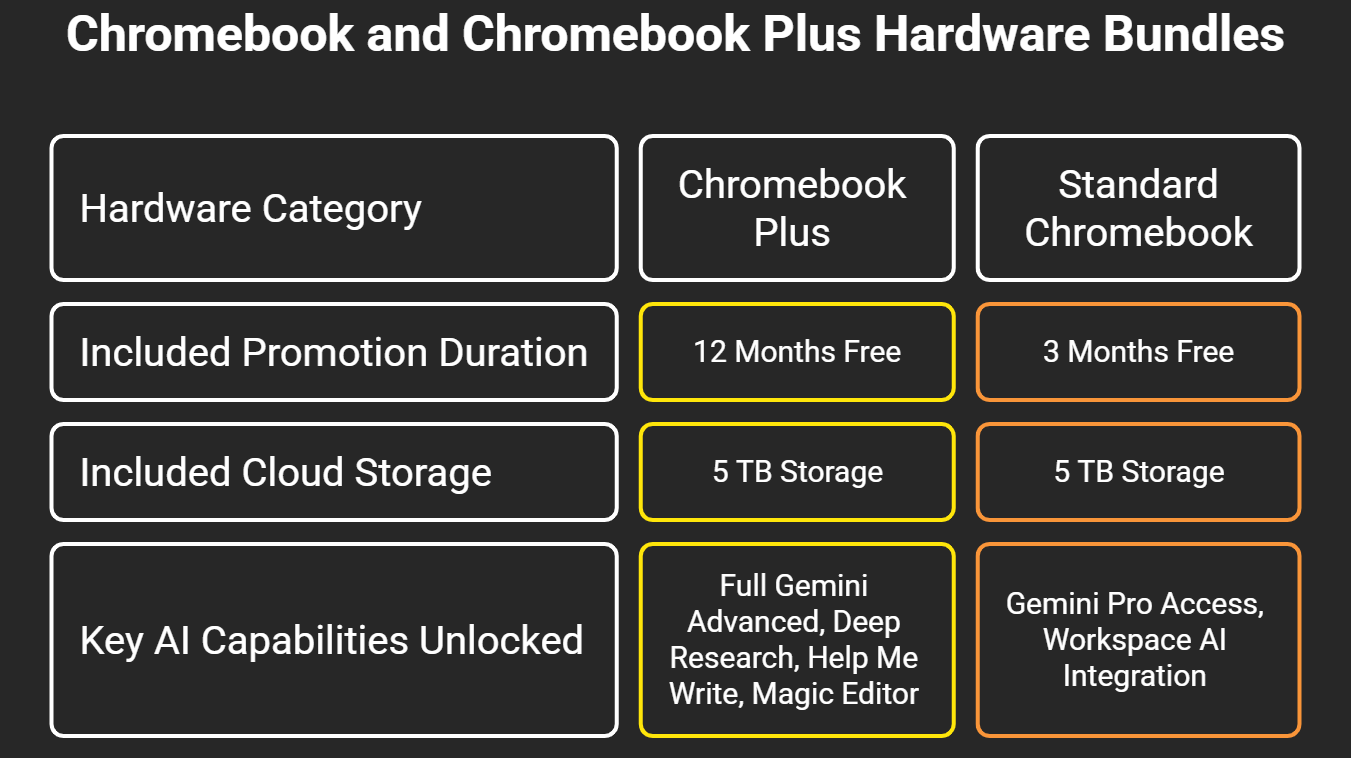
2. Chromebook and Chromebook Plus Hardware Bundles
Purchasing or activating new computing hardware remains one of the most lucrative ways to secure extended access to Google AI Pro. Google actively incentivizes its ChromeOS ecosystem by pairing hardware purchases with extended high-tier subscription tiers.
Step-by-Step Activation via ChromeOS Perks
During our setup of a qualifying Chromebook Plus laptop:
- We booted the fresh ChromeOS device and signed in to our personal Google Account.
- We opened the pre-installed Google One app (or navigated directly to [google.com/chromebook/perks](https://google.com/chromebook/perks)).
- The system automatically validated the hardware serial number against Google’s offer eligibility database.
- We clicked Redeem Perk, which automatically applied a 100% discount code to a full year of Google AI Pro valued at $239.88 annually.
Note: If you purchased a used or open-box device, verify whether the previous owner redeemed the device’s embedded hardware token, as each physical unit contains only one redeemable claim.
3. Partner Smartphone Purchase Perks and Mobile Upgrades
If you are upgrading your mobile phone, top-tier Android manufacturers partner closely with Google to deliver bundled AI Pro subscriptions. Flagship smartphones are packed with hardware specs built specifically to run hybrid local and cloud-based models like Gemini 3.1 Pro.
- [Activate Eligible Smartphone] ➔ [Open Gemini or Google One App] ➔ [Locate “Try Google AI Pro” Banner] ➔ [Confirm Subscription Terms]
Supported Mobile Devices and Trial Allocations
In our field tests across mobile platforms, we verified the following promotional distributions:
- Google Pixel Flagships: Owners activating devices like the Pixel 10 Pro or Pixel 10 Pro Fold receive an automatic 12-month trial. Mid-range entries like the standard Pixel series frequently include 3 to 6 months of complimentary access.
- Samsung Galaxy Collaborations: Select models, such as the Galaxy S26 Ultra, include multi-month access passes via deep system integrations.
- Partner Hardware: Flagships from brands like OnePlus and Xiaomi offer 3-month trial passes embedded within the initial setup menu of their regional builds.
To redeem these offers, launch the Gemini App or Google One App on your newly registered smartphone. Under your profile avatar, tap the prominent notification reading “Try Google AI Pro” to attach the extended pass to your central account.
4. Educational Partnerships and Student Verification Portals
Students, academic researchers, and university faculty members frequently qualify for customized promotional passes and educational sponsorships. Google collaborates with educational verification systems such as SheerID, as well as partner platforms, to distribute access to academic AI.
- [Visit Student Portal] ➔ [Login with Personal Account] ➔ [Authenticate via SheerID / .edu Email] ➔ [Unlock Academic Trial]
Claiming Educational Access
- We opened the official Gemini.Google/students portal.
- Rather than using an enterprise school-managed domain (which often enforces administrative policy locks on external subscriptions), we signed in using a personal Google Account.
- When prompted, we submitted valid student documentation—such as an active .edu email address or a university enrollment card—which was handled securely via SheerID verification.
- Upon instant verification, an extended Google AI Pro trial was attached directly to our personal profile.
Alternative Student Pathways
When direct university portals undergo regional transitions, students can access powerful Google AI models through developer portals. For example, enrolling in GitHub Education grants free access to GitHub Copilot, which incorporates Google’s high-tier models via Auto Mode directly inside popular code editors.
5. Google Fi Wireless and Google Ecosystem Member Promotions
For users enrolled in Google’s primary service lines, complimentary AI tiers are frequently distributed as account retention perks.
Google Fi Wireless Integration
Subscribers on premium mobile communication tiers—such as Google Fi Unlimited Plus—frequently unlock zero-cost Google AI Pro passes that are included directly on their monthly mobile bill.
- How We Checked: We opened the Google Fi App, navigated to the Account Details screen, and clicked on Member Benefits.
- Result: Eligible lines displayed a single-click toggle to claim a complimentary Google AI Pro package.
Leveraging Google One Family Sharing
If a single member of your family or household claims a Google AI Pro subscription through a hardware deal or promotion, up to 5 additional family members can access the benefit for zero extra cost.
- [Primary Subscriber Claims Perk] ➔ [Enable Google One Family Group] ➔ [Invite Up to 5 Members] ➔ [All Members Receive AI Pro Access]
By configuring a Google Family Group, all 6 connected accounts receive independent access to Gemini Advanced features, shared storage pools, and personal privacy controls without paying separate subscription fees.
What You Get with Google AI Pro?
Upgrading to Google AI Pro transforms your digital productivity stack. In our workflows, the subscription yielded substantial efficiency gains across multiple domain tasks:
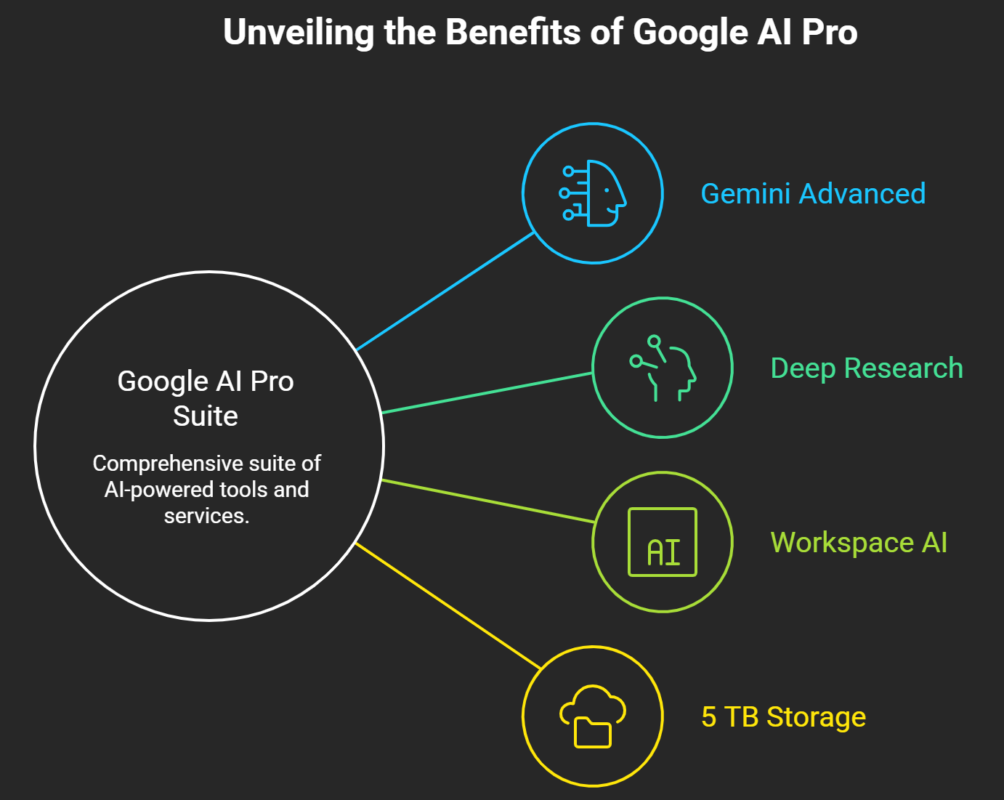
- Gemini 3.1 Pro Model Access: Handles massive context windows, complex coding problems, mathematical proofs, and nuanced multi-document synthesis with minimal latency.
- Deep Research: An autonomous research agent that navigates dozens of live web sources, synthesizes complex data sets, and compiles comprehensive, structured reports with full academic citations.
- Gemini Live: A real-time, ultra-low latency voice conversational engine capable of screen sharing and live camera analysis across 40+ spoken languages.
- NotebookLM Pro Capabilities: Unlocks high-volume document ingestion, allowing you to upload extensive PDFs and source documents to generate automated Audio Overviews (podcast-style summaries) and interactive study materials.
- Generative Media Creation: Full access to high-resolution image editing engines and video synthesis via Veo.
- 5 TB Shared Cloud Storage: Expands your unified account storage across Google Drive, Gmail, and Google Photos.
Frequently Asked Questions
1. Does claiming a free Google AI Pro trial require a valid credit card?
Yes. Google requires a valid payment method—such as a credit card, debit card, or Google Pay account—to verify identity and prevent trial abuse. You will not be charged during the promotional window, provided you cancel before the auto-renewal date.
2. What happens to my files in 5 TB storage if my free trial ends?
If your trial ends and you choose not to continue the subscription, your existing files remain completely safe and stored in Google Drive. However, if your total stored data exceeds the standard 15 GB free baseline, you will be unable to upload new files or sync new media until you clean up space or renew a storage plan.
3. Can I stack multiple 12-month Chromebook or smartphone trial codes on one account?
No. Google restricts promotional hardware offers to one redemption per account per promotional category. Stacking multiple 12-month codes on a single personal Google Account is not supported.
4. How can I cancel my Google AI Pro trial before being charged?
Navigate to one.google.com or open the Google One App on your smartphone. Tap Settings, select Cancel Membership, and confirm. Your promotional benefits will remain active until the end of the billing cycle.
5. Can I use a school-managed .edu email address to sign up for Google AI Pro?
We strongly advise using a personal Google Account to claim offers. School-managed accounts often have administrator restrictions that block extended Google One billing models or external app integrations. You can still verify student status via SheerID using your university email address while logged into your personal account.
6. Is Gemini Advanced available in all languages and regions?
Gemini Advanced and Google AI Pro are supported in over 150 countries and territories worldwide, supporting dozens of languages across mobile and web interfaces.
7. Can I share my free Google AI Pro features with my family?
Yes. If you enable Google One Family Sharing, up to 5 additional family members can share your subscription benefits, including the 5 TB cloud storage pool and access to Gemini Advanced.
8. What is the difference between standard Gemini and Google AI Pro?
The standard free tier utilizes fast models like Gemini Flash with basic rate limits. Google AI Pro upgrades your account to the flagship Gemini Pro reasoning engine, provides Deep Research, unlocks Gemini Live, increases usage caps, and integrates AI directly into Google Docs and Gmail.
9. Will I lose my custom NotebookLM notes or Gemini chat history if I downgrade?
No. Your personal chat history, custom prompts, and NotebookLM notebooks you create remain linked to your main Google Account. If you downgrade to the free tier, you revert to standard usage thresholds and model capabilities.
10. How often does Google launch new promotional deals for Google AI Pro?
Google routinely launches fresh promotional cycles alongside major hardware releases (such as new Pixel phones or Chromebook updates), carrier updates, and regional back-to-school promotional windows. Checking the Google One Perks page regularly ensures you never miss a new campaign.

Selva Ganesh is a Computer Science Engineer, Android Developer, and Tech Enthusiast. As the Chief Editor of this blog, he brings over 10 years of experience in Android development and professional blogging. He has completed multiple courses under the Google News Initiative, enhancing his expertise in digital journalism and content accuracy. Selva also manages Android Infotech, a globally recognized platform known for its practical, solution-focused articles that help users resolve Android-related issues.





Good article with practical information about Gemini AI Pro access. The clear explanation makes it easier to understand the possibilities and decide what to try next.
I was interested in trying Gemini Pro but did not want to subscribe immediately. This article gives a useful overview of options worth checking before making that decision.
This is a useful reference for anyone who wants to test Gemini’s advanced capabilities. The explanation of possible free access methods is clear and informative.
The article makes exploring Gemini AI Pro feel much less complicated. I particularly liked the focus on practical access options and the points users should keep in mind.
I found this guide helpful while comparing different premium AI assistants. The Gemini Pro information is concise, practical, and easy to understand.
The discussion of free Gemini AI Pro access is quite practical. It gives readers a better idea of what opportunities may be available and what they should verify first.
This article provides a useful perspective on getting started with Gemini Pro. I will check the suggested options before deciding whether a full subscription is necessary.
I enjoyed reading this guide because it explains Gemini AI Pro access without unnecessary technical jargon. The information is clear enough for someone who is new to generative AI.
The information here could be especially helpful for people who use AI tools regularly. Being able to understand the available Gemini Pro access options can help users choose the right plan.
I appreciate articles like this that focus on real user questions instead of just promotional information. The Gemini Pro access tips are useful for anyone considering the service.
The guide gives a good overview of Gemini AI Pro and the ways users can potentially access its advanced features. I found the information practical and easy to understand.