
Google Wallet Vs Apple Wallet – We rely on our smartphones for almost everything, and carrying a physical wallet full of plastic cards, paper tickets, and cash is quickly becoming a thing of the past. Digital wallets have completely transformed how we pay for groceries, board airplanes, hold concert tickets, and even store government-issued IDs.
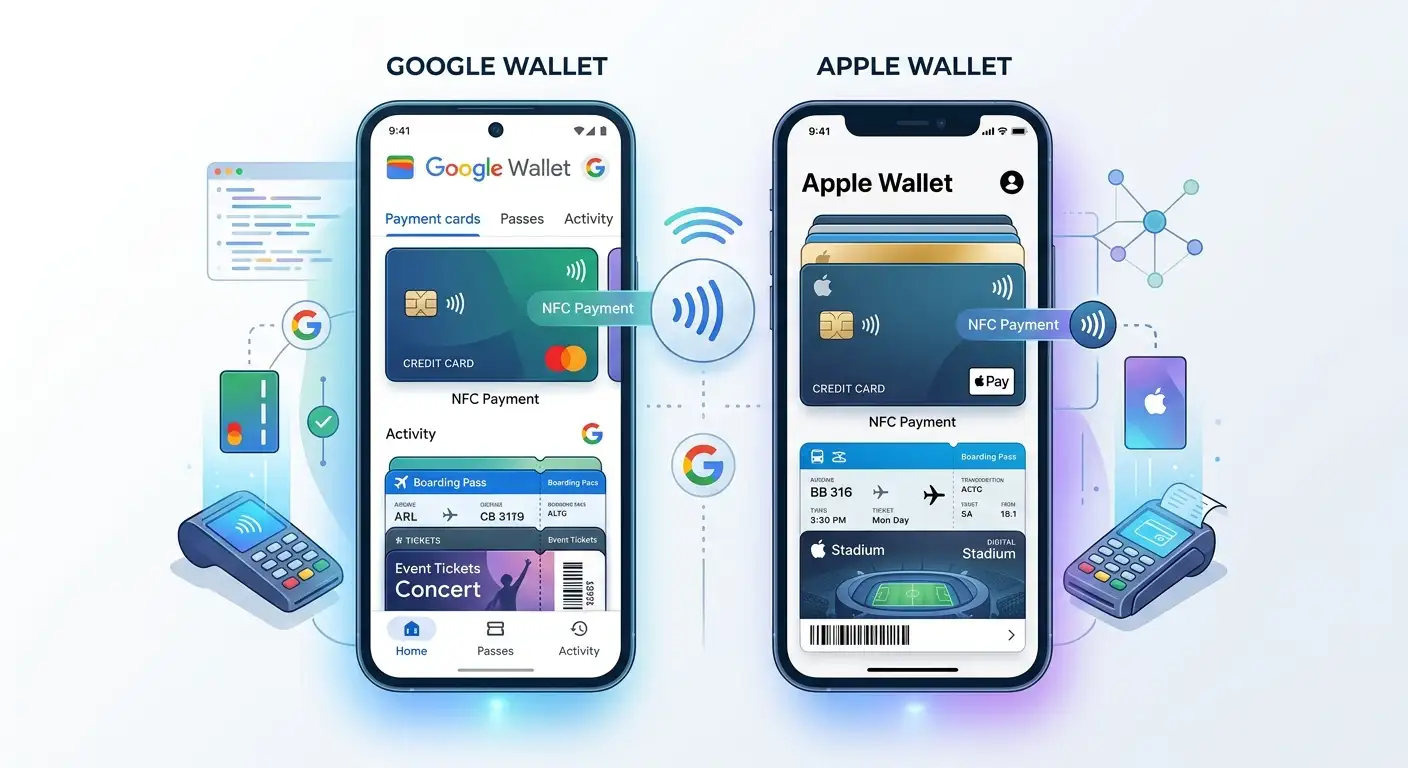

Two giant platforms lead this digital revolution: Google Wallet and Apple Wallet. While both serve the same fundamental purpose—replacing your physical wallet with a secure digital app on your phone—they approach everyday tasks with different features, designs, and capabilities.
We have created this comprehensive, non-technical guide to break down Google Wallet vs Apple Wallet, explaining how each works, where they differ, and which service best fits your daily digital lifestyle.
Understanding Digital Wallets: The Basics Explained Simply
Before diving into a direct comparison, we must understand what a digital wallet actually does without getting bogged down in complex jargon.
A digital wallet is a secure application on your mobile phone or smartwatch that securely stores digital versions of your physical items. Instead of pulling out a physical card or scanning a paper receipt, your phone sends a signal to a reader or displays a code on your screen.
Key capabilities of modern digital wallets include:
-
Storing Payment Cards: Adding credit cards, debit cards, and prepaid cards for tap-to-pay purchases.
-
Holding Travel Documents: Storing airline boarding passes, train tickets, and digital transit passes.
-
Managing Event Passes: Keeping digital tickets for sports games, concerts, and cinema visits.
-
Organizing Loyalty Programs: Saving store rewards cards, gym memberships, and gift cards.
-
Digital Identification: Carrying digital driver’s licenses, state IDs, and student ID cards in supported regions.
Google Wallet Vs Apple Wallet: Device Compatibility and Availability
The single biggest difference between these two platforms comes down to device compatibility. Your choice of smartphone largely dictates which digital wallet you will use every day.
Apple Wallet Availability
Apple Wallet is exclusively built into the Apple ecosystem. It comes pre-installed on all modern iPhone devices and works seamlessly alongside the Apple Watch, iPad, and Mac computers. You cannot install Apple Wallet on an Android device. Because Apple controls both the hardware and software of its devices, Apple Wallet offers an incredibly tight, seamless experience across every Apple gadget you own.
Google Wallet Availability
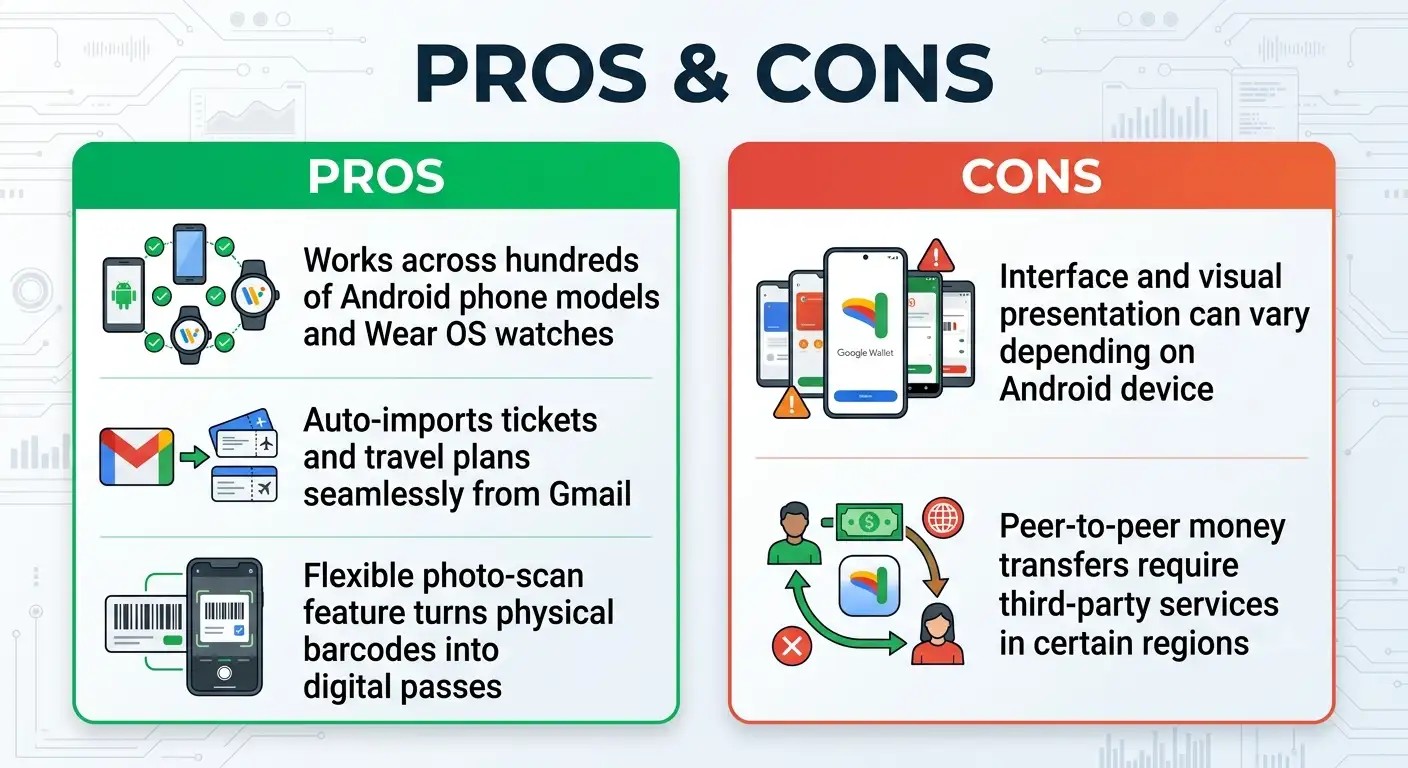
Google Wallet is designed for the broad Android ecosystem. It comes pre-installed on most modern Android smartphones—including Google Pixel phones, Samsung Galaxy devices, and phones made by brands like Motorola, Xiaomi, and OnePlus—as well as smartwatches running Wear OS. While Apple users cannot access Google Wallet for making tap-to-pay purchases, Android users enjoy massive global availability across hundreds of phone models from dozens of manufacturers.
How Daily Checkout Works: Contactless Payments
Both platforms use short-range wireless technology known as NFC (Near Field Communication) to complete payments at store checkout terminals. You simply tap your phone or smartwatch against the payment machine, and the transaction processes in seconds without exposing your physical card.

Paying with Apple Wallet
Using Apple Wallet in a store is fast and intuitive:
-
Double-click the side button on your iPhone or Apple Watch.
-
Look at your screen for Face ID, or place your finger on the sensor for Touch ID.
-
Hold the top of your iPhone near the contactless card reader.
-
A subtle vibration and a light ping sound confirm that the payment went through.
Paying with Google Wallet
Using Google Wallet on an Android phone is equally effortless:
-
Unlock your Android phone using your normal fingerprint, face unlock, or passcode.
-
Hold the back of your phone near the payment reader.
-
A green checkmark appears on screen to confirm the transaction.
Both systems make paying in stores substantially faster than searching through a physical handbag or pocket for a plastic card.
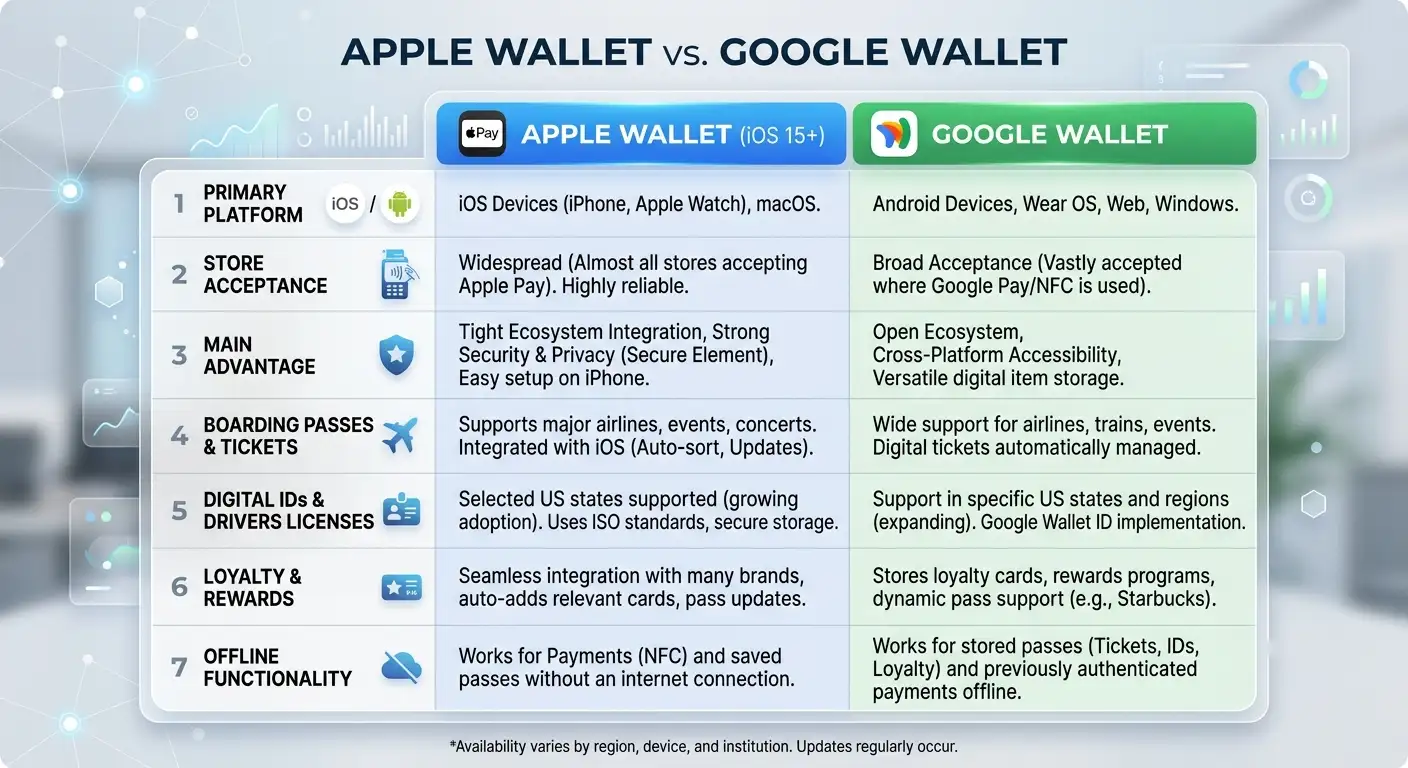
Google Wallet Vs Apple Wallet: Feature Comparison
To help non-technical users compare both platforms side-by-side, we have summarized their core daily functionality below:
Organizing Tickets, Boarding Passes, and Loyalty Cards
A digital wallet is much more than a credit card holder; it serves as a central hub for your entire daily paper trail.

Travel and Event Passes in Apple Wallet
Apple Wallet shines when organizing travel and entertainment assets. When you check in for a flight using an airline app, you can tap a single button to add your boarding pass directly to Apple Wallet.
Apple Wallet automatically groups multi-leg flight passes together and displays your pass on your iPhone lock screen as you approach the airport gate. Updates—such as gate changes or flight delays—refresh automatically right on the digital pass face.
Travel and Event Passes in Google Wallet
Google Wallet offers incredible convenience by leveraging Google’s smart services. For instance, if an airline emails a boarding pass or confirmation to your Gmail account, Google Wallet can automatically import the ticket straight into your wallet without forcing you to click anything.
Additionally, Google Wallet includes a unique Photo Scan feature. If you have a physical loyalty card or gym membership with a standard barcode that isn’t supported by an official app, you can simply take a photo of the barcode with Google Wallet, and the app instantly transforms it into a functional digital pass.
Digital Identification and Smart Key Support
Both platforms are working hard to make your physical ID card obsolete.
Digital Driver’s Licenses and Passports
In participating locations and airports, both Apple Wallet and Google Wallet allow users to store digitized state driver’s licenses and state IDs. When passing through participating TSA airport security lines, you simply tap your phone against the reader to verify your identity, eliminating the need to physically hand your ID card to security personnel.
Car, Home, and Hotel Keys
-
Apple Wallet supports digital car keys for compatible vehicles (including models from BMW, Hyundai, and Kia), allowing you to unlock and start your car using your iPhone or Apple Watch. It also holds digital hotel room keys and smart home door locks.
-
Google Wallet offers matching digital key support across selected automotive brands and smart lock systems, ensuring Android users can unlock vehicles and access buildings directly from their devices.
Security, Privacy, and Data Protection
When moving sensitive payment cards to a smartphone, security is naturally the top priority for most consumers. We can assure you that both Google Wallet and Apple Wallet are vastly safer than carrying physical plastic cards in a real wallet.
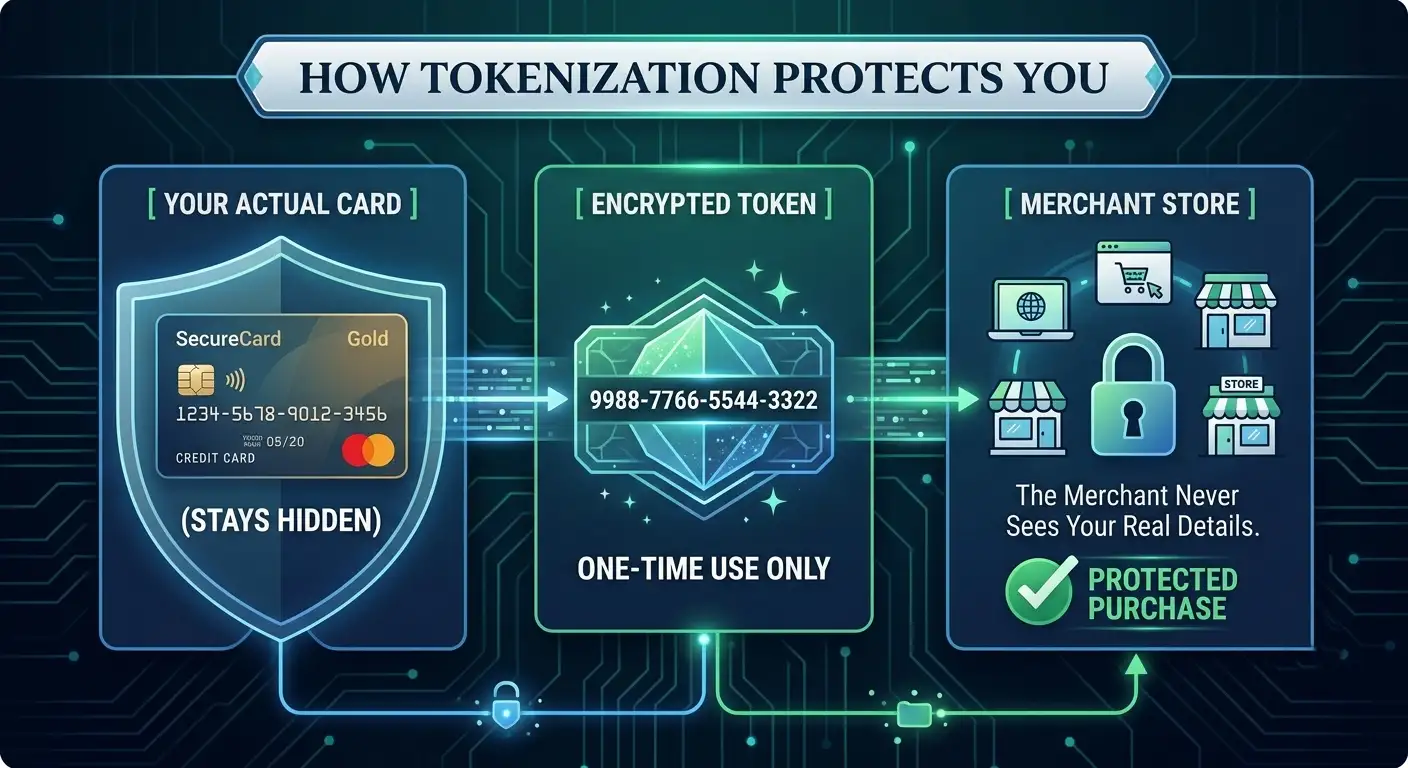
1. Tokenization Technology
When you add your credit card to either wallet, the app does not actually store your real 16-digit card number on your phone or share it with stores. Instead, both systems use a process called tokenization. They generate a random, encrypted number string (a “token”) to represent your card. When you buy something, the merchant only receives this temporary token. If a store’s system is ever hacked, your real credit card number remains completely safe.
2. Biometric Protection
If you lose your physical leather wallet, anyone who picks it up can spend money using your physical cards. However, if you lose your smartphone, no one can open your Apple Wallet or Google Wallet. Every payment requires biometric authorization—such as Face ID, Touch ID, or a secure fingerprint scan—or your personal passcode.
3. Privacy Differences
-
Apple Wallet: Apple’s business model is built around selling hardware and services rather than advertising. As a result, Apple does not track or store what you purchase, where you bought it, or how much you spent. Transaction history stays private on your local device.
-
Google Wallet: Google processes transaction details securely and does not sell payment data to advertisers. However, transaction signals may integrate with broader Google services to improve user convenience—such as displaying receipt info or updating flight details across your personal Google account.
Offline Usability: Paying Without an Internet Connection
A common worry for non-tech users is whether a digital wallet stops working if you lose cell phone service, go underground on a subway train, or travel abroad without roaming data.
We are pleased to clarify that both Apple Wallet and Google Wallet work perfectly offline for store payments.
-
Apple Wallet stores token keys securely inside a dedicated hardware chip in the iPhone called the Secure Element. This chip allows you to make contactless payments indefinitely without any cellular or Wi-Fi connection.
-
Google Wallet pre-loads encrypted payment tokens onto your phone. You can easily make dozens of store purchases while offline. Once your phone reconnects to the internet later, the wallet silently syncs its background data.
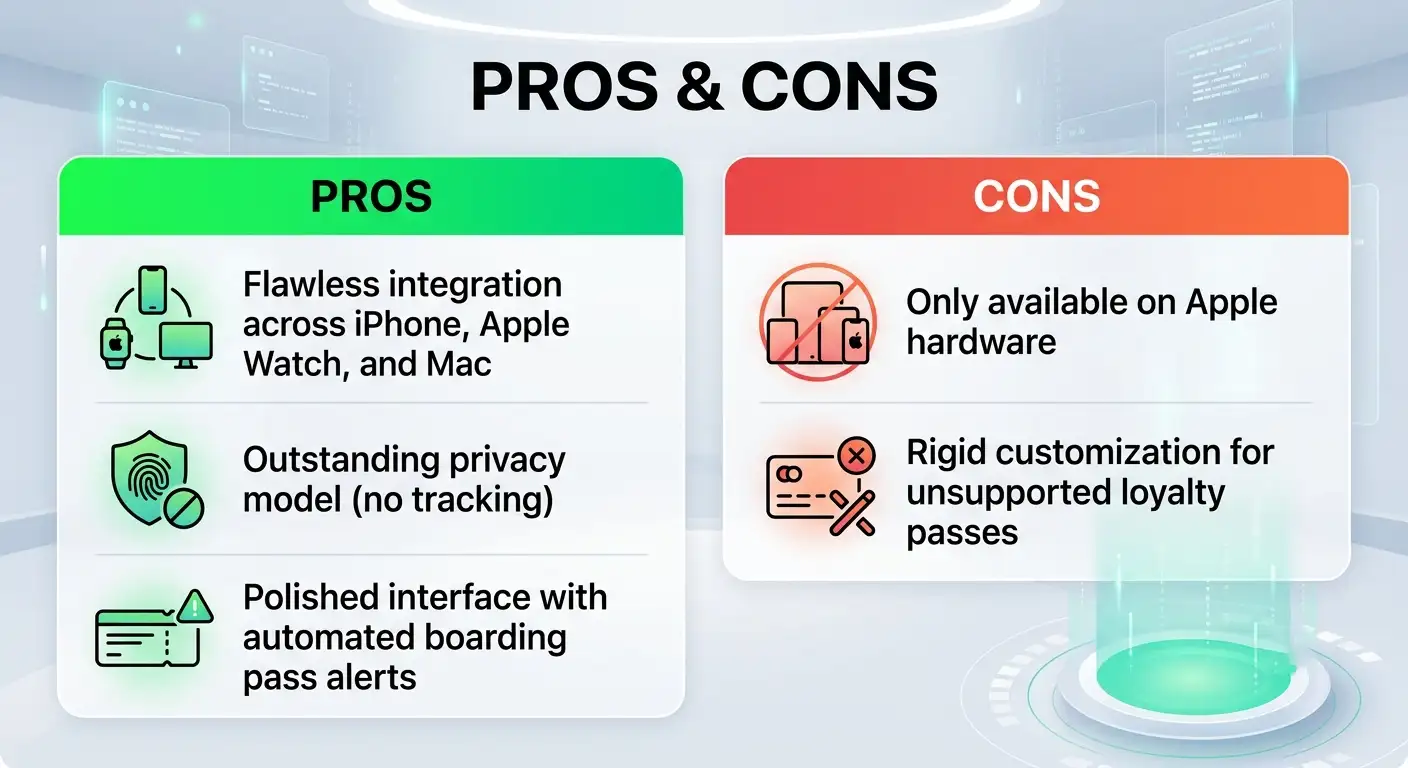
Pros and Cons: A Simple Breakdown
Apple Wallet
Google Wallet
Which Wallet Should You Choose? Our Final Verdict
When deciding between Google Wallet vs Apple Wallet, the choice rarely comes down to choosing the app itself; rather, it comes down to which smartphone you prefer to carry.
If you use an iPhone, Apple Wallet is hands-down the best digital wallet experience available. It is deeply integrated into your operating system, offers unmatched hardware security, keeps your shopping private, and works flawlessly with the Apple Watch.
If you use an Android phone, Google Wallet is a versatile, powerful, and ultra-convenient companion. Its ability to capture barcodes from photo snaps, sync automatically with your Gmail account, and operate on flexible hardware choices makes it an essential tool for everyday errands.
Both digital wallets eliminate clutter, make store checkouts faster, and protect your credit cards far better than traditional leather wallets. Whichever system you choose, transitioning your cards into a digital wallet is one of the easiest ways to simplify your daily mobile routine.

Selva Ganesh is a Computer Science Engineer, Android Developer, and Tech Enthusiast. As the Chief Editor of this blog, he brings over 10 years of experience in Android development and professional blogging. He has completed multiple courses under the Google News Initiative, enhancing his expertise in digital journalism and content accuracy. Selva also manages Android Infotech, a globally recognized platform known for its practical, solution-focused articles that help users resolve Android-related issues.




Leave a Reply