
How to Use Google Fi’s New Super Network for Better 5G Coverage – Finding a reliable mobile signal used to mean accepting dead zones, dropped calls, or frustrating buffering wheels the moment you stepped indoors or traveled away from major metropolitan areas. For years, mobile phone carriers relied on a single cellular path to keep devices connected. If that specific carrier experienced heavy congestion or lacked infrastructure in your immediate vicinity, your phone suffered. Google Fi Wireless has fundamentally shifted this dynamic with the introduction of its super network, designed to maximize coverage reliability without requiring users to navigate complicated technical setups.
By combining multiple top-tier cellular pathways with millions of secure public Wi-Fi hotspots, this system aims to deliver smooth, uninterrupted connectivity. Whether you are commuting through a crowded downtown transit hub or navigating a remote stretch of highway, understanding how this technology works helps you get the most out of your everyday mobile experience.

What Is the Google Fi Super Network?
At its core, the Google Fi super network is an intelligent connectivity system built into select mobile plans and compatible devices. Instead of locking your phone into a single carrier’s infrastructure, Google Fi bridges multiple leading 5G networks alongside an expansive footprint of secure Wi-Fi connections.
The primary goal is simplicity paired with resilience. Traditional phone plans require you to rely entirely on whatever tower your provider owns nearby. If that tower is overloaded or out of range, your connection slows to a crawl. Google Fi’s system acts as an invisible traffic controller, continuously evaluating signal availability in the background and routing your data through the strongest available option.
How Automatic Network Switching Works
The standout feature of this system is its ability to handle transitions seamlessly. In the past, switching between networks often meant a brief interruption or required manual adjustments. The super network utilizes advanced profile-sharing architecture to manage multiple connections simultaneously on a single electronic SIM card.
Here is what happens behind the scenes when you move through different environments:
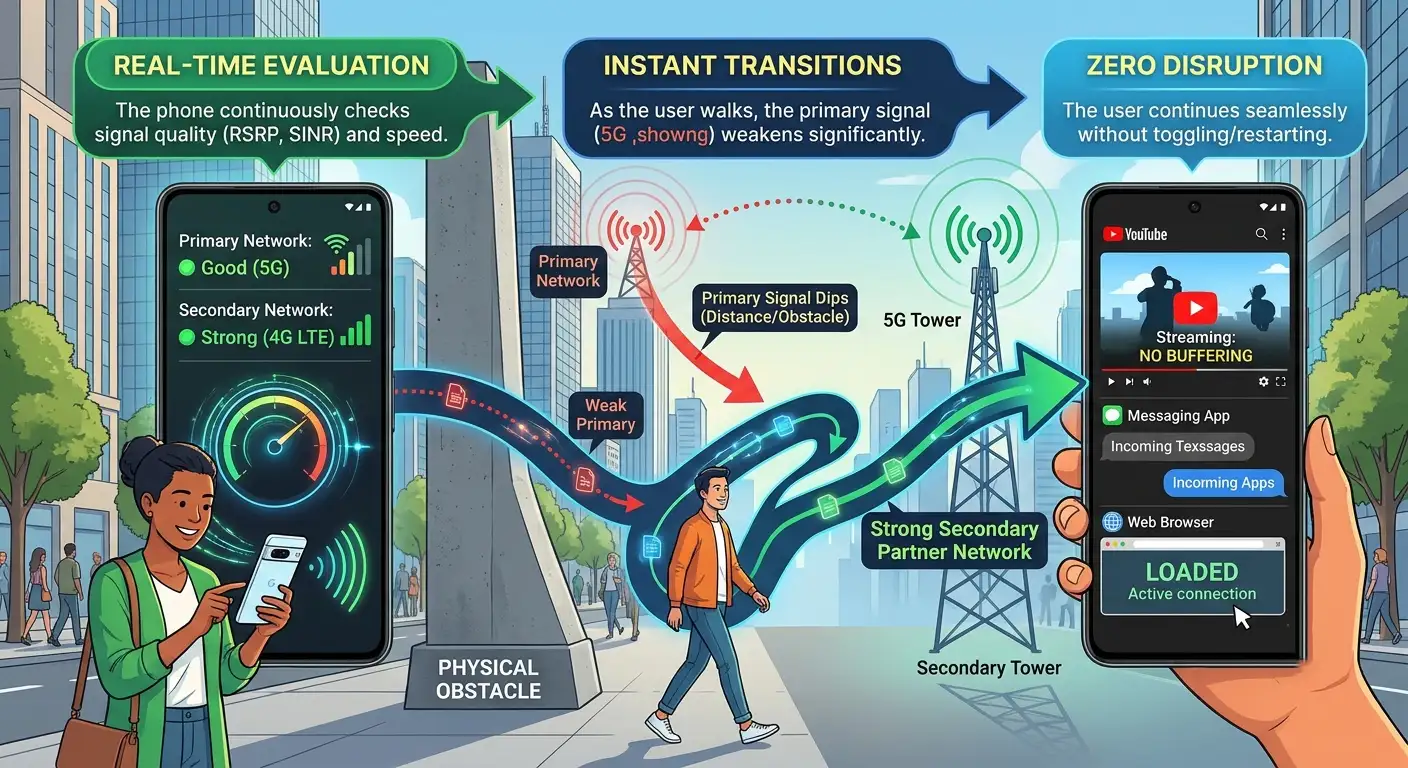
This capability is especially helpful during road trips, rural travel, or daily commutes where single-carrier coverage frequently fluctuates.
Beating Indoor Congestion With Smart Wi-Fi
Cellular towers face a unique challenge: physical barriers. Thick concrete walls, tinted glass, and underground structures often block outdoor signals, leaving indoor spaces like airports, sports stadiums, and shopping malls notoriously difficult to navigate.
To solve this, the super network integrates Wi-Fi Auto Connect+. Rather than forcing you to manually search for open Wi-Fi networks, deal with captive portals, or type in complicated guest passwords, the system automatically detects high-quality public Wi-Fi spots in millions of locations.
Crucially, security remains a top priority during these handoffs. Public hotspots can sometimes expose personal data, but Google Fi automatically encrypts your connection using a built-in virtual network layer. This means you get faster speeds and reliable data access in crowded indoor environments without compromising your digital privacy.
Global Connectivity Without Extra Hassle
Coverage challenges do not end when you cross international borders. Traveling abroad often introduces expensive roaming fees, confusing carrier selection menus, or lack of data access upon landing.
Google Fi extends its super network capabilities internationally on eligible plans. Both network switching and automated secure Wi-Fi functions operate overseas, ensuring that your translation apps, digital maps, and messaging tools work the moment your flight touches down. This removes the traditional friction of hunting down local physical SIM cards or paying daily international pass fees.
Managing Your Connection Inside the App
To keep users informed, Google Fi includes a dedicated Your super network hub right inside the mobile application. This dashboard provides a clear, non-technical window into your connectivity health.
Within the app, you can view:
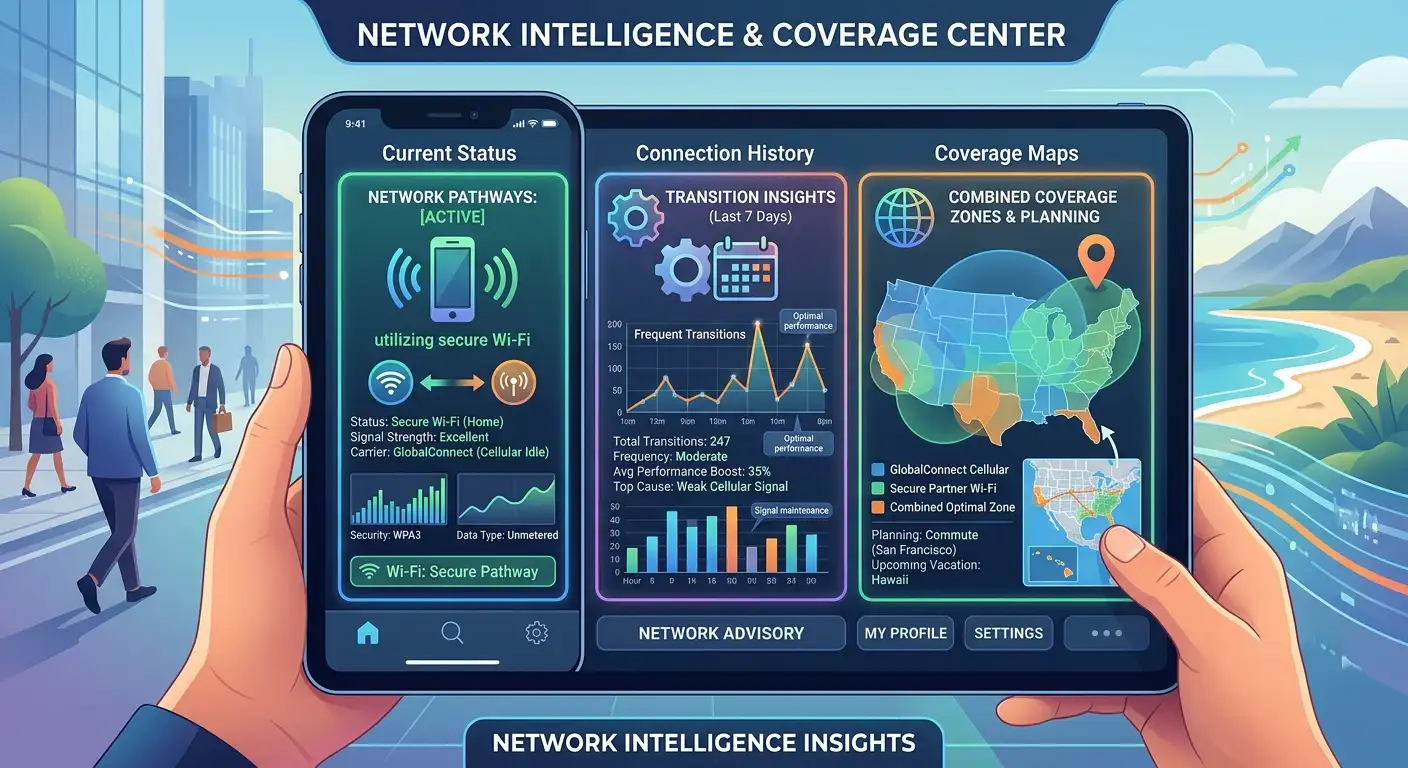
If you ever experience unexpected data slowdowns, the built-in troubleshooting assistant can diagnose and resolve common connectivity snags with a few taps.
Practical Tips to Get the Best Performance
To make sure your device takes full advantage of these connectivity upgrades, keep a few practical guidelines in mind:
-
Keep Your Software Updated: Ensure your phone’s operating system and the Google Fi app are running the latest software versions. Network optimization tools rely on up-to-date system files.
-
Check Device Compatibility: Advanced network switching features require modern hardware, such as recent Google Pixel models operating on an active electronic SIM.
-
Manage Secondary SIMs: If you use multiple lines—such as a separate work profile or a local travel SIM—keep secondary lines disabled when you want uninterrupted automatic network switching on your primary Fi line.
-
Monitor Battery Saver Modes: To conserve battery life during low-charge states, phones may reduce the frequency of background network evaluations. Plug in or disable battery saver if you need absolute peak performance in a fringe coverage area.
Frequently Asked Questions
1. What is the Google Fi super network?
It is a connectivity system that combines multiple top-tier 5G cellular networks with millions of secure public Wi-Fi hotspots to give your phone reliable coverage.
2. Do I need to pay extra to use it?
No, access to the super network is included across all standard Google Fi plans at no additional monthly cost.
3. How does my phone know which network to use?
Your phone evaluates signal strength and quality in the background, automatically shifting between available cellular and Wi-Fi paths without requiring manual input.
4. Which phones support automatic network switching?
The most advanced automatic switching features are optimized for modern Google Pixel devices running on an electronic SIM, with select features rolling out to other Android brands.
5. Is public Wi-Fi safe to use with this feature?
Yes. Google Fi automatically encrypts your connection when routing data through Wi-Fi Auto Connect+, protecting your personal information in crowded public spaces.
6. Does the super network work when traveling internationally?
Yes, automated network switching and secure Wi-Fi connectivity function globally on eligible plans like Unlimited Premium and Flexible.
7. Will my phone number change when it switches networks?
No, your phone number, contacts, and active messaging threads remain completely identical during all network transitions.
8. How can I check if my area has coverage?
You can open the Google Fi app or visit their online coverage map, which features a dedicated toggle for viewing combined super network availability.
9. What happens if I have a second work SIM installed?
Having an active secondary SIM card can pause automatic network switching. You can easily manage or disable secondary lines in your phone’s settings menu.
10. Where can I see my network switching history?
The Google Fi app includes a dedicated connection hub on its home screen where you can review your recent connectivity status and switching activity.

Selva Ganesh is a Computer Science Engineer, Android Developer, and Tech Enthusiast. As the Chief Editor of this blog, he brings over 10 years of experience in Android development and professional blogging. He has completed multiple courses under the Google News Initiative, enhancing his expertise in digital journalism and content accuracy. Selva also manages Android Infotech, a globally recognized platform known for its practical, solution-focused articles that help users resolve Android-related issues.




Leave a Reply