
How to Access Amazon Alexa+ – We have entered a brand-new era of artificial intelligence, and Amazon Alexa+ represents the single biggest evolution in smart home technology since the original Echo smart speaker debuted. Powered by next-generation generative AI models, Alexa+ transforms the familiar voice assistant from a rigid command-driven tool into a fluid, highly conversational, and proactive personal assistant.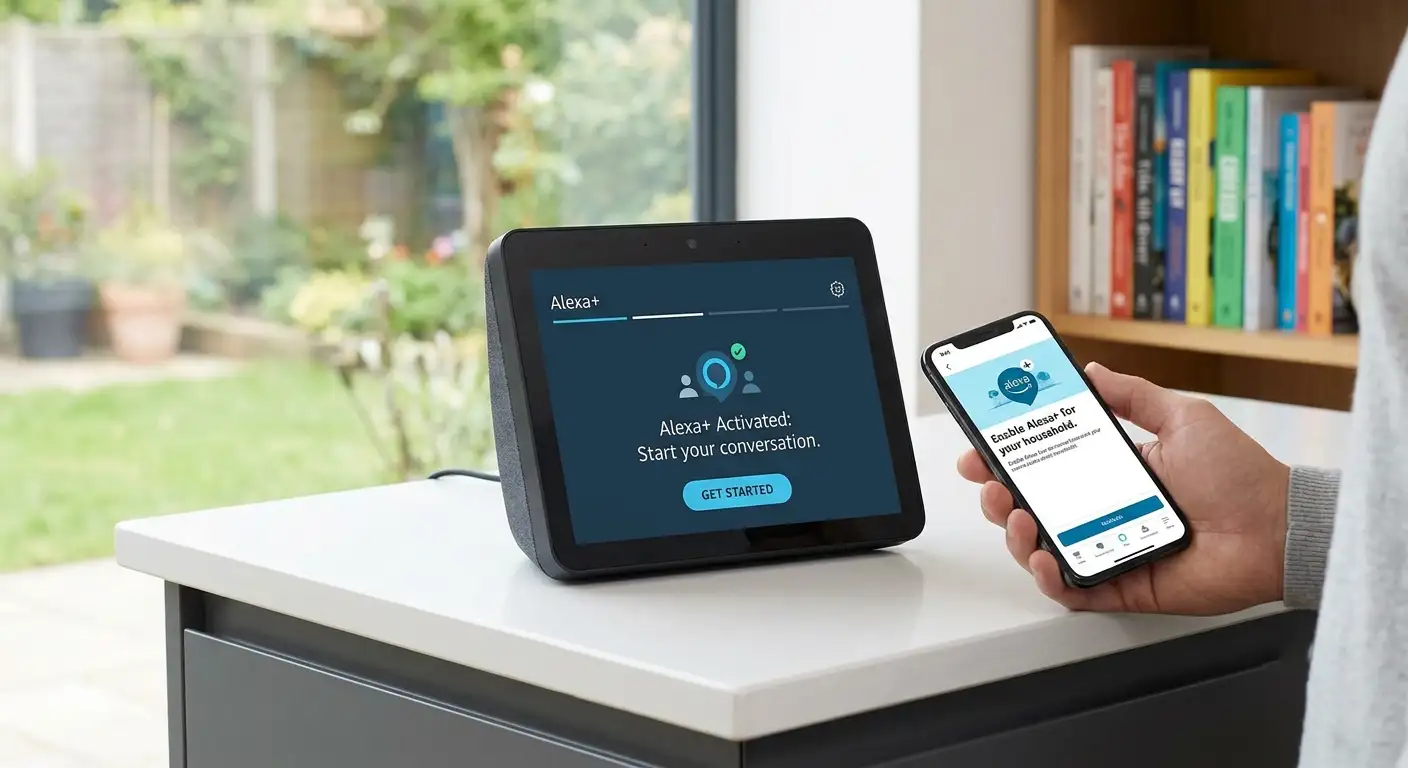
If you are wondering how to access Amazon Alexa+, whether you need to pay extra for it, or how to set it up on your everyday devices without dealing with confusing technical jargon, we have built this complete step-by-step guide for you. Below, we break down everything you need to know in straightforward, simple terms—covering activation steps, pricing tiers, hardware compatibility, and everyday household uses.

What Is Amazon Alexa+ and How Is It Different?
For years, standard voice assistants required specific, fixed command phrasing. If you did not speak to them using exact key phrases, you were often met with the frustrating response: “Sorry, I didn’t get that.”
Amazon Alexa+ completely eliminates this barrier by utilizing advanced generative AI. Instead of memorizing strict phrases, we can now speak to Alexa+ in completely natural human sentences, just as we would talk to a family member or friend.
Here is a quick look at how Alexa+ improves upon classic voice assistants without getting into complex technical jargon:
-
Fluid Conversations: You can ask follow-up questions without repeating the “wake word” every single time. It holds context across entire multi-turn conversations.
-
Proactive Action: Rather than simply answering a question, Alexa+ can handle complex tasks on your behalf. For example, it can check your emails for a school lunch menu and automatically add those items to your family calendar.
-
Deep Personalization: Alexa+ learns individual preferences over time, adapting to your personal habits, music tastes, and home routines.
-
Personalized Personalities: You can switch between different conversational styles—such as Brief, Chill, Sweet, or Sassy—to match the voice tone you prefer in your home.
Is Amazon Alexa+ Free? Pricing and Tiers Explained
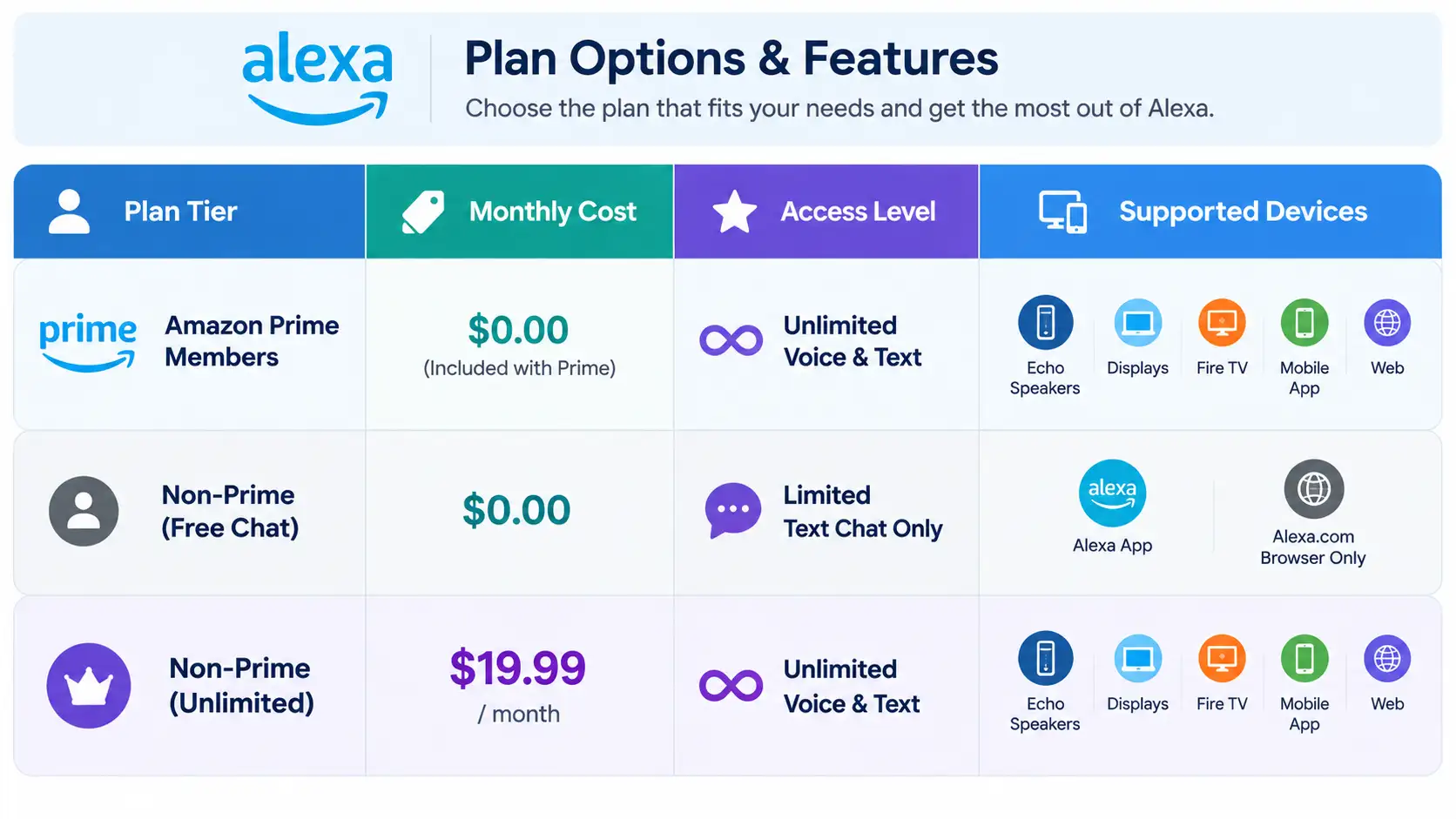
One of the most frequent questions people ask is whether Alexa+ requires an additional monthly bill. The answer depends entirely on whether you already subscribe to Amazon Prime.
1. Free for Amazon Prime Members
If you already hold an active Amazon Prime membership, Alexa+ is included entirely free of charge as a Prime benefit. You get unlimited access across all compatible Echo hardware, Fire TV devices, mobile apps, and Web browsers for your entire household at zero extra cost.
2. Free Basic Chat Tier (No Prime Required)
If you do not have Amazon Prime, you can still test out the system using the free text-based Alexa+ chat tier. By visiting Alexa.com or opening the Alexa app on your smartphone, you can type questions, conduct research, generate meal plans, or draft emails. This free web-and-app tier features daily usage limits and does not extend voice control to physical Echo smart speakers.
3. Standalone Unlimited Subscription ($19.99/month)
Non-Prime users who want the full, unlimited voice experience on all their smart home speakers and TVs can purchase a standalone Alexa+ subscription for $19.99 per month.
Step-by-Step: How to Access Amazon Alexa+ Right Now
Getting started with Alexa+ does not require buying new machinery, running complex downloads, or configuring network ports. We can enable Alexa+ on your account using three simple methods.
Method 1: The One-Sentence Voice Command (Easiest)
If you already own an Amazon Echo smart speaker or Echo Show smart display linked to an account with an active Amazon Prime membership, enabling Alexa+ takes less than five seconds.
-
Walk up to any connected Echo device in your home.
-
Speak clearly and say: “Alexa, upgrade to Alexa+.”
-
Your device will respond, confirm your membership tier, and instantly initiate the background upgrade across all supported devices connected to your Amazon household account.
Method 2: Activating via Web Browser (Alexa.com)
If you prefer using your computer or tablet, you can quickly unlock the Alexa+ experience through any standard web browser.
-
Open your browser and navigate directly to Alexa.com or Amazon.com/AlexaPlus.
-
Log in using your main Amazon Prime account credentials.
-
Follow the simple on-screen prompt asking to toggle on Alexa+ capabilities.
-
Once toggled on, your account profile is permanently updated, enabling the AI across your web experience and physical home speakers simultaneously.
Method 3: Activating via the Smartphone App
For those who manage their daily routines on an iOS or Android smartphone, activation is just as seamless:
-
Open the Amazon Alexa App on your iOS or Android mobile device.
-
Ensure you are signed in with your primary Amazon account.
-
Look for the main Alexa+ pop-up banner on the home screen or tap the “a” button located in the bottom menu bar.
-
Tap Enable Alexa+ to complete the rollout across your connected smart devices.
Device Compatibility: Which Devices Support Alexa+?
Because Amazon Alexa+ runs in cloud-based servers rather than on individual microchips inside your home speaker, most modern Amazon devices support Alexa+ right out of the box.
Supported Devices Include:
-
Amazon Echo & Echo Dot: (3rd Generation, 4th Generation, and 5th Generation models)
-
Echo Show Smart Displays: (Echo Show 5, Echo Show 8, Echo Show 10, and Echo Show 15)
-
Echo Studio & Echo Hub
-
Fire TV Devices: (Fire TV Smart TVs, Fire TV Stick 4K, Fire TV Stick Max)
-
Fire Tablets
-
Mobile Apps: Amazon Alexa App, Amazon Music App
-
Web Browsers: Accessible via laptop, desktop, or mobile browsers at Alexa.com
Very early first-generation Echo hardware released almost a decade ago lacks the hardware components needed to process fast real-time audio streams for generative AI. Those older models will continue operating on classic Alexa while newer devices seamlessly run Alexa+.
5 Practical, Everyday Ways Non-Tech People Can Use Alexa+
You do not need to be a technology expert to get real, daily value out of Alexa+. Here are five down-to-earth examples of how Alexa+ makes home life easier and less chaotic:
1. Turning Messy Emails into Organized Calendars
Instead of manually typing appointment dates into a phone, you can forward emails (such as sports schedules, doctor appointment confirmations, or HOA guidelines) directly to Alexa+. Alexa+ will automatically extract the dates, times, and details, posting them neatly onto your digital family calendar.
2. Conversational Meal Planning and Recipe Archives
Instead of searching through countless websites filled with pop-up ads, simply tell Alexa+: “I have chicken breasts, fresh broccoli, and cream cheese in the fridge. Give me three quick dinner ideas I can make in under 20 minutes.” Alexa+ can instantly draft recipes, adapt to dietary requirements, store your family’s favorite meals in your custom recipe library, and add missing ingredients directly to your Amazon Fresh cart.
3. Voice-Created Home Routines
With old voice assistants, setting up an automation—like turning off lights and setting alarms—required tapping through complex menu screens inside a mobile app. With Alexa+, you simply speak your intent naturally: “Alexa, wake me up every weekday at 6:30 AM by slowly turning on the bedroom lights and playing light jazz.” Alexa+ creates the entire rule in the background automatically.
4. Smart Shopping and Automatic Deal Tracking
Alexa+ serves as a proactive shopping helper. You can say, “Keep an eye on air fryers and let me know when a top-rated one goes on sale for under $80.” Alexa+ tracks prices behind the scenes 24/7 and alerts you via voice or mobile notifications when an item hits your target price.
5. Instant Homework and Research Assistance
Whether your children are working through history assignments or you are researching how to care for outdoor garden plants, Alexa+ offers comprehensive, structured answers. You can upload long PDF documents—such as user manuals or appliance guides—and ask Alexa+ specific questions, like “How do I clean the filter on my specific washing machine model?”
Frequently Asked Questions (FAQ)
Do we need to buy new Echo speakers to use Alexa+?
No. As long as you own modern Echo hardware (such as standard Echo Dot 3rd Gen or newer, Echo Show displays, or Fire TV hardware), Alexa+ works on your existing devices without hardware upgrades.
Can multiple people in the same household use Alexa+?
Yes. When a primary Prime account holder enables Alexa+, the feature covers all users and devices linked within that Amazon Household account.
What if we want to turn off Alexa+ and go back to Classic Alexa?
You hold full control over your account settings. You can toggle off Alexa+ features at any time by visiting the settings menu inside the Amazon Alexa App or at Alexa.com.
Final Thoughts: Unlocking the Full Power of Alexa+ Today
Amazon Alexa+ removes the awkwardness from smart home voice control, turning your household devices into an intuitive, helpful AI assistant. Because it is completely free for Amazon Prime members, there is no reason to delay trying it out.
Simply walk up to your nearest Echo speaker and say, “Alexa, upgrade to Alexa+,” or sign in at Alexa.com to unlock the full power of Amazon’s next-generation AI assistant today.

Selva Ganesh is a Computer Science Engineer, Android Developer, and Tech Enthusiast. As the Chief Editor of this blog, he brings over 10 years of experience in Android development and professional blogging. He has completed multiple courses under the Google News Initiative, enhancing his expertise in digital journalism and content accuracy. Selva also manages Android Infotech, a globally recognized platform known for its practical, solution-focused articles that help users resolve Android-related issues.




Leave a Reply