
Claim the Free Google Gemini Student Plan– When the academic semester begins, the sheer volume of research, coding assignments, essay drafts, and complex problem sets can quickly become overwhelming. We have all experienced the exhaustion of juggling multiple deadlines while trying to parse hundreds of pages of academic literature. Having access to cutting-edge artificial intelligence tools fundamentally transforms the way we learn, analyze data, and produce high-level work. Google has leveled the playing field by offering higher education students a free one-year Google Gemini student plan.
Through this official initiative, eligible university and college students can claim 12 months of premier AI access at zero cost. We have navigated this verification journey firsthand, testing every step from the initial portal access to active redemption in workspace apps. In this comprehensive guide, we share our detailed walkthrough, essential requirements, troubleshooting strategies, and best practices to help you unlock and maximize your complimentary subscription.

Understanding the Google Gemini Student Offer
Google designed the student plan to equip learners with premium research models, vast cloud storage, and contextual AI productivity inside daily applications. Depending on your geographic location, the student offer delivers immense monetary value and critical academic utility:
-
United States Students: Eligible college students receive a complimentary 12-month tier of Google AI Pro (normally $19.99 per month), featuring up to 4x higher usage limits, 5 TB of cloud storage, advanced model reasoning, deep research tools, and built-in integration inside Google Docs, Gmail, and Google Slides.
-
International Students: Eligible higher education learners across supported global regions receive one full year of Google AI Plus, providing 2x higher usage limits, 400 GB of cloud storage, multimodal capabilities, and interactive study notebooks.
Both tiers provide access to specialized learning environments where you can build tailored flashcards, upload full course syllabi, run practice examinations, and generate audio overviews of dense technical reports.
Core Eligibility Requirements
Before initiating the verification process, we recommend preparing your credentials to ensure instant approval. To qualify for the promotional year, you must satisfy specific criteria:
-
Active Enrollment: You must be currently enrolled in an accredited higher education institution (undergraduate, graduate, or postgraduate degree programs).
-
Age Verification: You must be at least 18 years of age at the time of redemption.
-
Personal Account Use: You must redeem the offer on an individual, personal Google Account rather than a school-administered workspace account, as institutional administrators often restrict third-party billing trials.
-
Official Documentation: You must have access to either an active institutional email portal (
.eduor regional equivalent) or supporting documentation such as a current student ID card, official enrollment verification letter, or tuition fee receipt. -
Valid Payment Method: A payment method (credit card, debit card, or verified regional digital wallet) is required to authenticate identity and set up the trial profile.
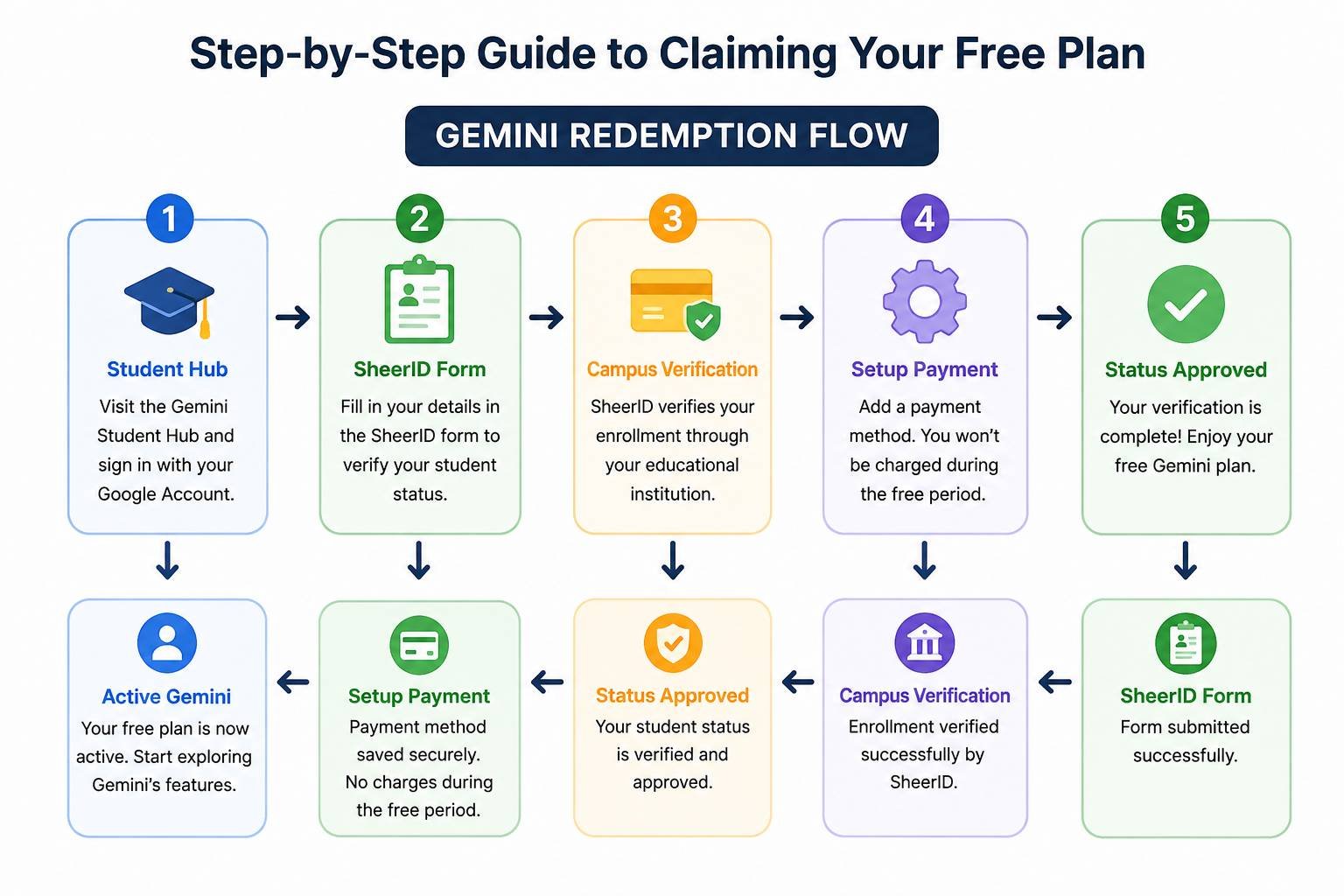
Step-by-Step Guide to Claiming Your Free Plan
1. Access the Dedicated Student Portal
Navigate directly to the official Google student destination at [gemini.google.com/students](https://gemini.google.com/students) or visit the designated student landing page on Google One. Ensure that you are logged into your primary personal Google account before proceeding.
2. Initiate Student Status Verification
Click on the Get Student Offer or Verify Eligibility button. The portal will automatically redirect you to the secure third-party academic verification service, SheerID, which handles student credential validation on behalf of Google.
3. Provide Your Academic Details
Complete the SheerID verification form by entering:
-
Your exact higher education institution name (select from the auto-suggest directory).
-
Your legal first and last name matching your university records.
-
Your date of birth.
-
Your academic contact details or personal email associated with your university profile.
4. Authenticate Through Single Sign-On or Document Upload
The verification system will prompt you to authenticate via your university’s Single Sign-On (SSO) portal. If your institution supports direct integration, simply log in with your campus credentials for instant verification.
If SSO is unavailable or fails to connect:
-
Select the manual document upload pathway.
-
Upload a clear image or PDF of your student ID card, dated enrollment certificate, or current term tuition schedule.
-
Ensure the document visibly displays your full name, the school name, and an active date within the current academic term.
5. Finalize the Zero-Cost Subscription
Once SheerID confirms your status, you will be redirected back to Google One with an active promo token. Confirm the promotional terms showing $0.00 due today. Add or select your payment method for identity confirmation and click Subscribe. Your 12-month free access activates immediately across all compatible web interfaces and mobile applications.
Essential Features for Academic Success
Once we activated our complimentary tier, we integrated Gemini directly into our daily study workflows. Here are the core features every student should leverage immediately:
-
Interactive Study Notebooks: Upload lecture slides, PDF readings, and textbook chapters into unified notebooks. Gemini parses the material to build structured summaries, practice quizzes, and custom study plans tailored to upcoming exam schedules.
-
Deep Research Mode: Conduct exhaustive academic literature reviews. Gemini cross-examines multiple authoritative sources, outlines differing perspectives on complex topics, and helps structure comprehensive research paper outlines.
-
Native Workspace Integration: Use AI drafting tools directly within Google Docs for real-time essay structural feedback, syntax refinement, and brainstorming, or summarize long communication threads inside Gmail.
-
Code Assistance and Debugging: Accelerate programming coursework by reviewing logic errors, optimizing algorithmic efficiency, and explaining complex software engineering concepts step by step.
Managing Your Subscription and Avoiding Unexpected Charges
Because the promotional trial requires a linked payment method during setup, it automatically rolls over into a standard monthly paid subscription after 365 days unless canceled.
We strongly advise setting a calendar reminder two weeks before your 12-month period concludes. You can inspect your active plan status at any time by navigating to your Google One account settings under Manage Subscription. If you choose to cancel before the renewal date, your premium benefits typically remain active until the full promotional year expires, ensuring complete peace of mind throughout your academic term.
Frequently Asked Questions
1. Is the Google Gemini student plan completely free?
Yes. The offer grants 12 consecutive months of Google AI Pro (US) or Google AI Plus (International) at no cost. No monthly fees are charged during the promotional term.
2. Can I use my university-issued email to redeem the offer?
While you use your university email or portal to verify your enrollment via SheerID, we recommend applying the actual trial to your personal Google Account to prevent institutional workspace permission conflicts.
3. What should I do if SheerID cannot find my university?
If your university does not appear in the automated drop-down menu, choose the manual submission option and upload official documentation bearing your institution’s name, logo, and current semester dates.
4. How long does manual document verification take?
Automated SSO logins verify instantly. Manual document reviews submitted through SheerID typically take between 20 minutes to 48 hours. You will receive an email confirmation once reviewed.
5. Does the student plan include extra Google Drive storage?
Yes. The student offer includes significant storage upgrades—ranging from 400 GB up to 5 TB depending on your regional tier—shared across Google Drive, Gmail, and Google Photos.
6. Can existing Google One subscribers claim the student offer?
Yes. Eligible students with an existing personal Google One membership can verify their status; the promotional plan will adjust your billing terms and apply the complimentary 12-month credit.
7. What happens after the one-year free period ends?
At the end of the 12 months, the plan will renew at the standard monthly consumer price unless you cancel it in your account settings prior to the expiration date.
8. Is the student offer available globally?
The student offer is supported across dozens of countries worldwide. Regional tiers (Pro versus Plus) are assigned automatically based on local availability and regional academic partnership programs.
9. Can high school students claim this promotion?
No. The promotion is specifically restricted to students enrolled in accredited post-secondary institutions, colleges, and universities who meet the minimum age requirement of 18 years.
10. Will canceling the renewal early terminate my AI access immediately?
In most regions, canceling the auto-renewal allows you to retain your promotional features until the original 365-day expiration date, but we recommend verifying your local subscription terms in the Google One dashboard.

Selva Ganesh is a Computer Science Engineer, Android Developer, and Tech Enthusiast. As the Chief Editor of this blog, he brings over 10 years of experience in Android development and professional blogging. He has completed multiple courses under the Google News Initiative, enhancing his expertise in digital journalism and content accuracy. Selva also manages Android Infotech, a globally recognized platform known for its practical, solution-focused articles that help users resolve Android-related issues.




Leave a Reply