
How to Enable the Contacts Tab in WhatsApp? – For years, millions of users around the globe have relied on WhatsApp as their primary tool for daily communication. Whether connecting with family members, coordinating with colleagues, or chatting with friends, WhatsApp has consistently served as an indispensable digital bridge. However, despite its widespread popularity and countless feature updates over the years, navigating the application to find a specific person or check who is currently online has often felt surprisingly cumbersome.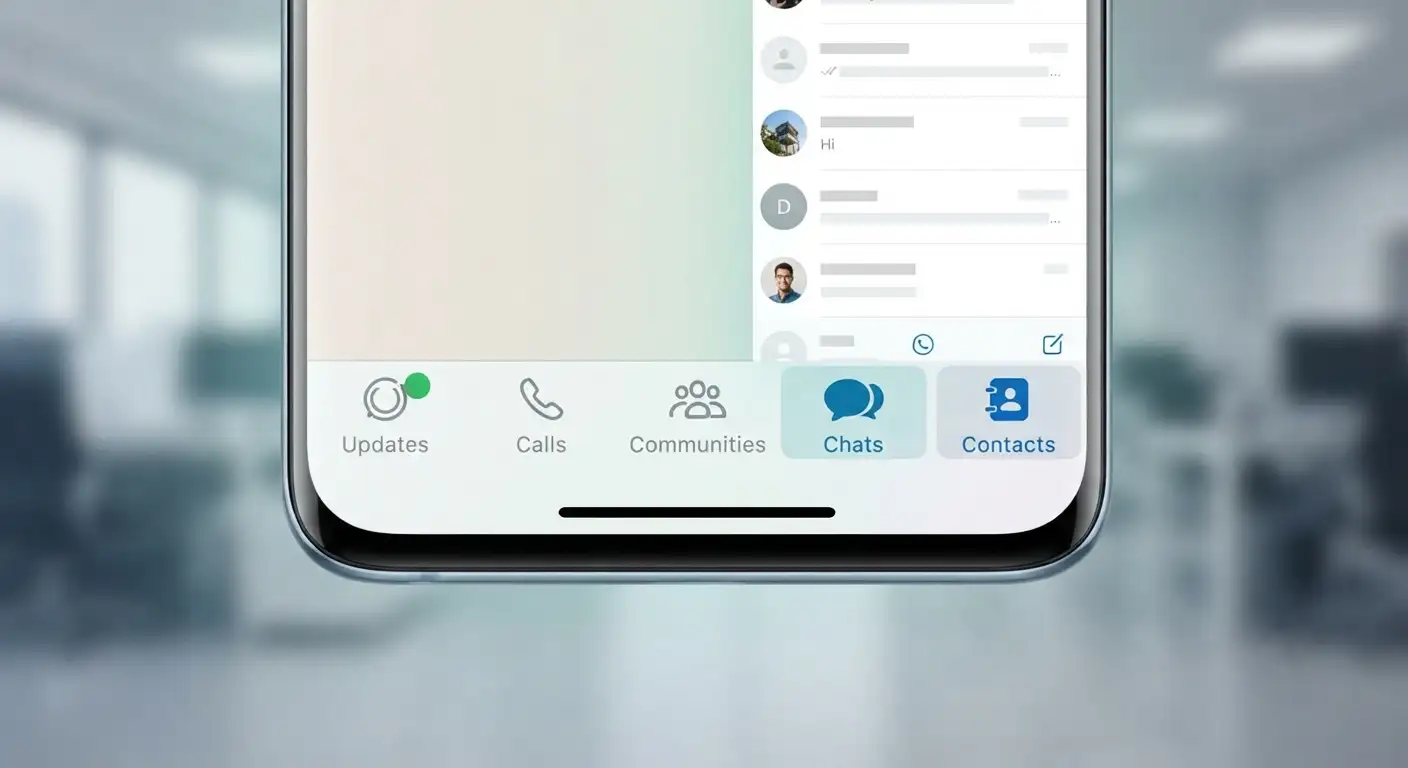
Users previously had to sift through their recent chat logs or tap through nested menus just to locate someone who hasn’t messaged them recently. Recognizing this long-standing user feedback, WhatsApp is rolling out a dedicated, standalone Contacts tab designed to simplify your digital communication experience completely.

In this comprehensive guide, we will walk you through everything you need to know about this major update, how it changes your daily routine, how to access and enable the contacts tab in WhatsApp, and how to make the most of its powerful new features without getting bogged down by complicated settings.
Understanding the New WhatsApp Contacts Tab Update
Before diving into the setup instructions, it helps to understand what this update actually changes. Historically, WhatsApp organized its main screen primarily around your active conversation threads. If you wanted to start a brand new conversation with someone whose chat history had been cleared or who you had never messaged before, you had to press a floating action button or dive into various sub-menus.
The newly introduced Contacts tab brings a fundamental shift by providing a dedicated, permanent space right on your main navigation bar. Instead of burying your address book deep inside application settings—which was initially tested in early beta releases—the developers refined the layout to place your entire phone book directly at your fingertips.
By centralizing your contacts, online indicators, and quick-action shortcuts into one clean interface, WhatsApp makes connecting with your network faster and far more intuitive than ever before.
Key Features Included in the New Contacts Tab
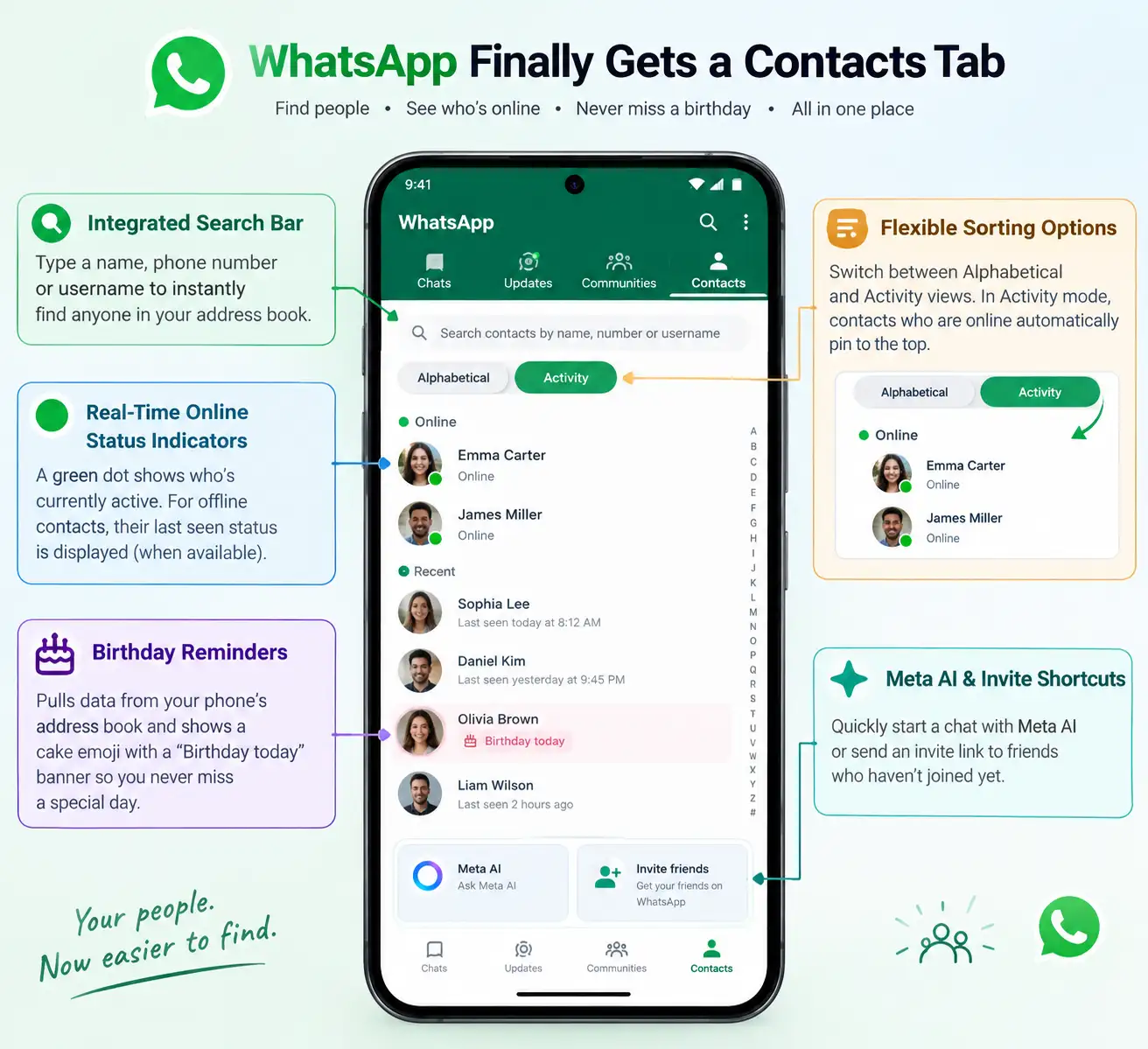
The inclusion of a dedicated contacts section is not merely a cosmetic redesign. It brings several functional upgrades that make managing your relationships easier:
-
Integrated Search Bar: Located right at the very top of the tab, this powerful search utility lets you instantly filter through your address book by typing a name, phone number, or username.
-
Real-Time Online Status Indicators: A prominent green dot now appears directly on the profile pictures of users who are currently active on the platform. For contacts who are offline, their traditional last seen status is displayed where available.
-
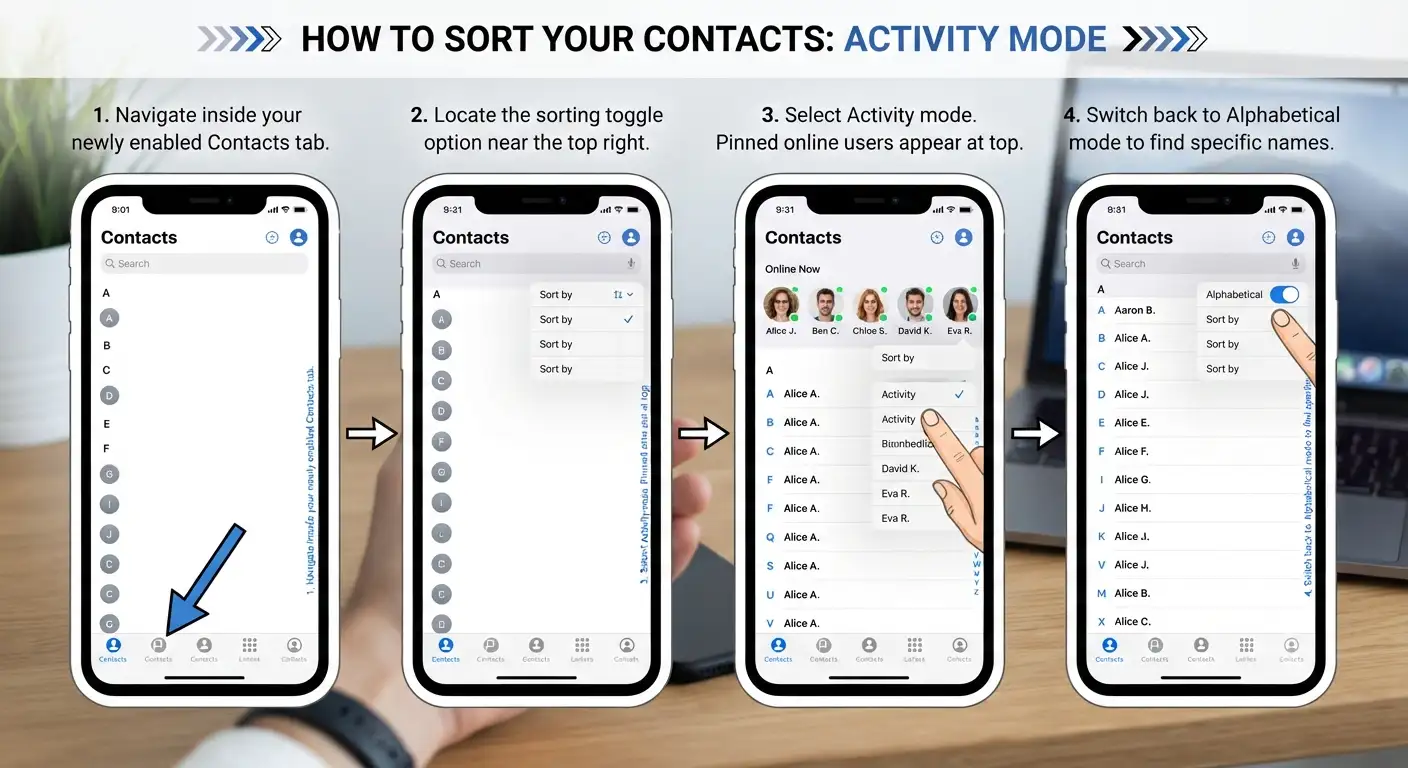
Flexible Sorting Options: You are no longer restricted to a rigid alphabetical view. You can easily toggle between an alphabetical sorting layout and an Activity-based layout. When activity sorting is enabled, contacts who are currently online automatically pin themselves to the top of your list.
-
Built-In Birthday Reminders: By pulling data directly from your smartphone’s local address book, the application displays a friendly cake emoji and a Birthday today banner next to celebrants’ names, ensuring you never miss an important milestone.
-
Direct Meta AI and Invite Shortcuts: The bottom portion of the tab provides quick, convenient shortcuts to initiate a conversation with the Meta AI assistant or send an invite link to friends who have not yet joined the platform.
How to Enable and Access the Contacts Tab in WhatsApp
Because software rollouts for global applications happen in stages, the exact steps to view this feature depend on your current application version and device status. Follow these steps to ensure you have access:
Step 1: Check and Update Your Application
The dedicated contacts feature is rolling out primarily through recent application updates. To give yourself the best chance of receiving the feature immediately:
-
Open the Google Play Store (for Android users) or the Apple App Store (for iOS users).
-
Search for WhatsApp.
-
If an Update button is visible, tap it immediately to download the latest stable release package. If you are participating in public beta testing programs, ensure your beta build is fully updated to the latest available revision.
Step 2: Launch WhatsApp and Locate the Navigation Bar
Once your application is updated to the required version:
-
Open WhatsApp from your device’s home screen or app drawer.
-
Look at the main navigation bar located either at the bottom of the screen (on most modern layouts) or at the top header area.
-
Locate the brand new icon representing a traditional address book or people silhouette, labeled as the Contacts tab.
Step 3: Tap to Open and Explore Your Address Book
Simply tap on the Contacts tab icon. The application will instantly load a unified view of your smartphone’s address book, merging your phone’s local contacts with your WhatsApp connections seamlessly.
How to Customize Your Contacts Tab for Maximum Efficiency
Once you have opened your new contacts section, you can tailor the interface to suit your personal communication style. Here is how to configure the available options:
Switching Between Alphabetical and Activity Sorting
If you communicate with certain people constantly throughout the day, scrolling through an alphabetical list can feel tedious. To optimize your view:
Utilizing the Universal Search Bar
Rather than scrolling manually through hundreds of entries, tap the search icon at the top of the tab. Typing even two or three letters of a person’s name will instantly filter the list in real-time, allowing you to tap their name and launch a direct chat instantly.
Understanding Privacy Settings and Limitations
It is important to note how personal privacy settings interact with this new interface. Many users wonder if the new tab exposes their online habits or last-seen timestamps to everyone in their phone book.
Rest assured that WhatsApp maintains strict adherence to your existing privacy configurations:
-
If you have chosen to hide your online status or last seen timestamp from specific groups or everyone, other users will not see your active status either.
-
The sorting features and online indicators respect the mutual privacy boundaries established within your account settings. If a contact hides their information, their status will remain hidden within your new tab as well.
-
Birthday reminders rely strictly on the local data stored securely inside your smartphone’s native address book and are never shared externally without your consent.
Troubleshooting: What to Do If You Don’t See the Tab Yet
If you have updated your application and still cannot locate the dedicated contacts section, consider the following troubleshooting steps:
-
Staged Rollout Delays: Tech companies frequently release major user-interface updates in waves to ensure server stability. If your account has not received the server-side activation flag yet, you may need to wait a few days.
-
Clear Application Cache: On Android devices, go to your phone’s Settings > Apps > WhatsApp > Storage, and tap Clear Cache. Avoid clearing data unless you have a recent chat backup, as this will require you to log back in.
-
Restart Your Device: A simple power cycle can often clear temporary system glitches and force applications to refresh their loaded interface components.
FAQs
-
How do I enable contacts tab in WhatsApp?
Update WhatsApp to the latest version via the Google Play Store or Apple App Store. Once updated, open the app, and the dedicated Contacts tab will automatically appear in your main navigation bar.
-
Why can’t I see the Contacts tab after updating WhatsApp?
WhatsApp distributes major user interface updates via staged, server-side rollouts. If you have updated to the latest build and do not see it yet, the feature flag has likely not reached your account. Clearing the app cache or restarting your device can help trigger pending UI updates once available in your region.
-
Is there a toggle switch inside settings to enable contacts tab manually?
No manual toggle exists inside WhatsApp settings. Once your account receives the server-side rollout, the interface automatically adds the permanent tab to your top or bottom navigation bar.
-
Will other people see when I am online inside the Contacts tab?
The Contacts tab strictly respects your existing privacy settings. If you configured your status to hide “Last Seen” or “Online” from everyone or specific contacts under Settings > Privacy, your active green dot indicator will remain invisible to those users.
-
How does activity-based sorting work in the Contacts tab?
Activity-based sorting prioritizes your currently active network. Instead of a purely alphabetical list, contacts who are currently online pin to the top of your address book, making it easier to start immediate conversations.
-
Where does WhatsApp pull birthday reminders shown in the Contacts tab?
WhatsApp references birthday details directly from your phone’s native address book. It does not scrape or publish this information externally without your permission.
-
Does the new Contacts tab replace the traditional “New Chat” button?
The Contacts tab serves as a permanent, centralized hub for your full address book, quick searches, and status indicators. While the traditional floating chat icon may still appear on some builds, the Contacts tab is designed to be the primary shortcut for reaching anyone in your address book without digging through chat logs.
-
Can I use the Contacts tab to message people who are not saved in my address book?
The tab primarily mirrors your saved phone contacts. However, you can use the integrated search bar at the top to look up unsaved phone numbers or usernames to start a direct chat.
-
Is the Contacts tab available on WhatsApp Web or Desktop?
The dedicated tab layout is rolling out first to Android and iOS mobile builds. Web and desktop companion apps continue using the sidebar search and chat filter icons, with layout alignments following mobile rollouts.
-
Does having the Contacts tab enabled consume more background battery or data?
No. Online presence indicators and address book syncing operate on existing WhatsApp background sync protocols, so you won’t experience noticeable extra battery or data drain.
Conclusion
The introduction of a dedicated contacts section marks a major milestone in improving everyday user convenience. By bringing your address book, online status indicators, sorting tools, and birthday reminders into one centralized hub, WhatsApp eliminates unnecessary navigation steps and helps you stay connected effortlessly. Follow the simple update steps outlined in this guide today, and enjoy a faster, more organized messaging experience.

Selva Ganesh is a Computer Science Engineer, Android Developer, and Tech Enthusiast. As the Chief Editor of this blog, he brings over 10 years of experience in Android development and professional blogging. He has completed multiple courses under the Google News Initiative, enhancing his expertise in digital journalism and content accuracy. Selva also manages Android Infotech, a globally recognized platform known for its practical, solution-focused articles that help users resolve Android-related issues.




Leave a Reply