
Enable Google Gemini in Samsung Galaxy Watch 8– Samsung has revolutionized the wearable tech space once again with the launch of the Galaxy Watch 8 and Galaxy Watch 8 Classic — the first smartwatches to feature Google Gemini AI right out of the box. This powerful virtual assistant, designed as the next evolution of Google Assistant, transforms the way users interact with their smartwatches. From performing complex tasks to engaging in natural conversations, Gemini brings AI directly to your wrist like never before. But the great news doesn’t end with the newest devices. Gemini AI is rolling out to all Wear OS 4 and above smartwatches, which includes earlier Samsung models like the Galaxy Watch 4, Watch 5, Watch 6, Watch 7, and Watch Ultra.
Below, we’ll walk you through exactly how to enable Google Gemini on your Samsung Galaxy Watch 8 and how to activate it on older Galaxy smartwatches running Wear OS. Let’s dive in.

What is Google Gemini on the Galaxy Watch?
Google Gemini is an AI-powered assistant that surpasses Google Assistant’s capabilities in multiple ways. Not only can it answer queries in a more natural and conversational tone, but it also processes complex instructions more effectively. Whether you want help setting reminders, checking your schedule, cooking advice, or controlling smart home devices, Gemini handles it all faster and wiser.
Some features include:
- Conversational AI: Understands context and carries on back-and-forth conversations.
- Rich Knowledge Base: Offers detailed, informative answers from the web.
- Multimodal Capabilities: Understands voice, text, and images (on supported devices).
- Cross-App Integration: Can interact with watch-specific apps and even control phone features.
Devices Eligible for Google Gemini on Wear OS
As of July 2025, Google Gemini is available or rolling out to all Wear OS 4+ smartwatches. Eligible Samsung models include:
- Samsung Galaxy Watch 8 / 8 Classic
- Galaxy Watch Ultra
- Galaxy Watch 7 / 7 Classic
- Galaxy Watch 6 / 6 Classic
- Galaxy Watch 5 / 5 Pro
- Galaxy Watch 4 / 4 Classic
️ How to Enable Google Gemini on Samsung Galaxy Watch 8
If you’ve just unboxed your new Galaxy Watch 8 or 8 Classic, here’s how to activate Gemini in a few simple steps.
Step 1: Connect Your Watch to Wi-Fi
Ensure your watch is connected to a stable internet connection. Go to:
Settings > Connections > Wi-Fi and connect to a trusted network.
Step 2: Update to the Latest Software
Gemini requires the latest version of Wear OS and the latest update on the Play Services.
- On your watch, go to Settings > Software Update and ensure you’re using the latest version.
- On your phone, open the Galaxy Wearable app, tap Watch Settings > Watch Software Update, and update if needed.
Step 3: Open the Google App on Your Watch
Once the watch is updated, open the Google app on your Galaxy Watch 8. If prompted, accept the new Gemini AI assistant setup screen.
Step 4: Enable Gemini as the Default Assistant
If Google Assistant is still active, you can manually switch to Gemini:
- On your watch, open Settings > Apps > Default apps > Digital assistant app.
- Select Google Gemini from the list.
You will now have access to Gemini directly from your wrist — either by long-pressing the home button or saying “Hey Google.”
How to Enable Gemini on Older Galaxy Watches (Watch 4–7)
Gemini is not just limited to the Galaxy Watch 8. If you own an older Samsung Galaxy Watch running Wear OS 4 or above, you can also enjoy Gemini’s features.
Step 1: Check Compatibility and Update OS
- Confirm that your Galaxy Watch is on Wear OS 4 or newer.
- Update to the latest firmware via:
Settings > Software Update on your watch
or
via the Galaxy Wearable app on your phone.
Step 2: Update Google App and Services
- Open the Play Store on your watch.
- Search for Google, Google Play Services, and Wear OS, then tap Update if updates are available.
Step 3: Set Gemini as Your Assistant
- Navigate to Settings > Apps > Default apps > Digital assistant.
- Choose Gemini if the option is available.
⚠️ If you don’t see the Gemini option yet, it’s likely still rolling out to your device. Keep checking for updates regularly as the rollout is phased.
Pro Tips for Using Gemini on Your Galaxy Watch
1. Activate by Voice or Button
Say “Hey Google” or press and hold the Home key to launch Gemini instantly.
2. Ask Complex Questions
Try queries like:
“Plan a 30-minute bodyweight workout for me.”
“What are some high-protein vegetarian dinner recipes?”
3. Integrate with Smart Home Devices
Control your lights, thermostat, security cameras, and more using voice commands.
4. Use Gemini with Samsung-Specific Apps
Thanks to tight integration with Samsung Health, Calendar, and SmartThings, Gemini can offer context-aware responses and actions.
What’s New with Gemini and Wear OS 6?
With the upcoming Wear OS 6, Google Gemini will integrate even deeper into your smartwatch experience:
- App-Aware Suggestions: Gemini will analyze app usage patterns to suggest actions.
- Battery-Aware Task Management: The assistant will recommend battery-saving tips in real time.
- Personalized Insights: Fitness goals, sleep tracking, and productivity tips, directly from the assistant.
Samsung confirmed during Galaxy Unpacked July 2025 that these features will become available soon, with the Galaxy Watch 8 series being the first to take full advantage.
Gemini vs. Google Assistant: What’s Better?
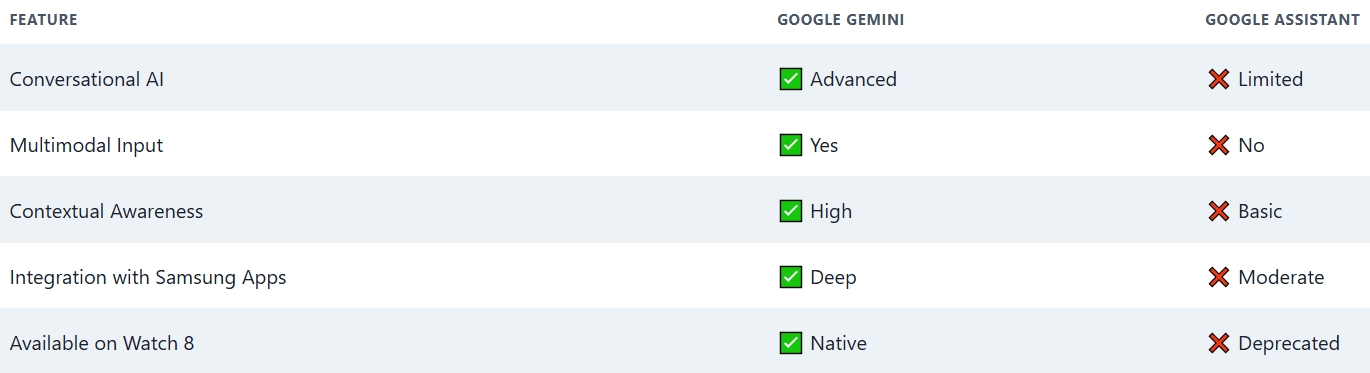
There’s no competition — Google Gemini is the clear successor and is expected to completely replace Google Assistant across all Android and Wear OS platforms soon.
Wrap Up
Enabling Google Gemini on your Samsung Galaxy Watch 8 or any compatible older Galaxy smartwatch is simple and unlocks a whole new level of functionality. With real-time information, deeper integration, natural language understanding, and evolving capabilities, Gemini redefines how you interact with your smartwatch.
Ensure your device is updated, follow the steps above, and begin experiencing a knowledgeable AI assistant designed for the future of wearable technology.

Selva Ganesh is a Computer Science Engineer, Android Developer, and Tech Enthusiast. As the Chief Editor of this blog, he brings over 10 years of experience in Android development and professional blogging. He has completed multiple courses under the Google News Initiative, enhancing his expertise in digital journalism and content accuracy. Selva also manages Android Infotech, a globally recognized platform known for its practical, solution-focused articles that help users resolve Android-related issues.




The new AI functionalities powered by Google Gemini are very practical. The Galaxy Watch 8 user interface feels more responsive.
Google Gemini’s AI integration improves fitness tracking on the Galaxy Watch 8. I’ve been more motivated to hit my goals.
The Galaxy Watch 8 comes alive with the Google Gemini AI. It’s like having a personal assistant right on your wrist.
Enabling AI with Google Gemini brought a fresh experience to my Galaxy Watch 8. The watch feels smarter and more capable now.
I love how Google Gemini adds new features to the Galaxy Watch 8. It makes daily tracking and reminders much easier to manage.
Google Gemini on Galaxy Watch 8 really sets a new standard for smartwatches. The AI assistant is both quick and accurate.
Setting up Google Gemini was effortless and very user-friendly. The AI is a major upgrade for Samsung’s smartwatch lineup.
Google Gemini enhances the overall experience on the Galaxy Watch 8. I noticed quicker responses and better app interactions.
Samsung did a great job embedding Google Gemini in the Galaxy Watch 8. The AI assistant offers helpful suggestions throughout the day.
The integration of Google Gemini AI into the Galaxy Watch 8 feels very natural. It understands my needs and helps manage my schedule better.
Enabling Google Gemini on the Galaxy Watch 8 improved its usability greatly. It’s a must-have feature for any smartwatch user.
I appreciate how Google Gemini helps with notifications and quick actions. The Galaxy Watch 8 truly benefits from this AI boost.
Google Gemini’s presence on the Galaxy Watch 8 brings powerful AI capabilities right to your wrist. I find it very handy and efficient.
The AI features introduced with Google Gemini really enhance productivity. The watch performance has noticeably improved.
I wasn’t sure how to enable Google Gemini initially, but the steps were easy to follow. Now my Galaxy Watch 8 feels much smarter.
Setting up Google Gemini was simple and quick. The AI integration feels seamless and useful in everyday tasks.
Google Gemini makes the Galaxy Watch 8 stand out among smartwatches. The AI assistant is remarkably helpful.
The new AI capabilities with Google Gemini are impressive on the Galaxy Watch 8. It’s really boosted my smartwatch experience.
Enabling Google Gemini on the Samsung Galaxy Watch 8 was straightforward. I love the enhanced AI features it brings!
Google Gemini AI integration in the Galaxy Watch 8 is a game-changer. Truly makes the watch smarter and more intuitive.