
Four Ways to Purchase Google Pixel Care+ Program- Pixel Care+ is Google’s official protection plan that provides extended coverage, peace of mind, and premium support for Pixel phones, watches, tablets, and Fitbit devices. With benefits like unlimited accidental damage claims, $0 screen and battery repairs, and 24/7 tech support, your device stays protected long after the standard warranty ends. For Pixel owners in the United States, enrolling in Care+ is easy and flexible, with multiple purchase options. We will walk you through four ways to purchase Pixel Care+, eligibility rules, pricing details, and the advantages of each plan.
Why Choose Pixel Care+ Protection?
Pixel Care+ is an extended warranty and a comprehensive protection program designed to safeguard your device against unexpected mishaps and long-term wear. Key benefits include:
- Unlimited accidental damage coverage (drops, cracks, and liquid spills)
- $0 front screen and back glass repairs (Pixel phones only)
- $0 battery replacement if battery health drops below 80%
- Unlimited post-warranty malfunction claims
- Next-day device replacement (subject to availability)
- 24/7 expert support from Google Pixel specialists
- Optional Loss and Theft coverage (available outside of New York)
Pixel Care+ is available for many devices, including Pixel 10, Pixel 9, Pixel 8 series, Pixel Fold, Pixel Watch models, Pixel Tablet, and Fitbit wearables.

Four Ways to Purchase the Pixel Care+ Program
Google offers several convenient methods to purchase Pixel Care+ within 60 days of buying a new device. Let’s explore each option in detail.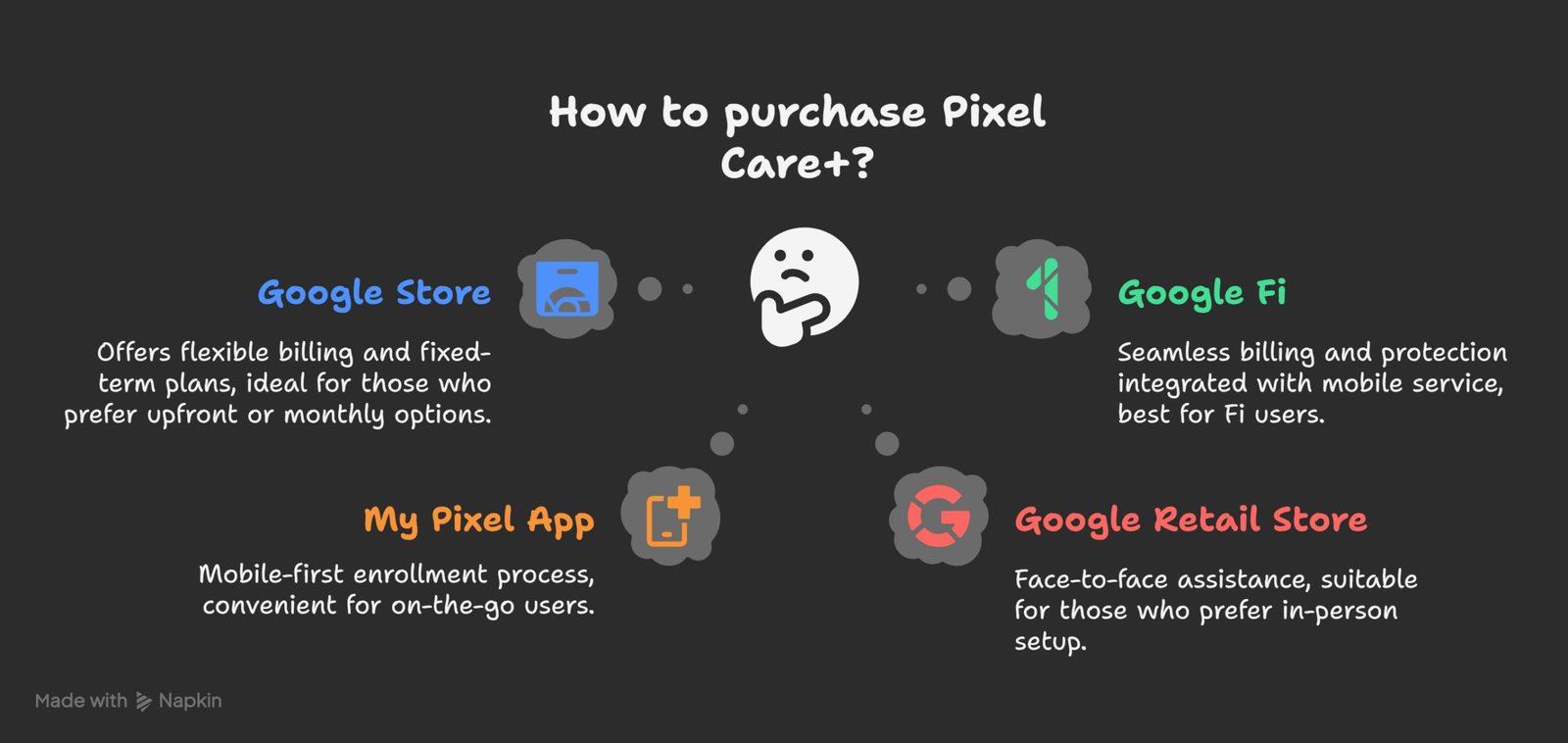
1. Purchase via Google Store
When buying directly from the Google Store, you can add Pixel Care+ to your cart during checkout. This is the most straightforward way to secure coverage from day one.
Steps to Enroll Through Google Store:
- Add a new Pixel device to your cart.
- Choose Pixel Care+ as an add-on.
- Select between:
- Monthly Plan (up to 60 months)
- Monthly with Loss & Theft Coverage (up to 60 months)
- 2-Year Fixed Term Plan
- 2-Year Fixed Term with Loss & Theft Coverage
- Complete the purchase.
If you skip enrollment at checkout, you still have 60 days to add Care+:
- Visit the Pixel Care+ management page.
- Find your device order.
- Select Review and Buy to complete the process.
Best for: Customers who prefer flexible billing or a fixed-term upfront plan.
2. Purchase via Google Fi
If you buy your device through Google Fi, you can enroll in Pixel Care+ during checkout. Coverage is linked directly to your Fi account for easier management.
Steps to Enroll Through Google Fi:
- Purchase a new Pixel device through the Google Fi website or Google Fi app.
- Make sure your Fi service is activated first.
- Select the device you want to cover.
- Follow the prompts to choose your Pixel Care+ plan.
- Confirm your enrollment.
Available plans:
- Monthly with Loss & Theft Coverage (up to 60 months)
Best for: Google Fi users who want seamless billing and protection integrated into their mobile service.
3. Purchase via My Pixel App
The My Pixel app makes it easy to enroll in Pixel Care+ even after purchase, as long as it’s within the 60-day eligibility window.
Steps to Enroll Through My Pixel App:
- Open the My Pixel app on your device.
- Go to the Support tab or Home tab.
- Select the Pixel Care+ option.
- You’ll be redirected to the web purchase flow.
- Choose your desired plan and complete checkout.
Best for: Customers prefer a mobile-first enrollment process without visiting the Google Store or the Fi website.
4. Purchase at a Google Retail Store
For in-person buyers, Google Retail Stores offer Pixel Care+ enrollment at the time of purchase.
Key Details:
- Only 2-Year Fixed Term Plans are available at retail stores.
- Monthly subscription plans are not sold in retail locations.
- If you want a monthly plan, use the Google Store website or the Google Fi platform.
Best for: Shoppers prefer face-to-face assistance when setting up their device protection.
Eligibility and Enrollment Deadlines
Pixel Care+ must be purchased within 60 days of your device purchase. Eligibility varies slightly depending on the source of your device:
- Google Store devices: Phones, Watches, Tablets, Fitbits
- Third-party retailers: Must be enrolled via the Google Store within 60 days using the device’s IMEI or serial number
- Google Fi devices: Phones and Watches only
- Retail Store devices: Enroll at the time of purchase
Note: Due to state insurance regulations, loss & Theft coverage is unavailable in New York.
What Devices Are Covered?
Pixel Care+ supports the latest lineup of Google hardware, including:
- Pixel Phones: Pixel 10, Pixel 10 Pro, Pixel 10 Pro Fold, Pixel 10 Pro XL, Pixel 9a, Pixel 9, Pixel 9 Pro, Pixel 9 Pro XL, Pixel 9 Pro Fold, Pixel 8a, Pixel 8, Pixel 8 Pro, Pixel Fold
- Pixel Watches: Pixel Watch 4 (41mm & 45mm), Pixel Watch 3, Pixel Watch 2
- Pixel Tablet: With or without Charging Speaker Dock
- Fitbit Devices: Fitbit Ace LTE, Fitbit Sense 2, Fitbit Versa 4, Fitbit Charge 6, Fitbit Inspire 3
This ensures that whether you own a phone, watch, tablet, or Fitbit, you can find the right Pixel Care+ plan for your device.
Why Pixel Care+ is Worth It
Investing in Pixel Care+ ensures long-term device security and saves money on costly repairs. For example:
- Screen replacements without coverage can cost over $200, but Pixel Care+ offers $0 repairs.
- Battery replacements are free when the health drops below 80%.
- Next-day replacements minimize downtime if your device becomes unusable.
For users who rely on their Pixel daily, Pixel Care+ delivers peace of mind and financial protection.
Wrap Up
Pixel Care+ is your ultimate safeguard for your device, offering unlimited accidental damage protection, $0 repairs, priority support, and optional loss & theft coverage. With four ways to purchase—Google Store, Google Fi, My Pixel App, and Google Retail Stores—it’s flexible and easy to secure coverage that fits your lifestyle.
If you recently purchased a Pixel phone, watch, tablet, or Fitbit, don’t miss your 60-day enrollment window to lock in Pixel Care+ and protect your device.

Selva Ganesh is a Computer Science Engineer, Android Developer, and Tech Enthusiast. As the Chief Editor of this blog, he brings over 10 years of experience in Android development and professional blogging. He has completed multiple courses under the Google News Initiative, enhancing his expertise in digital journalism and content accuracy. Selva also manages Android Infotech, a globally recognized platform known for its practical, solution-focused articles that help users resolve Android-related issues.




I appreciate the effort you put into detailing each purchasing method. This is truly comprehensive.
This post makes the decision process so much easier. I’m going with the monthly plan.
The information on Fitbit devices is a big win for me. I didn’t realize they were covered too.
I wish I had read this before I bought my last phone. I would have saved so much hassle.
I’ve always wondered about this. Thanks for the clear and concise article.
The part about unlimited accidental damage claims is what stands out to me. Most plans have a limit.
I appreciate the mention of the pros and cons of each purchase method. It helps in making a decision.
The article gives me the confidence to purchase the plan. Thank you for the detailed information.
I’m so glad I read this. I was about to buy my phone without the protection plan.
How does the monthly subscription work if I upgrade my phone to a new model? Do I just start a new plan?
This is the best summary I’ve found on this topic. Thanks for putting it all in one place.
I’ve had a great experience with the customer support team through Pixel Care+. They are very responsive.
Great article! It’s so much easier to understand now.