
Gemini AI in Your Car – The relationship between drivers and their vehicles is undergoing a massive transformation. For years, in-car technology was limited to basic radio dials, primitive built-in maps, and standard voice assistants that required precise, robotic commands to function. Today, Google is radically changing this experience by bringing its advanced artificial intelligence, Google Gemini, directly onto the dashboard. Through platforms like Android Auto and systems featuring Google built in, cars are evolving from mere modes of transportation into intelligent, helpful, and highly adaptive driving companions.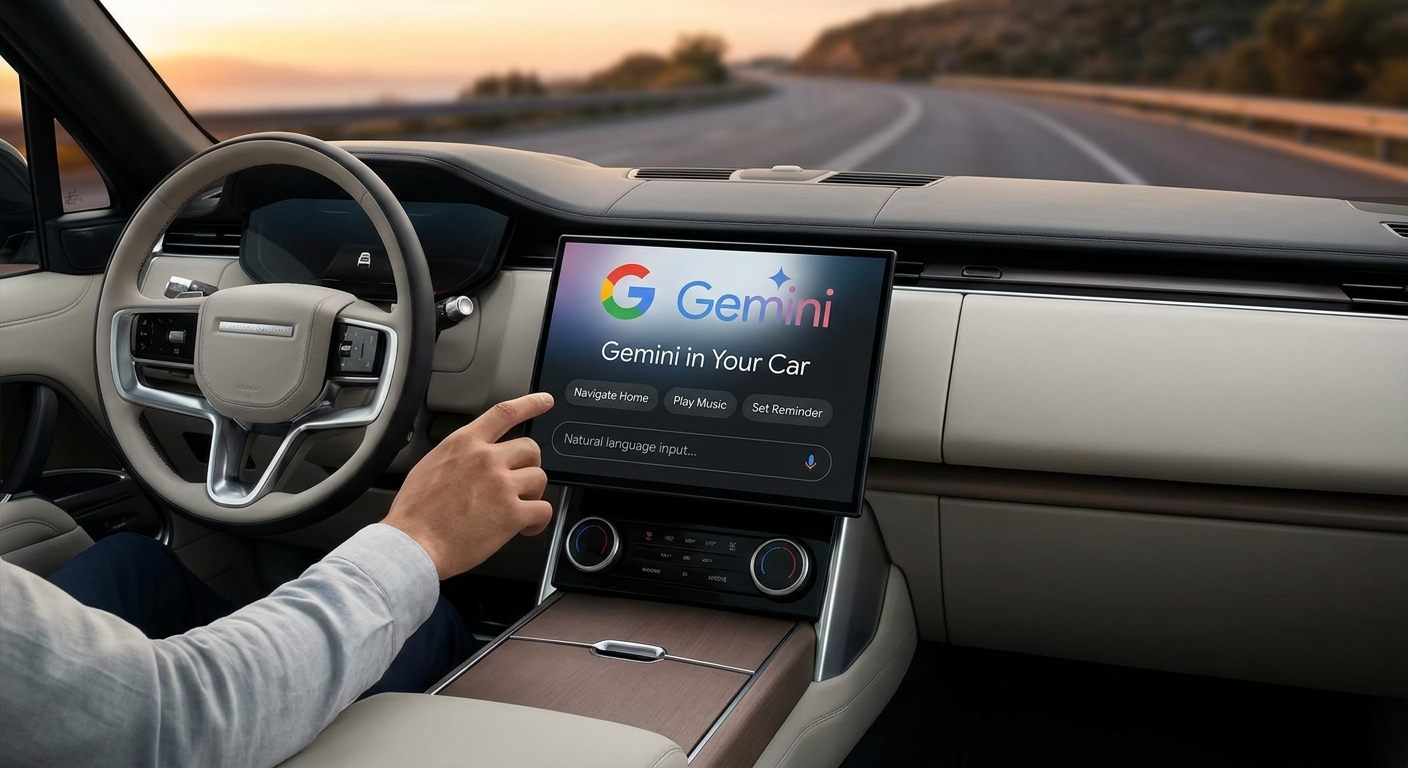
For daily commuters, families, and road-trippers who may not consider themselves “tech-savvy,” this shift is incredibly practical. Instead of introducing confusing technical hurdles, Gemini simplifies how we interact with technology while on the road. By understanding natural human language and executing complex, multi-step tasks, this advanced AI removes the friction of managing phone calls, navigation, entertainment, and daily organization.

Moving Beyond Basic Voice Commands: The True Conversational Co-Pilot
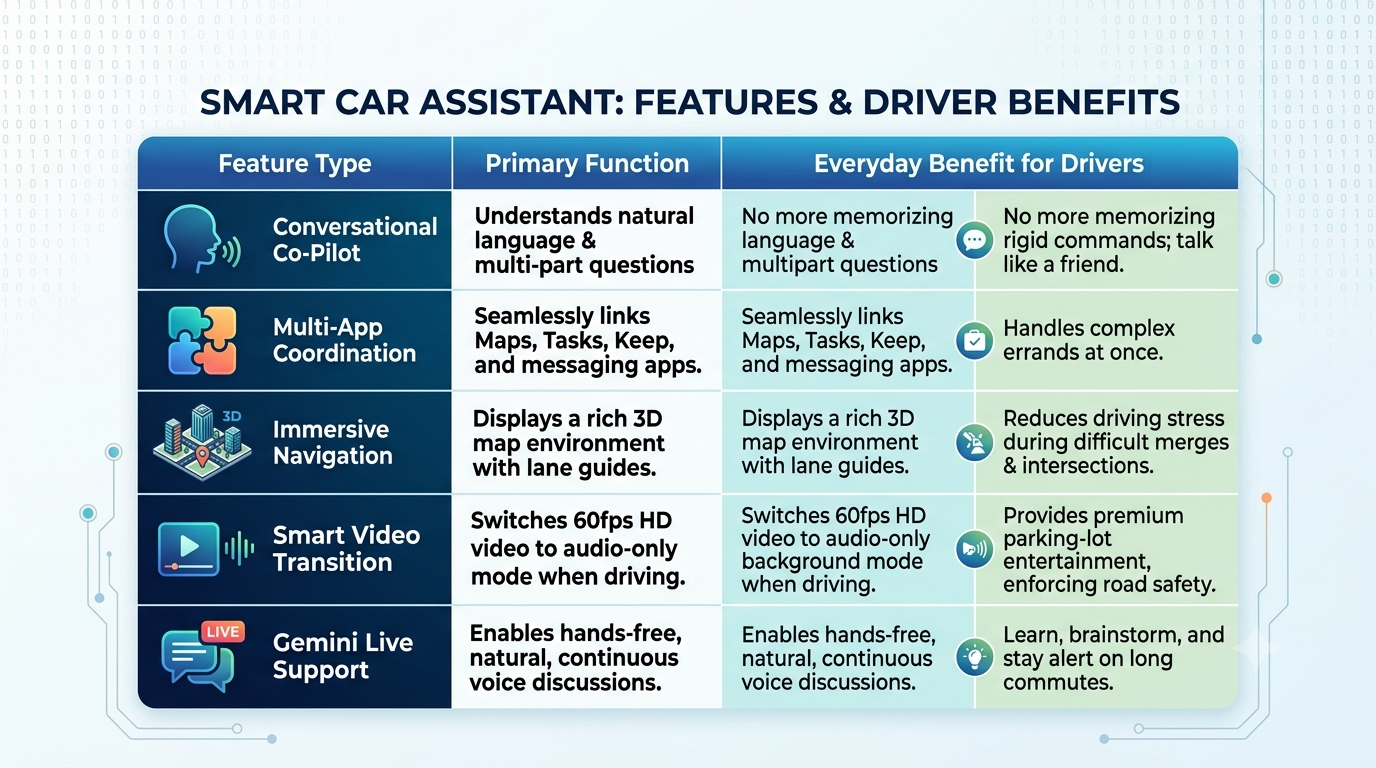
Traditional in-car voice systems are notoriously rigid. Drivers often have to memorize specific phrases, such as “Navigate to [Address]” or “Call [Contact Name],” and any deviation or background noise can cause the system to fail. Google Gemini completely eliminates this frustration by operating as a genuine conversational co-pilot.
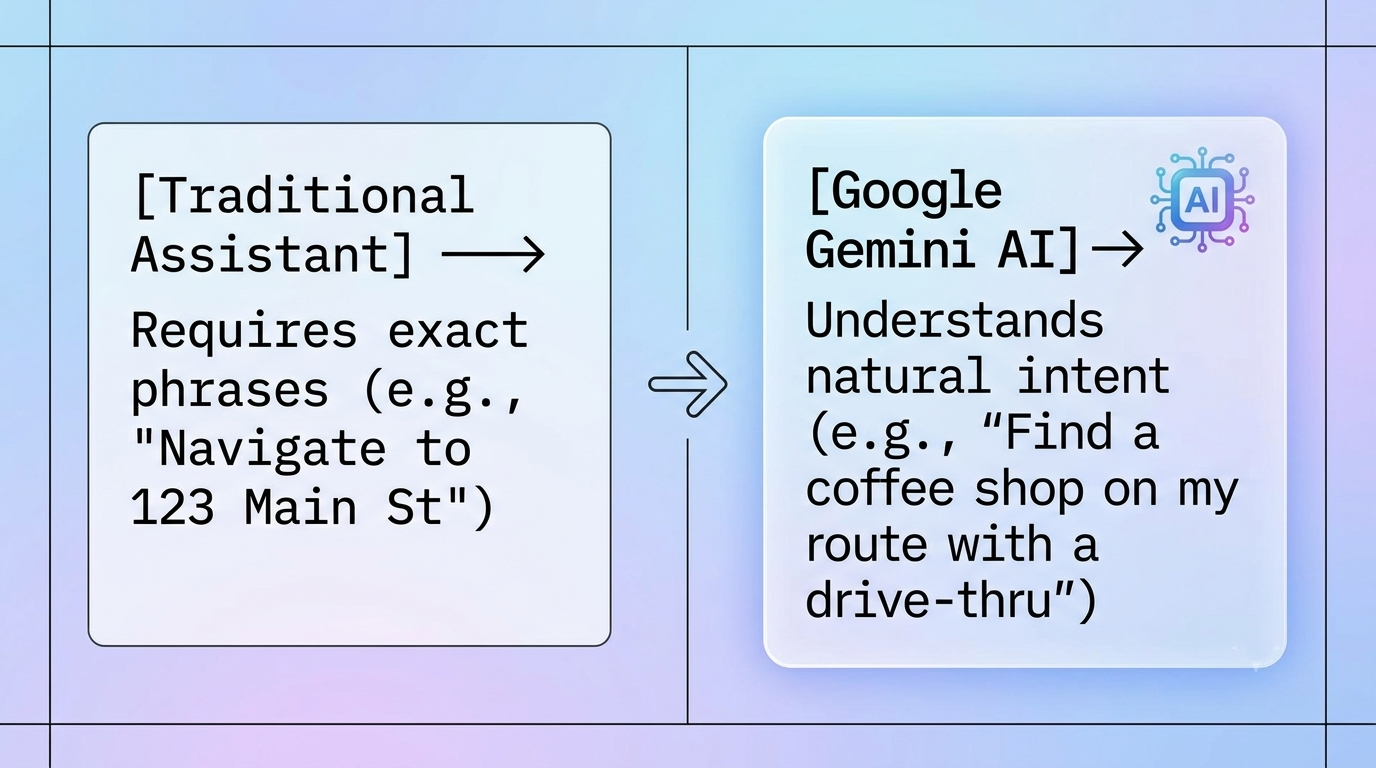
Because Gemini is powered by advanced generative AI, it understands context, nuance, and casual phrasing. You do not need to speak like a computer to get results. You can speak to your car exactly as you would to a passenger sitting in the seat next to you. If your air conditioning is blowing too hard, or if you want to know more about a landmark you just passed, you can simply ask.
Furthermore, Gemini excels at handling multi-layered requests. In the past, if you wanted to find a place to eat, check its reviews, and alter your route, you would have to make multiple separate voice commands or safely pull over to type on your phone. With Gemini, you can combine these steps into a single sentence: “Hey Google, find a highly-rated sushi restaurant along our current route that has a charging station nearby and is open right now.” The AI processes all of these criteria simultaneously, sifts through real-time data, and updates your navigation flawlessly.
Seamless Multi-App Coordination: One Command, Multiple Actions
One of the most powerful capabilities Gemini brings to the dashboard is its ability to break down the walls between different applications. When we drive, our needs are rarely isolated to just a map or just a messaging app. We often need our apps to work together.
Imagine you are driving to a friend’s house but realize you need to pick up ingredients for dinner and let them know when you will arrive. Normally, this involves a stressful juggling act of checking a recipe note, searching for a grocery store, and sending a text message. Gemini removes this entire multi-step headache by orchestrating your apps behind the scenes.
Real-World Example: The Pizza Run
-
The Problem: You want to make a homemade pizza, need to find a store, and want a grocery list ready.
-
The Gemini Command: “Create a list of ingredients for a Margherita pizza in Google Tasks and navigate me to a nearby supermarket.”
-
The Action: Without requiring you to touch a single screen, Gemini instantly searches for the recipe, populates your Google Tasks app with the exact ingredients, opens Google Maps to plot the fastest route to the nearest store, and has everything waiting on your phone by the time you park.
This level of cross-application intelligence extends to communication and productivity as well. You can tell the AI to pull a specific address out of a personal note in Google Keep, start navigating toward it, and automatically send your estimated time of arrival (ETA) to a family member via WhatsApp or standard text message. It bridges your navigation, organization, and communication tools into one seamless workflow, keeping your hands safely on the wheel.
Revolutionizing the Visual Experience: Immersive 3D Navigation and Personalization
The updates coming to vehicles aren’t just auditory; they are profoundly visual. Google is rolling out a massive design refresh to the vehicle dashboard using its Material 3 Expressive design system. For non-technical drivers, this simply means that your car’s screen is about to look much more modern, beautiful, colorful, and customized to your specific tastes, featuring smooth animations and tailored wallpapers.
The core centerpiece of this visual overhaul is Immersive Navigation within Google Maps. This represents the most significant update to the mapping interface in over a decade. Rather than looking at a flat, abstract 2D line, your map comes alive with a vivid 3D view displaying highly realistic buildings, overpasses, and local terrain.
Crucially for safety, the map highlights critical roadway details with extreme precision. It clearly displays:
-
Specific lane configurations to show you exactly which lane you need to be in well before a highway split.
-
Real-time traffic lights and stop signs directly on the digital map.
-
Detailed layout markings to help you confidently merge or execute complex turns in unfamiliar, high-traffic cities.
To supplement this beautiful map, the new interface introduces highly glanceable widgets. Just like the helpful mini-windows on your smartphone, these car widgets allow you to view important information without leaving your main navigation screen. Drivers can customize their layout to display a quick weather overview, shortcuts to favorite contacts, or even a one-tap button to open a smart garage door as they pull into the driveway.
Safe Entertainment and Premium Audio Options
Cars are no longer just tools to get from point A to point B; they are comfortable, personal spaces where we often spend a lot of time waiting. Whether you are waiting to pick up your kids from school, sitting in a parking lot, or charging an electric vehicle, Google has turned your stationary car into a premium personal movie theater.
For the first time, high-definition video streaming is coming directly to the car dashboard display. Drivers can sit back and watch high-quality content on native apps like YouTube at a buttery-smooth 60 frames per second.
Safety remains the absolute priority here. Video streaming functions exclusively when the vehicle is safely shifted into park. The moment you switch the gears into drive to hit the road, the video feed does not abruptly cut off or crash. Instead, it undergoes a smart safety transition, seamlessly shifting into an audio-only background mode. This allows you to safely continue listening to your favorite video podcast, news report, or interview while keeping your eyes completely focused on the road ahead.
Furthermore, Google is elevating the auditory experience by bringing Dolby Atmos spatial audio support to compatible vehicles and apps like YouTube Music. Rather than sound flatly pumping out of standard car doors, spatial audio places you directly in the center of the music, creating a rich, multi-dimensional audio environment that mimics a high-end live concert or commercial theater.
Productive Commutes: Brainstorming and Learning on the Go
Because Gemini is an exceptionally intelligent AI model, it can transform boring, gridlocked traffic into a highly productive or educational space. If you have a long commute, you can engage in free-flowing, back-and-forth conversations using a feature called Gemini Live.
By activating the voice button and saying “Let’s talk Live,” you open an interactive, human-like dialogue with the AI. There is no need to wait for a prompt or press buttons between sentences. You can use this active drive time to:
-
Brainstorm Creative Ideas: Talk through an upcoming presentation for work, outline the structure of an email, or practice pitching an idea out loud.
-
Learn New Concepts: Ask Gemini to simplify complex topics, such as explaining how a historical event unfolded or breaking down a scientific concept in easy-to-understand words.
-
Discover Local History: Ask the AI to act as a local tour guide by saying, “Tell me a fascinating historical fact about the town I am currently driving through,” making long family road trips educational and engaging for passengers.
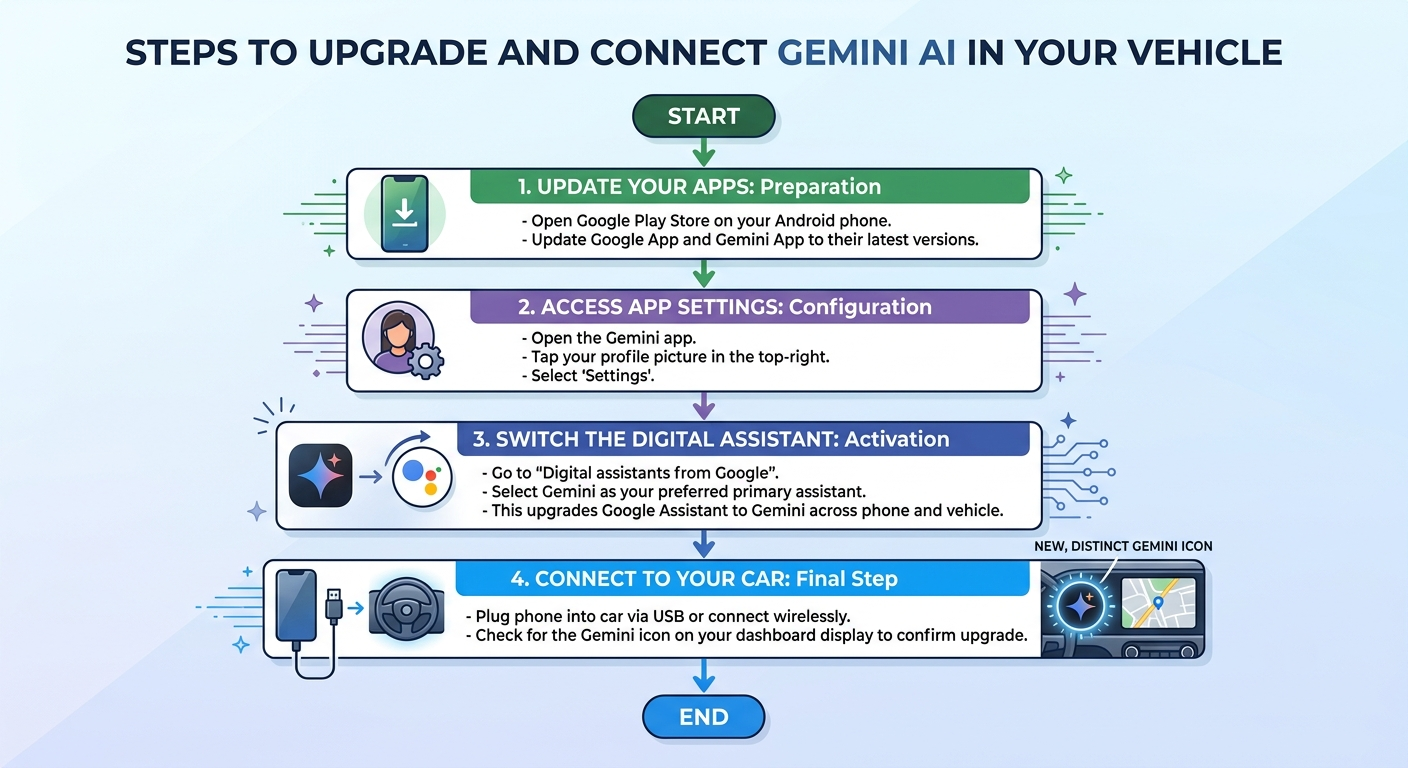
How to Get Started with Gemini in Your Car
Setting up this next-generation AI experience is incredibly straightforward and does not require complex technical knowledge.
Core Summary of Advanced In-Car Features
A Quick Reminder for Drivers: While Gemini is an incredibly sophisticated and powerful assistant designed to minimize driving distractions, it is still an AI tool. Always maintain primary focus on the road, obey local traffic laws, and never rely solely on technology for critical, split-second safety decisions behind the wheel.
Gemini AI in Your Car: Frequently Asked Questions
1. How is Google Gemini different from traditional in-car voice assistants?
Traditional in-car voice systems are rigid, requiring drivers to memorize precise, robotic commands (like “Navigate to [Address]”) to function. Google Gemini operates as a true conversational co-pilot. Because it’s powered by generative AI, it understands context, nuance, casual phrasing, and natural human language. You can speak to it exactly as you would to a passenger sitting next to you.
2. Can Gemini handle multiple requests at the same time?
Yes. Unlike older systems that require separate commands for every single action, Gemini excels at multi-layered requests. For example, you can say: “Hey Google, find a highly-rated sushi restaurant along our current route that has a charging station nearby and is open right now.” The AI will process all criteria simultaneously, check real-time data, and update your route in real time.
3. What does “multi-app coordination” mean for drivers?
Gemini breaks down the walls between different applications so they can work together seamlessly behind the scenes. With a single voice command, it can pull information from one app and use it in another. For instance, it can pull an address from a personal note in Google Keep, navigate to it in Google Maps, and automatically text your ETA to a family member via WhatsApp.
4. How does the “Pizza Run” example demonstrate Gemini’s capabilities?
If you want to make a homemade pizza, you can tell Gemini: “Create a list of ingredients for a Margherita pizza in Google Tasks and navigate me to a nearby supermarket.” Without you touching a single screen, Gemini will find the recipe, add the ingredients to your Google Tasks app, and map the fastest route to the nearest store so everything is ready on your phone when you park.
5. What is Immersive Navigation in Google Maps?
Immersive Navigation is a major visual update that replaces flat, 2D maps with a vivid 3D view of highly realistic buildings, overpasses, and local terrain. For added safety, it precisely displays:
- Specific lane configurations so you know which lane to be in before a highway split.
- Real-time traffic lights and stop signs.
- Detailed layout markings to help with complex turns and merging.
6. What are dashboard widgets, and how do they help?
Dashboard widgets are glanceable, customizable mini-windows powered by the new Material 3 Expressive design system. They allow drivers to view important information—such as a quick weather overview, shortcuts to favorite contacts, or a one-tap button to open a smart garage door—directly on the main screen without leaving the navigation map.
7. Can I watch videos on my car’s dashboard display?
Yes, but exclusively when the vehicle is safely shifted into Park. You can stream high-definition video at 60 frames per second on native apps like YouTube while waiting to pick up kids or charging an electric vehicle.
8. What happens to a video when I start driving?
Safety is the absolute priority. The moment you shift the car into Drive, the video feed does not crash; instead, it transitions to a smart safety mode that runs in the background as audio-only. This allows you to safely listen to the rest of your video podcast, interview, or news report without taking your eyes off the road.
9. What is “Gemini Live” and how can I use it during a commute?
Gemini Live is a feature that opens an interactive, human-like dialogue for free-flowing, back-and-forth conversations. By saying “Let’s talk Live,” you can use your commute time hands-free to brainstorm creative ideas (like practicing a work pitch), learn new concepts (asking the AI to simplify complex topics), or discover local history about the towns you are driving through.
10. Does using Gemini in the car require advanced technical skills?
Not at all. The system is specifically designed to be incredibly straightforward for non-tech-savvy drivers, families, and daily commuters. It is intended to remove technical hurdles and friction by letting you interact with your vehicle using your normal voice.

Selva Ganesh is a Computer Science Engineer, Android Developer, and Tech Enthusiast. As the Chief Editor of this blog, he brings over 10 years of experience in Android development and professional blogging. He has completed multiple courses under the Google News Initiative, enhancing his expertise in digital journalism and content accuracy. Selva also manages Android Infotech, a globally recognized platform known for its practical, solution-focused articles that help users resolve Android-related issues.




Leave a Reply