
• Skip to primary navigation
  • Skip to main content
  • Skip to primary sidebar
  • Skip to footer
Android Infotech

Android Infotech

Android Tips, News, Guide, Tutorials

  • AI
  • Firmware
  • Knowledge
  • News
  • Deals
  • Root
  • Tutorial
  • Applications
  • Opinion
  • Tools
  • Search
  • Account
You are here: Home / Knowledge / How to Get Price Drop Alerts in Microsoft Edge?

How to Get Price Drop Alerts in Microsoft Edge?

Updated On: September 13, 2025 by Android Infotech Team 51 Comments

Get Price Drop Alerts in Microsoft Edge– Microsoft Edge has grown into one of the most feature-rich browsers, and one of its standout tools is the built-in price tracking system. This feature allows users to monitor product prices across popular e-commerce websites and receive timely alerts when prices drop. With this, shoppers no longer need third-party extensions or constant manual checks. In this detailed guide, we explain step-by-step how to set up price alerts in Microsoft Edge, ensuring you save money and time while shopping online.Get Price Drop Alerts in Microsoft Edge
Check Your Microsoft Edge Version Before Enabling Price Alerts

The first step is verifying that you’re using an Edge build that supports the price alert feature. Microsoft typically rolls out such tools to Canary builds first, followed by Beta, and then Stable versions.

  1. Open Edge.
  2. Go to Settings > About Microsoft Edge.
  3. Verify that you are on the latest stable version. If you’re running an older build, update immediately to unlock shopping-related enhancements.
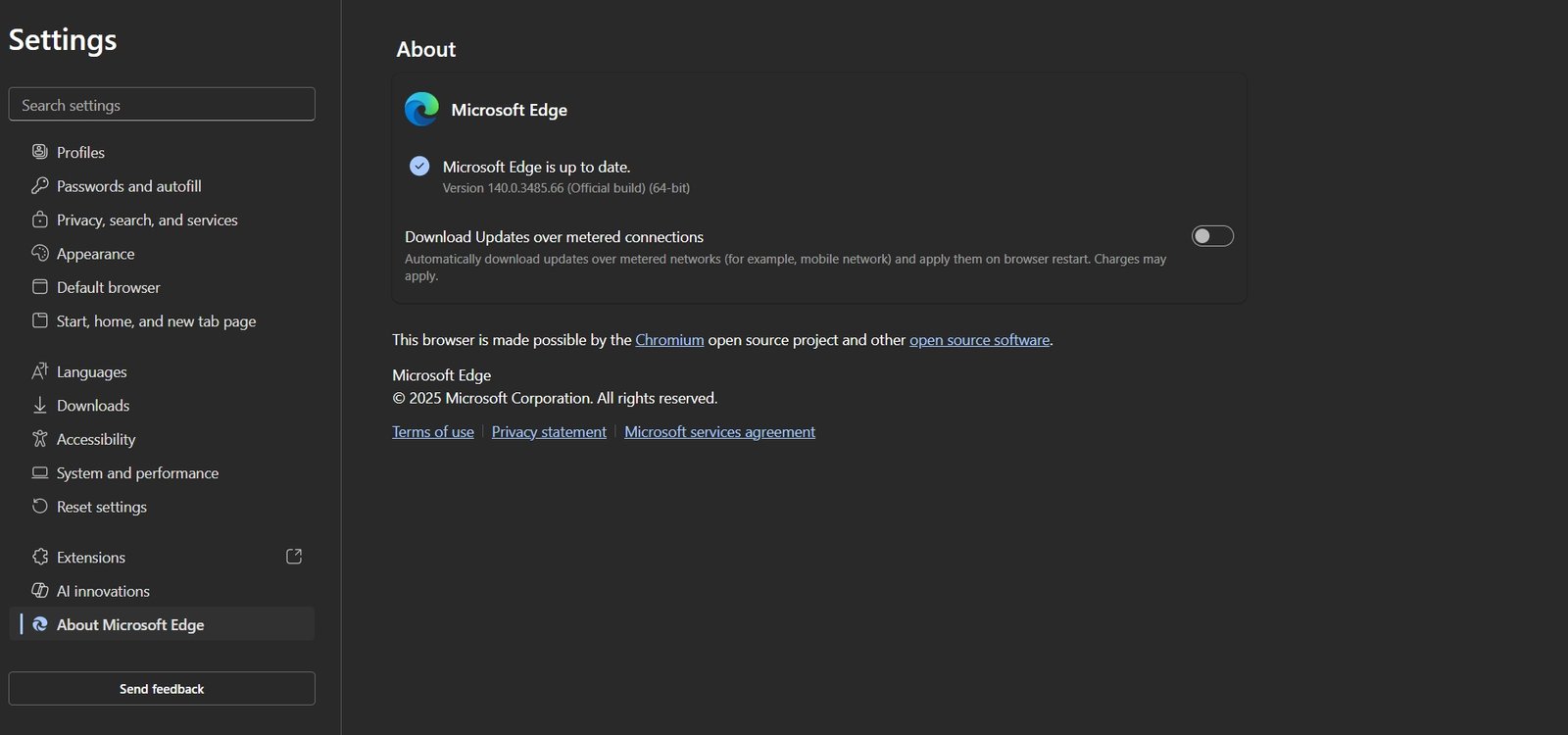

Checking Version of Microsoft Edge

In newer builds, you will notice toggles like:

  • “Save time and money with shopping in Microsoft Edge”
  • “Show opportunities to track product prices”

If you don’t see these options in Stable, they are likely rolling out gradually. In that case, you can install the Canary channel to test them earlier.

Enable Shopping and Price Tracking Features in Edge

Microsoft Edge requires specific toggles to be turned on before receiving price alerts. Follow these steps carefully:
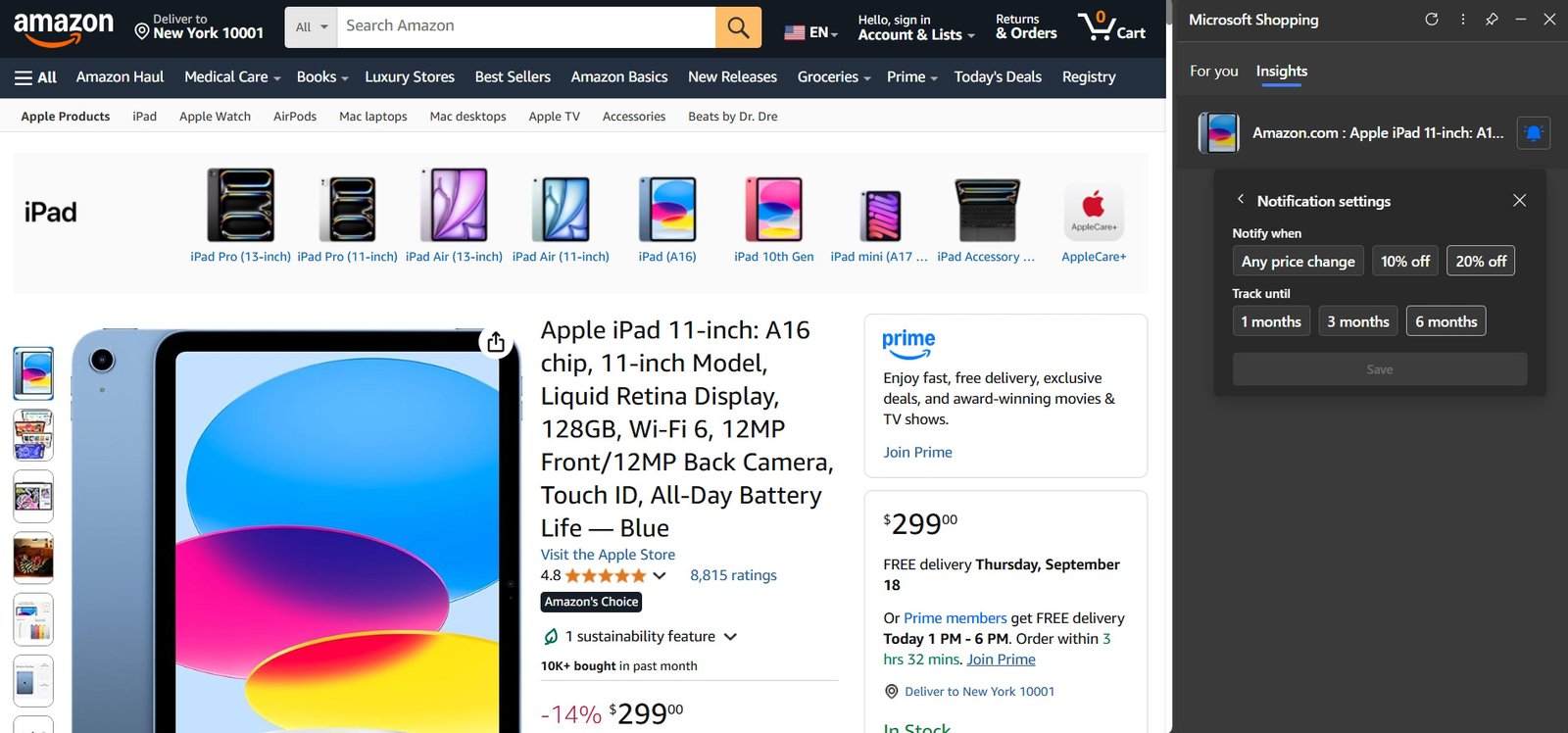
Setup price drop alerts in Microsoft Edge

  1. Open Edge > Settings.
  2. Navigate to Privacy, search, and services.
  3. Scroll down to the Services section.
  4. Turn on “Save time and money with shopping in Microsoft Edge.”

Enabling this option unlocks coupons, cashback offers, and price tracking.

If available, also activate:

  • “Show opportunities to track product prices.”

This option allows Edge to auto-detect products on shopping sites and suggest tracking options when you browse.

Use Edge Price Tracking on Product Pages

Once the shopping features are enabled, you can begin tracking products directly on e-commerce sites like Amazon, Walmart, and others supported by Edge.
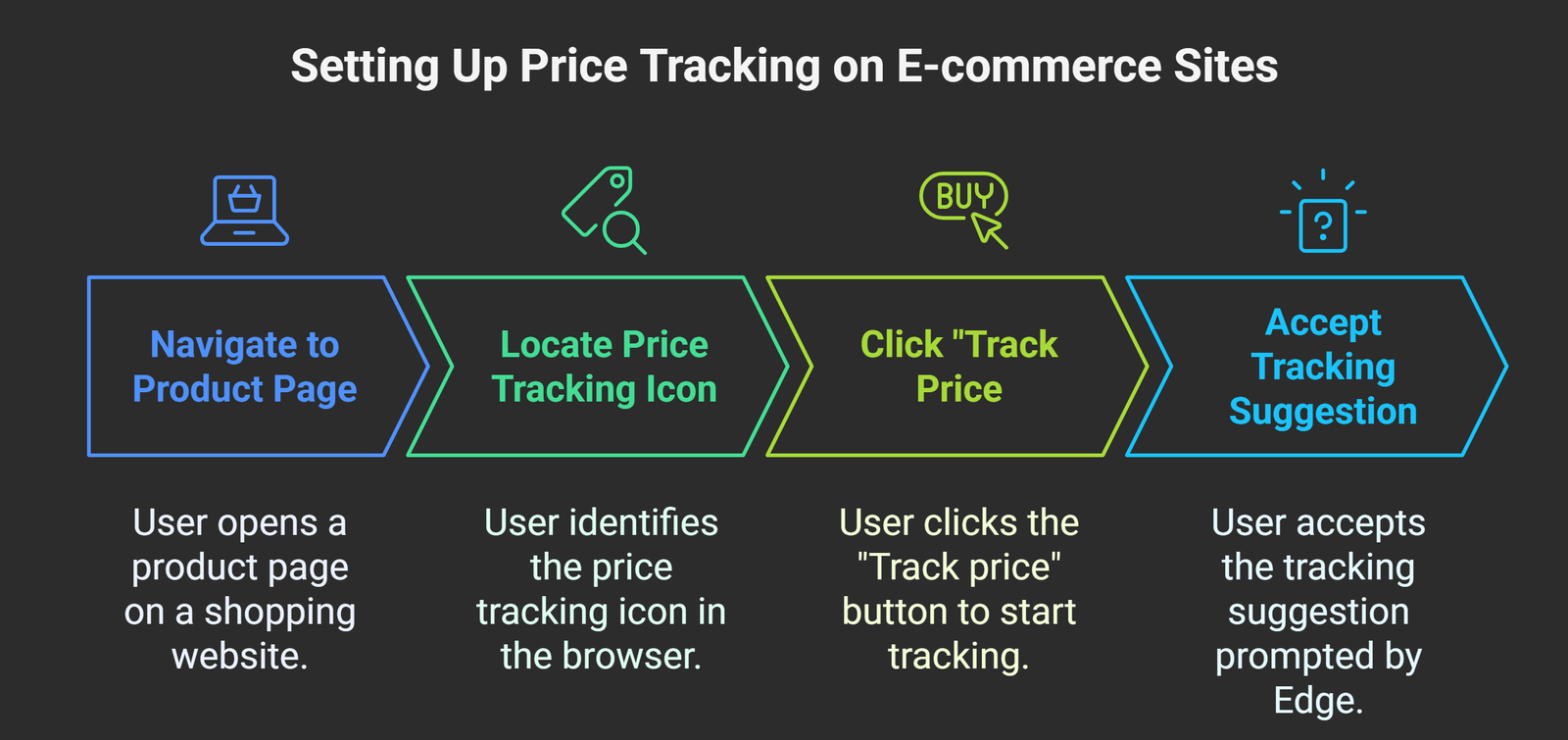
Use Edge Price Tracking on Product Pages - visual selection

  1. Navigate to a product page on a shopping website.
  2. Look for a price tracking icon in the address bar or shopping sidebar.
  3. Click “Track price” or accept the tracking suggestion that Edge prompts.

After enabling, Edge will begin monitoring that specific product. When a price drop occurs, you will get an alert via browser notifications or see it displayed in the shopping sidebar.

View Price History Before Tracking Products

One of Edge’s powerful shopping tools is Price History, which helps you make smarter buying decisions.

  • You’ll notice a Price history graph in the sidebar on supported product pages.
  • The graph shows recent price fluctuations over a period of time.
  • If the graph suggests a potential drop window, you can choose to track the product for alerts.

This feature provides transparency, helping you understand if you’re buying at the best time.

What to Do If the Price Alert Toggle Is Missing

Sometimes, you might not see the price tracking toggle. Here’s how to troubleshoot:

  • Ensure the main toggle “Save time and money with shopping in Microsoft Edge” is enabled.
  • Confirm you are running the latest version by checking Settings > About Microsoft Edge.
  • Understand that “Show opportunities to track product prices” may still be rolling out to Stable builds.
  • If you want immediate access, consider downloading the Edge Canary build, which receives features earlier than Stable.

Tips to Get the Most Out of Price Tracking in Edge

Edge’s built-in shopping features work best when used strategically. Below are some tips:

  • Enable Coupons and Cashback: Price tracking pairs well with Edge’s coupon auto-apply and cashback integration for maximum savings.
  • Leave the Shopping Toggle On: Keeping the main toggle enabled improves Edge’s ability to automatically detect trackable items and alternative offers.
  • Use Third-Party Extensions for Broader Coverage: Tools like Keepa or Buyhatke can provide more detailed tracking for heavy Amazon shoppers. These work well alongside Edge’s native tracker.
  • Check Multiple Sites: Edge may suggest alternative sellers offering better deals on the same product.
  • Stay Logged Into Your Microsoft Account: Sync ensures that your price alerts work across devices, whether desktop or mobile.

Why Microsoft Edge’s Price Tracking Stands Out

Unlike third-party extensions, Edge’s native tracking system is:

  • Lightweight – No need for additional plugins that may slow your browser.
  • Secure – Integrated directly into Microsoft Edge, reducing privacy risks.
  • Comprehensive – Combines coupons, cashback, and price history into one shopping hub.
  • Cross-Platform – Works seamlessly across Windows, macOS, iOS, and Android when signed in with your Microsoft account.

With these advantages, Edge ensures you don’t miss opportunities to save.

Alternative Ways to Track Prices

If Microsoft Edge’s system isn’t yet available in your region or you want extra functionality, you can use:

  • Keepa: A dedicated Amazon price tracker with detailed historical charts.
  • Honey: Tracks price drops and applies coupons automatically.
  • Buyhatke: Popular in India, offering alerts and price comparison.

These can be installed as Edge extensions, working with the browser’s native tools.

Wrap Up: Smarter Shopping with Microsoft Edge Price Alerts

Setting up price alerts in Microsoft Edge is a straightforward yet powerful way to shop smarter. You can save money without effort by ensuring your Edge is up-to-date, enabling the right toggles in settings, and tracking products directly on supported pages. With additional features like price history graphs, coupon auto-apply, and cashback integration, Edge has become one of the most practical shopping assistants built into a browser today.

For frequent online shoppers, combining Edge’s native tracker with specialised extensions ensures the widest coverage and maximum savings. Whether browsing Amazon deals or looking for discounts on other major retailers, Edge makes it easier to stay informed.

Android Infotech Favicon PNG
Android Infotech Team

AITeam is the dedicated editorial team of Android Infotech, consisting of experts and enthusiasts specialized in Android-related topics, including app development, software updates, and the latest tech trends. With a passion for technology and years of experience, our team aims to provide accurate, insightful, and up-to-date information to help developers, tech enthusiasts, and readers stay ahead in the Android ecosystem.

For more about our team, visit our About Us page.

Share This Post:

Related Posts

  • Download Microsoft Edge Chromium Beta Version, Features
  • How to use Microsoft Edge Collections in Android Mobiles and iOS?
  • How to Stop Microsoft Outlook and Teams Opening Links in Edge Browser?

Filed Under: Knowledge Tagged With: Enable Price Tracking in Microsoft Edge, How to Get Price Drop Alerts in Microsoft Edge, Microsoft Edge Price Alerts Guide, Set Up Price Drop Notifications in Edge, Track Product Prices Easily in Edge

Reader Interactions

Comments

  1. Tina Fey says

    September 15, 2025 at 3:01 pm

    I didn’t know Edge had this feature.

    Reply
  2. Laura Palmer says

    September 15, 2025 at 2:27 pm

    Saved me from missing out on big deals.

    Reply
  3. Mike Tyson says

    September 15, 2025 at 1:54 pm

    Very useful, bookmarked for future reference.

    Reply
  4. Alice Smith says

    September 15, 2025 at 1:31 pm

    Very useful, bookmarked for future reference.

    Reply
  5. Rachel McAdams says

    September 15, 2025 at 1:14 pm

    Nice article, very insightful.

    Reply
  6. Xander Cage says

    September 15, 2025 at 11:50 am

    This post answered all my questions.

    Reply
  7. Nina Dobrev says

    September 15, 2025 at 11:00 am

    This guide was super helpful, thanks!

    Reply
  8. Oscar Isaac says

    September 15, 2025 at 10:15 am

    This will definitely help me save money.

    Reply
  9. Tina Fey says

    September 15, 2025 at 8:44 am

    Very informative post, thanks a lot!

    Reply
  10. Charlie Lee says

    September 15, 2025 at 7:35 am

    Perfect for tracking product price trends.

    Reply
  11. George Clooney says

    September 15, 2025 at 6:19 am

    Simple steps and easy to follow.

    Reply
  12. Kevin Hart says

    September 15, 2025 at 5:25 am

    Following this tutorial was straightforward.

    Reply
  13. Uma Thurman says

    September 15, 2025 at 3:23 am

    Edge’s price tracking feature is a game-changer.

    Reply
  14. Zachary Levi says

    September 15, 2025 at 12:53 am

    Really appreciate the detailed explanation.

    Reply
  15. Uma Thurman says

    September 15, 2025 at 12:06 am

    Simple setup, great results.

    Reply
  16. Yara Shahidi says

    September 14, 2025 at 11:03 pm

    Great way to stay updated on discounts.

    Reply
  17. Vince Vaughn says

    September 14, 2025 at 10:17 pm

    Finally, a way to track price changes effortlessly.

    Reply
  18. Yara Shahidi says

    September 14, 2025 at 9:45 pm

    A must-use feature for bargain hunters.

    Reply
  19. Diana Prince says

    September 14, 2025 at 8:31 pm

    Well explained steps, very clear.

    Reply
  20. Laura Palmer says

    September 14, 2025 at 8:10 pm

    An essential tool for savvy shoppers.

    Reply
  21. George Clooney says

    September 14, 2025 at 8:01 pm

    This guide was super helpful, thanks!

    Reply
  22. Zachary Levi says

    September 14, 2025 at 5:15 pm

    Edge’s price tracking feature is a game-changer.

    Reply
  23. Julia Roberts says

    September 14, 2025 at 5:07 pm

    Highly recommend this for regular online shoppers.

    Reply
  24. Sam Smith says

    September 14, 2025 at 3:19 pm

    An essential tool for savvy shoppers.

    Reply
  25. Sam Smith says

    September 14, 2025 at 12:58 pm

    Never knew about price drop alerts before.

    Reply
  26. Fiona Gallagher says

    September 14, 2025 at 10:57 am

    Great job explaining this feature clearly.

    Reply
  27. Laura Palmer says

    September 14, 2025 at 7:48 am

    Glad I found this, thanks for sharing.

    Reply
  28. Fiona Gallagher says

    September 14, 2025 at 7:41 am

    Worked like a charm, highly recommended.

    Reply
  29. Fiona Gallagher says

    September 14, 2025 at 7:29 am

    Such a helpful guide, thank you!

    Reply
  30. Bob Johnson says

    September 14, 2025 at 6:55 am

    Makes tracking deals so much easier.

    Reply
  31. Uma Thurman says

    September 14, 2025 at 4:05 am

    I’m impressed with Edge’s functionality.

    Reply
  32. Diana Prince says

    September 14, 2025 at 3:55 am

    Makes my shopping experience stress-free.

    Reply
  33. Bob Johnson says

    September 14, 2025 at 1:37 am

    Really handy feature, thanks for sharing.

    Reply
  34. Quentin Tarantino says

    September 14, 2025 at 12:22 am

    Simple steps and easy to follow.

    Reply
  35. Kevin Hart says

    September 13, 2025 at 9:14 pm

    Super useful for keeping track of sales.

    Reply
  36. Ethan Hunt says

    September 13, 2025 at 8:23 pm

    Thanks for the useful tip, really helpful.

    Reply
  37. Vince Vaughn says

    September 13, 2025 at 8:06 pm

    I’m impressed with Edge’s functionality.

    Reply
  38. Sam Smith says

    September 13, 2025 at 8:03 pm

    Simple steps and easy to follow.

    Reply
  39. Uma Thurman says

    September 13, 2025 at 7:53 pm

    Thanks for the heads-up on this feature.

    Reply
  40. Vince Vaughn says

    September 13, 2025 at 6:57 pm

    Perfect timing for my online shopping spree.

    Reply
  41. Nina Dobrev says

    September 13, 2025 at 6:46 pm

    This will definitely help me save money.

    Reply
  42. Tina Fey says

    September 13, 2025 at 6:45 pm

    Simple steps and easy to follow.

    Reply
  43. Mike Tyson says

    September 13, 2025 at 5:31 pm

    A must-use feature for bargain hunters.

    Reply
  44. Yara Shahidi says

    September 13, 2025 at 4:37 pm

    Saved me a lot of time, appreciate it!

    Reply
  45. Wendy Williams says

    September 13, 2025 at 3:29 pm

    I love how Edge keeps adding useful features.

    Reply
  46. Wendy Williams says

    September 13, 2025 at 2:11 pm

    Finally, a way to track price changes effortlessly.

    Reply
  47. Oscar Isaac says

    September 13, 2025 at 1:54 pm

    Great way to stay updated on discounts.

    Reply
  48. Fiona Gallagher says

    September 13, 2025 at 1:36 pm

    The tutorial was easy to understand.

    Reply
  49. Ethan Hunt says

    September 13, 2025 at 10:21 am

    Excellent breakdown of the steps.

    Reply
  50. Kevin Hart says

    September 13, 2025 at 10:12 am

    Easy to implement, works perfectly.

    Reply
  51. Oscar Isaac says

    September 13, 2025 at 5:53 am

    This saved me from overpaying!

    Reply
You must be logged in to comment.
Login with Google

Leave a Reply Cancel reply

Your email address will not be published. Required fields are marked *

This site uses Akismet to reduce spam. Learn how your comment data is processed.

Primary Sidebar

Join With Us

Advertisement

Recent Comments

  • Akki on Root Samsung Galaxy F14 5G Android 13 SM-E146B using Magisk
  • Catherine B. on Fix Samsung Galaxy A17 Battery Drain Issues
  • Quincy Y. on Fix Samsung Galaxy A17 Battery Drain Issues
  • Rachel X. on Fix Samsung Galaxy A17 Battery Drain Issues
  • Tina E. on Fix Samsung Galaxy A17 Battery Drain Issues

Today Trending News ⚡

7 Hidden Features Every Prime Member Must Enable

The Ultimate Alexa+ Guide: 7 Hidden Features Every Prime Member Must Enable

In the rapidly shifting landscape of artificial intelligence and smart … [Read More...] about The Ultimate Alexa+ Guide: 7 Hidden Features Every Prime Member Must Enable

Footer

Copyright © 2010-2025. AndroidInfotech.com, All Rights Reserved. Iris Media MSME. Android Infotech is a Registered Enterprise. Android is a trademark of Google Inc. All contents on this blog are copyright protected and should not be reproduced without permission.

  • Subscribe
  • Sitemap
  • About Us
  • Contact Us
  • Privacy Policy
  • Disclaimer
  • Our Image License
  • Hosted on Google Cloud
  • Ad Partner Ezoic
  • Corporate Office
  • Careers
