
Samsung Wallet Adds Digital Key Support for Volkswagen EVs: The Complete Guide to Next-Gen Car Access – We are thrilled to highlight a major leap forward in mobile technology and smart automotive connectivity. Samsung Electronics and Volkswagen have officially partnered to bring Samsung Wallet Digital Key support to Volkswagen’s popular lineup of electric vehicles (EVs).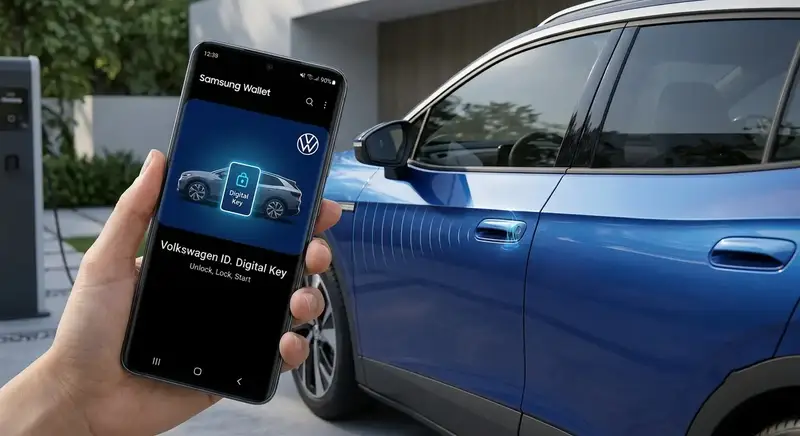
This milestone integration means that drivers can now lock, unlock, start their car, and open their trunk directly using a compatible Samsung Galaxy smartphone—completely eliminating the need to carry a physical key fob.
Whether you are a longtime EV owner or considering your very first electric car, digital vehicle access is transforming how we interact with our cars every day. In this comprehensive guide, we break down what this partnership means, how the feature works in plain language, which Volkswagen models and Galaxy devices are supported, and how advanced safety protocols protect your vehicle.
What Is the Samsung Wallet Digital Key Integration?
At its core, Samsung Wallet Digital Key integration turns your Samsung smartphone into a secure, virtual car key. Instead of searching through your pockets or bag for a plastic key fob, your phone communicates directly with your Volkswagen electric vehicle.
Through Samsung Wallet, vehicle owners can effortlessly perform everyday driving actions:
-
Unlock and lock doors automatically as you walk up to or walk away from your vehicle.
-
Start the engine as soon as you step inside.
-
Open the trunk remotely using Remote Key Entry options on your screen.
-
Share digital keys with family members, friends, or trusted contacts in seconds.
By bringing Volkswagen EV connectivity into Samsung Wallet, both companies are streamlining everyday travel, ensuring that your physical key fob can safely stay at home.
How Does It Work? Simple Access Technologies Explained
You do not need to be a technology expert to appreciate how seamless this experience is. Samsung Wallet utilizes two everyday signal methods to keep your vehicle access smooth, reliable, and completely effortless.
1. Hands-Free Access (Proximity Entry)
Imagine walking up to your car carrying heavy grocery bags. With Ultra-Wideband (UWB) technology built into many premium Samsung Galaxy phones, your car senses your arrival as you approach. The doors unlock automatically without you having to touch your phone, take it out of your pocket, or open an application.
2. Tap-to-Unlock Access (Touch Entry)
For devices that use Near Field Communication (NFC)—the exact same tap-and-pay technology used at supermarket registers—unlocking your car is as simple as holding the back of your phone against the driver’s door handle. Once inside, resting your phone on the wireless charging pad allows you to push the start button and drive away instantly.
Key Benefits of Using a Digital Car Key
Making the switch to digital car keys offers incredible daily conveniences that go far beyond just opening a door.
Total Convenience Without Extra Fobs
Modern drivers already carry their smartphones everywhere. Integrating digital car keys into Samsung Wallet means one less item to keep track of, search for, or accidentally leave behind.
Easy Key Sharing with Family and Friends
Have a family member who needs to borrow your car? Or a friend picking up your vehicle? With traditional keys, you must meet in person to hand over a physical key. With Samsung Wallet, you can send a digital key invitation directly to their phone.
As the owner, you maintain full control:
-
Set custom permission levels (e.g., allow full driving privileges or trunk access only).
-
Limit access to specific timeframes for short-term borrowing.
-
Revoke digital access at any moment with a single tap on your phone.
Remote Trunk and Accessory Control
Need to load luggage or put away shopping bags quickly? The Samsung Wallet app includes controls to release or open the trunk remotely, giving you hands-free flexibility when you need it most.
Which Volkswagen EVs Are Compatible?
This exciting rollout focuses on Volkswagen’s expanding all-electric ID. vehicle lineup. Supported models rolling out across European markets include:
-
Volkswagen ID.Polo
-
Volkswagen ID.Cross
-
Volkswagen ID.3neo
-
Volkswagen ID.4
-
Volkswagen ID.5
-
Volkswagen ID.7
-
Volkswagen ID.Buzz
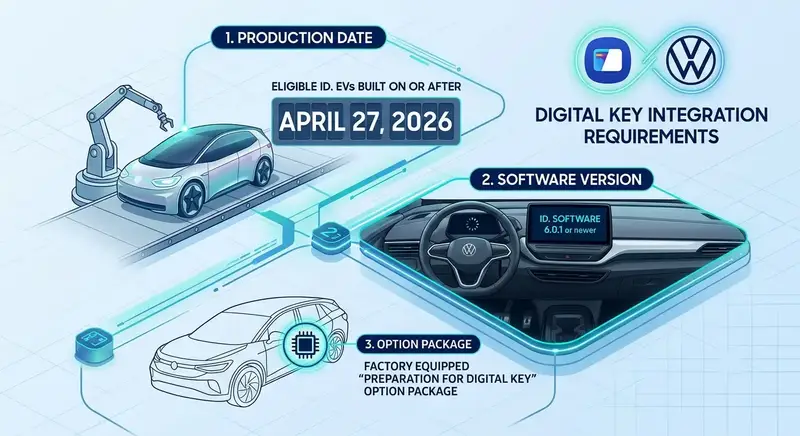
Important Requirements for Compatibility
To ensure optimal performance and security, Volkswagen vehicles must meet a few hardware and software conditions:
Compatible Samsung Galaxy Phones
To take advantage of Samsung Wallet Digital Key functionality, you will need a supported Samsung Galaxy device running the latest system updates.
A wide selection of Galaxy devices supports this integration:
-
Galaxy S Series: Galaxy S21+, S21 Ultra, S22+, S22 Ultra, S23+, S23 Ultra, S24+, S24 Ultra, S25 series, and S26 series.
-
Galaxy Foldables: Galaxy Z Fold2, Z Fold3, Z Fold4, Z Fold5, Z Fold6, Z Fold7, and Z Fold8 variants.
-
Galaxy Note Series: Galaxy Note20 Ultra.
Security and Peace of Mind: Is Digital Key Safe?
Security is understandably the number one question for drivers moving to digital vehicle access. We can reassure you that Samsung Wallet Digital Key architecture is engineered with bank-grade defense systems to protect your vehicle against theft or digital tampering.
Hardware Security with Samsung Knox
Your digital car key is stored inside an isolated, highly protected hardware environment on your Galaxy phone, certified to stringent EAL6+ security standards. Backed by Samsung Knox, this secure vault keeps your cryptographic keys immune to unauthorized software attacks or malware.
Protection Against Signal Relay Theft
Because Ultra-Wideband (UWB) technology calculates precise distance based on the speed of radio signals, modern thieves cannot trick your car into opening using signal extenders or relay devices. The car knows exactly where the phone is located in real time.
What Happens If You Lose Your Phone?
Losing a phone sounds stressful, but digital keys are actually far safer than losing a physical key fob. If your phone is lost or misplaced:
-
Biometric Locks Prevent Usage: Anyone holding your phone cannot start the car without your fingerprint, facial recognition, or personal PIN code.
-
Samsung Find Protection: You can immediately log into Samsung Find from any computer or secondary tablet to lock your device or erase your digital car key remotely.
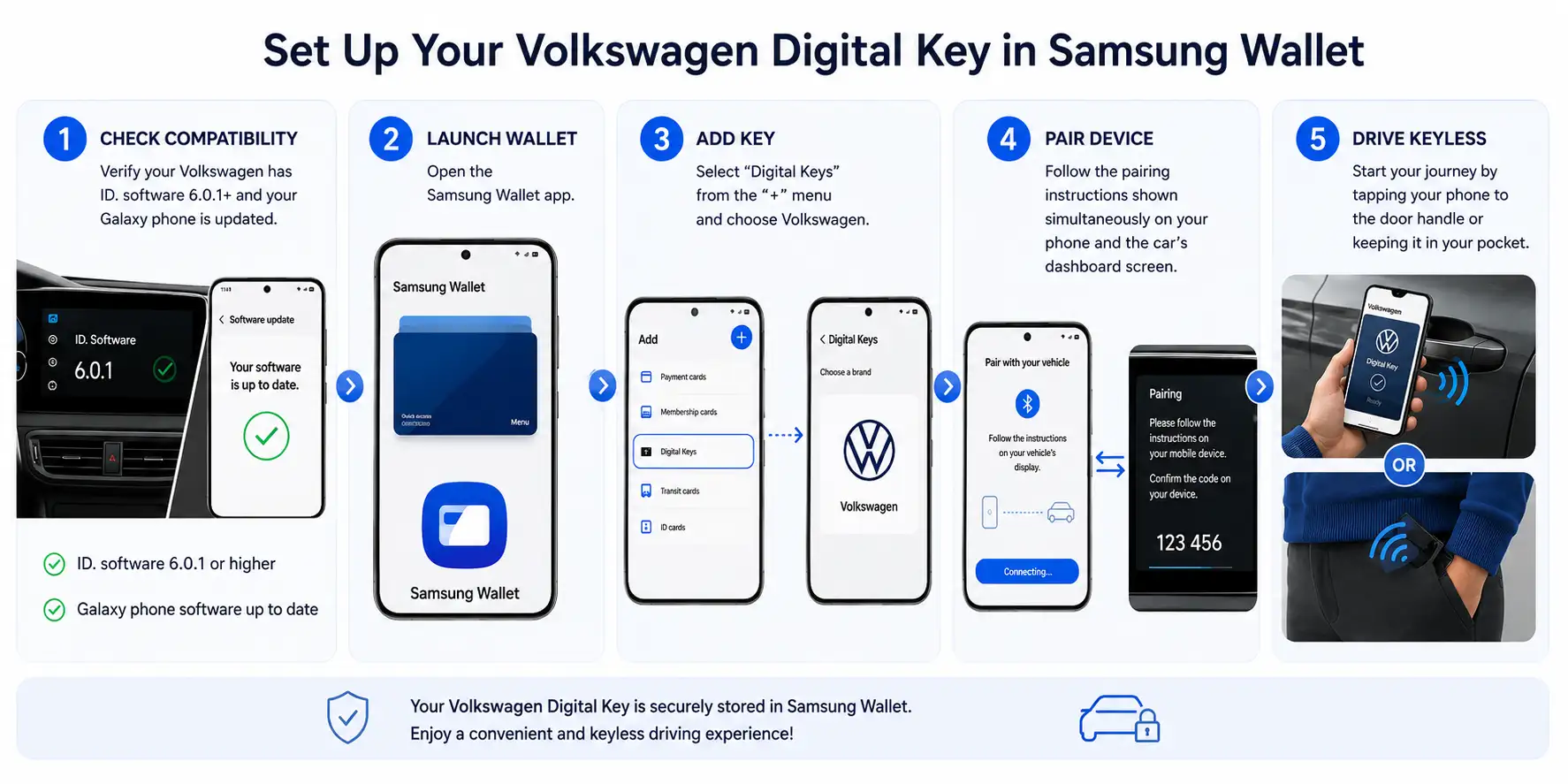
How to Set Up Your Volkswagen Digital Key in Samsung Wallet
Setting up your digital key takes only a few simple steps before you are ready to hit the road.
The Future of Connected Electric Mobility
This collaboration between Samsung Electronics and Volkswagen marks an important milestone in modern transportation. As electric vehicles continue to revolutionize mobility, replacing legacy physical keys with secure, intelligent digital solutions represents a major upgrade in everyday driver convenience.
By combining Samsung Knox security, flexible key sharing, and seamless hands-free access, Samsung Wallet and Volkswagen are setting a new benchmark for connected car experiences.

Selva Ganesh is a Computer Science Engineer, Android Developer, and Tech Enthusiast. As the Chief Editor of this blog, he brings over 10 years of experience in Android development and professional blogging. He has completed multiple courses under the Google News Initiative, enhancing his expertise in digital journalism and content accuracy. Selva also manages Android Infotech, a globally recognized platform known for its practical, solution-focused articles that help users resolve Android-related issues.




Tech collaborations like this one prove that the future of driving is deeply tied to our smartphones. Samsung Wallet supporting Volkswagen EVs is a massive win for modern drivers.
The convenience of sharing temporary digital keys with friends is an underrated feature. This comprehensive guide outlines all the major benefits clearly and concisely.
I am glad to see Android ecosystems catching up in the smart vehicle integration space. Volkswagen’s EV line is a great testing ground for Samsung Wallet’s new capabilities.
Smart automotive features like this make owning an electric vehicle feel like driving something from the future. Samsung and Volkswagen have really knocked it out of the park.
This guide made the entire activation process look much simpler than I originally anticipated. I am definitely going to configure my digital key as soon as possible.
The futuristic vibe of walking up to your EV and having it unlock automatically is hard to beat. Volkswagen made a brilliant strategic alliance with Samsung for this release.
Having my ID, transit cards, credit cards, and now my car key in one app is wonderful. Samsung is doing an incredible job building out a comprehensive ecosystem.
Will this feature require a monthly subscription fee, or is it included with the car’s connected services? I hope automakers don’t start paywalling basic digital key functionality.
The integration looks seamless based on the screenshots and instructions provided in the guide. Samsung Wallet is quickly becoming the central command center for my daily life.
This is a great milestone for mobile connectivity and electric vehicle adoption overall. Volkswagen continues to impress with their forward-thinking approach to consumer technology.
I wonder how user profiles will sync when multiple family members use their own phones as keys. Hopefully, the car automatically adjusts seat settings based on the active digital key.