
One of the main reasons people prefer Android OS devices over other devices running on different operating systems is because Android is more flexible to deal. You can quickly gain access over all aspects of an Android-powered smartphone including system files via rooting. The recent versions of the Android operating system are packed with a lot of features some people are yet to explore; you can use two apps at the same time utilizing the split screen feature available on Android nougat version or later versions.
Over to our primary focus of today – how to use two or more accounts for an app in one device?

In a time like now, it is not a big deal to run multiple accounts on an app. For example, let’s say you’ve got more than one Twitter account or maybe, your account and your business account. You cannot install the Twitter apps twice, so, how’re you going to access your two accounts?
Well, for Twitter, it is quite easy to log in to your various accounts on one app, but in the case of WhatsApp messenger or Facebook messenger, you can never run multiple accounts unless you follow the solutions available on this post.
Using below Clone apps
You can only log in to multiple accounts on a social media app using apps. You got what I mean? Okay, this is the breakdown; it says you have to install a/some certain apps on your Android mobile to be able to run multiple accounts on social media apps or messenger app.
The most common app people seek to use more than one account for the WhatsApp messenger. It is quite apparent that WhatsApp is the most used messenger app with billions of active users’ every day.
There are other apps too which you may want to log in to your various accounts. Nevertheless, these solutions provided in this article will help quite well.
1. Parallel Space
This app is top-rated; it is the most popular app amongst all apps for running multiple accounts on messenger apps or social media apps.
With the parallel space app, you can clone and run multiple accounts of the same app concurrently. Also, you can use the preset themes to style your unique space.
Being among the top-rated apps for Android devices on various app stores, Parallel Space boasts of over 90 million users. Yeah, so many people find this app worthy and so, below is how to run multiple accounts using parallel space app.
How to use Parallel Space
First of all, you must install the app on your Android device; it is compatible with devices with the following specifications;
-
Android version 4.0.3 or later versions
-
At least 1GB Ram
-
Up to 15MB free storage space
Now, after installation, launch the app
- Select the apps you want to run multiple accounts on and click the button you see at the bottom of the app window.
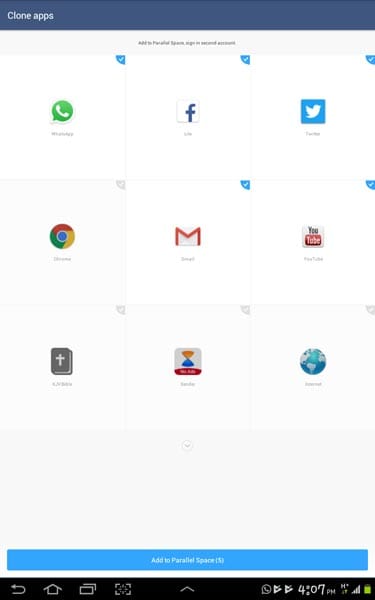
- The apps can be cloned, and you’ll see them right before now.
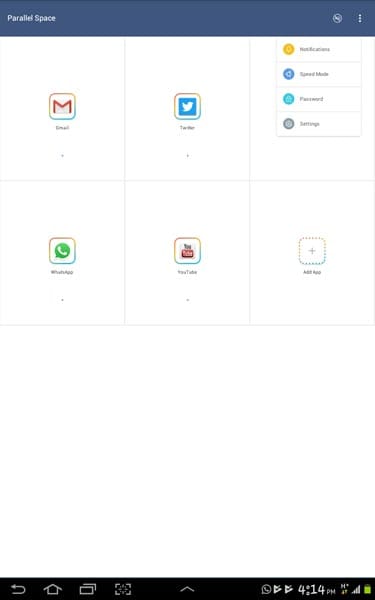
- Now, click on the cloned versions which are inside the “Parallel Space” app to log in to another account on those platforms (Facebook, Messenger, WhatsApp, Twitter, Instagram, YouTube, etc.).
It is easy. Also, when you install a new app, you can clone the installed app too in the Parallel Space app.
One of the key reasons most people love this particular is because it is easier to use. Plus, it is intuitive and with an excellent user-friendly interface.
So, you log in to one account on the main app and log in to another account on the cloned app through parallel space.
Finally, you can easily switch between themes; the default shows a white background. However, there are quite a bunch of themes available on the Parallel Space theme gallery for you to choose.
2. Dual Space
Honestly, nothing is as exciting as having a simple, unique, and useful app that solves a problem for you. Dual Space is one of those best apps for running multiple accounts for the apps on your Android device.
It has support for various applications which of course did not exclude social media apps such as Facebook, Twitter, Instagram, etc. and messenger apps like the Facebook messenger, Viber, WeChat, WhatsApp, etc.
This app is popular on Google play store; it is one of the top-rated multiple accounts apps. It is simple for everyone to use and it is compatible with almost all the versions of Android OS.
How to use Dual Space App
First of all, you must install the app on your Android device; it is compatible with devices with the following specifications;
-
Android version 4.0.3 or later versions
-
At least 1GB Ram
-
Up to 15MB free storage space
This app will take only 7MB space on your device. Install Dual Space
-
Launch the app after installation
-
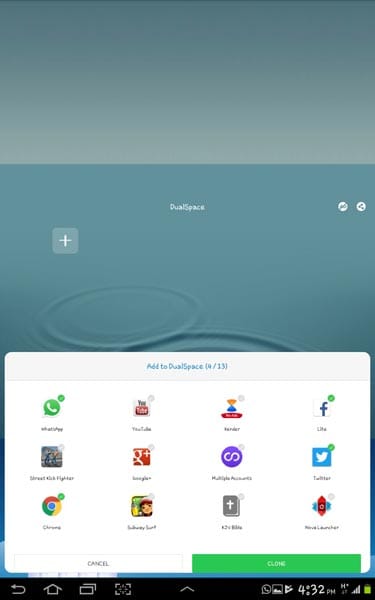
Select the apps you have more than one account with and clone them
-
Now, click on the cloned versions to log in to your second accounts
Just that, and you’ll find yourself running your business and personal social media account simultaneously.
One thing you don’t like about this app is the regular display of ads. Yeah, it is a free app, so the developers generate money via the ads they show, but it comes up more often than expected.
Using this app, you will be able to clone almost all the apps on your Android device. Nevertheless, there are certain apps that cannot be cloned.
Furthermore, there are other good things about this app you may want to know about, see them below;
-
The simple, user-friendly interface operation
-
Lightweight – doesn’t have much size
-
Consumes low power and memory
-
Quick cloning of apps
3. Multiple Accounts: Parallel App
It is yet another great app for this action; it is intuitive as the others with a nice easy-to-understand interface.
If you’ve been using a cloning app before now, you’ll agree that it is not all of those apps support the latest version of WhatsApp messenger. WhatsApp messenger is one of the most used everyday apps. The guys at Zhuoan Technology had to exercise their expertise to make this app support all versions of WhatsApp including the most recent one.
While the cloned WhatsApp keeps crashing on other apps, it doesn’t crash on this app due to the integrated support.
Once you launch the app after installation, you will be greeted with a sweet, calm, lovely interface. Just slide left to continue.
How to use Multiple Accounts: Parallel App
-
Install the app from playstore, here’s the link: install multiple accounts: Parallel App
-
Launch the app, swipe left to continue
-
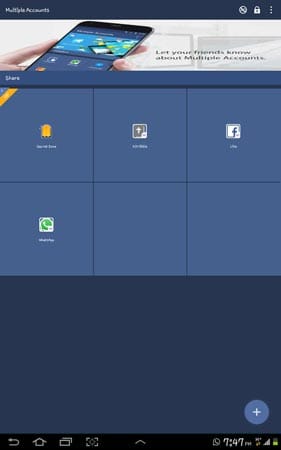
It will automatically detect a few apps, so, click on the “add” button to include more apps as you wish
-
Tick the checkbox beside each of the apps you added and further click on “Enable”; this will now allow you to run your second accounts on those apps.
-
If you more options, upgrade to the pro version. You will also stop seeing ads when you upgrade.
This app is just unique in its way. Also, it is easy to operate even without being guided. But, unlike the Parallel Space app and Dual Space, this app does not have an option for you to customize/choose any theme.
Features
-
A simple and clean user interface
-
Very easy to operate
-
Different accounts, same features, separate space, no conflict
-
Small and Low CPU consume
4. MoChat (Clone App)
Here comes a premium app to run multiple social and game accounts online simultaneously on one Android device. It is a top-rated app on Google playstore with lots of features for everyone.
This is the MoChat is the first and only App that allows you to log in to more than three accounts at the same time on one Android device.
Interestingly, it is a totally free app and lightweight (6MB). If you’re yet to see the best app that will allow run multiple accounts on Android, this is the APP.
How to use MoChat
The procedure is the same as the others. However, this app is not compatible with lots of Android device. This is because it only works on devices running on Android Nougat 7.0 and above.
So, if your device is on Marshmallow (6.0), Lollipop (5.0), KitKat (4.4) or former versions, kindly resort to use the other apps above.
For users with compatible devices, this app is safe to use. There won’t be mixed messages as the apps will be running individually.
Finally, MoChat has more sweet themes to customize your app background. Also, it comes with more options than the others. In short, this is simply a premium app made available for free for Android users.
Where Can It help you?
Apps like Twitter can allow you to log in to your various Twitter accounts with using a clone app; you’ll just have to toggle between accounts from your profile page.
But, asides Twitter, there is currently no other app with such feature; you must log out from one account first before logging in to another.

Selva Ganesh is a Computer Science Engineer, Android Developer, and Tech Enthusiast. As the Chief Editor of this blog, he brings over 10 years of experience in Android development and professional blogging. He has completed multiple courses under the Google News Initiative, enhancing his expertise in digital journalism and content accuracy. Selva also manages Android Infotech, a globally recognized platform known for its practical, solution-focused articles that help users resolve Android-related issues.




No other mobile OS respects the user’s desire for customization quite like Android does. Running dual apps side-by-side is a feature I rely on heavily for productivity.
The ability to manage system files directly gives advanced users unmatched troubleshooting power. Meanwhile, everyday features like Nougat’s split-screen make life easier for everyone else.
I love diving into settings menus to find new ways to optimize my daily routine. The freedom to manipulate system functions is why Android will always be my top choice.
Android’s flexibility lets you mold the software to fit your life rather than forcing you to adapt to the software. Split-screen multitasking is just the tip of that iceberg.
Having absolute access to your device files is what true digital independence looks like. Modern versions also pack so many intuitive features that casual users stay thoroughly impressed.
Rooting used to be essential for basic customizations that now come built right in. The platform has matured wonderfully while keeping its signature open-ended spirit.
The split-screen feature is essential for my daily research and communication habits. Android continuously proves that flexibility and power can coexist seamlessly.
Modifying system files requires caution, but the absolute control you gain is liberating. Android has always catered to people who love exploring every corner of their tech.
I could never go back to a locked-down operating system after experiencing Android’s freedom. Running two applications simultaneously is a standard I cannot live without now.
You articulated the core advantage of this operating system brilliantly. The blend of root-level accessibility and smart multitasking features keeps Android miles ahead.
It is amazing how many hidden productivity gems are buried inside the recent Android builds. Split-screen alone saves me countless app-switching seconds every single day.
Accessing system files lets you optimize performance and battery life in ways manufacturers never imagined. Android gives you the tools to make the phone truly yours.
Flexibility is precisely why my entire household uses Android devices exclusively. The freedom to arrange your workflow with features like split-screen is hard to give up.
Rooting gives you the keys to the kingdom if you want to push your hardware past official limits. Modern OS iterations have made those drastic steps less necessary with native features.
Split-screen usage has become second nature for me when checking social media alongside a live stream. Android’s architecture is built from the ground up for adaptable multitasking.
The open nature of the OS fosters creativity among developers and everyday users alike. Exploring system files and advanced features is half the fun of owning these devices.
There is a steep learning curve if you want to explore root files, but the payoff is immense. Thankfully, everyday features like split-screen are intuitive right out of the box.
Being restricted by a rigid operating system has always felt counterintuitive to me. Android’s flexible environment welcomes both casual users and deep system modders alike.
Split-screen capability is an absolute game-changer for anyone who loves efficient multitasking. Android remains the undisputed king of software personalization and user choice.
Root access is definitely the ultimate expression of Android’s open philosophy. Even standard users benefit immensely from the continuous stream of functional upgrades.