
How to Use Scam Alert in WhatsApp – Digital fraud is becoming more sophisticated every day, but keeping your personal information safe does not require a degree in computer science. WhatsApp’s Scam Alert feature provides built-in protection designed to catch fraudulent messages before they can fool you.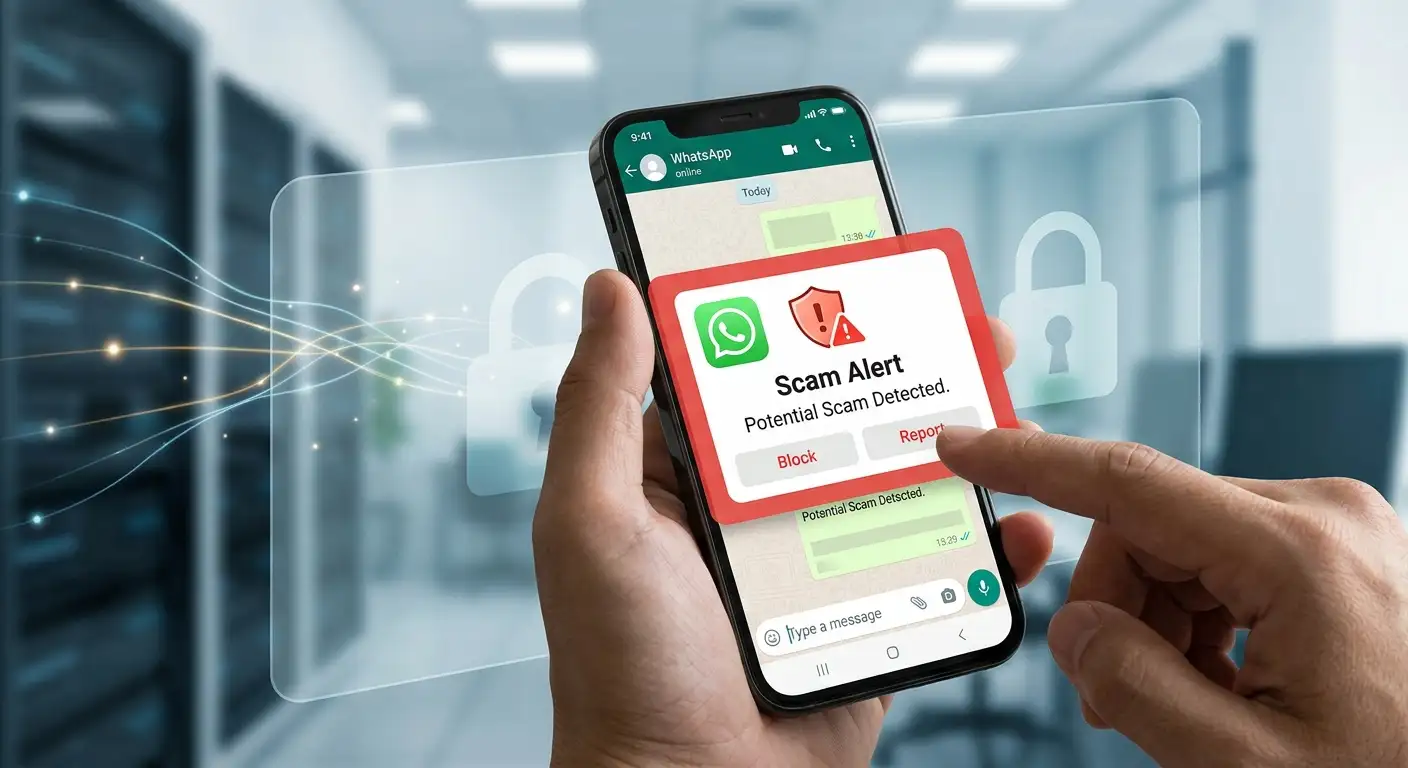
We have written this comprehensive, plain-English guide to walk you through exactly what WhatsApp Scam Alert is, how it works behind the scenes without compromising your privacy, and how you can use it to keep your account, money, and personal identity safe.

What Is WhatsApp Scam Alert?
WhatsApp Scam Alert is an automated safety feature built directly into the WhatsApp application. Its main purpose is to automatically detect suspicious messages sent from unknown numbers and warn you before you interact with a potential fraudster.
Historically, identifying a digital scam required users to spot red flags on their own—such as poor grammar, unusual demands for money, or suspicious website links. With Scam Alert, WhatsApp acts as a digital assistant that scans incoming text patterns in real time. If a message from someone outside your contact list resembles known fraudulent behavior, WhatsApp displays a clear warning box right inside your chat window.
Why This Feature Matters for Non-Technical Users
-
No technical setup is required: You do not need to configure complicated security rules or manage firewalls.
-
Instant visual warnings: Warnings appear directly in the conversation window so you cannot miss them.
-
Zero cost: The feature is completely free and built directly into standard updates of the app.
-
Proactive protection: It alerts you before you click a link, transfer money, or share sensitive details.
How Does WhatsApp Scam Alert Work? (In Plain Terms)
Many people worry that automated security tools read their personal conversations or send private texts to corporate servers. WhatsApp Scam Alert is built from the ground up to protect your privacy while keeping you safe.
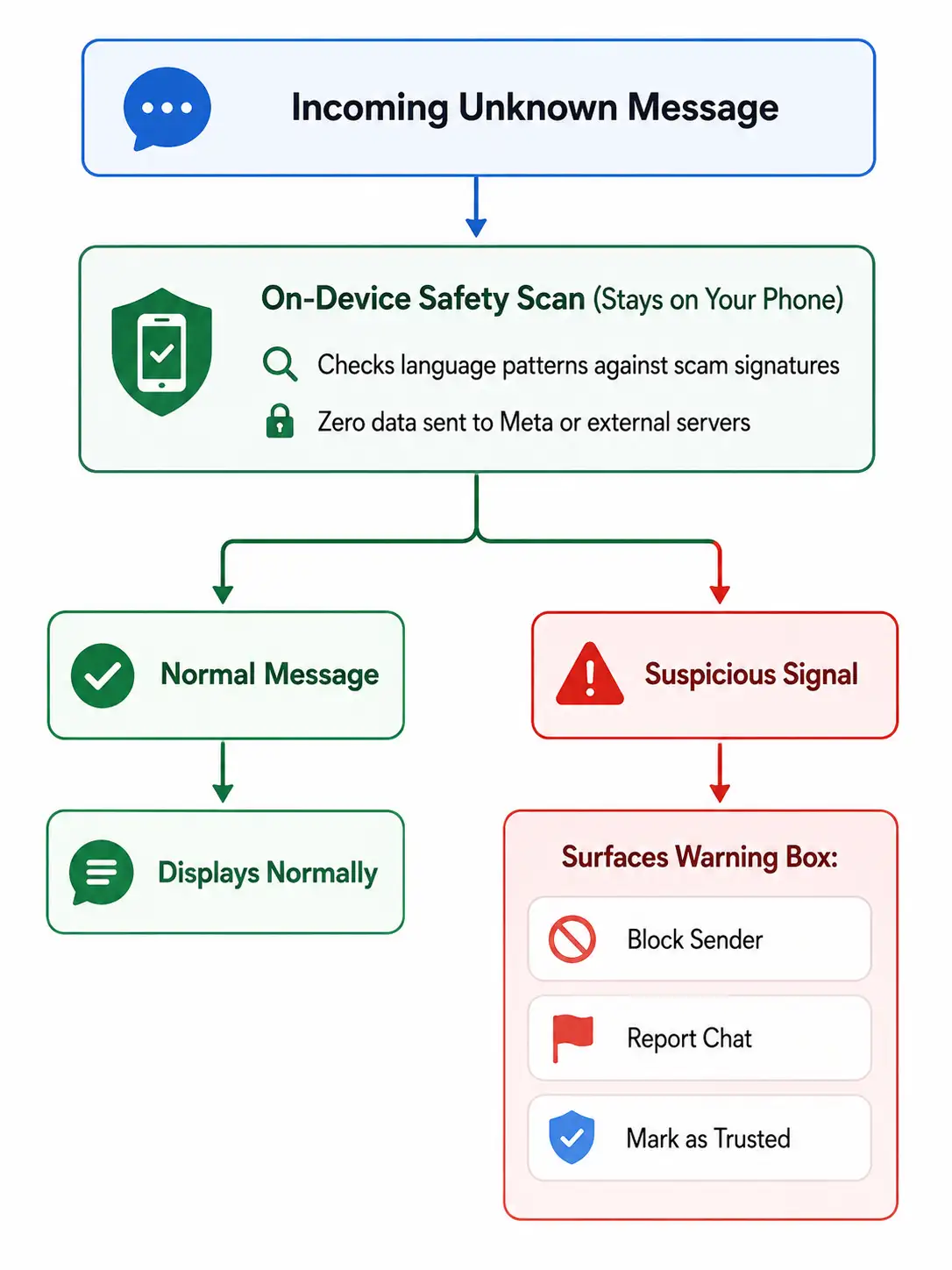
1. Everything Happens on Your Phone
Instead of sending your messages over the internet to a server for scanning, Scam Alert runs entirely on your device. When you update WhatsApp, the app downloads a tiny, intelligent safety checklist. Your phone compares incoming messages against this checklist locally. No one at WhatsApp or Meta ever reads your messages.
2. End-to-End Encryption Remains Untouched
WhatsApp is famous for end-to-end encryption, which ensures that only you and the person you are messaging can read what is sent. Scam Alert does not break or bypass this encryption. Because the safety check occurs locally on your phone after the message is decrypted for your screen, your private communications remain 100% private.
3. It Only Focuses on Unknown Contacts
To keep the app running fast and smoothly, Scam Alert primarily evaluates messages from people who are not saved in your phone’s contacts. Conversations with your friends, family, and saved colleagues are not flagged under standard conditions.
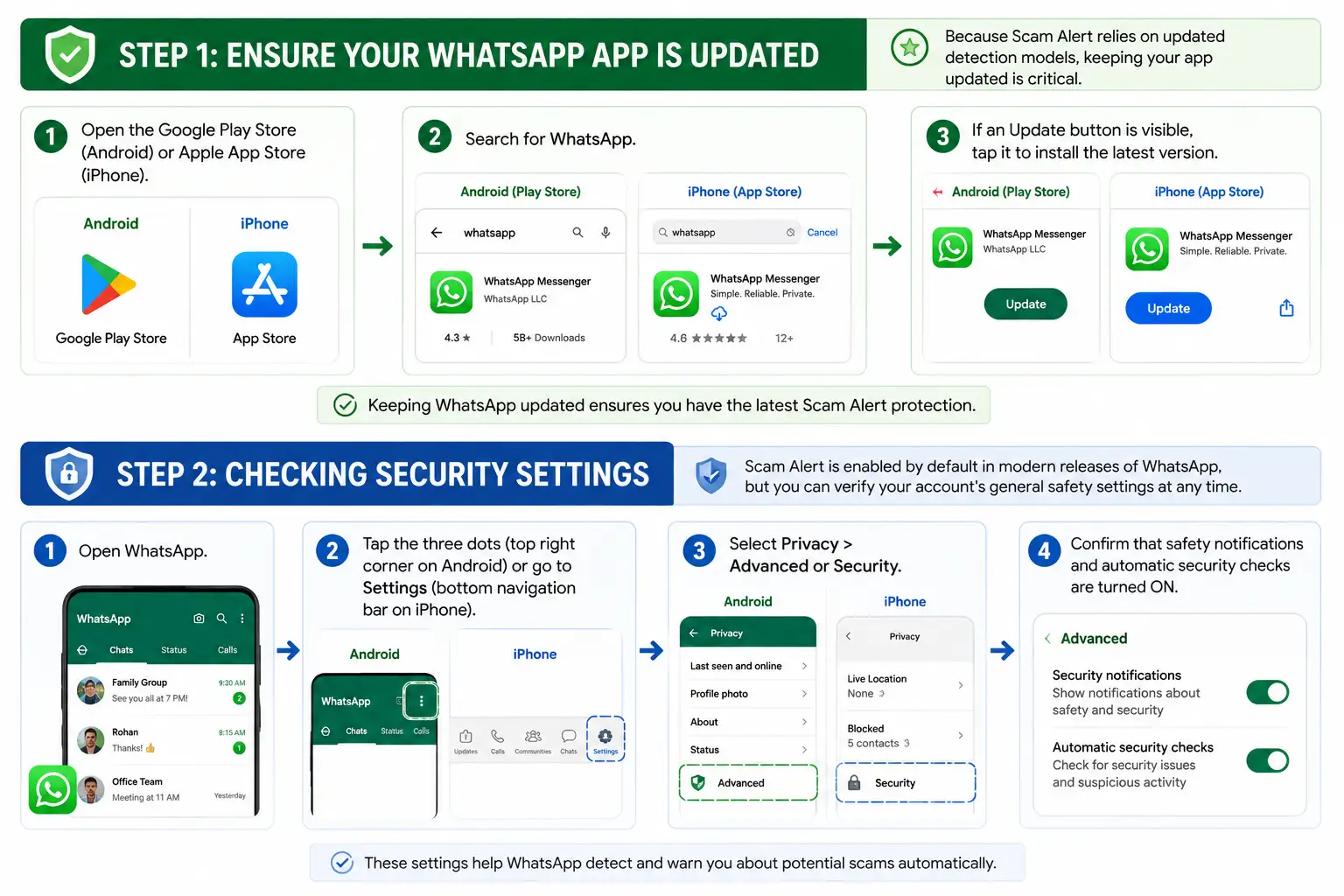
Step-by-Step: How to Use Scam Alert in WhatsApp
Using WhatsApp Scam Alert is simple. Here is how to ensure the feature is running and what to do when an alert pops up.
What to Do When You See a Scam Alert Warning
If an unknown number sends you a message that triggers the system, a prominent security banner will appear at the top or bottom of your chat screen. Crucially, the sender cannot see that a warning has been displayed to you.
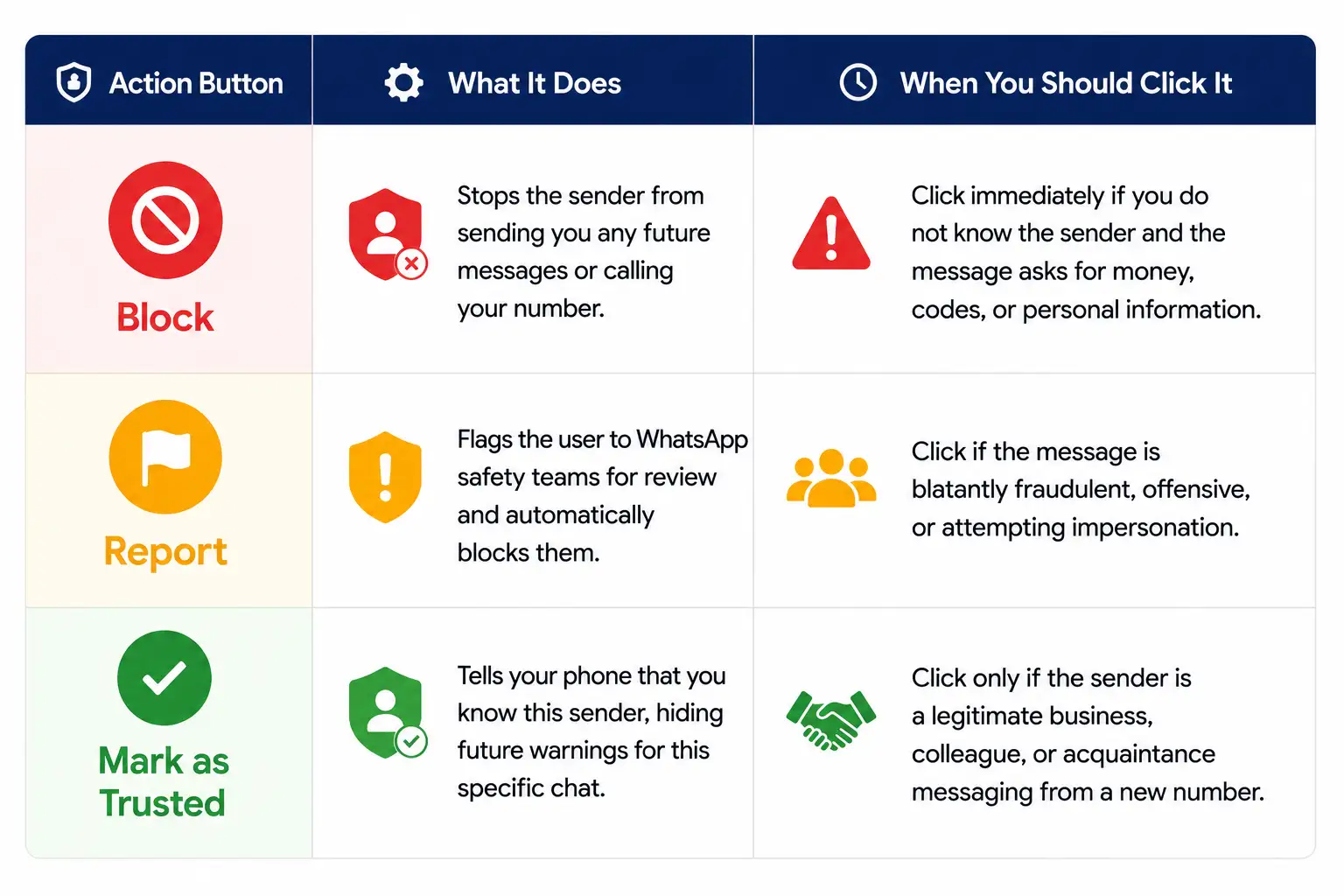
Here are the choices WhatsApp provides when an alert is triggered, along with our recommended actions:
Common WhatsApp Scams That Trigger the Warning
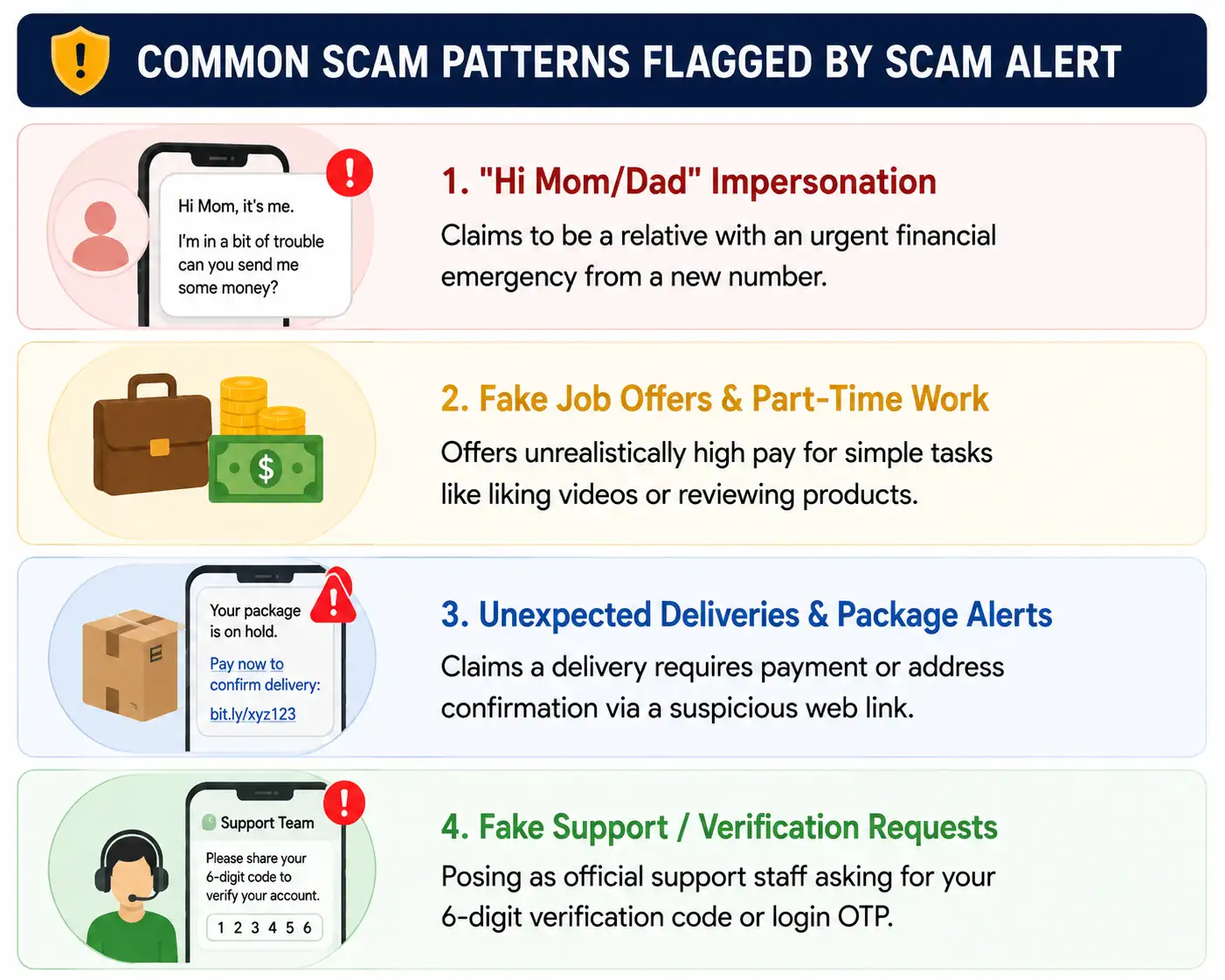
Understanding what scammers try to do can help you act quickly when Scam Alert appears. Here are four common scams the feature is specifically designed to catch:
-
The “Hi Mom / Hi Dad” Family Impersonation Scam: Fraudsters pretend to be a family member who lost their phone and urgently needs money sent to a new bank account.
-
Fake Job Offers: Unsolicited messages promising high daily wages for simple online tasks (e.g., liking YouTube videos or completing quick reviews) designed to steal your bank details.
-
Delivery and Package Delays: Texts claiming that a courier cannot deliver a parcel unless you click a link to update your address or pay a small fee.
-
Verification Code Theft: Attackers posing as official WhatsApp support representatives asking for your 6-digit registration code or One-Time Password (OTP).
Golden Rules for WhatsApp Safety
While WhatsApp Scam Alert provides an automated layer of defense, combining it with good security habits gives you complete peace of mind.
-
Never Share Your 6-Digit WhatsApp Code: No legitimate WhatsApp representative will ever ask for your verification code.
-
Verify Urgency via a Direct Phone Call: If a contact claims to be a friend or relative in distress, call their original phone number directly to verify their identity before sending any money.
-
Avoid Unverified Links: Do not click on links sent by unknown contacts, even if the preview image looks authentic.
-
Turn On Two-Step Verification: Go to WhatsApp Settings > Account > Two-step verification and set a permanent security PIN. This prevents anyone from registering your phone number on another device.
Frequently Asked Questions (FAQ)
Does WhatsApp Scam Alert cost anything to use?
No. Scam Alert is a core safety feature integrated directly into the official WhatsApp application at no additional charge.
Can WhatsApp read my private messages when Scam Alert is active?
No. The analysis happens entirely on your physical phone using an on-device detection model. Your message text is never sent to WhatsApp, Meta, or any third-party server.
What should I do if a legitimate contact gets flagged as a scam?
If a message from a trusted acquaintance or business gets flagged by mistake, simply tap Mark as Trusted. This clears the warning and prevents future alerts for that conversation.
Will Scam Alert work if I am offline?
Yes! Because the detection model lives on your smartphone, Scam Alert evaluates incoming messages locally as soon as they reach your device, even if your internet connection is weak.

Selva Ganesh is a Computer Science Engineer, Android Developer, and Tech Enthusiast. As the Chief Editor of this blog, he brings over 10 years of experience in Android development and professional blogging. He has completed multiple courses under the Google News Initiative, enhancing his expertise in digital journalism and content accuracy. Selva also manages Android Infotech, a globally recognized platform known for its practical, solution-focused articles that help users resolve Android-related issues.




Leave a Reply