
What Is the Android Pulse App? Google’s System Tool Explained – If you have noticed a mysterious background application named Android Pulse or seen com.google.android.apps.pulse listed in your phone’s storage settings, you might be wondering what it is, why it was installed, and whether it poses any privacy risks.
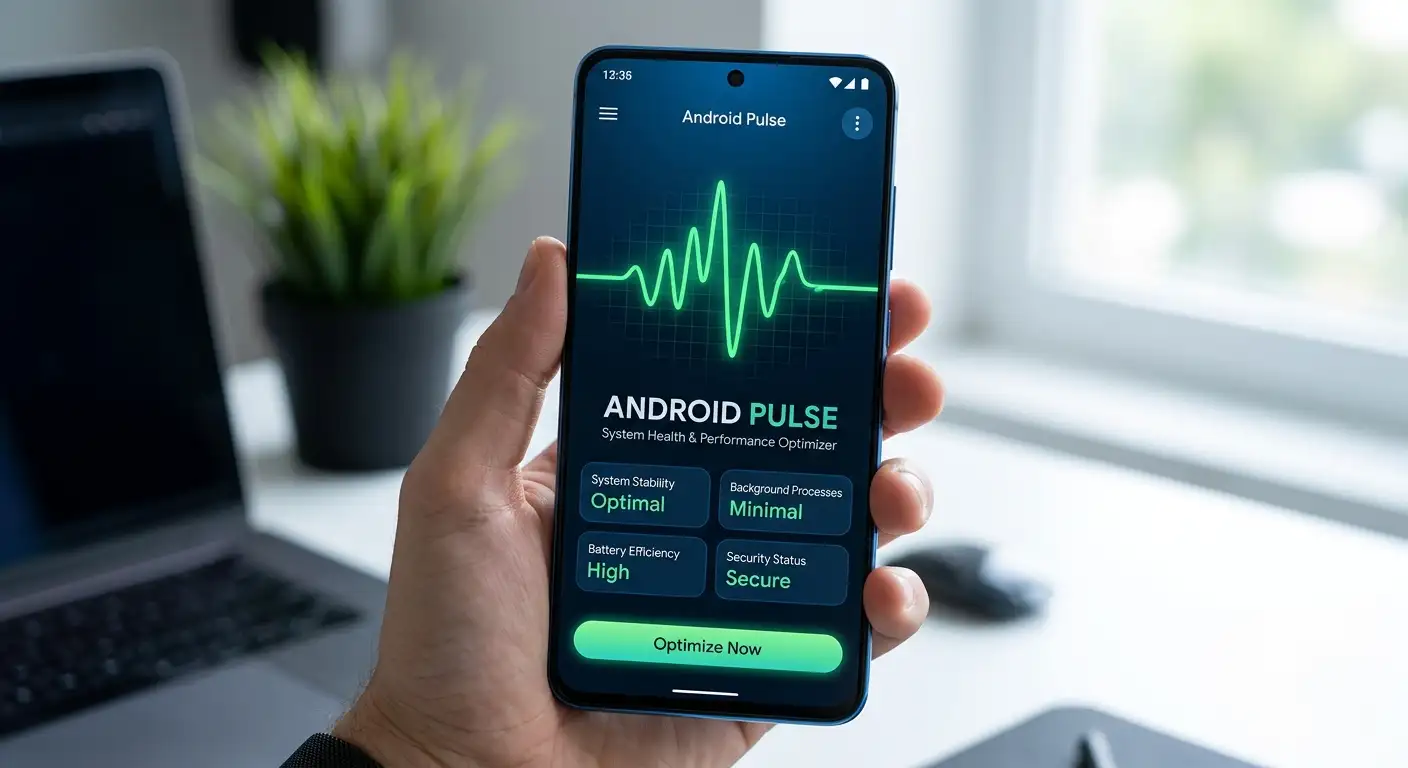

We created this comprehensive, easy-to-understand guide to break down everything you need to know about the Android Pulse app, its role as an essential Google system tool, how it handles your data safety, and why it is critical for maintaining a healthy Android ecosystem.
What Is the Android Pulse App?
The Android Pulse app is an internal system component developed by Google designed to monitor, maintain, and optimize core operating system processes on mobile devices. Unlike traditional smartphone applications like Instagram, WhatsApp, or YouTube, Android Pulse does not feature a user-visible icon on your home screen or app drawer. It operates quietly in the background, serving as a vital engine component that keeps your smartphone running smoothly.
Think of Android Pulse as the engine diagnostics tool inside a modern automobile. You rarely see the internal diagnostic sensors while driving, but they constantly track engine performance, check oil pressure, monitor battery levels, and alert the central computer if something goes wrong. Similarly, Google’s system tool checks the overall health and stability of your smartphone behind the scenes.
Why Is Android Pulse Installed on Your Device?
Many users discover Android Pulse while auditing their phone storage or reviewing battery usage statistics in their settings menu. Because they never manually downloaded it from the Google Play Store, many people worry it might be bloatware, spyware, or malware.
We can assure you that Android Pulse is a legitimate, official Google application. Here are the primary reasons it is present on your device:
-
Background Telemetry and System Health Checks: The app collects vital operational metrics regarding how your device is performing, ensuring that the Android operating system remains stable under heavy usage.
-
App Crash and Error Reporting: When an app unexpectedly closes or freezes, Android Pulse helps capture diagnostic data so developers and system engineers can fix underlying bugs.
-
Automated Updates and Security Patches: As part of Google Play System Updates, tools like Android Pulse ensure that minor security fixes and performance tweaks can be delivered seamlessly without requiring a full Android software upgrade.
-
Performance Tuning: It optimizes how system resources (such as memory and processor output) are distributed when opening complex applications or switching between tasks.
How Does Android Pulse Work Behind the Scenes?
To understand how Android Pulse works without getting bogged down in overly technical jargon, it helps to look at the three main functions it performs daily on your smartphone:
1. Monitoring System Stability
Every second your phone is powered on, dozens of services run simultaneously—handling Wi-Fi connections, cellular signals, touch inputs, display rendering, and notification syncs. Android Pulse acts as a centralized supervisor. If a background process begins consuming excessive resources or behaving erratically, Pulse flags the issue to prevent your entire phone from freezing or restarting unexpectedly.
2. Managing Device Battery Life and Memory
One of the main causes of rapid battery drain on smartphones is poorly optimized background activity. Android Pulse monitors how apps interact with system memory and processor power. By identifying background tasks that are hung or stuck in a loop, it helps protect your battery health and ensures your physical memory (RAM) remains free for the apps you are actively using.
3. Delivering Diagnostic Feedback
When you opt into sending diagnostic and usage data during your device setup, Android Pulse compiles anonymous performance summaries. This data helps Google identify broad issues—such as a specific phone model crashing on a new software build—so they can deploy targeted solutions globally.
Understanding Data Safety and Privacy in Android Pulse
Whenever a hidden system app is discovered, privacy concerns naturally arise. You might ask: Is Google using Android Pulse to track my personal conversations, photos, or location?
According to official entries on the Google Play Store Data Safety page for com.google.android.apps.pulse, Google adheres to strict guidelines regarding system-level diagnostics.
Here is a clear breakdown of what Android Pulse does and does not do with your personal data:
-
No Personal Identifiable Information (PII) Theft: The tool does not access your personal text messages, photos, contacts, financial information, or personal files.
-
Encryption in Transit: Any diagnostic metrics or crash logs sent from your device to Google servers are encrypted during transmission, protecting your information from interception.
-
Data Privacy Controls: System diagnostic collection is tied directly to your device’s overall privacy settings. If you turn off “Usage & Diagnostics” in your Android settings, the app severely limits the data it collects.
-
Purpose-Driven Data Handling: Collected data is strictly used for app functionality, system analytics, developer communications, and prevention of fraud or security vulnerabilities.
Package Name: What Does com.google.android.apps.pulse Mean?
In the Android ecosystem, every installed application possesses a unique package name that acts as its digital identification card. For the Android Pulse app, this identifier is com.google.android.apps.pulse.
Here is what that package name breaks down to:
-
com.google: Indicates that the application is officially created and digitally signed by Google.
-
android: Specifies that the package is built explicitly for the Android platform.
-
apps: Clarifies that it is structured as an application within the operating system architecture.
-
pulse: The specific name of this system diagnostic service.
When reviewing your device’s app list, if you see the package identifier com.google.android.apps.pulse, you can rest assured it is an authentic, verified Google system tool.
Should You Disable or Uninstall the Android Pulse App?
When users attempt to free up storage space or stop background processes, they often consider disabling apps they do not recognize. However, modifying core system services can lead to unintended consequences.
Can You Uninstall It?
In most cases, you cannot uninstall Android Pulse through standard phone settings. Because it is pre-installed as a system package by Google or your phone’s manufacturer, the option to uninstall is disabled.
Should You Force Stop or Disable It?
We strongly advise against disabling or force-stopping Android Pulse.
Disabling essential system components can cause unpredictable behavior across your smartphone, including:
-
Increased app crashes and unexpected system freezes.
-
Disrupted automated security updates and bug fixes.
-
Potential degradation in battery efficiency and overall device speed.
-
Inaccurate diagnostic logs when troubleshooting real device problems.
Because Android Pulse uses a negligible amount of storage space and operates with extreme efficiency, leaving it enabled will ensure your phone operates at peak efficiency.
How to Check Android Pulse Details on Your Smartphone
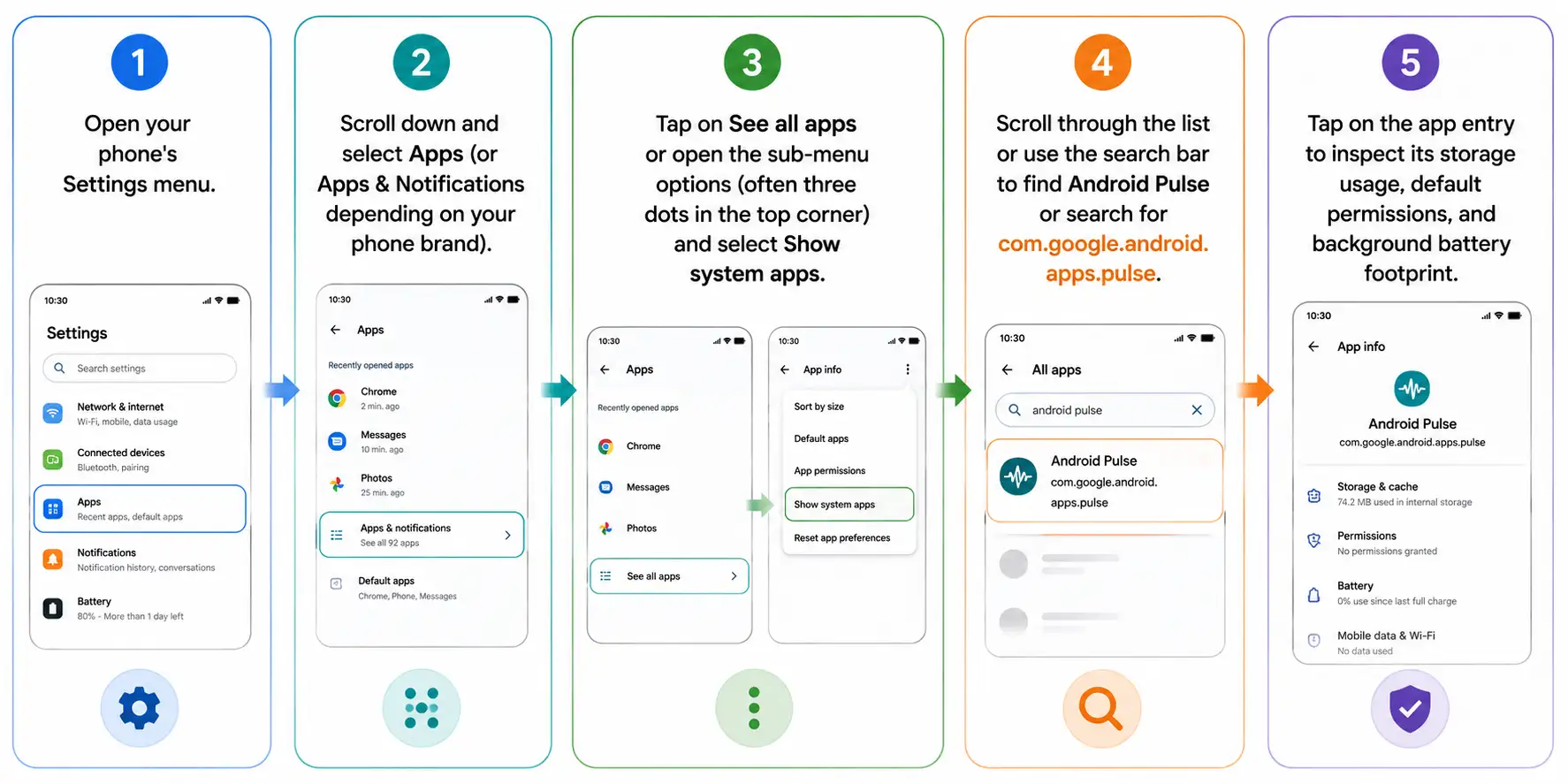
If you want to view the permissions, storage footprint, or settings for Android Pulse on your own phone, follow these straightforward steps:
Common Myths About Android Pulse Debunked
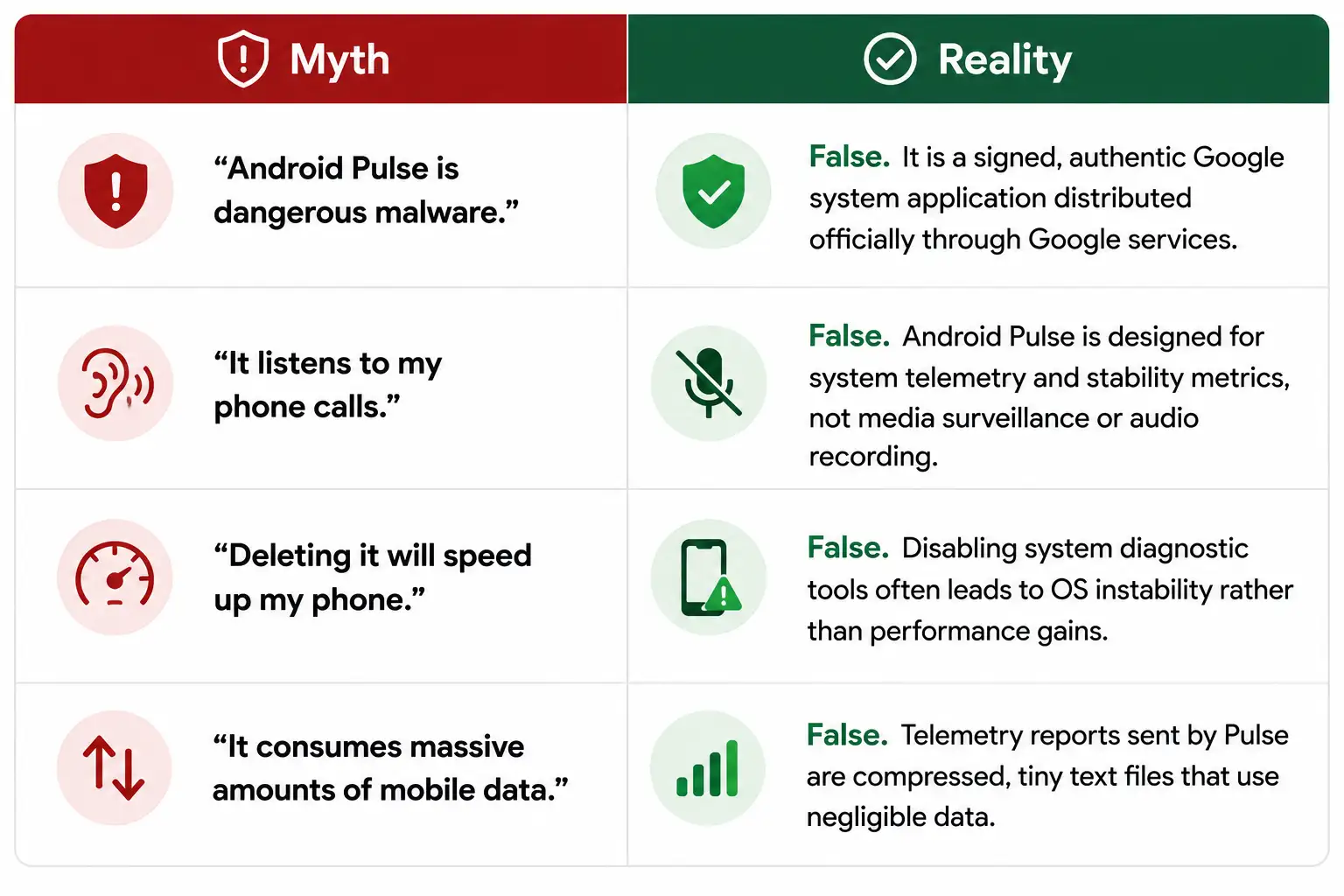
To clear up common misunderstandings found across online tech forums, let us address a few frequent myths regarding this software:
Summary: Why Android Pulse Matters for Everyday Users
You do not need to be a software engineer or tech enthusiast to appreciate what Android Pulse does for your smartphone. While it functions silently without a flashy user interface, its continuous background work keeps your operating system stable, secure, and energy-efficient.
By handling diagnostic data securely, respecting privacy standards listed on the Google Play Store, and running automated health checks, Android Pulse ensures that your day-to-day smartphone experience remains seamless and trouble-free. The next time you spot com.google.android.apps.pulse in your system settings, you can feel confident knowing it is simply Google’s quiet helper working to keep your phone running reliably.

Selva Ganesh is a Computer Science Engineer, Android Developer, and Tech Enthusiast. As the Chief Editor of this blog, he brings over 10 years of experience in Android development and professional blogging. He has completed multiple courses under the Google News Initiative, enhancing his expertise in digital journalism and content accuracy. Selva also manages Android Infotech, a globally recognized platform known for its practical, solution-focused articles that help users resolve Android-related issues.




Device telemetry is a double-edged sword for both performance optimization and personal privacy. This breakdown gives a very balanced view of why Google includes this tool.
It is funny how a simple app name can spark so much discussion across online tech forums. I am just glad to finally have a definitive answer on what it actually does.
Mobile diagnostics have evolved significantly from the old days of basic crash-reporting logs. Android Pulse seems like a modern iteration of keeping track of overall device health.
I stumbled across this file name while trying to free up space on my aging device. Thanks for explaining that deleting or tampering with it is definitely not a good idea.
You can always count on the internet to panic over a harmless system app update. It is refreshing to read a sensible, fact-based explanation that debunks the conspiracy theories.
Privacy concerns are entirely valid when dealing with tech giants like Google and their background utilities. However, this overview reassures me that there is no malicious intent here.
I found this process running high on my memory usage list during a routine performance check. Understanding its background role helps me realize it is just doing its normal job.
The terminology used in mobile operating systems is often deliberately opaque to keep everyday consumers in the dark. Breaking down com.google.android.apps.pulse like this empowers ordinary users.
I am usually quick to disable unnecessary services using developer tools, but I will definitely leave this one alone. Stability and security updates depend heavily on these background system tools.
Every time my phone gets a major security patch, a dozen new package names appear in the settings menu. Sorting through them to find out what matters is a full-time job.
Background services are notorious for consuming resources if they are poorly coded by the manufacturer. It is good to know that Android Pulse is managed directly by Google’s framework.
I tried searching for documentation on this specific package name and found very little official information. Kudos to the author for putting together such an informative breakdown.
Developers often pack diagnostic utilities into system updates without any fanfare or changelog notes. Articles like this fill in the missing puzzle pieces for power users.
With all the recent news about data privacy, finding a mystery app feels very alarming. Knowing it is an official framework component definitely lowers my anxiety level.
It is amazing how deep the rabbit hole goes when you start looking at Android application packages. I appreciate the concise and reassuring overview of the Pulse application.
I was worried it might be tracking my location data or browsing habits without explicit consent. This explanation helps clarify its actual operational boundaries within the operating system.
OEMs and Google should really provide an integrated glossary for all these hidden background packages. Until then, community-driven guides like this one are absolute lifesavers.
Discovering unfamiliar files in deep directory structures always triggers a mild heart attack. I am bookmarking this page so I can share it with other tech-support friends.
System-level diagnostics are necessary for maintaining device stability and performance over time. Android Pulse seems to be just another cog in that massive maintenance machine.
The modern digital landscape requires us to constantly question what runs in the background of our phones. I feel much more secure knowing this is just a standard Google utility.