
Since Every platform we use has an account, It requires a username and password. It is a must need to protect the account with Strong Passwords. But When a password is strong, we can’t remember it. So to manage the balance, Google provides Auto-Fill solutions to your trusted devices. But when we log in to new devices, We can’t use Autofill since it needs to be set up first. So, Instead of filling Passwords, We can use Passkeys, which can fill or allow accounts to bypass the Password filling process. To avoid this kind of issue, Google will roll out Passkeys to Google Chrome and Android.
Passkeys
Passkeys follow the same UX patterns and enhance the experience of auto-filling passwords. For the end-user, using one is like saving a password to verify their current device’s screen lock, such as their fingerprint. Passkeys for smartphones and computers are synced and backed up through the cloud, preventing locking outs in the event of the loss of the device. Users can also use passkeys saved on their phones to sign into websites and apps on other nearby devices.
Passwordless sign-in for accounts by using Passkeys
The password-free technology in the market is based on your phone and an identity/sync account with Apple (ID), Google, or Microsoft. It depends on biometric authentication (fingerprint or facial) or passcode unlocks to authenticate and sign you into. The account can be used when you create the account on a new device or get rid of your existing one.

This new method allows users to sign into websites and applications without a password. Passkeys are currently available on the Apple platforms, and Google has brought the feature to Android and Google Chrome.
What is the process behind Passkey’s function?
Google Password Manager, which Google has been making more popular recently. On Android devices, passwords will be stored and synced to Google Password Manager. Passkeys can be found on multiple devices (phone and tablet + phone or tablet, etc.) since it is the case that the “same private key” can be used across several devices.”
For security, “private passkey keys are secured while on the user’s device, using the protection of a hardware-encrypted encryption key.” Passkeys are end-to-end encrypted using Google Password Manager. Google Password Manager.
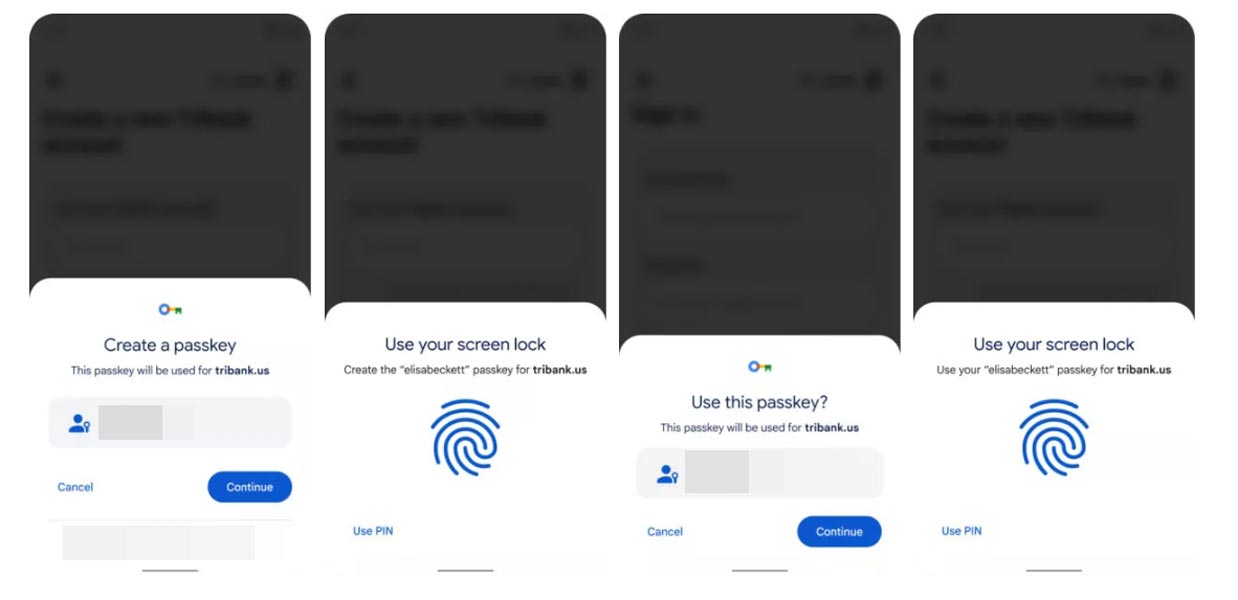
Signing in with your Passkey to the web is a simple experience (see pictures three and four above); when you select the account, you want to sign in and sign in with your password when asked to enter it. It’s all you have to do. Passkeys are also synced with Google’s Password Manager, so you won’t be caught in the middle of your phone getting lost or stolen.
Wrap Up
Going towards a comfortable seamless experience is excellent. But Google should implement these as an alternative and provide multiple ways to sign in. When they have issues in the filling, they can’t sign in to their account; There will be an alternative that should work at that time. Even though the process is simple, We have to adapt the way for some time. What are your thoughts about Passkeys coming to Google Chrome and Android? Share it below.

Selva Ganesh is a Computer Science Engineer, Android Developer, and Tech Enthusiast. As the Chief Editor of this blog, he brings over 10 years of experience in Android development and professional blogging. He has completed multiple courses under the Google News Initiative, enhancing his expertise in digital journalism and content accuracy. Selva also manages Android Infotech, a globally recognized platform known for its practical, solution-focused articles that help users resolve Android-related issues.




Leave a Reply