
Instagram’s “Add Yours” templates have evolved into a widely embraced method for users to interact with their audience creatively. These interactive templates provide a dynamic platform for followers to contribute content aligned with a particular theme or topic. In this comprehensive step-by-step guide, we aim to demystify the process of leveraging someone else’s “Add Yours” template on Instagram. Users can seamlessly participate in the collaborative storytelling experience by navigating through each step, broadening their engagement on the platform. Whether you’re a seasoned Instagram user or a newcomer, this guide offers valuable insights into harnessing the potential of “Add Yours” templates, fostering a richer and more interactive connection between content creators and their audience.
Utilizing Someone’s “Add Yours” Template on Instagram: A Step-by-Step Guide
The world of Instagram is constantly evolving, and one exciting feature that has gained traction is the “Add Yours” template. These templates are virtual canvases where users can contribute unique content to a collective story. Let’s dive into the steps to maximize this engaging feature.
Accessibility of Add Yours Templates
Before you start, it’s crucial to understand how to access stories containing “Add Yours” templates. You can view these templates on stories from people you follow or public profiles. However, remember that permission settings may affect your ability to use specific templates.
Open Instagram and Navigate to the Desired Story
- Begin by opening the Instagram app and navigating to the story that contains the “Add Yours” template you want to use.
- Choosing the right story is essential for a seamless experience.
Tap on “Add Yours” in the Story
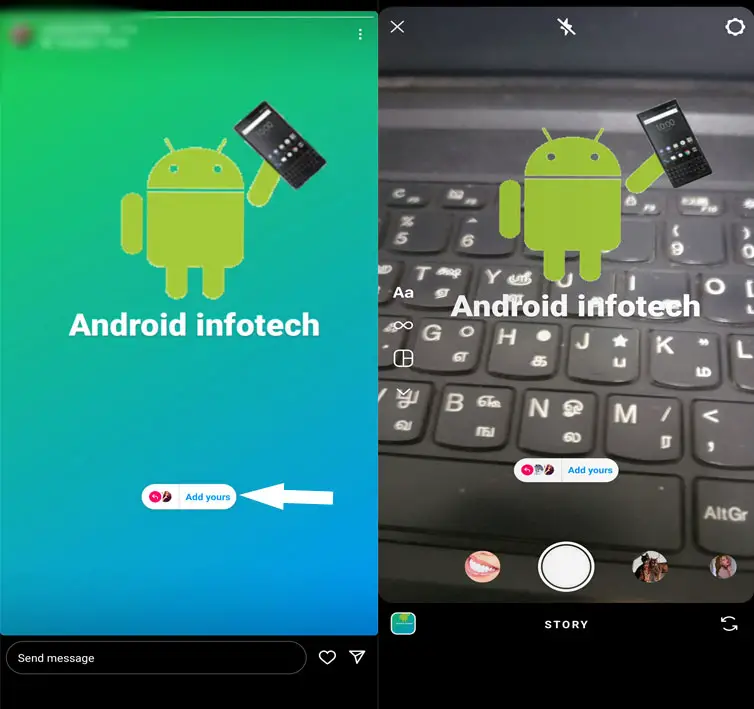
- Once you’ve located the desired story, tap the “Add Yours” option within the story interface.
- This action will prompt the template to open on your screen.
Template Opens on Your Screen
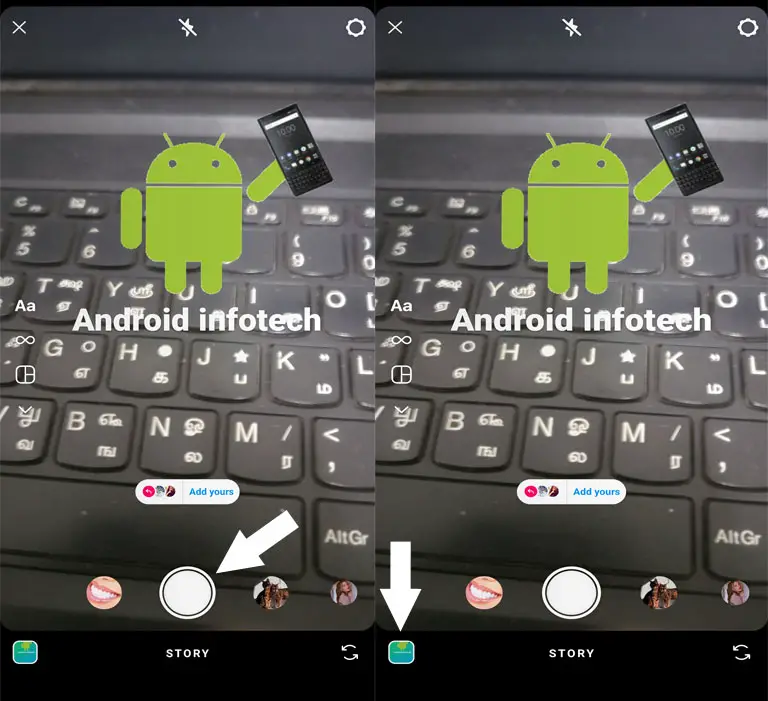
- Upon tapping “Add Yours,” the template will appear on your screen.
- Familiarize yourself with the template’s layout and available options before proceeding.
Use Shutter Icon or Images Icon
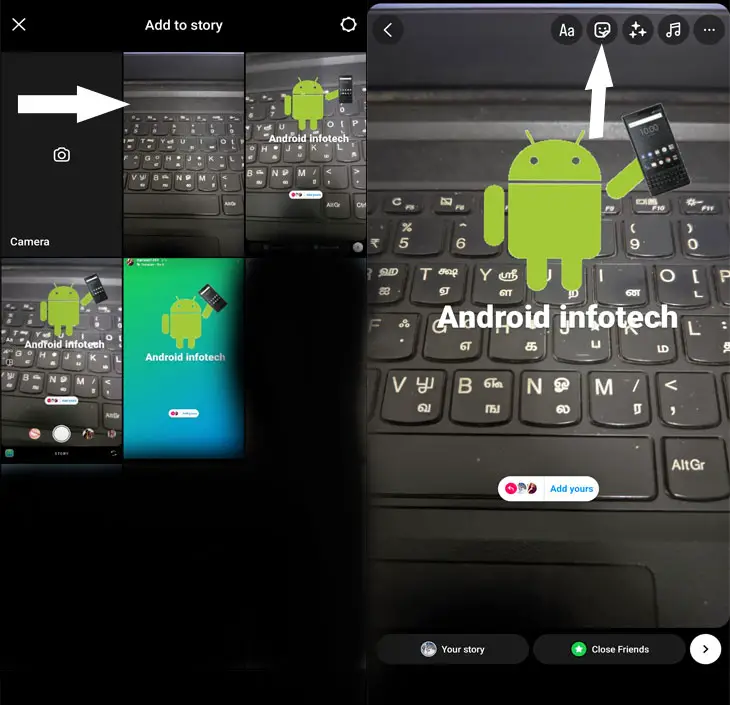
- Now, you can contribute by either capturing a new image or video using the shutter icon or selecting media from your device’s library using the images icon.
Selecting and Adding Media to the Template
- Carefully choose the image or video you want to share in the story.
- Tap and select your preferred media, and watch as it seamlessly integrates into the “Add Yours” template.
Edit Your Story
- Customize your story using the options at the top of the template.
- Enhance your contribution by incorporating filters, text, or stickers to give it a distinctive touch.
Tap on the Send Icon
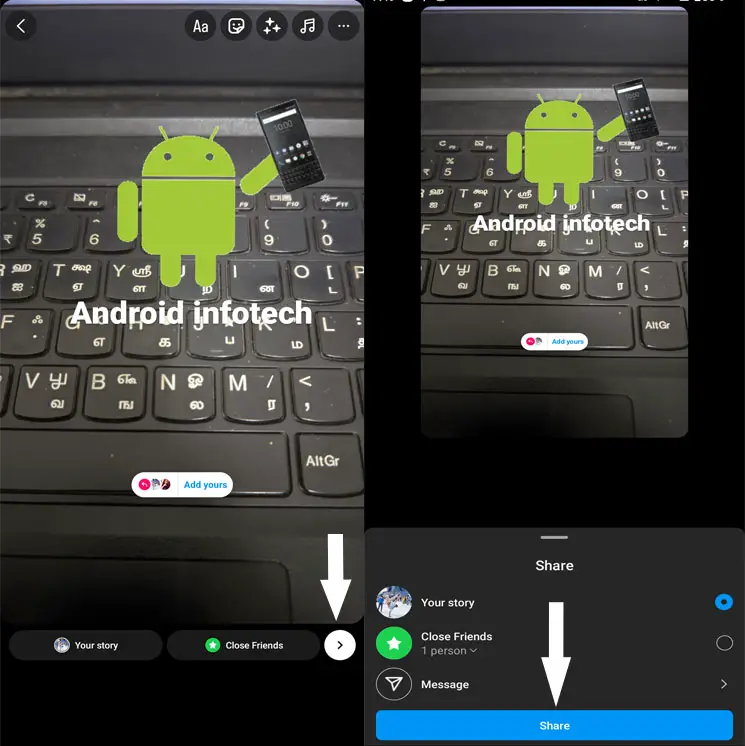
- When satisfied with your edits, tap on the Send icon.
- Select your preferred audience for the story, and hit Share to let your creation reach the world.
FAQs
What is the purpose of “Add Yours” templates?
“Add Yours” templates encourage interactive storytelling by allowing users to contribute to a shared theme or topic.
Can I use an “Add Yours” template from a private account?
Yes, as long as you can view their story, you can use the “Add Yours” template.
Are there any restrictions on the type of media I can add?
Depending on the template creator’s settings, you can usually add images and videos.
How do I know if someone has added to my story using my template?
You will receive notifications and see the contributions within your story views.
Is there a limit to the number of people participating in an “Add Yours” story?
The limit depends on the template creator’s settings, but many templates allow many participants.
Wrap Up
Using someone else’s “Add Yours” template on Instagram represents a straightforward yet inventive avenue to immerse yourself in the social storytelling phenomenon. This feature offers a unique opportunity to transcend traditional communication on the platform. Participating in collaborative storytelling allows you to express your individuality and forge a personal connection with your audience. Contributing to shared narratives fosters a sense of community, enabling you to communicate your ideas, experiences, and creativity more interactively. Embrace this feature as a canvas for self-expression, adding your unique perspective to the collective story and, in doing so, establishing a more intimate connection with your followers.
Ultimately, the simplicity and creativity inherent in utilizing “Add Yours” templates on Instagram can significantly enhance your social media experience, making your online presence more vibrant and engaging.

Selva Ganesh is a Computer Science Engineer, Android Developer, and Tech Enthusiast. As the Chief Editor of this blog, he brings over 10 years of experience in Android development and professional blogging. He has completed multiple courses under the Google News Initiative, enhancing his expertise in digital journalism and content accuracy. Selva also manages Android Infotech, a globally recognized platform known for its practical, solution-focused articles that help users resolve Android-related issues.




Leave a Reply