
Google Chrome Dino Game-We have all encountered the famous Google Chrome T-Rex dinosaur, affectionately known as the “No Internet Dinosaur.” Typically, this pixelated prehistoric creature appears as a frustrating reminder that our internet connection has dropped. However, this simple Easter egg game has evolved into a massive cultural phenomenon, offering an incredibly addictive way to pass the time. The game itself is a classic infinite runner. As the T-Rex automatically sprints from left to right across a monochrome desert landscape, players must help it avoid incoming obstacles. The speed steadily escalates, the terrain introduces flying predators, and the day-and-night cycles swap back and forth to disrupt your visual focus.
While it was initially engineered to ease the annoyance of a lost network connection, you do not have to unplug your router or deactivate your Wi-Fi card to enjoy this masterpiece. Google built a dedicated internal pathway that allows enthusiasts to access the game instantly, fully online, without disrupting any background downloads or active browser tasks.

Access the Chrome Dino Game While Online
Accessing the hidden offline game while remaining fully connected to the internet is incredibly straightforward. Google Chrome includes a massive ecosystem of internal system URLs, and one specific command maps directly to the standalone game interface.
Follow these precise steps to launch the game instantly:
- Launch your Google Chrome browser on your device.
- Click directly inside the address bar (URL omnibox) at the very top of the window.
- Type the following internal system command exactly as shown: chrome://dino/
- Press the Enter key on your keyboard.
- chrome://dino/
Upon executing this command, the browser bypasses the standard “No Internet” error page and opens a dedicated, full-screen portal featuring the lonely dinosaur. To initiate gameplay, press the Spacebar on your desktop keyboard or tap your finger anywhere on a mobile screen. The dinosaur will immediately begin its sprint across the digital desert.
Comprehensive Platform Compatibility
A common misconception is that this internal URL only functions on specific desktop versions of the browser. In reality, the architecture supporting this Easter egg is deeply integrated into the core Chromium source code, ensuring total multi-platform functionality.
Desktop Systems (Windows, macOS, Linux, and ChromeOS)
On all desktop platforms, the dedicated link functions flawlessly. Desktop users gain the distinct advantage of precise mechanical input, utilizing dedicated keys for refined movement. The experience remains uniform whether you are running a high-end Windows gaming rig, an Apple MacBook, a lightweight Linux distribution, or a fast ChromeOS device.
Android Mobile Devices
For mobile users on Android, opening the browser app and entering the internal link shifts the interface into a highly responsive touch layout. The game automatically scales to match your mobile screen aspect ratio.
iOS Devices (iPhone and iPad)
Apple users utilizing Google Chrome from the App Store can also leverage this same command. Tapping the screen commands the dinosaur to jump, matching the touch-optimized mechanics found on Android devices.
Mastering Game Mechanics and Controls
To achieve a competitive high score, players must master the exact layout of the input controls. While the game appears deceptively basic at first glance, the mechanical nuances separate casual players from true high-score record holders.
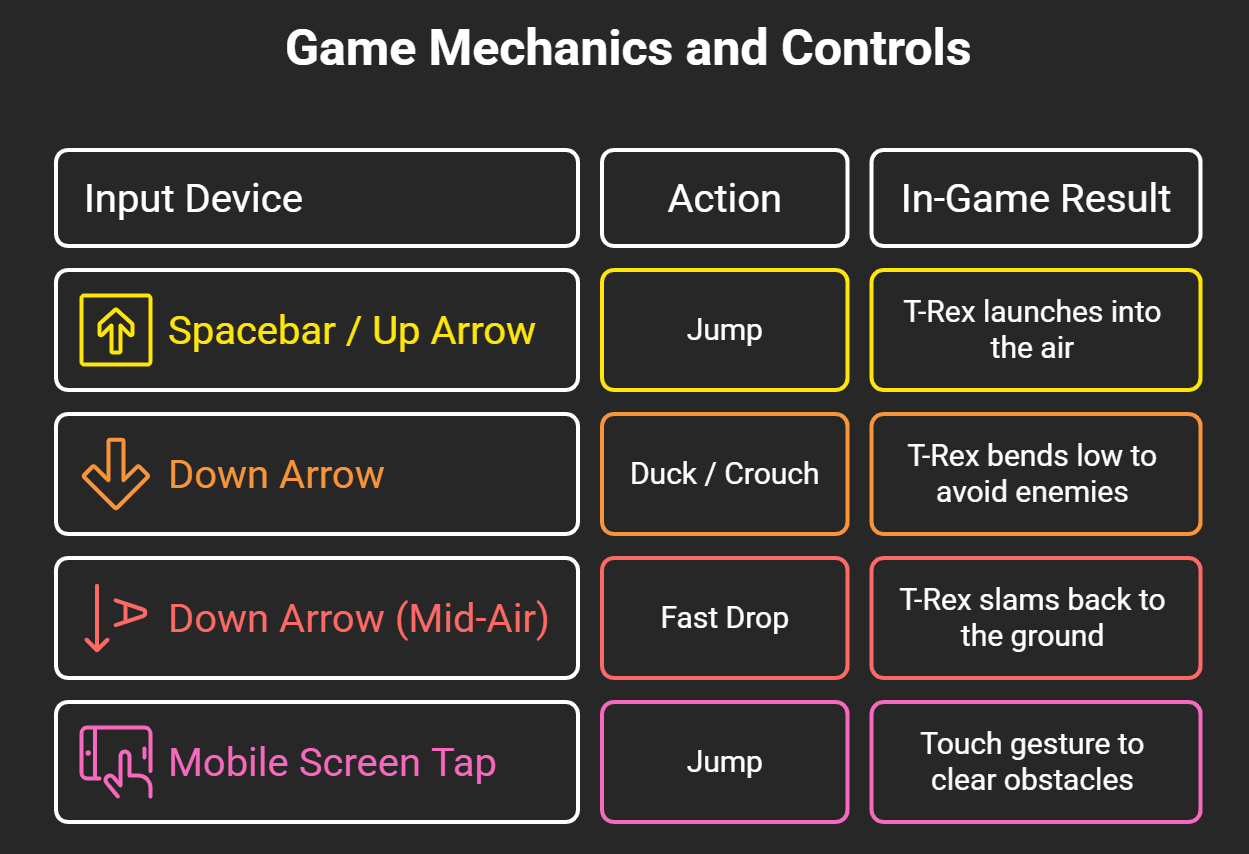
The mid-air fast drop maneuver is the absolute secret weapon for elite players. As the velocity increases, regular jumps float too long in the air, leaving you completely defenseless against rapidly approaching obstacles. Actively tapping the Down Arrow mid-jump resets your ground position instantly, allowing you to prepare for the next obstacle ahead.
Core Obstacles and Survival Strategies
Surviving the infinite desert layout requires an understanding of how obstacles spawn. The engine generates hazards procedurally, meaning the placement is randomized continuously to keep players off balance.
Navigating the Desert Cacti
The primary threat comes from the varying sizes of desert cacti. They appear as isolated single units, dense double clusters, or massive triple rows. As your speed amplifies, jumping early becomes a fatal mistake. You must time your vertical leaps so that the arc peaks directly over the center of the obstacle cluster.
Evading the Pterodactyls
Once your score crosses the 500-point threshold, the game introduces dynamic aerial enemies called pterodactyls. These prehistoric birds spawn at three distinct altitudes:
- Low Altitude: These fly right along the ground. You must jump directly over them.
- Mid-Altitude: These hover perfectly at head height. You must use the Down Arrow to duck underneath them.
- High Altitude: These glide safely well above the T-Rex. These can be completely ignored by remaining completely stationary on the ground.
Managing Visual Distortions
Every 700 points, the game transitions between a stark white day mode and a dark gray night mode. The screen inversion takes exactly one second to complete. This abrupt shifting of contrast can easily cause momentary visual disorientation, often leading to a mistimed jump. Keep your eyes focused slightly ahead of the dinosaur rather than directly on it to anticipate incoming hazards during these quick transitions.
Frequently Asked Questions
Can we save our highest scores in the Chrome Dino game?
The local browser tab caches your current session high score at the top right of the screen. However, closing the browser tab or clearing your browser cookies will completely reset the high score metric back to zero.
Does playing the game online consume active internet data?
No, the asset files, pixel sprites, and game scripts are completely hardcoded inside the browser installation files. Launching the game via the system link requires zero data transfer from the internet.
Why does the game keep moving faster over time?
The game engine features a progressive acceleration algorithm. The movement speed increases continuously to elevate the difficulty, testing the limits of human reaction times.
Is there a definitive ending or final level to the game?
The game is mathematically designed as an infinite runner. However, it does have a maxed-out internal cap. If you manage to survive continuously for approximately 17 million years, the internal step counters will overflow and reset the game.
Can we access this game on alternative browsers like Edge or Firefox?
The specific link only functions within Google Chrome and Chromium-based browsers. Microsoft Edge features its own unique internal surfing game, while Firefox uses alternative built-in Easter eggs.
How do we make the dinosaur duck on a mobile smartphone screen?
The mobile version of the game is a simplified port that does not natively support the ducking mechanic. Mobile players only need to tap the screen to execute jumps over ground hazards.
What happens if we refresh the page mid-game?
Refreshing the browser window will instantly terminate your active run, wipe your current progress, and reset the game back to the starting line.
Are there official cheat codes built directly into the game?
There are no built-in cheat menus, but advanced users can open the Chrome Developer Tools Console to input custom JavaScript commands to adjust velocity or toggle total invincibility mode.
Does the game work properly if we are using Incognito Mode?
Yes, the internal address functions perfectly across standard browsing windows as well as private Incognito sessions.
What was the original inspiration behind creating the T-Rex game?
Google designers built the game as a playful nod to the “prehistoric prehistoric era” before the widespread availability of modern Wi-Fi and high-speed internet connections.
Our comprehensive guide provides everything needed to master this classic browser experience. Bookmark the internal address to easily enjoy a quick break during your daily browsing routines.

Selva Ganesh is a Computer Science Engineer, Android Developer, and Tech Enthusiast. As the Chief Editor of this blog, he brings over 10 years of experience in Android development and professional blogging. He has completed multiple courses under the Google News Initiative, enhancing his expertise in digital journalism and content accuracy. Selva also manages Android Infotech, a globally recognized platform known for its practical, solution-focused articles that help users resolve Android-related issues.





Leave a Reply