
If you are a Pixel owner, you already know you have a Free premium plan in Google Photos, that you can Upload High-Quality Images/Videos Free for a few years. Not only does it come with Pixel phones, but It also comes with some Moto mobiles too. But, Did you think about what can happen to your photos/videos after these free years?. Google recently restricted a few things for the Freee Google Photos Storage option. We will explain the restrictions and how much quality and quantity of photos and video you can upload.
A lot has changed, especially how we store things digitally. Technology has taken a giant step when the storage of data is considered. In the late 19th century, They used diskettes to store files from a computer, and the mobile phone wasn’t equipped with much storage space. Different ways of storing data quickly came up as time passed, such as using flash drives, memory cards, hard drives, etc.

We are now living in a world where we can store many things online without affecting the memory space of our phones. Yes, your files will be online, especially photos and videos, and can be accessed anytime. Online cloud storage is an efficient way to avoid your memories getting lost.
What is this Google Photos?
Thanks to another great innovation of Google, it has been made possible for the public to save their pictures online and access them whenever they need them and from any smartphone device. Google photos are the app that has been designed to perform this function effortlessly. It is a storage service and a photo-sharing app that allows users to store an unlimited amount of photos and videos with quality up to 16 megapixels and 1080p resolution, respectively. It is entirely free and is available to both Android and IOS systems. I am sure many of us are unaware that such a feature exists on our mobile phones; well, it does, and you still have time to enjoy this service.
Special Offer with Pixel Owners
Google made this service much better for pixel owners. People who use the pixel series of the mobile phone are allowed free unlimited uploads of their photos and videos at any resolution because the quality of the picture or the video does not matter when you use the pixel mobile phone. With this mobile phone, you can store unlimited photos and videos (4K to be precise) at full resolution, and you will not be charged for it.
Electronic devices in the line of pixel include laptops, smartphones, tablets, and other mobile accessories, developed by Google and can run either the Android operating system or the Chrome operating system. This is why there are more benefits for pixel mobile users because Google also created it.
For Non-Pixel Owners (All Regular users)
For all non-pixel users, the Google photos app will allow you to upload original photos and videos in full resolution, free of charge, until you attain a storage limit of 15GB in the size of an upload on different Google storage apps. When this limit is reached, there is an option for you to choose the upload as many photos as you may wish with no storage limitations and at a high quality.
Google has referred to the high-quality images and videos as 16 megapixels and 1080p video resolution; it can’t go beyond this. If any photo or video exceeds this limit, it will be compressed to 16 MP and 1080p, respectively. But for pixel owners, you can upload as much as you like at full resolution without any conversion taking place.
This unlimited storage space of original quality pictures and videos for Google pixel owners is not going to last forever; what sad news. According to Google, it will no longer be possible to store these files at this quality free of charge by the end of 2020. So there is still time to enjoy this excellent feature for one or two years before it stops functioning.
How to setup Google photos free plan
Be careful during the setup because any wrong selection will not get you a free plan for your photos to be uploaded to your desired account if you have more than one account signed in. The steps are as follows;
- I assume you have Google pixel devices such as Pixel 2, Pixel 3, Pixel 2 XL, and so on.
- If the Google photos app is unavailable on the device, you can download and install it from the play store.
- Go to the Google photos app.
- The first account you sign in here will apply to the free plan.
- Tap the menu icon (three parallel lines) at the top left corner of the screen.
- Go into the settings.
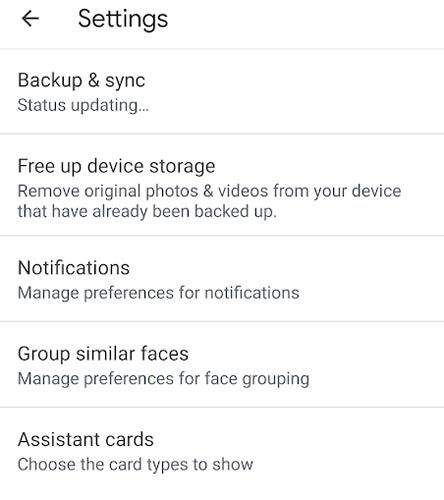
- Select the backup and sync option.
- It will present tap upload size and different image qualities to you.
- Select the image quality you want and get started with uploads, free of charge.
- Lastly, go to phone settings and change the camera storage to Google photos.
Things That Will Happen After The Free years of Google Photos For Pixel Owners
The following will occur once the free year’s plan of storing photos online expires for all Google pixel users. They are as follows;
- Before the end of 2020, all pixel 2 users can upload original quality images for free.
- On the 31st of January 2021, all free plans will expire totally.
- All uploads that Google made before the expiring date above will remain the same and will not be converted to 16 megapixel and 1080p resolution.
- Once you sign in to your Google account, you will have 15 GB of free storage, but once it is exhausted, charges will apply.
- Make sure all the photos you upload are uploaded using Google photos; if you use the web, it will count into your drive account and won’t be free. So it is recommended that you use the Google photos app only.
- If you previously stored files worth up to 300 GB before the plan expired, you will not have to pay for the space of those previous files.
Hurry now and get yourself a Google Pixel mobile phone to enjoy this fantastic feature before it expires, and make sure your Google photos app is up to date to gain the best experience possible.

Selva Ganesh is a Computer Science Engineer, Android Developer, and Tech Enthusiast. As the Chief Editor of this blog, he brings over 10 years of experience in Android development and professional blogging. He has completed multiple courses under the Google News Initiative, enhancing his expertise in digital journalism and content accuracy. Selva also manages Android Infotech, a globally recognized platform known for its practical, solution-focused articles that help users resolve Android-related issues.




I am officially starting my offline backup project this weekend thanks to this eye-opening post. It is better to be safe than sorry when dealing with priceless memories.
Thanks for explaining the fine print that most people gloss over during setup. Pixel owners definitely need to wake up and smell the digital coffee.
If you calculate how much storage accumulated over those free years, it is actually staggering. Figuring out what to keep and what to delete will be a monumental task.
Navigating Google’s endless tiered storage plans has become a headache on its own. I really miss the days of straightforward, hassle-free unlimited backups.
This is a fantastic public service announcement for all distracted smartphone owners. I am going to share this article with my family before their trials run out.
Google Photos remains the best app out there, but paying for extra space stings a bit. I suppose convenience always comes with a financial catch eventually.
I am planning to migrate my entire gallery to a decentralized storage platform soon. Thanks for outlining the exact restrictions we are all about to face.
The digital landscape is shifting toward subscription models for everything we touch. This Google Photos change is just another reminder of that relentless trend.
Your tips on managing photo quantity and quality are super practical for everyday users. I will definitely start compressing some of my older video footage.
It is unfortunate that future generations of phone buyers won’t experience this amazing perk. I guess we were just lucky to ride the wave while it lasted.
I had completely forgotten that my phone came with a time-limited cloud perk. Reading this made me rush over to check my remaining storage balance immediately.