
All 5 Googlebook Models Explained – The technology landscape has shifted dramatically with the official arrival of the Googlebook lineup. Designed to redefine what a premium laptop can achieve, Google has partnered with world-renowned hardware manufacturers to release a comprehensive portfolio of devices built for both everyday users and demanding professionals. Whether you are looking for an ultra-light travel companion, a versatile convertible, or a massive productivity workstation, understanding the differences across the five launch models is essential before making your purchase.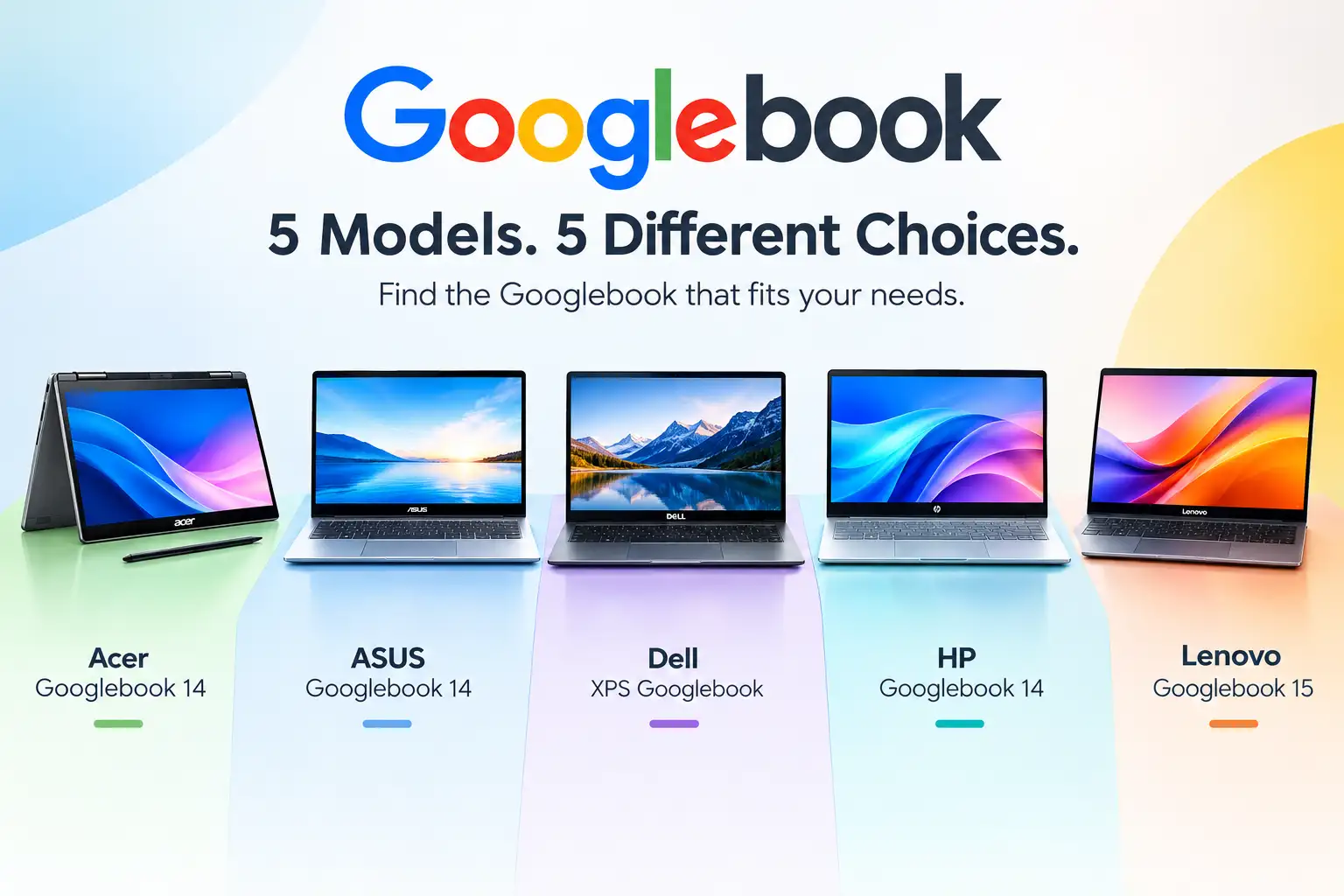
In this comprehensive guide, we break down every single model in the Googlebook 2026 lineup, detailing their unique features, pricing, display technologies, battery performance, and hardware advantages so you can find the ideal laptop for your lifestyle.

What Makes the Googlebook Lineup Revolutionary?
Before diving into the individual models, it is important to understand what ties this family of laptops together. Every Googlebook is crafted from premium materials like aluminum, magnesium alloy, and carbon fiber, providing an exceptionally sleek, lightweight, and durable finish. Across the entire portfolio, users benefit from vibrant touchscreens featuring up to 2.8K resolution, custom-designed backlit keyboards, large glass-feel haptic trackpads, and cinematic multi-speaker audio systems with Dolby Atmos surround sound.
Furthermore, every model is powered by next-generation processors engineered to handle intensive tasks and intelligent software features completely silently—without the distraction of loud, spinning cooling fans. Every purchase also includes 12 months of Google AI Pro, offering 5TB of cloud storage, expanded Gemini usage limits, and supplementary subscriptions to creative software like Adobe Photoshop and YouTube Premium.
1. Acer Googlebook 14: The Ultimate Convertible 2-in-1
For users who want the flexibility of a traditional laptop combined with the convenience of a touchscreen tablet, the Acer Googlebook 14 stands alone in the initial lineup as the only convertible 2-in-1 device.
Key Specifications and Features:
-
Starting Price: $899 (making it the most affordable entry point into the Googlebook ecosystem)
-
Display: 14-inch 2.8K OLED touchscreen with vibrant colors and deep contrast
-
Processor: Intel Core Ultra 5 delivering robust everyday performance and efficient multitasking
-
Battery Life: Up to 16 hours of continuous use on a single charge
The Acer Googlebook 14 is tailor-made for students, digital creators, and presenters who frequently need to flip their screen around to sketch, take handwritten notes, or stream content in tent mode. Its accessible price point paired with a stunning OLED display ensures that you do not have to compromise on visual fidelity or versatility.
2. ASUS Googlebook 14: The Feather-Light Travel Companion
If your primary requirement for a laptop is extreme portability, look no further than the ASUS Googlebook 14. Engineered for maximum mobility, this model focuses heavily on shedding unnecessary weight without sacrificing performance or build quality.
Key Specifications and Features:
-
Starting Price: $1,299
-
Display: 14-inch 2.8K OLED touchscreen offering incredible clarity and brightness
-
Processor: Intel Core Ultra 5 optimized for seamless, responsive computing
-
Battery Life: Up to 16 hours of battery endurance
-
Weight: Approximately 2.2 lbs / 0.99 kg, making it the lightest Googlebook available
The ASUS Googlebook 14 is the ultimate machine for frequent flyers, remote workers, and mobile professionals who work from cafes, airports, and train stations. Its feather-light chassis virtually disappears inside a backpack, allowing you to carry high-end computing power anywhere in the world effortlessly.
3. Dell XPS Googlebook: Compact Form Factor Meets Elite Efficiency
Dell brings its legendary craftsmanship to the ecosystem with the Dell XPS Googlebook, a device that blends a highly compact footprint with high-performance architecture designed for speed and longevity.
Key Specifications and Features:
-
Starting Price: $999
-
Display: 13.4-inch 2.5K LCD touchscreen, presenting the smallest screen size in the lineup for maximum compactness
-
Processor: Snapdragon X Elite, offering exceptional energy efficiency and blistering computing speeds
-
Battery Life: Up to 18 hours of impressive battery life
The Dell XPS Googlebook is engineered for users who prefer a smaller, highly pocketable laptop screen without sacrificing performance. Thanks to the advanced Snapdragon X Elite processor, this laptop manages thermal output brilliantly, ensuring long working sessions away from a power outlet with up to 18 hours of endurance.
4. HP Googlebook 14: Unmatched Battery Life and Enhanced Security
For professionals who demand all-day productivity without ever worrying about finding a wall outlet, the HP Googlebook 14 sets a new benchmark for endurance and safety features.
Key Specifications and Features:
-
Starting Price: $1,299
-
Display: 14-inch 2.8K OLED touchscreen with immaculate outdoor visibility
-
Processor: Snapdragon X Elite processor for ultra-fast, intelligent workflows
-
Battery Life: Up to 19 hours, representing the longest claimed battery life in the entire Googlebook family
-
Security: Features face unlock alongside traditional fingerprint security
The HP Googlebook 14 is ideal for executives, field researchers, and power users who spend long hours away from their desks. The inclusion of dual biometric authentication—both facial recognition and fingerprint scanning—ensures that your sensitive data remains entirely secure while allowing lightning-fast logins.
5. Lenovo Googlebook 15: The Ultimate Productivity Workstation
Users who need maximum screen real estate to manage complex spreadsheets, multi-window multitasking, and creative timelines will find their match in the Lenovo Googlebook 15.
Key Specifications and Features:
-
Starting Price: $1,099
-
Display: 15.3-inch 2.8K OLED touchscreen, providing the largest viewing area in the lineup
-
Processor: Intel Core Ultra 5 for powerful, dependable workstation computing
-
Battery Life: Up to 13 hours of reliable power
-
Exclusive Add-on: Comes equipped with Lenovo’s specialized AI Mouse offering
The Lenovo Googlebook 15 acts as a desktop replacement for home offices and collaborative workspaces. The expansive 15.3-inch display allows you to comfortably snap multiple windows side-by-side, boosting your daily workflow efficiency while delivering the deep blacks and vibrant colors characteristic of top-tier OLED panels.
Summary Comparison Table
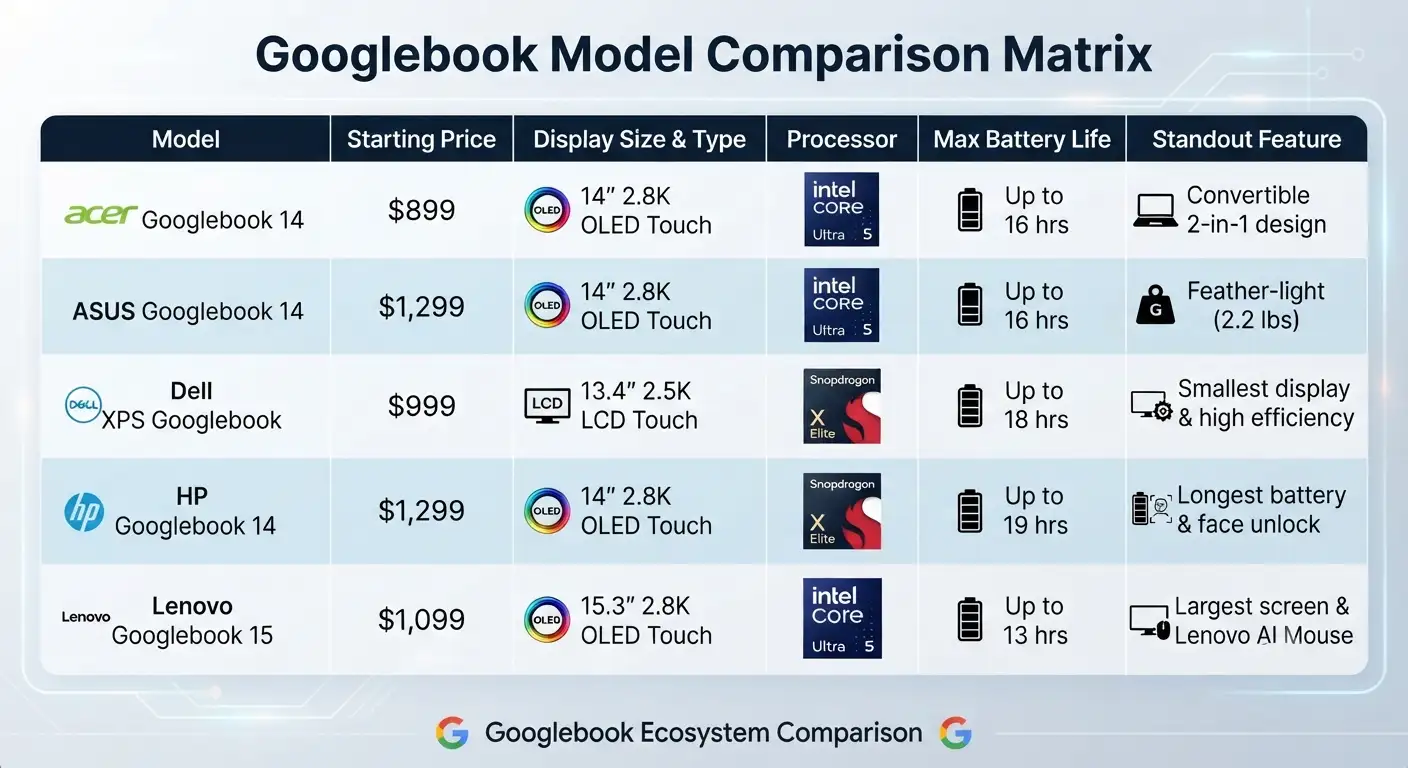
To help you quickly evaluate your options, here is how all five Googlebook models compare side-by-side:
FAQs
1. Which Googlebook model is the most affordable?
The Acer Googlebook 14 is the most budget-friendly option in the lineup, with a starting price of $899.
2. Which Googlebook has the best battery life?
The HP Googlebook 14 leads the lineup in battery endurance, offering up to 19 hours on a single charge, followed closely by the Dell XPS Googlebook at up to 18 hours.
3. Are all Googlebook models traditional clamshell laptops?
No. The Acer Googlebook 14 is the only convertible 2-in-1 model in the launch lineup, allowing you to flip the display for tablet, tent, or presentation modes.
4. Which Googlebook is the lightest for frequent travelers?
The ASUS Googlebook 14 is the lightest device in the family, weighing in at approximately 2.2 lbs (0.99 kg).
5. What is the largest screen size available in the Googlebook lineup?
The Lenovo Googlebook 15 features the largest display, sporting a 15.3-inch 2.8K OLED touchscreen designed for workstation multitasking.
6. Which processors power the Googlebook lineup?
The lineup uses two distinct processor platforms:
-
Intel Core Ultra 5: Powers the Acer Googlebook 14, ASUS Googlebook 14, and Lenovo Googlebook 15.
-
Snapdragon X Elite: Powers the Dell XPS Googlebook and HP Googlebook 14.
7. Do Googlebooks have noisy cooling fans?
No. The entire lineup is engineered to run completely silently without spinning cooling fans, even under intensive workloads.
8. What software and cloud perks are included with a Googlebook purchase?
Every Googlebook comes with 12 months of Google AI Pro, which provides 5TB of cloud storage, expanded Gemini usage limits, and bundled subscriptions to services like Adobe Photoshop and YouTube Premium.
9. Do all Googlebook models come with OLED screens?
Four out of the five models (Acer, ASUS, HP, and Lenovo) feature 2.8K OLED touchscreens. The compact Dell XPS Googlebook features a 13.4-inch 2.5K LCD touchscreen.
10. Which model offers dual biometric authentication (face and fingerprint)?
The HP Googlebook 14 includes both facial recognition unlock and a fingerprint sensor for enhanced security.
Conclusion: Which Googlebook Should You Choose?
Choosing the right device comes down to identifying your personal daily habits. If you want the lowest entry price with tablet flexibility, select the Acer Googlebook 14. If travel weight is your primary concern, the ultra-light ASUS Googlebook 14 is unmatched. For compact mobility and extended battery longevity, the Dell XPS Googlebook and HP Googlebook 14 deliver exceptional results with Qualcomm processing. Finally, if you need a spacious screen for intensive multitasking and media consumption, the Lenovo Googlebook 15 provides the ultimate workspace.
No matter which model you choose, every Googlebook delivers premium craftsmanship, intelligent hardware integration, and long-term software support designed to elevate your digital life for years to come.

Selva Ganesh is a Computer Science Engineer, Android Developer, and Tech Enthusiast. As the Chief Editor of this blog, he brings over 10 years of experience in Android development and professional blogging. He has completed multiple courses under the Google News Initiative, enhancing his expertise in digital journalism and content accuracy. Selva also manages Android Infotech, a globally recognized platform known for its practical, solution-focused articles that help users resolve Android-related issues.





The specifications look solid on paper, but real-world testing will be the true test of these machines. Thanks for breaking down the differences in such a clear and concise manner.
Having options tailored for both casual users and demanding professionals is a smart strategy by Google. This explanation helps cut through the marketing noise to focus on real utility.
The landscape of portable computing has truly been redefined by these new announcements. I will be keeping a close eye on reviews for the mid-tier productivity models.
Quality hardware manufacturing paired with intelligent software integration is a winning combination. This overview highlights why taking a close look at each model is so crucial.
Finding a device that bridges the gap between everyday portability and workstation power is notoriously difficult. The Googlebook lineup seems to address this exact dilemma remarkably well.
The evolution of the laptop market over the last few years has led directly to this exciting release. I am particularly curious about how well the cooling systems manage intensive workloads.
Navigating five different launch models can feel overwhelming without a clear breakdown. This thoughtful summary makes it much easier to justify the investment for my business.
Design aesthetics combined with raw power make these new machines stand out in a crowded market. I am eager to test the ergonomic feel of the keyboard during extended writing sessions.
The sheer breadth of this hardware portfolio proves that Google is taking the laptop market very seriously. Professionals need robust tools, and these devices appear to deliver.
I was skeptical about a new laptop lineup, but the range of options here is genuinely impressive. Knowing the distinctions between all five models saves me hours of research.
Performance and battery life will ultimately dictate whether these laptops succeed in the enterprise market. This guide provides a fantastic starting point for understanding the ecosystem.
The versatility of the convertible option caught my attention right away for creative design work. These insights make evaluating the specs a much simpler task.
It is refreshing to read such a thoughtful analysis of the entire Googlebook series. I will definitely weigh these options carefully before upgrading my current office setup.
The collaboration between Google and traditional hardware giants seems to have paid off brilliantly. Every device in this lineup looks meticulously designed to meet specific user demands.
As someone who travels constantly, finding a reliable yet powerful ultra-light laptop is my top priority. This overview gives me a lot of hope that the right option is finally available.
The technology landscape has indeed shifted dramatically with these new releases. I cannot wait to see independent benchmarks testing the performance limits of the workstation model.
I appreciate the detailed explanation of each model’s unique strengths and intended audience. Understanding these differences is definitely essential before making any major purchase decision.
Choosing between an ultra-light travel companion and a massive productivity workstation has always been a tough compromise. This comprehensive portfolio might finally offer the exact balance I need.
It is fascinating to see Google partner with such renowned hardware manufacturers for this lineup. The shift in the premium laptop landscape certainly looks promising for professionals.
The breakdown of these five models really helps clarify which device fits my daily workflow best. I am particularly interested in how the convertible holds up under heavy multitasking.