
Earthquakes strike without warning, but thanks to Android’s built-in Earthquake Alert System, your smartphone can become a robust early warning tool. With tremors recently shaking cities like Delhi, Jaipur, Chandigarh, and other regions of North India, it’s critical to ensure this alert system is enabled on your device. This guide walks you through everything you need to know — how the system works, how to activate it, who can use it in India, and what to do when an alert is triggered.
What is the Android Earthquake Alert System?
Android’s Earthquake Alert System is a free, automatic seismic early warning network powered by Google and supported on devices running Android 5.0 (Lollipop) or later. It uses your phone’s accelerometer — the same sensor responsible for screen rotation — to detect early tremors, also called P-waves, which precede the more dangerous S-waves that cause severe shaking.

When multiple Android phones detect simultaneous motion in a region, they send anonymized data to Google servers. If a seismic pattern is confirmed, Google instantly sends an emergency notification to other nearby Android devices — often seconds before the damaging waves strike.
Is the Earthquake Alert System Available in India?
Yes. The rollout of the Android Earthquake Alert System in India began in 2023, with active coverage expanding across Delhi, NCR, Himachal Pradesh, Uttarakhand, Gujarat, Maharashtra, and other quake-prone regions. Most Android smartphones sold in India that support Google Play Services are compatible.
To receive alerts:
- You must be using Android 5.0 or higher.
- Google Play Services must be enabled.
- Your device must have Location Services turned on.
- You must manually enable Earthquake Alerts in your phone settings if they’re not turned on by default.
⚙️ How to Enable Earthquake Alerts on Your Android Phone
Activating Android’s Earthquake Alerts is simple and takes less than a minute. Follow the step-by-step instructions below to turn it on:
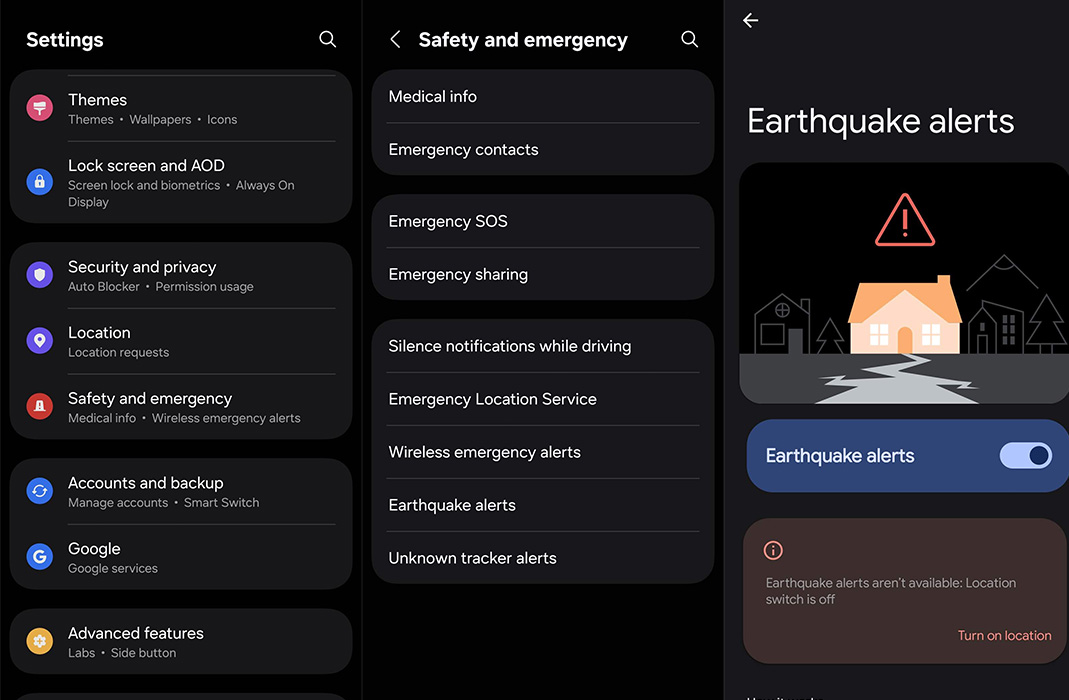
Step 1: Open Settings
Launch your phone’s Settings app. You can do this from your app drawer or quick menu.
Step 2: Navigate to “Safety & Emergency”
Scroll down and look for the “Safety & emergency” section. Some phones may be under “Location” or “Privacy & security”.
Step 3: Tap on “Earthquake Alerts”
You’ll find a dedicated option named “Earthquake alerts”. Tap it.
Step 4: Enable the Alert Toggle
Switch the toggle ON to activate alerts.
✅ Important Tip:
Ensure Location Services are turned on so this feature works correctly. Your device uses your precise location to determine whether a local seismic event is detected nearby.
How to Check If Earthquake Alerts Are Active
To verify that your Android device has Earthquake Alerts turned on:
- Open the Settings app.
- Tap the search icon at the top.
- Type “Earthquake”.
- Tap on Earthquake alerts in the search results.
- Ensure the toggle is switched on.
This will confirm whether your phone is actively monitoring for seismic activity.
What Happens When You Receive an Earthquake Alert?
When the system detects a quake, your phone vibrates and displays an Earthquake Warning Notification. Here’s what you should do immediately:
DROP, COVER, and HOLD
- Drop to your hands and knees to prevent falling.
- Cover your head and neck under a sturdy table or against an interior wall.
- Hold on until the shaking stops.
Avoid These During a Quake Alert:
- Do not run outside, especially from upper floors.
- Stay away from windows, mirrors, and glass panels.
- Avoid elevators.
Even a 5 to 10-second warning can give you enough time to take critical actions that could save your life or prevent serious injury.
Limitations and Considerations
While the Android Earthquake Alert System is a powerful tool, it’s imperfect. Be aware of the following limitations:
- Network Connectivity Required: You need a working internet or mobile data connection for the alert to reach your phone.
- Coverage is not 100%: Remote or rural areas with limited sensor density or network access may not benefit from timely alerts.
- Not a Government Replacement: This system is designed to supplement, not replace, official disaster warning systems, such as those by the National Centre for Seismology (NCS) or NDMA.
- Device Manufacturer Settings: Some manufacturers may hide or relocate this setting. Search for “Earthquake” or check under “Emergency Alerts” in your settings.
Technical Background: How It Detects Earthquakes
- Android’s system is a crowdsourced seismograph.
- Phones act as sensors that detect P-wave tremors using accelerometers.
- The system filters out false positives by analyzing multiple simultaneous readings from nearby devices.
- If the data confirms a potential earthquake, Google servers will instantly alert all users in the affected radius.
- All data is anonymized, and Google does not use this information to track users.
Additional Safety Features on Android
Along with Earthquake Alerts, Android’s Safety & Emergency settings often include other vital tools:
- Emergency SOS: Quickly call emergency services with power button presses.
- Medical Info: Add allergies, medications, and emergency contacts visible from your lock screen.
- Crisis Alerts: Receive information about local disasters, public health emergencies, and more.
We recommend enabling all of these features for complete mobile safety readiness.
Earthquake Preparedness Tips for Smartphone Users
Having alerts enabled is only part of the equation. Here are some quick preparedness actions to pair with your mobile alerts:
- Keep a disaster kit with water, a flashlight, a power bank, and first-aid.
- Learn how to turn off gas and electricity in your home.
- Familiarise yourself with local evacuation plans.
- Practice earthquake drills regularly with your family.
- Enable Auto-Rotate Lock so your phone doesn’t misread motion as tremors.
Compatible Android Phones
Most modern Android phones support this feature, including:
- Google Pixel Series
- Samsung Galaxy Series (A, M, S, and Fold)
- OnePlus, Xiaomi, Realme, Vivo, OPPO (with Google Play Services)
- Motorola, Nokia, Asus, Lava, Micromax (Android One or Stock Android)
It should be compatible if your device runs Android 5.0+ and has Play Services.
Wrap Up: Activate Earthquake Alerts Now to Stay Protected
Natural disasters don’t announce their arrival. But with Android Earthquake Alerts, your phone becomes a powerful warning device that could give you the extra seconds needed to save lives and reduce injuries. Enabling this feature is simple, quick, and completely free. Every second counts — take a moment to check your settings and share this guide with your loved ones.

Selva Ganesh is a Computer Science Engineer, Android Developer, and Tech Enthusiast. As the Chief Editor of this blog, he brings over 10 years of experience in Android development and professional blogging. He has completed multiple courses under the Google News Initiative, enhancing his expertise in digital journalism and content accuracy. Selva also manages Android Infotech, a globally recognized platform known for its practical, solution-focused articles that help users resolve Android-related issues.





Definitely worth enabling, even if you never get an alert.
Hope iPhones get a similar feature someday.
Glad I read this. I was unaware of the feature until now.
This article came just in time. Delhi had a minor shake last week.
Good job spreading awareness. Most people don’t even know about this feature.
Thank you for the guide. I’ve now enabled alerts on my phone.
I was skeptical, but this is truly smart tech.
Thank you Android for this life-saving tool.
We need more awareness about mobile safety features.
Great public service article.
Timely post. North India is becoming more prone to seismic activity.
Following alerts should be taught in schools too.
Perfect timing with all the recent quakes in Himachal too.
Saved this link to share with my WhatsApp groups.
Wish this existed during the Uttarakhand tremors years ago.
If it works during real quakes, it’s worth every byte of data.
Technology used the right way! Very impressive.
Everyone in North India should enable this immediately. Tremors have become more frequent.
Phones have become more than communication tools. This proves it.
The accuracy has improved a lot recently.