
Enable VoLTE Anywhere on Google Pixel– Google Pixel smartphones have earned their place among the best Android devices due to their clean software, excellent cameras, and early access to updates. However, Pixel users outside officially supported regions often face one major setback — the lack of VoLTE (Voice over LTE) and VoWiFi (Voice over WiFi) support. When importing a Pixel device from another market, users often discover that voice calls don’t work properly, despite having full network bars. This problem stems from Google’s carrier restrictions; however, there are effective workarounds that enable VoLTE on any Google Pixel, even in regions where it is not supported. We’ll explain what VoLTE is, why it might be turned off, and how to re-enable it using advanced but safe methods — all without rooting your Pixel.
What Is VoLTE and Why Is It Important?
VoLTE (Voice over LTE) enables your phone to make voice calls using the 4G LTE data network, eliminating the need to fall back to 3G or 2G networks. As many countries have completely shut down legacy 2G/3G networks, VoLTE has become essential for making and receiving calls. Without it, users might find that their Pixel devices can connect to mobile data but can’t make voice calls at all.

Similarly, VoWiFi (Voice over WiFi) enables users to make calls via a WiFi connection when cellular signals are weak, improving call quality in low-coverage areas.
Unfortunately, many carriers only allow VoLTE/VoWiFi on officially approved or region-specific models, which leaves imported Pixels with disabled features even if the hardware fully supports them.
Why Google Pixel Devices Disable VoLTE in Unsupported Regions
Google maintains a carrier allowlist within the Pixel’s firmware. This list determines whether your SIM card and carrier combination is eligible for VoLTE or VoWiFi. Suppose you’re using a Pixel purchased in the U.S. on a network in India or Europe, for instance. In that case, your device may fail to enable VoLTE simply because the carrier is not certified by Google in that region.
This limitation affects global Pixel owners who import devices for better pricing or early access to new models. The hardware supports VoLTE — the software doesn’t allow it due to carrier configuration checks built into Android.
The Pixel IMS Solution – How It Worked Before
In 2023, a talented developer named Kyujin Cho introduced an innovative app called Pixel IMS, designed to force-enable VoLTE and VoWiFi on any Pixel phone. The app bypassed the built-in carrier restrictions by overriding Android’s carrier configuration system.
To achieve this, Pixel IMS used a clever loophole with Shizuku, an open-source Android utility that grants elevated privileges to apps through ADB (Android Debug Bridge). This allowed Pixel IMS to bypass the system’s security checks and enable IMS (IP Multimedia Subsystem) features, such as VoLTE and VoWiFi, without requiring root access.
For more than two years, this method worked flawlessly, restoring calling functionality for thousands of Pixel users in unsupported regions.
Google’s October 2025 Update and the Closure of the Loophole
However, with the October 2025 Pixel security update, Google silently closed this privilege loophole. Users began reporting that the Pixel IMS app crashed when toggling VoLTE or VoWiFi. The error message “overrideConfig cannot be invoked by shell” confirmed that Android had revoked the ability of shell-level processes to modify carrier configurations.
This patch was later identified internally as CVE-2025-48617, classified as a high-severity privilege escalation vulnerability. Although not listed in the October 2025 Android Security Bulletin, Google is expected to include it in the December quarterly security update under its new Risk-Based Update System (RBUS).
As a result, Pixel IMS is no longer functional on Pixel devices running the October 2025 update or newer.
The New Method to Enable VoLTE on Pixel Devices (2025 Update)
Fortunately, the Android developer community quickly discovered a new workaround. Although this method is less user-friendly and primarily documented in Chinese forums and Telegram channels, it successfully enables VoLTE on updated Pixel models.
Steps Overview (For Advanced Users)
⚠️ Note: This process is advanced. Proceed carefully and back up your data before making any changes.
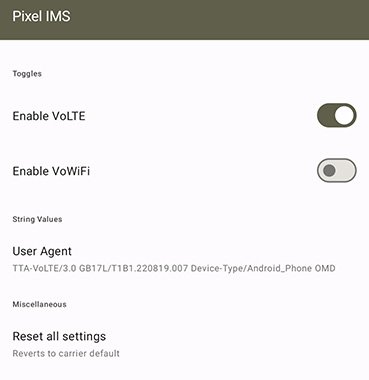
- Download the New Pixel IMS Mod APK
- The modified app version is shared within Telegram developer groups (ensure it’s from a trusted source). It utilizes an alternative permission grant system that is compatible with newer Android security policies.
- Install and Grant Permissions Using Shizuku or ADB
- Install Shizuku from the Play Store.
- Enable developer options on your Pixel.
- Connect your phone to a PC and run:
- adb shell sh /sdcard/Android/data/moe.shizuku.privileged.api/start.sh
- Once linked, open the modified Pixel IMS app.
- Force Enable VoLTE
- Within the Pixel IMS interface:
- Go to IMS Settings → Carrier Config Override.
- Toggle VoLTE Provisioned to ON.
- Reboot your device.
- Verify VoLTE Activation
- Dial the code *#*#4636#*#* → Select Phone Information → Confirm VoLTE Provisioned: True.
- You should now see an HD or VoLTE icon when making calls.
Currently, this method only enables VoLTE, not VoWiFi. Developers are actively working to expand functionality for WiFi calling as well.
Alternative Option: Rooting Your Pixel
If VoWiFi or advanced carrier customization is critical, rooting your Pixel remains the most flexible solution. Root access allows modification of deep system properties and carrier configuration files. However, rooting voids the warranty, turns off secure features like Google Wallet, and may interfere with Gemini AI functions.
For users who rely on Google Pay or banking apps, we recommend against rooting your device. The better approach is to use the non-root workaround discussed above or wait for Google’s official regional enablement.
Google’s Efforts to Expand VoLTE Support Globally
In recent months, Google has acknowledged the widespread complaints from international Pixel owners. Internal code references in Android 15 builds suggest Google is preparing a universal VoLTE toggle and expanding carrier profiles. This could eliminate the need for region-specific allowlists in the near future.
Moreover, with Gemini AI and Tensor G4 becoming deeply integrated into the Pixel ecosystem, Google has a strong motivation to ensure network stability and feature parity across regions. Full VoLTE enablement may soon become standard for all markets.
Troubleshooting VoLTE Activation Issues
If VoLTE still doesn’t appear after following the steps:
- Ensure your carrier plan supports VoLTE. Some prepaid or legacy plans may not offer this feature.
- Remove and reinsert your SIM card after rebooting.
- Reset network settings and reapply the configuration.
- Try a different SIM slot if available.
- Avoid sideloading outdated Pixel IMS builds; always use the latest version from a verified source.
Final Thoughts
Enabling VoLTE anywhere on a Google Pixel is now possible again — though with more technical steps than before. While Google’s security measures have closed earlier loopholes, the Android community has proven resilient in keeping essential network features accessible to all users.
For now, the safest and most reliable route for non-rooted users is to follow the new Pixel IMS method. If you need WiFi calling, consider waiting for Google’s upcoming updates or exploring carrier-supported eSIMs with native VoLTE provisioning.
Your Pixel’s true potential shouldn’t be limited by borders — and with the right approach, it doesn’t have to be.

Selva Ganesh is a Computer Science Engineer, Android Developer, and Tech Enthusiast. As the Chief Editor of this blog, he brings over 10 years of experience in Android development and professional blogging. He has completed multiple courses under the Google News Initiative, enhancing his expertise in digital journalism and content accuracy. Selva also manages Android Infotech, a globally recognized platform known for its practical, solution-focused articles that help users resolve Android-related issues.





Leave a Reply