
Enable the Privacy Dashboard in Android 16– Just weeks after the public release of Android 15, Google has surprised everyone by launching the first Developer Preview of Android 16, hinting at a potentially earlier release schedule. One of the most notable changes introduced in this preview is a significant enhancement to the Privacy Dashboard, a feature that originally debuted with Android 12. This upgrade marks a significant leap forward in data transparency and user privacy.
What Is the Privacy Dashboard and Why Does It Matter in Android 16
The Privacy Dashboard was designed as a transparency tool to give users insights into how often and when apps access sensitive permissions such as location, microphone, and camera. Until Android 15, users could only see activity from the past 24 hours. That meant limited visibility into how apps behave over time.

With Android 16, Google is expanding that window to seven full days. This is a significant privacy improvement, enabling users to identify patterns in app behaviour better, particularly those that access sensitive permissions quietly and infrequently.
What’s New in Android 16 Privacy Dashboard
The updated Privacy Dashboard in Android 16 Developer Preview 1 brings:
- 7-Day Permissions History: Tap the new “Show 7 Days” option in the overflow menu to see a week-long activity log.
- More Granular Tracking: You can now monitor permission requests broken down by each day, giving a comprehensive view over time.
- Enhanced Alerts for Sensitive Access: This makes it easier to spot apps breaching privacy norms without your knowledge.
With these improvements, Android 16 empowers users to take greater control over their data and enhances trust in the ecosystem.
How to Enable the 7-Day View in Android 16 Privacy Dashboard
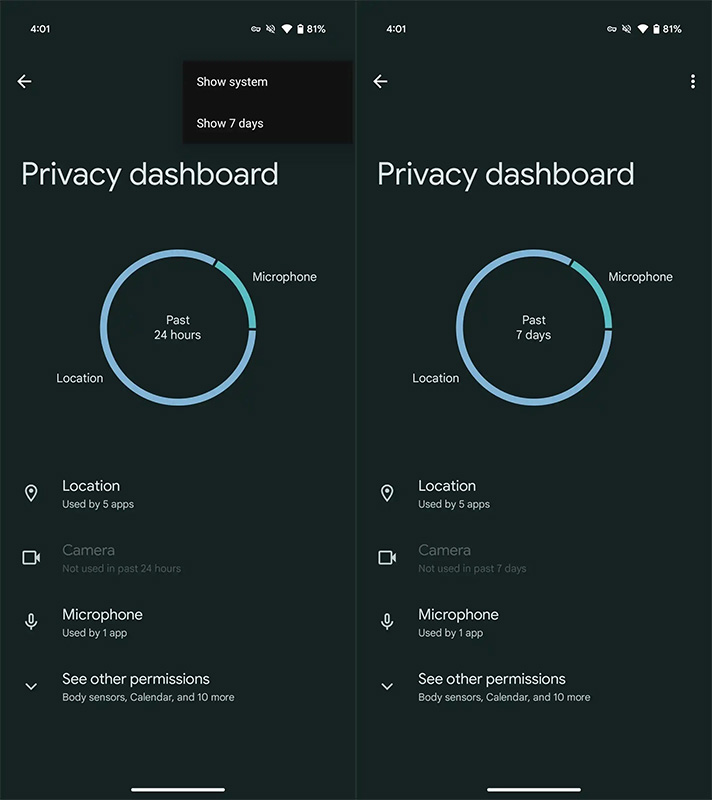
Enabling the 7-day history in Android 16 is simple. Here’s how to do it:
- Open Settings.
- Scroll to Privacy & Security.
- Tap on Privacy Dashboard.
- By default, you’ll see data from the past 24 hours.
- Tap the three-dot overflow menu at the top right.
- Select “Show 7 Days”.
The dashboard will display a breakdown of permission access for the past seven days. Tap any permission (like “Location” or “Microphone”) to see which apps accessed it, and when.
️ How Android 16 Strengthens User Privacy
This Privacy Dashboard upgrade aligns with Google’s broader privacy mission. Android 16 also includes:
- Real-time threat detection via Google Play Protect is more aggressive, scanning apps and devices in real-time.
- Background permission limits: Android 16 places stricter policies on apps running background tasks that access sensitive data.
- Granular permission prompts: Users are asked for contextual consent, explaining why an app needs access.
These changes come amid growing scrutiny of app data collection practices. Users get greater awareness and control with tools like the 7-day Privacy Dashboard.
Reintroduction of Notification Cooldown Feature
Another privacy-friendly improvement in Android 16 is the return of the Notification Cooldown feature, first tested in Android 15 builds. This feature:
- Automatically reduces the alert volume for repeated notifications from the same app.
- Prevents spammy or aggressive notifications, especially from poorly built or intrusive apps.
- Gives users a calmer, distraction-free experience while retaining critical notifications.
While not directly related to the Privacy Dashboard, this update contributes to the overall focus on user autonomy and mental wellness in Android 16.
Android 16 Adds Auracast Audio Sharing Support
Beyond privacy, Android 16 includes innovative features such as support for Auracast™ broadcast audio. This allows:
- Simultaneous audio sharing with multiple nearby devices.
- Great for group experiences, shared music, or public audio sources like TVs in gyms, airports, and cafes.
- A boost to accessibility, allowing those with hearing aids or Bluetooth devices to join a shared audio stream easily.
This inclusion demonstrates Android 16’s ambition to push boundaries in privacy, connectivity, and accessibility.
How Android 16 Uses AI and ML for Privacy
Google is leveraging on-device machine learning in Android 16 to enhance user privacy in real-time:
- Contextual behaviour monitoring: Android analyses app behaviour to detect suspicious activity patterns.
- Predictive permission prompts: Android may suggest revoking unnecessary permissions based on usage.
- System-level sandboxing: Reduces an app’s ability to interact across profiles or extract data from other services.
This AI-first privacy framework helps prevent data abuse before it happens, rather than relying solely on user vigilance.
Real-World Impact: Why the 7-Day View is Crucial
Many apps access sensitive permissions sporadically—perhaps once every few days—to avoid raising suspicion. The 24-hour window limited users from spotting these access patterns.
With the new 7-day view:
- You can track the cumulative behaviour of apps.
- Spot apps that access your location at odd hours, days apart.
- Identify low-usage apps behaving suspiciously, prompting timely uninstalls or permission revocations.
This feature empowers users to protect their privacy proactively, rather than reacting only after issues occur.
Devices Compatible with Android 16 Developer Preview
As of now, the Android 16 Developer Preview is available on:
- Pixel 6 and newer devices
- Future support expected for Pixel Fold and Pixel Tablet
To test these features, now enroll your device in the Android Beta Program.
- Download and install the Developer Preview.
- Explore the Privacy Dashboard enhancements and provide feedback via the Beta app.
⚙️ Wrap Up: Android 16 Sets a New Standard for Mobile Privacy
With the 7-day Privacy Dashboard, Google is taking a bold step towards making Android the most privacy-forward mobile OS. The feature is easy to use, highly informative, and empowering, letting users see beyond the surface and truly understand what their apps are doing.
With real-time threat detection, notification cooldown, and AI-powered security enhancements, Android 16 promises a safer, smarter, and more private digital experience.
If you care about who sees your data and when, upgrading to Android 16—and using the new Privacy Dashboard—is a no-brainer.

Selva Ganesh is a Computer Science Engineer, Android Developer, and Tech Enthusiast. As the Chief Editor of this blog, he brings over 10 years of experience in Android development and professional blogging. He has completed multiple courses under the Google News Initiative, enhancing his expertise in digital journalism and content accuracy. Selva also manages Android Infotech, a globally recognized platform known for its practical, solution-focused articles that help users resolve Android-related issues.




It’s impressive how Android 16 builds upon Android 12’s Privacy Dashboard. The improvements are quite significant.
The addition of enhanced data transparency is a game changer. This makes Android 16 a great choice for privacy-conscious users.
The privacy updates are crucial for today’s digital age. Google is setting new standards with Android 16’s dashboard.
The Privacy Dashboard upgrade seems very intuitive. Google is definitely moving in the right direction with user data protection.
This guide really helped me understand the new Privacy Dashboard in Android 16. The detailed steps make it easy to enable and customize.
Thanks for the clear guide on enabling privacy features in Android 16. It’s great to see such detailed tutorials.
Privacy has always been a major concern for me, and this update addresses it perfectly. Looking forward to seeing more improvements in future releases.
The addition of enhanced data transparency is a game changer. This makes Android 16 a great choice for privacy-conscious users.
This guide really helped me understand the new Privacy Dashboard in Android 16. The detailed steps make it easy to enable and customize.
This article is a must-read for anyone upgrading to Android 16. Understanding privacy settings has never been easier.
Privacy has always been a major concern for me, and this update addresses it perfectly. Looking forward to seeing more improvements in future releases.
This guide really helped me understand the new Privacy Dashboard in Android 16. The detailed steps make it easy to enable and customize.
This guide really helped me understand the new Privacy Dashboard in Android 16. The detailed steps make it easy to enable and customize.
The addition of enhanced data transparency is a game changer. This makes Android 16 a great choice for privacy-conscious users.
The Privacy Dashboard upgrade seems very intuitive. Google is definitely moving in the right direction with user data protection.
I appreciate how Google is enhancing user privacy with this new update. The Android 16 Privacy Dashboard looks promising and user-friendly.
Thanks for the clear guide on enabling privacy features in Android 16. It’s great to see such detailed tutorials.
It’s impressive how Android 16 builds upon Android 12’s Privacy Dashboard. The improvements are quite significant.
I love the focus on privacy enhancements in this Android version. The step-by-step explanation was very helpful.
The addition of enhanced data transparency is a game changer. This makes Android 16 a great choice for privacy-conscious users.