
The Samsung Galaxy Watch series has evolved beyond being a stylish smartwatch. With the integration of the Samsung Health Monitor app and advanced Photoplethysmogram (PPG) sensors, users can now measure their blood pressure directly from their wrist. However, this feature works accurately only after calibration with a traditional cuff-based monitor. We explain how the Galaxy Watch measures blood pressure, which models support the feature, how to calibrate correctly, and important considerations for achieving the most accurate results.
How Blood Pressure Measurement Works on the Samsung Galaxy Watch
The Galaxy Watch uses its PPG sensor to track changes in blood flow. When combined with the Samsung Health Monitor app, it can estimate both systolic and diastolic pressure. However, because wrist-based monitoring can be influenced by body position and external factors, the watch requires initial calibration.

Calibration Process:
- To enable blood pressure monitoring, users must take three readings using a standard cuff-based monitor and enter those values into the Samsung Health Monitor app. This syncs the watch’s sensor with your real readings.
Duration of Accuracy:
- After calibration, the watch can measure blood pressure independently for 28–30 days. Once this period ends, recalibration with a cuff-based device is necessary.
Viewing Results:
- Blood pressure measurements are displayed instantly on both the Galaxy Watch and the paired Samsung smartphone, making it easy to track and monitor trends over time.
Supported Galaxy Watch Models for Blood Pressure Monitoring
Not all Samsung watches include this feature. Currently, blood pressure monitoring is supported on:
- Galaxy Watch3
- Galaxy Watch Active2
- Galaxy Watch4, Watch4 Classic
- Galaxy Watch5, Watch5 Pro
- Galaxy Watch6, Watch6 Classic
- All later Galaxy Watch models
These watches must be paired with a Samsung smartphone running the latest version of the Samsung Health Monitor app.
Regulatory Approvals and Availability
Samsung has received several regulatory clearances for the blood pressure monitoring feature:
- Approved by the Ministry of Food and Drug Safety (MFDS) in South Korea.
- Cleared in multiple international markets, including the Central Drugs Standard Control Organisation (CDSCO) in India.
- Available in Europe, the US, and select Asia-Pacific regions.
This ensures that the feature is not just experimental but has undergone strict testing for reliability.
Limitations of Galaxy Watch Blood Pressure Monitoring
While the Samsung Galaxy Watch’s blood pressure feature is impressive, users must be aware of its limitations:
Not a Replacement for Medical Equipment
- The watch is designed for wellness tracking and trend observation, not for diagnosing or making treatment decisions. Always consult a healthcare professional for clinical accuracy.
Health Conditions May Affect Accuracy
- Conditions such as arrhythmia, heart failure, or even tattoos on the wrist may reduce accuracy because they can interfere with the PPG sensor’s ability to detect blood flow changes.
Recalibration is Mandatory
- To maintain accuracy, recalibration with a cuff-based device is required every 28–30 days.
User Habits Impact Results
- Blood pressure readings may vary based on arm position, stress levels, caffeine intake, or recent exercise. Proper sitting posture is crucial for accuracy.
How to Set Up Blood Pressure Monitoring on the Galaxy Watch
Setting up the feature is straightforward. Follow these steps to ensure proper calibration: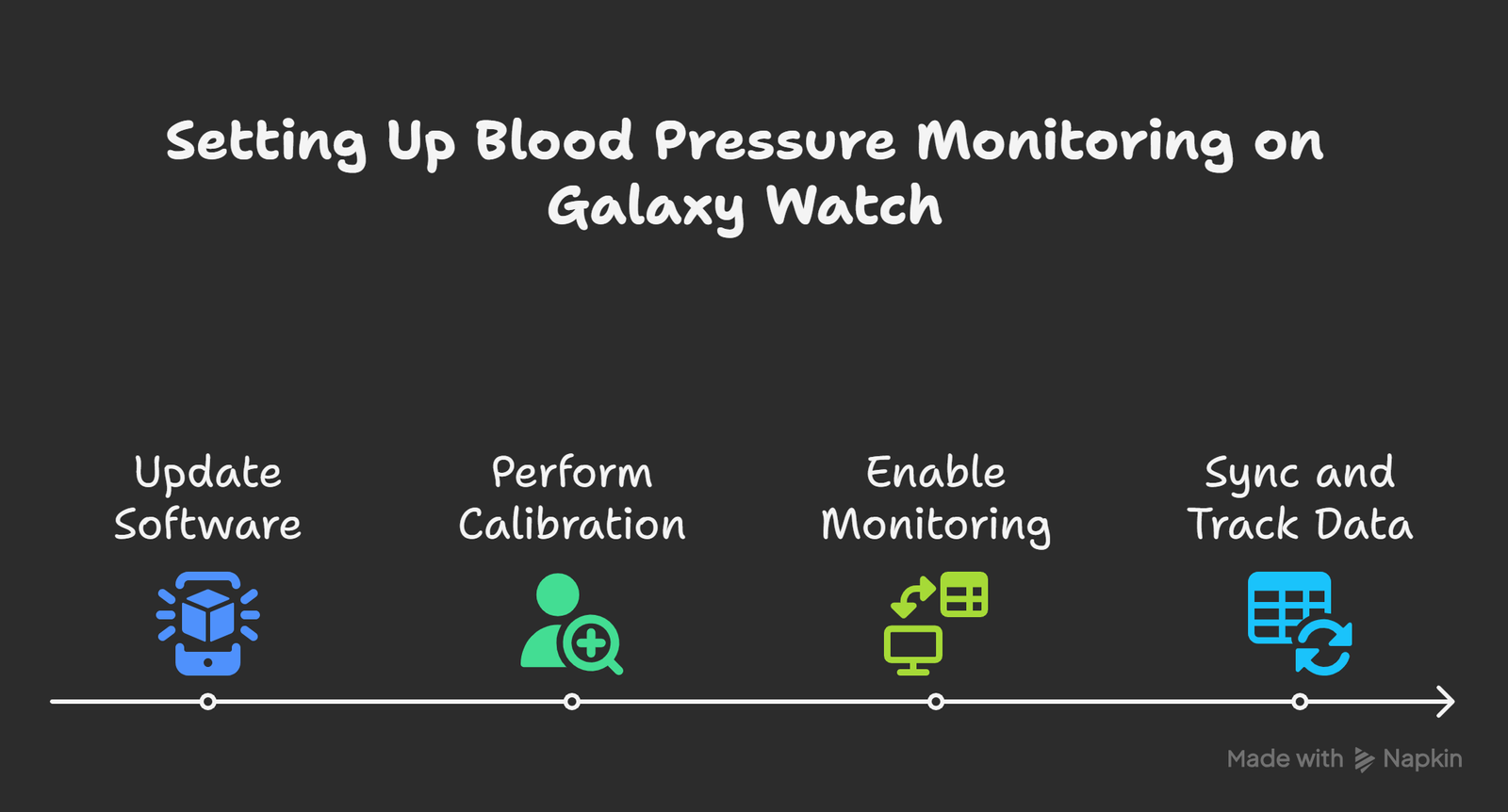
Step 1: Update Software
- Ensure both your Galaxy Watch and paired Samsung smartphone have the latest firmware updates.
- Download or update the Samsung Health Monitor app from the Galaxy Store.
Step 2: Perform Calibration with a Cuff Monitor
- Sit comfortably and wear a cuff-based blood pressure monitor on one arm.
- Wear the Galaxy Watch on the opposite wrist.
- Take three consecutive readings with the cuff monitor and input them into the Samsung Health Monitor app.
Step 3: Enable Monitoring on the Watch
- After calibration, add the Blood Pressure widget to your watch face.
- Place your arm on a flat surface, stay still, and press “Measure.”
- The watch will provide systolic, diastolic, and heart rate data within seconds.
Step 4: Sync and Track Data
- All measurements automatically sync with your Samsung Health Monitor app.
- Data can be viewed in daily, weekly, or monthly charts for long-term tracking.
Best Practices for Accurate Measurements
To maximise accuracy when using your Samsung Galaxy Watch for blood pressure monitoring, follow these guidelines:
- Sit Still: Remain seated, relaxed, and quiet during the measurement.
- Keep Arm at Heart Level: Position your wrist so that the watch aligns with your heart.
- Avoid Stimulants: Do not consume caffeine, alcohol, or tobacco 30 minutes before testing.
- Consistent Timing: Take measurements at the same time daily for reliable trend tracking.
- Recalibrate Regularly: Always recalibrate once a month with a standard cuff monitor.
Benefits of Using the Samsung Galaxy Watch for Blood Pressure Monitoring
Convenience
- No need to carry around a bulky cuff monitor. You can check your blood pressure anytime, anywhere with just your watch.
Data Integration
- The Samsung Health Monitor app integrates with Samsung Health, allowing users to combine blood pressure data with other health metrics like sleep, stress, heart rate, and activity tracking.
Long-Term Wellness Insights
- By tracking trends over weeks or months, users can gain valuable insights into how lifestyle, diet, and stress impact blood pressure.
- Regulatory Confidence
- Since medical regulatory bodies approve the feature, users can trust that Samsung has followed stringent quality checks.
Is the Samsung Galaxy Watch a Reliable Blood Pressure Monitor?
The Samsung Galaxy Watch’s blood pressure feature is a powerful tool for personal health tracking. However, it is not a substitute for professional medical equipment. For individuals with hypertension or heart conditions, the watch serves as a supportive device to observe fluctuations, not as a primary diagnostic tool.
For healthy individuals, it provides an accessible way to stay informed about cardiovascular wellness. For patients, it may serve as a helpful supplement to regular clinical monitoring.
Wrap Up
The Samsung Galaxy Watch series offers blood pressure monitoring through a combination of advanced sensors and the Samsung Health Monitor app. While the feature requires initial calibration with a traditional cuff-based device and regular recalibration every month, it provides a convenient and reliable way to track blood pressure trends on the go.
By following proper calibration and usage practices, Galaxy Watch users can make the most of this feature while staying mindful of its limitations as a wellness tool rather than a medical-grade device.

Selva Ganesh is a Computer Science Engineer, Android Developer, and Tech Enthusiast. As the Chief Editor of this blog, he brings over 10 years of experience in Android development and professional blogging. He has completed multiple courses under the Google News Initiative, enhancing his expertise in digital journalism and content accuracy. Selva also manages Android Infotech, a globally recognized platform known for its practical, solution-focused articles that help users resolve Android-related issues.




This is a great tool for managing my hypertension.
I hope Samsung continues to improve this feature. It’s already so good.
I’m a senior citizen and this feature is a godsend. It’s so much easier than a cuff.
I had no idea the watch could do this. This article has opened my eyes.
The part about the PPG sensors was super interesting. I love learning the tech behind the features.
I’m considering buying a new watch just for this feature. It sounds incredibly helpful.
This is a brilliant use of technology. Kudos to Samsung!
The article is so detailed. I feel much more confident using this feature now.
I’ve been a long-time user of the Galaxy Watch. This is one of the most useful new features.
This feature is a real selling point for me. I’m glad I chose the Galaxy Watch.
I’m impressed with Samsung’s commitment to health tech. This is a big step forward.
I appreciate the heads-up about the calibration. I would have missed that.
This article should be shared with everyone who owns a Galaxy Watch. It’s so helpful.
I can’t wait to try this out. My cuff-based monitor is so clunky.
I was gifted a Galaxy Watch. Now I know how to use all its health features.
The explanation of the PPG sensors was fascinating. I learned something new today.
I’m using a different smartwatch brand. Do you know if any other watches have this feature?
I’m a little hesitant about the accuracy. How do I know the calibration is correct?
I love my Galaxy Watch! This feature has given me peace of mind.
This information is very timely. My doctor just recommended I start monitoring my blood pressure.