
How to Schedule Messages on WhatsApp for Free Officially -In the modern digital landscape, communication rules our daily routines, professional obligations, and social connections. Among all instant messaging platforms, WhatsApp stands tall as a global titan, connecting billions of users across continents. However, a feature that users have requested for years—the ability to schedule messages natively—has long been missing from the standard application interface. People frequently find themselves needing to send birthday greetings at midnight, professional reminders early in the morning, or crucial updates across different time zones without staying awake or interrupting important tasks.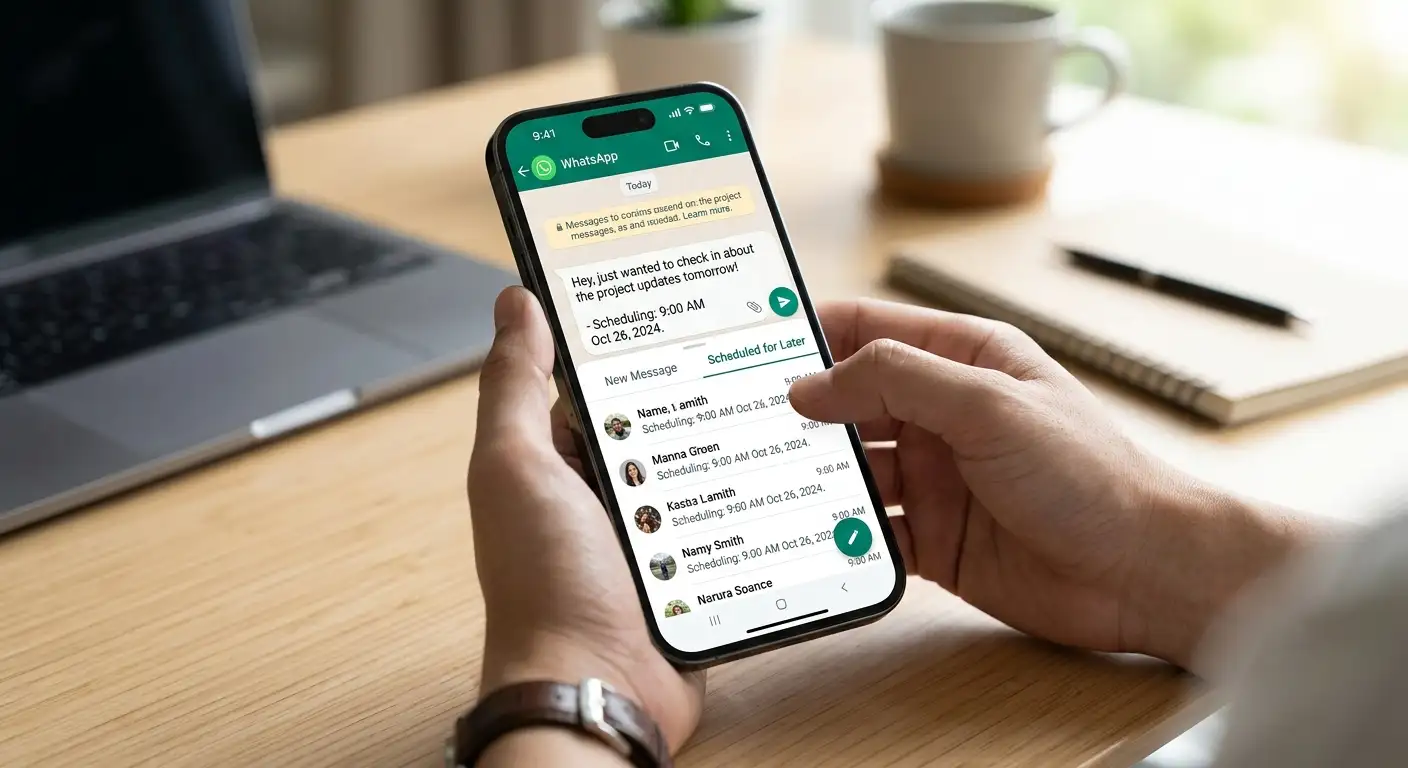
Recently, developments in WhatsApp’s testing phases have introduced official beta rollouts for native message scheduling on Android, while alternative built-in workflows exist through official auxiliary tools like the WhatsApp Business application. This comprehensive guide explores how you can leverage these options seamlessly, ensuring your messages reach your intended recipients precisely when intended, completely free of charge.

Understanding Official Scheduling Horizons on WhatsApp
The quest for a seamless messaging experience has led platform developers to trial integrated scheduling mechanisms. In recent updates for Android beta testers, WhatsApp has begun testing a native tool that allows users to draft a message and designate a specific time for delivery.
Unlike third-party workarounds that often require complex permissions or compromises on security, an official or semi-official approach guarantees that your data remains protected under end-to-end encryption standards. When utilizing official beta channels or business ecosystems, the platform handles the delivery backend seamlessly. Whether you are communicating within a one-on-one private chat or managing announcements inside a group conversation, understanding these native environments ensures you never miss a critical window of communication.
Leveraging the WhatsApp Business App for Free Message Automation
While everyday personal accounts have historically lacked native scheduling buttons, the free WhatsApp Business app offers official built-in tools that function as excellent scheduling alternatives. Designed primarily for entrepreneurs, small business owners, and freelancers, this application is completely free to download and use on both Android and iOS devices.
Setting Up Away Messages as Scheduled Reminders
If you want to automate responses or ensure certain notifications go out during specific windows, the Away Message feature acts as a reliable scheduling mechanism:
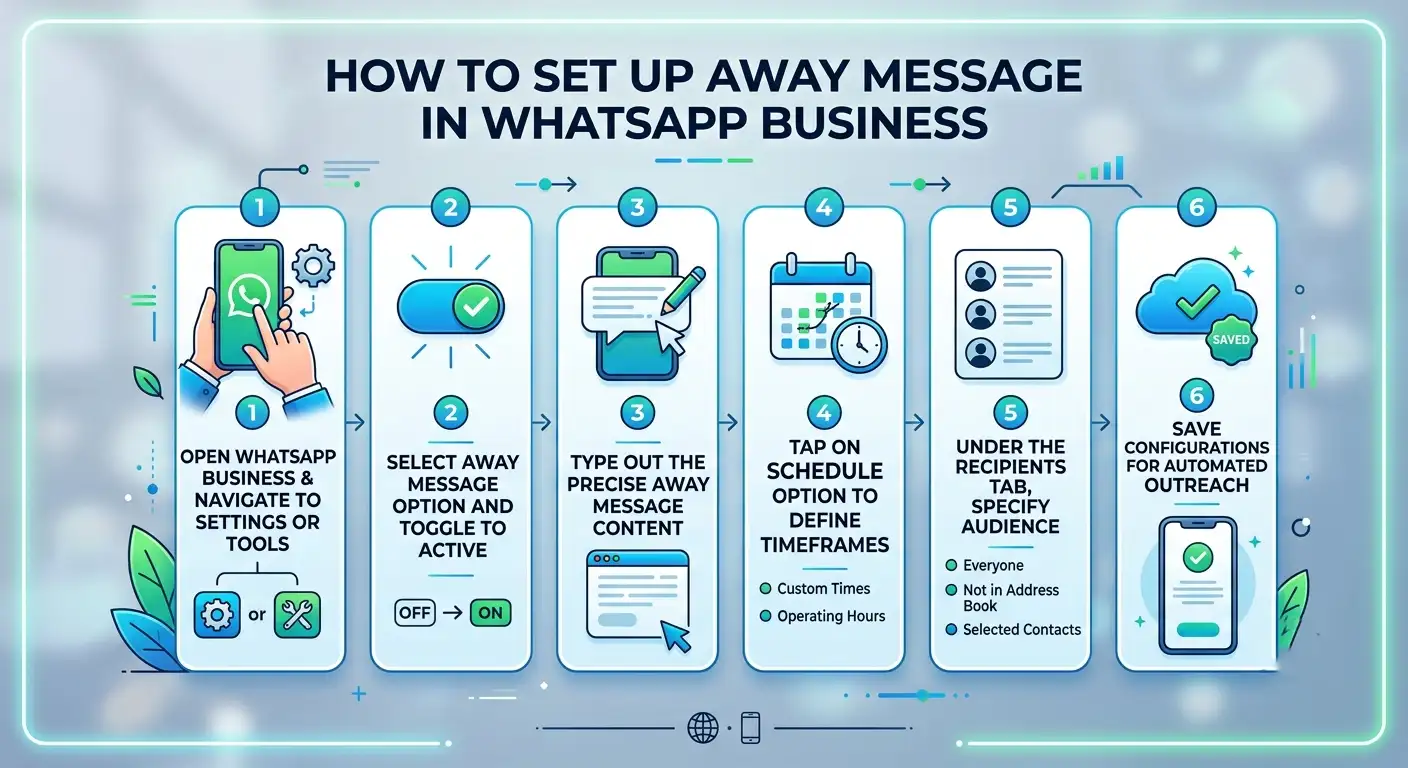
Navigating Upcoming Native Chat Scheduling Features
For everyday users anticipating the full public rollout of native chat scheduling, understanding how the interface operates will save time and effort. Recent testing phases reveal a streamlined, user-friendly approach built directly into the conversation window.
The Tap-and-Hold Mechanism
In supported beta environments, scheduling a message requires no complicated menus or external software:
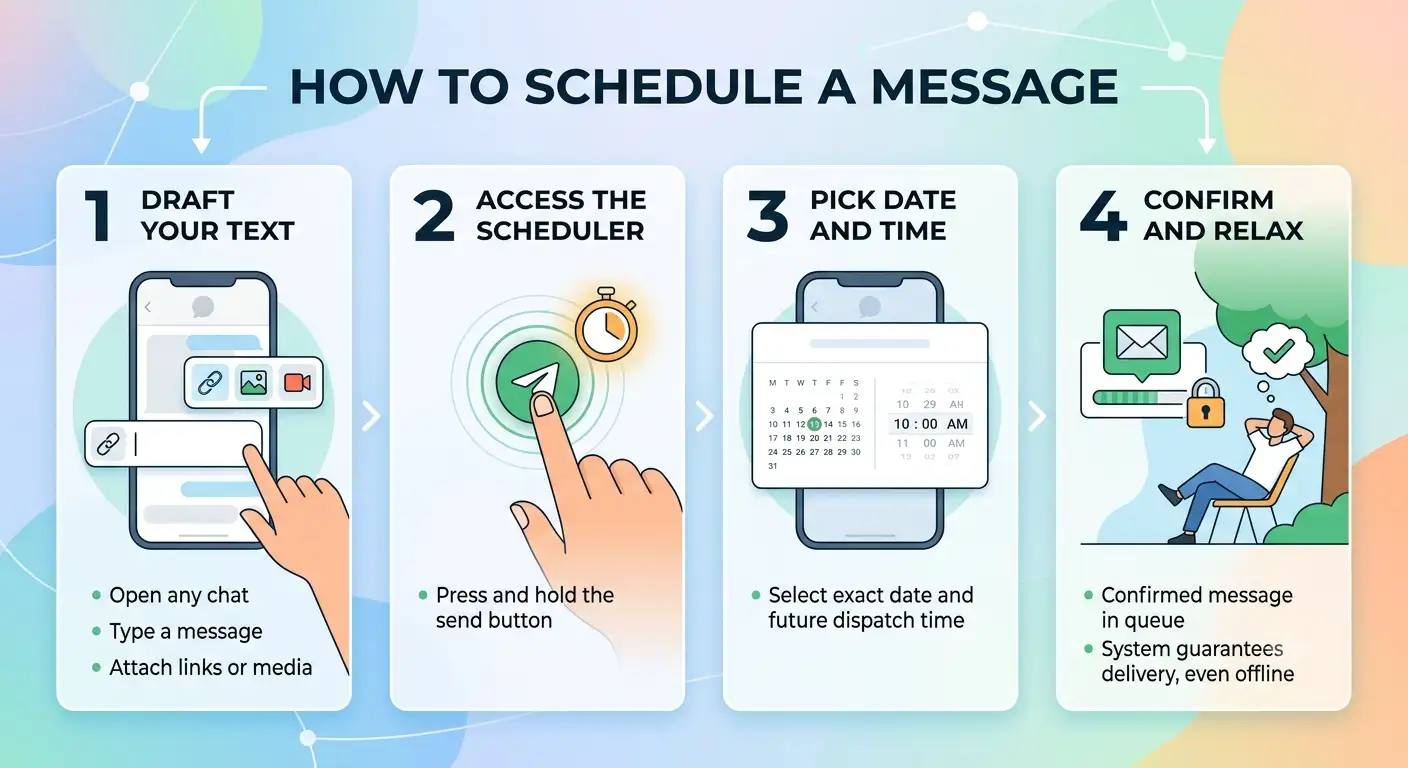
Best Practices for Effective Message Scheduling
Mastering message scheduling requires more than just knowing where to tap; it involves strategy and clarity. Because scheduled communications remove you from the immediate context of the conversation, adhering to a few core principles ensures your messages land with maximum impact:
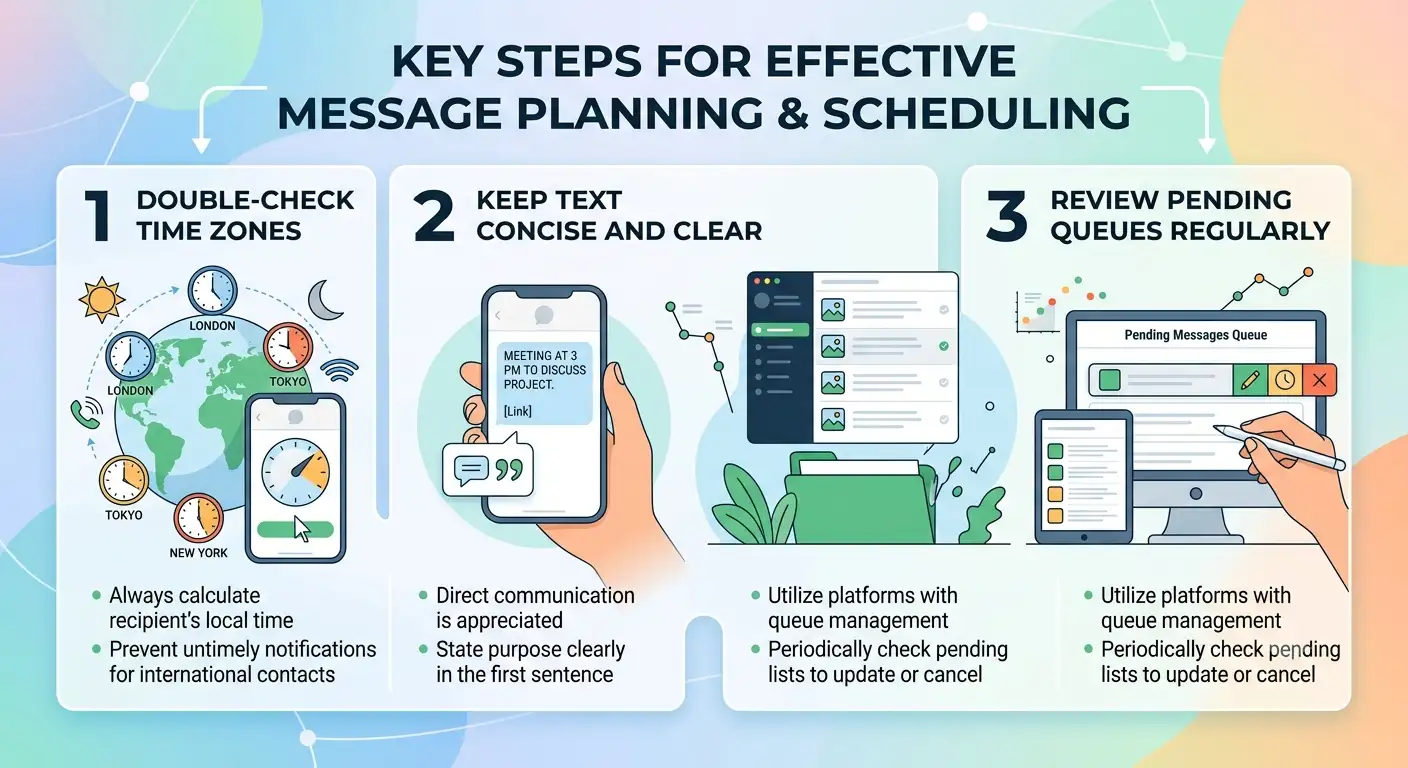
By utilizing these official pathways, integrated business tools, and upcoming native features, you can take complete control of your communication schedule, ensuring efficiency, professionalism, and perfect timing in every interaction.
Frequently Asked Questions
1. Can I schedule messages on WhatsApp without third-party apps?
Yes. You can use official workarounds like the Away Message schedule feature in the free WhatsApp Business app, or use native scheduling options currently rolling out to Android beta testers.
2. Is WhatsApp message scheduling free to use?
Yes. Both the native beta scheduling tools and the built-in scheduling options available in the official WhatsApp Business app are completely free of charge.
3. Does WhatsApp for Android have a native message scheduling feature?
WhatsApp has introduced native scheduling functionality to select Android beta testers. In supported versions, users can long-press the send button to designate a specific delivery time.
4. How does message scheduling work in WhatsApp Business?
WhatsApp Business allows you to configure an automated “Away Message” on a custom schedule. You can set specific operating hours, custom time windows, or outside-business-hours triggers to automatically send predetermined updates.
5. Are scheduled WhatsApp messages end-to-end encrypted?
Yes. Using official WhatsApp channels—such as the native beta scheduler or the official WhatsApp Business platform—ensures that all transmitted messages maintain standard end-to-end encryption.
6. Do third-party WhatsApp scheduling apps pose security risks?
Yes. Most third-party scheduling apps require accessibility permissions and screen overlay access to mimic human taps, which can compromise personal privacy, violate WhatsApp’s Terms of Service, or result in temporary account bans.
7. Can I schedule WhatsApp messages to groups as well as individual chats?
In supported beta builds and official business broadcast setups, scheduled messages can be deployed to both private individual chats and multi-user group conversations.
8. Does my phone need to be connected to the internet at the scheduled send time?
For official client-side scheduling features, your device must maintain an active internet connection (Wi-Fi or mobile data) at the selected delivery time for the message to leave the outbox.
9. Can I edit or cancel a scheduled message before it sends?
Yes. In interfaces supporting scheduled messages, pending messages typically reside in a queue where you can edit the text, adjust the target delivery time, or delete the scheduled event entirely prior to dispatch.
10. When will native message scheduling roll out to all WhatsApp users?
Native scheduling is rolled out in phases through WhatsApp’s Google Play Beta program. Once performance and encryption reliability meet platform standards, the feature expands to the stable public release.

Selva Ganesh is a Computer Science Engineer, Android Developer, and Tech Enthusiast. As the Chief Editor of this blog, he brings over 10 years of experience in Android development and professional blogging. He has completed multiple courses under the Google News Initiative, enhancing his expertise in digital journalism and content accuracy. Selva also manages Android Infotech, a globally recognized platform known for its practical, solution-focused articles that help users resolve Android-related issues.




I never realized how much I needed scheduled messaging until I started using this method. It keeps my personal and professional life running like clockwork.
The breakdown of these official techniques is both clever and reliable. It is great to see a solution that does not compromise user privacy.
Staying awake across different time zones to send updates was exhausting. Now I can queue everything up before bed and sleep soundly.
Efficiency in communication is everything for modern entrepreneurs. This free trick has already saved me hours of manual tracking every single week.
Digital landscapes evolve so fast, yet basic messaging features lag behind. I am bookmarking this guide for future reference as my daily tasks continue to pile up.
Social connections thrive on thoughtfulness, like remembering milestones instantly. Scheduling those greetings ensures I never miss an important date again.
I tried setting up the automated trigger this morning for a team meeting reminder. It executed perfectly, proving that official workarounds can sometimes beat native updates.
Global connectivity demands smarter tools to manage our busy social lives. This feature addition will undoubtedly help millions of users stay organized daily.
This is by far the most comprehensive tutorial on the subject I have read. Thank you for breaking down the technical steps in such an accessible way.
I always worried about getting banned for using unofficial scheduled messaging apps. Knowing there is a safe, official way to do this brings immense peace of mind.
Professional obligations often require reaching out during off-hours, which can feel intrusive. Scheduling those messages officially lets me maintain better work-life balance.
Sending birthday greetings right at midnight without staying awake is the ultimate life hack. I tested this method yesterday, and it worked like absolute charm.
It is amazing how a simple feature request can take years to implement officially. Thankfully, clever use of built-in shortcuts bridges the gap nicely for now.
Communication truly rules our routines nowadays, making efficiency tools essential. Being able to queue up messages ahead of time gives me back valuable mental space.
The step-by-step instructions provided here are super easy to follow. Setting up automated reminders for my small business operations has never been simpler.
I appreciate that this article focuses strictly on official methods rather than sketchy mods. Security and privacy are paramount when dealing with daily messaging apps.
Managing different time zones used to mean setting annoying alarms in the middle of the night. These official scheduling tricks make cross-border communication completely seamless.
WhatsApp is definitely a global titan, but missing basic features like this for so long was frustrating. I am glad these official methods are finally being highlighted clearly.
Using built-in automation tools really changes the game for professional communication. It ensures my clients get their morning updates right on time without manual effort.
This guide on scheduling messages without third-party apps is incredibly timely. I often forget late-night birthdays, so having a native workaround will save me a lot of stress.