
Share Photos Faster on WhatsApp Media Suggestions– Sharing pictures and videos with friends and family is one of the most popular ways to stay connected. However, finding the right image can sometimes feel like a chore. You finish a vacation, attend a family gathering, or take a funny snapshot, and when you want to send it over chat, you have to dig through hundreds of items in your phone gallery.
Fortunately, WhatsApp has introduced a clever feature designed to streamline this exact process. Known as media suggestions, this addition aims to make sharing recent photos and videos significantly faster. By understanding how this feature works, anyone can share memories instantly without navigating away from their conversations.

Understanding WhatsApp Media Suggestions
The concept behind media suggestions is simple: anticipation. When you open a chat window to send a message, WhatsApp can intelligently recognize the most recent additions to your device storage. Instead of forcing you to open your phone gallery, locate the image, and select it manually, the application brings forward relevant options right where you need them.
This functionality bridges the gap between your phone’s camera roll and your messaging app. Whether you are using an Android device or an iPhone, the goal is to reduce the steps required to share a visual moment.
How the Feature Works in Daily Chats
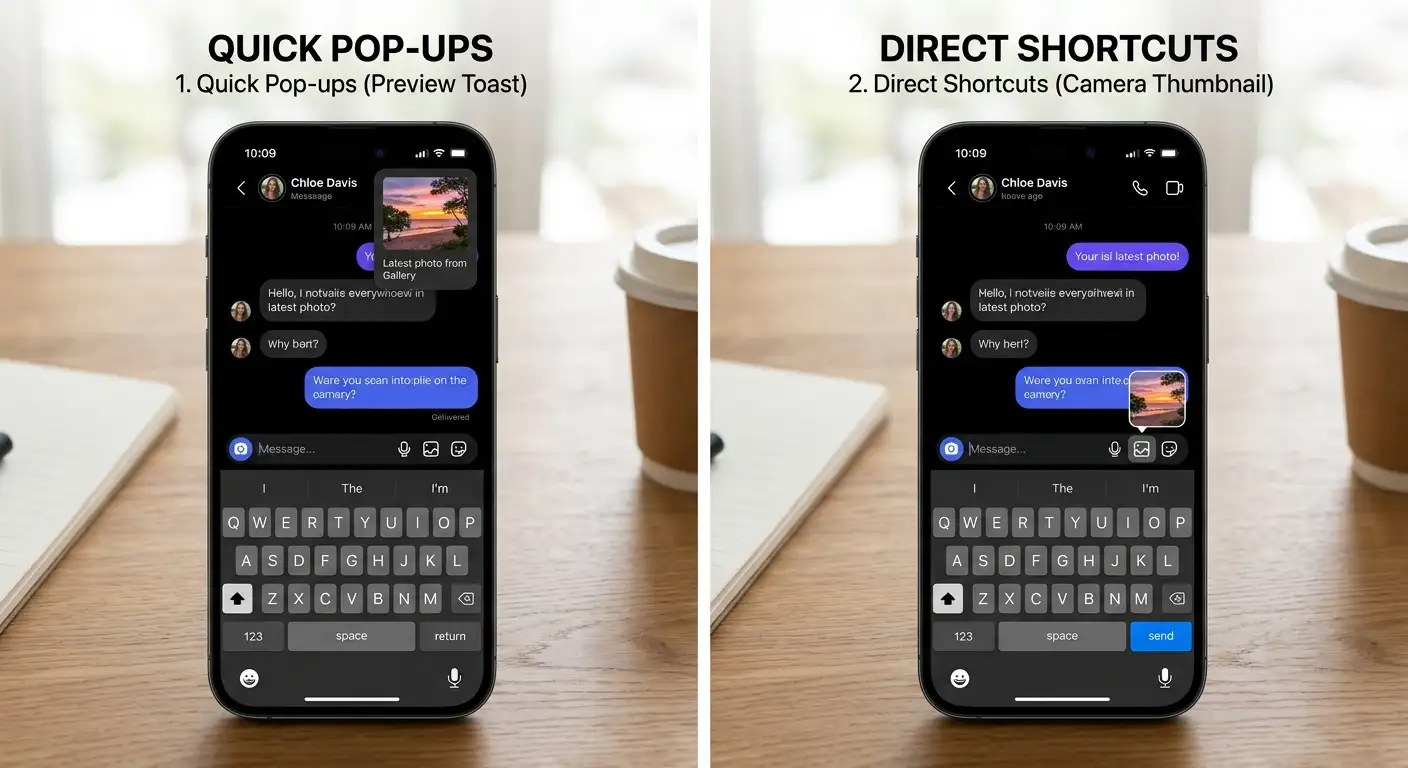
When the feature is active on your account, media suggestions appear dynamically within your messaging interface. Depending on your app version and setup, you may notice suggestions displayed in a couple of different ways:
-
Quick notification prompts: A subtle preview or toast message may appear, highlighting a recently captured image or video.
-
Camera icon integration: In some interface configurations, the standard camera icon inside the chat bar is temporarily replaced by a small thumbnail of your most recent photo or video.
In either scenario, the app ensures you maintain total control. Tapping a suggestion does not instantly blast the photo into the chat. Instead, it opens the familiar editing screen where you can review the image, add a text caption, apply doodles, or attach stickers before sending. This safeguard prevents accidental shares if you tap a suggestion by mistake. If you choose to ignore the suggestion, you can simply continue typing your message as usual.
Main Benefits of Faster Media Sharing
For everyday users, this update brings several practical advantages:
-
Time savings: Cutting out the step of switching between apps or scrolling through an endless gallery saves valuable seconds.
-
Reduced friction: Conversations flow more naturally when sharing a spontaneous snapshot takes only a single tap.
-
Accidental share prevention: Because the app opens an editing preview rather than sending immediately, you have a chance to double-check your selection.
Managing Your Preferences and Privacy
Not everyone wants their recent snapshots surfaced automatically inside messaging windows. Fortunately, the feature is fully optional and customizable.
If you prefer a cleaner interface or value your privacy, you can easily disable media suggestions through your application settings. Navigating to your chat preferences allows you to turn off recent media suggestions with a single toggle, ensuring WhatsApp operates exactly the way you want. Because updates roll out gradually across different regions and operating systems, keeping your application updated to the latest version ensures you have access to these controls as soon as they become available on your device.
Frequently Asked Questions
1. What are WhatsApp media suggestions?
They are a feature designed to surface your most recent photos and videos directly inside chat screens so you can share them quickly without opening your phone gallery.
2. Do photos send automatically when I tap a suggestion?
No. Tapping a suggestion opens the preview and editing screen, allowing you to review the image, add captions, or cancel before sending.
3. Is this feature available on both Android and iOS?
Yes, the rollout covers both major smartphone operating systems.
4. Can I turn off media suggestions?
Yes, you can easily disable the feature by navigating to your chat settings within the application.
5. Why do I not see media suggestions on my phone yet?
WhatsApp rolls out new updates gradually, meaning it may take some time for the feature to reach your specific account.
6. What types of files are suggested?
The feature looks at your most recent media items, which can include regular photos, downloaded pictures, videos, or screenshots.
7. Will media suggestions slow down my phone?
No, the feature runs locally and efficiently, designed to assist with sharing without impacting overall device performance.
8. Do I need a special app version to use this?
You need to ensure your application is updated to a version that supports the feature, though the rollout happens automatically through standard app updates.
9. Can other people see what media is being suggested to me?
No, your media suggestions are entirely private and only visible to you on your personal device screen.
10. How do I access the setting to manage this feature?
Open your app settings, select the chat preferences menu, and look for the toggle controlling recent media suggestions.

Selva Ganesh is a Computer Science Engineer, Android Developer, and Tech Enthusiast. As the Chief Editor of this blog, he brings over 10 years of experience in Android development and professional blogging. He has completed multiple courses under the Google News Initiative, enhancing his expertise in digital journalism and content accuracy. Selva also manages Android Infotech, a globally recognized platform known for its practical, solution-focused articles that help users resolve Android-related issues.




Leave a Reply