
Due to the current situation, We are separated and stay in our houses. We are currently using Video chat apps to contact with our loved ones and work-related. There are a lot of apps that can do this job. But, Most of the apps struggle to give better video quality and audio quality backup due to their limited server capacity. Most of the time, they go outage, or we get poor quality. Here we know only tech giants like Google can resolve the issue. Thus Google took a step forward and made some changes in their video call platform-Google Duo. Now you can talk with up to 12 people at a time, including you. If you already used Google Duo, you know how much it is better to compare with other apps. Also, you have Google’s trust.

When will I get the extension up to 12 People in Google Duo?
This feature does not come as an update. Google did some tweaks in its server-side. Thus, you can access the 12 people limit without waiting for the update to roll out by Google. In initial days google supports only four people. Then it makes eight people. Now, they increased the limit further. Even if it is a server-side tweak, update your app to the 79.0 version. You can’t use the Group calls feature in the web version.

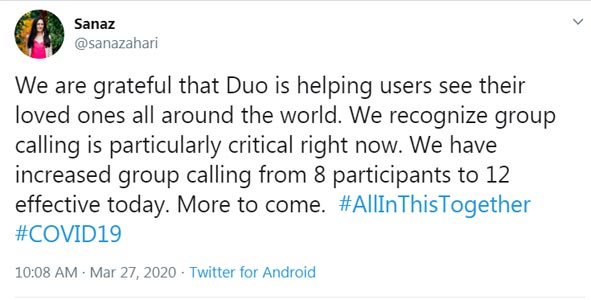
As Announced by Sanaz-Sr( Director of Product & Design @ Google), The update already rolled out and available in realtime for users. When we check in the app, the option is there. Also, they are working on the Google messages reaction. When one of the users asks about it, Sanaz replied: “Stay Tuned.” So, We can expect that feature too. But, It may take some time due to the limited team available, and they focus on more important things.

How to Make Group Calls to 12 People in Google Duo?
This feature does not come as an update. Google did some tweaks in its server-side. Thus, you can access the 12 people limit without waiting for the update to roll out by Google. Even if it is a server-side tweak, update your app from the Play Store to the 79.0 version. You can’t use the Group calls feature in the web version.
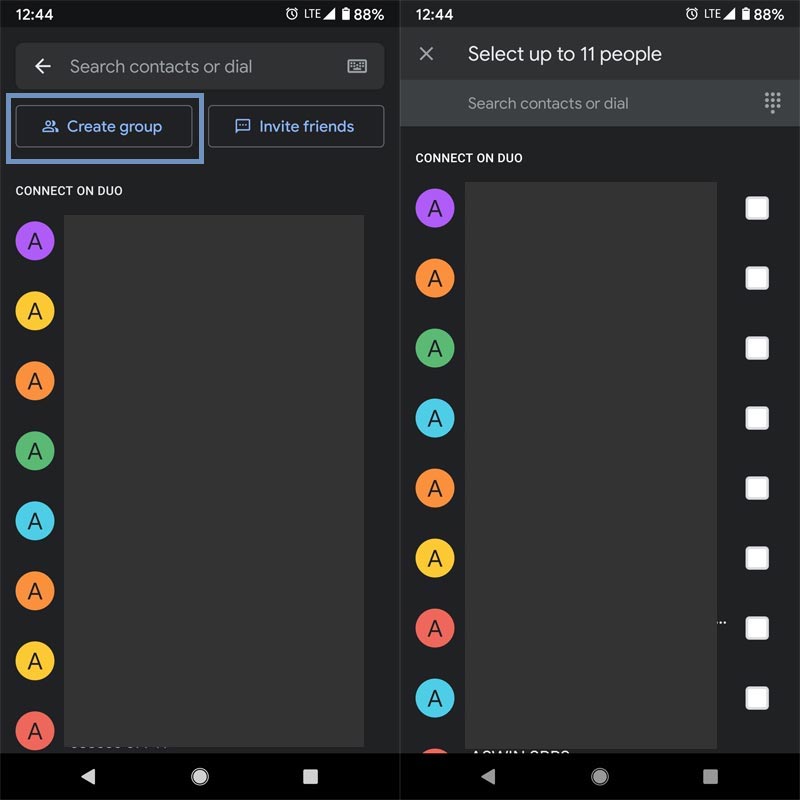
- Open your installed Google Duo app.
- Open Contacts and choose “Create Group.”
- You can select the other 11 people and make a group. So, You and the other 11 people make 12 People in the group call.
Wrap Up
The problem with the Google Duo is, It doesn’t support Group calls on Web version. So, Unless you have Big screen Tablets, You can’t make the correct conversation among those 11 People. As you already know, Google Duo may not be comfortable for Business and Work usage. You can use Gsuite solutions. Google already did full capabilities to make the product better. The motto of the Duo is to connect with the people and feel like you are there with them. Even if in this current situation and some network outage problems, It works better compare with other third-party apps. Also, When you use Google products, you will feel secure. What are your thoughts on this extension? Did you think it is useful? Comment below.

Selva Ganesh is a Computer Science Engineer, Android Developer, and Tech Enthusiast. As the Chief Editor of this blog, he brings over 10 years of experience in Android development and professional blogging. He has completed multiple courses under the Google News Initiative, enhancing his expertise in digital journalism and content accuracy. Selva also manages Android Infotech, a globally recognized platform known for its practical, solution-focused articles that help users resolve Android-related issues.




Leave a Reply