
Even if Facebook and Instagram fall into privacy issues among users, The Total Volume of users on both platforms is huge. People use those platforms daily to share their thoughts and activities. The company also rolling out new features to make users comfortably use the platform. Recently they added a new feature on Instagram. Hereafter you can Restore your Recently Deleted Posts on Instagram. The Restore includes Photos, Videos, Reels, IGTV videos, and Stories. It will be useful when you accidentally deleted a post and revert to live.
It sometimes happens when you feel the “delete regret” after deleting some of your posts or stories. And you start asking the ways to get back what has been deleted. Or you may have faced this trauma once you got your Instagram account compromised, and as a result, you lost your favorite posts and stories.

Not only you, but many of the Instagram users with compromised accounts are asking the ways to get back the images of their memorable moments. Now the Instagram felt the severity of this issue and roll out a new feature, “Recently Deleted,” that allows you to restore your deleted posts and stories within 30 days of deletion.
Recover/Restore Recently Deleted Instagram Posts Feature
The recently launched feature by Instagram, called “Recently Deleted,” stores all you have deleted, including images, Reels, IGTV videos, and stories. It allows you to review your deleted items and restore those that you still want in your gallery. It is also beneficial for those who have lost their favorite pics from the Instagram gallery.
Instagram announced in its official announcement blog post about this new feature that all deleted items would be saved in the Recently Deleted folder for 30 days. After 30 days, everything will be auto-deleted. The only exception is for stories that you have not archived, it will stay only for 24 hours, and after that, it will be auto-deleted.
How to Access/Enable the Recently Deleted Folder on Instagram?
To recover your deleted items on Instagram, you need the latest version of Instagram installed on your device. If you don’t have the latest version, you can download the Android version from here and the iOS version. Now follow these steps:
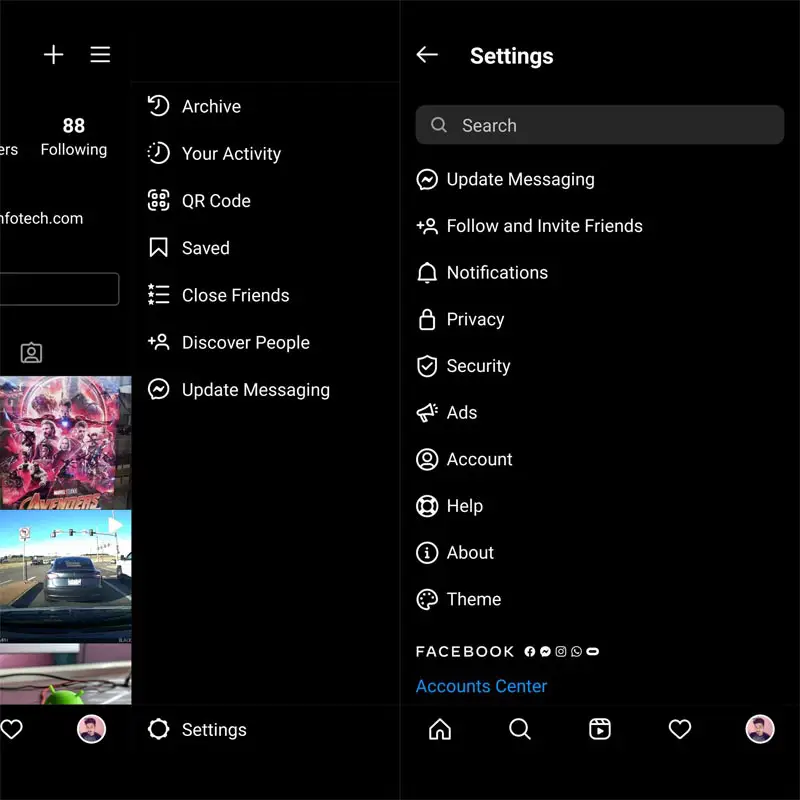
- Open Instagram on your device
- Go to Settings
- Scroll down for Account
- Tap Recently Deleted.
Here you can see all of your deleted items. Now you can restore any of these items or permanently delete them from Instagram. Starting today, Instagram will ask you to verify yourself as the rightful account holder when you ask for permanent deletion or restoration of deleted items from the Recently deleted folder.
How to Restore Deleted Items from the Recently Deleted Folder on Instagram?
To restore the deleted items or delete them permanently from the Recently Deleted folder, follow these simple steps:
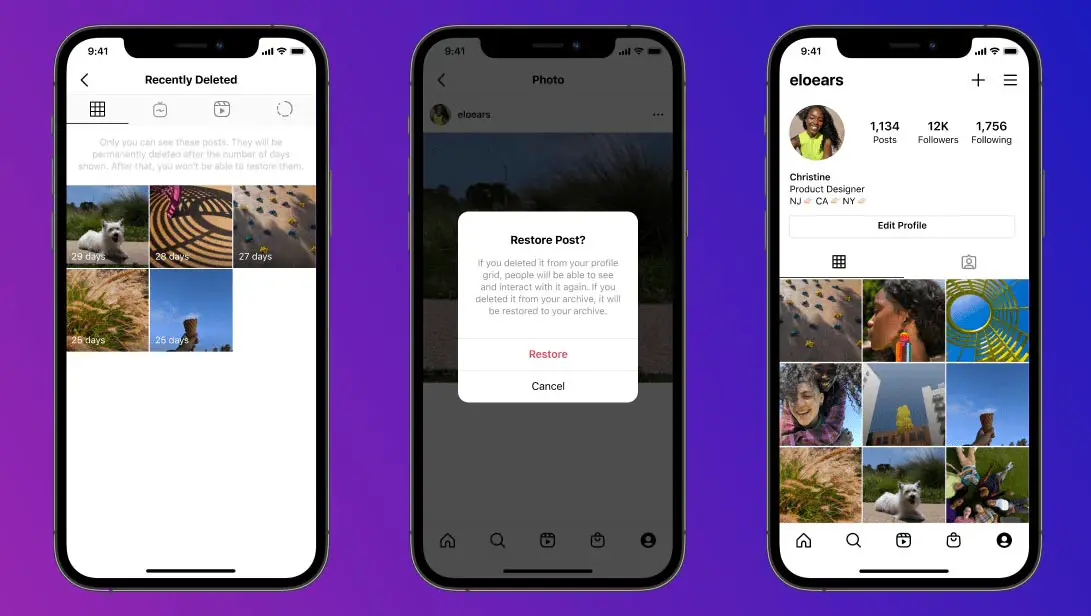
- In the bottom right corner, tap your Profile picture.
- Select the three lines icon from the top right.
- Tap Settings
- Scroll down and tap Account.
- Select the Recently Deleted
- Tap the type of content that you like to restore or delete permanently.
- Select the photo, video, or story that you want to restore or delete permanently.
- Select the three-dot icon.
- Choose Restore to profile or Delete.
- Verify yourself as the rightful account holder to restore or permanently delete this content.
For How long can you Restore from the Recently Deleted Folder on Instagram?
Any photos, videos, Reels, stories, or IGTV videos that you decided to delete are instantly removed from your gallery and move to the Recently Deleted folder. The same will happen if anybody deletes your Instagram gallery items. Now you can restore your deleted content within 30 days, and after that, it will be auto-deleted permanently. Deleted stories that you didn’t archive will stay only for 24 hours in the Recently deleted folder, and after that, they will be auto-deleted from this folder.
Wrap Up
Privacy and security are the major concerns for you when sharing your data on any social media platform. And if any person accesses your Account, the least you face is the deletion of your data. Instagram users are facing account compromise issues these days. To compensate for your accidental deletion of data by you or by any person, Instagram introduced the option to restore your deleted data within 30 days.
Besides this, Instagram also announced that an extra security layer is being introduced to save your data from compromise. The Facebook-owned company will ask you to verify yourself as a rightful account holder to restore your permanently deleted data on Instagram. Be careful to delete your content if you don’t have the latest version of Instagram installed on your Android or iOS device. Do tell us in the comments below if this rolls out proved beneficial for you.

Selva Ganesh is a Computer Science Engineer, Android Developer, and Tech Enthusiast. As the Chief Editor of this blog, he brings over 10 years of experience in Android development and professional blogging. He has completed multiple courses under the Google News Initiative, enhancing his expertise in digital journalism and content accuracy. Selva also manages Android Infotech, a globally recognized platform known for its practical, solution-focused articles that help users resolve Android-related issues.




Leave a Reply