
We have all been there. You spend months meticulously building a daily language learning habit, watching the flame icon grow from a modest double-digit number into a towering testament of your dedication. Then, life intervenes. An exhausting workday, an unexpected family emergency, a flight across time zones, or simply a night where sleep claims you before you can complete your daily lesson. You wake up the next morning, open the green owl app, and feel a heavy sinking sensation in your stomach: your Duolingo streak is broken.
The psychological impact of losing a streak can be utterly devastating to your educational momentum. For many of us, that number represents more than just digital gamification; it represents hard work, consistency, and a daily promise to ourselves. When it resets to zero, the barrier to restarting feels immensely high, and many learners walk away from their target language altogether.

Fortunately, we do not have to accept defeat. We have uncovered the absolute best legal, ethical, and built-in methods to revive Duolingo’s old broken streak for free without emptying your wallet on premium tiers or expensive gem packs.
The Official Free Solution: The Limited Time Streak Revival Event
We are thrilled to highlight an official, completely free mechanic that Duolingo periodically deploys to bring lapsed learners back into the fold. The platform understands that permanent streak loss actively discourages users, which is why they introduce the official Duolingo Streak Revival Event.
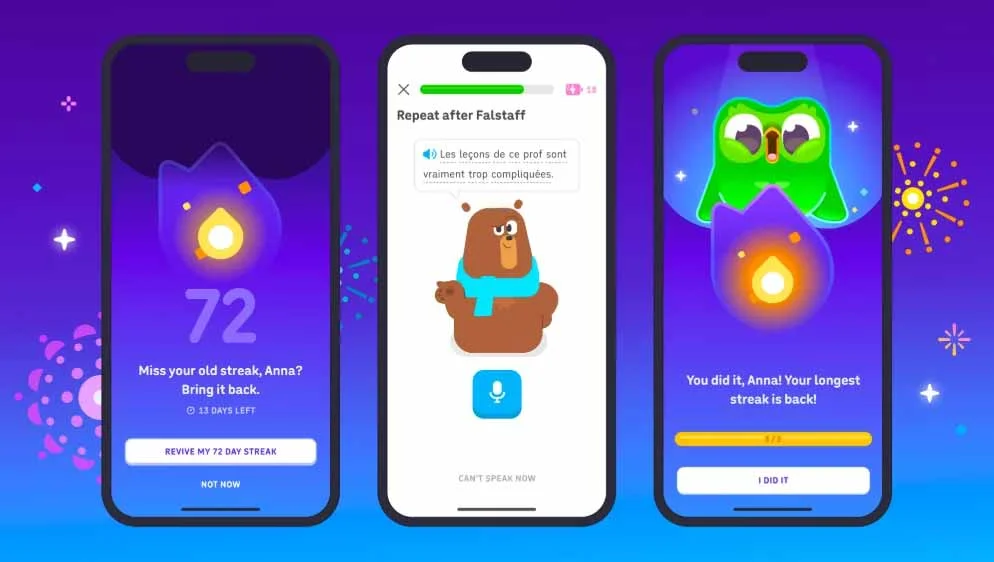
How the Free Streak Revival Event Works?
This specific feature targets users who have lost a substantial milestone—specifically, an old broken streak of 30 days or more. Instead of demanding that you pay with hard-earned real money or premium virtual currency, the application challenges your dedication.
To successfully reclaim your old milestone under this event, we must follow a straightforward execution protocol:
- Open the Duolingo application on your iOS or Android device.
- Look for the dedicated promotional prompt or notification announcing the Streak Revival Event.
- Accept the challenge and immediately complete three consecutive lessons without breaking your focus.
Once you complete these three lessons in a row, the platform automatically restores your highest historic milestone completely free of charge.
Crucial Limitations of the Official Event
While this official event is an incredible lifeline, we must note a few strict parameters to manage your expectations:
- Time-Bound Execution: These events are highly time-sensitive promotional windows. If you do not execute the required lessons within the active event timeframe, the opportunity disappears.
- No Combining Streaks: If you had an old 1,000-day milestone that broke, and you subsequently built up a fresh 500-day milestone, the event will safely restore your 1,000-day achievement. However, it will not merge them into a 1,500-day tally.
- Targeted Visibility: If you currently possess an active streak and have not suffered a historic loss of 30 days or more, this event interface will not display on your account profile.
Technical Workarounds: The Time Travel Time Zone Adjustment Trick
If you just missed your streak cutoff by a matter of hours and do not want to wait for an official corporate event window, we can utilize a classic technical workaround. This method relies on manipulating your smartphone’s internal clock to trick the server into thinking you completed the lesson before the midnight reset.
1. Force Close the App: Prerequisite Step.
Completely close the Duolingo application on your device. Ensure it is not running in your background multitasking tray, so it clears its temporary cache.
2. Disconnect Network Access: Isolate Your Device.
Toggle on Airplane Mode and manually turn off both Wi-Fi and Cellular Data. This prevents your device from cross-referencing global atomic clocks online.
3. Adjust Date and Time Settings: The Time Travel Mechanism.
Navigate to your phone’s System Settings. Turn off the “Set Automatically” option for Date and Time. Manually roll the clock back to the previous calendar day, selecting a time well before midnight.
4. Execute Your Lesson: Re-establish the Habit.
Launch the Duolingo application while remaining offline. Complete one full lesson in your target language path successfully.
5. Restore Normal Settings: Re-sync to Reality.
Close the app again, return to your phone settings, re-enable automatic time sync, turn off Airplane Mode, and open Duolingo over an active internet connection to let the local progress sync to the cloud.
Leveraging Support and Social Mechanics for a Free Restore
If technical workarounds feel too risky or complex, we can leverage the human side of the language learning community. Duolingo values its active community, and the staff behind the scenes possess the administrative power to correct errors or grant grace periods.
Requesting Direct Support via Social Channels
The customer service engineering teams at Duolingo are remarkably active on public social media platforms, particularly X (formerly Twitter). If your milestone broke due to a documented application bug, a sudden server outage during your practice session, or a legitimate personal crisis, you can tag their official handle (@duolingo).
When structuring your appeal, we advise keeping the tone exceptionally polite, clear, and concise. Provide your exact alphanumeric username and explain the scenario. In dozens of documented community instances, support representatives have manually applied a complimentary Streak Repair to user accounts as a gesture of goodwill.
Strategic Gem Accumulation for In-App Safety Nets
While purchasing gems with real fiat currency is exactly what we want to avoid, accumulating them natively inside the app is entirely free. We highly recommend maximizing your daily intake of virtual currency so you always have a cushion when a true emergency strikes:
- Always open your Daily Chests located in the shop tab.
- Maintain a high position on your weekly Leaderboard Leagues to earn massive gem payouts every Sunday evening.
- Complete the comprehensive monthly challenges to secure large-scale currency rewards.
By hoarding these free gems, you can easily afford the standard 500-gem Streak Repair directly inside the app store whenever you experience an accidental break, maintaining your streak completely for free.
Proactive Preservation: How to Never Lose a Streak Again
The ultimate way to enjoy a free streak is to ensure it never breaks in the first place. By adopting a handful of proactive habits, we can safeguard our language learning journey against unexpected disruptions.
Strategy Implementation Method Financial Cost
Streak Freeze Equipping: Keep two Streak Freezes permanently equipped in your shop inventory at all times. They activate automatically on days you forget to practice. Free (Using earned gems)
The 2-Minute Habit Rule: On incredibly busy days, do not attempt a complex new unit. Navigate to your oldest, easiest unlocked skill or characters tab and complete a basic review lesson in under two minutes. Free
Customized Push Notifications: Configure the application to send smart alerts to your lock screen precisely two hours before your typical bedtime. Free
By implementing these automated guardrails, you shift your energy away from stressful recovery workarounds and channel it directly back into what truly matters: mastering your brand-new language.
Frequently Asked Questions
Q: Can Duolingo permanently restore a streak that broke months ago?
A: Generally, customer support teams can only assist with recently broken milestones that occurred due to application glitches or exceptional short-term circumstances. For very old broken progress, you must wait for a specialized event challenge.
Q: Does the time zone trick work on the desktop web browser version?
A: No, the desktop browser environment constantly pulls live server time directly from web hosting protocols, making time zone manipulation ineffective. This workaround is strictly confined to native mobile operating systems.
Q: How many times can I use the free Streak Revival Event?
A: These events are highly regulated internal promotions launched at corporate discretion. They cannot be triggered on demand by the user and are typically limited to once per calendar quarter per eligible account.
Q: What is the maximum streak number that can be restored for free?
A: There is no mathematical cap on the streak size. Whether your lost tally was 30 days or 3,000 days, the recovery mechanics will restore the exact historic figure to your profile.
Q: Will installing an older version of the APK file allow free streak repairs?
A: We highly advise against this strategy. Duolingo processes streak validation server-side. Modifying local client packages or using outdated applications frequently results in synchronization failures or potential profile bans.
Q: Do Duolingo Max or Super Duolingo subscriptions grant infinite streak restores?
A: Premium tiers grant a monthly complimentary Streak Repair credit, but they do not offer infinite free recoveries for repeated, ongoing consecutive misses.
Q: Can my friends in a Duolingo Quest save my streak for me?
A: Friends cannot directly practice on behalf of your account to save your personal streak, but participating in Friends Quests provides massive gem bonuses that you can use to purchase free safeguards.
Q: Does practicing an offline lesson count toward my streak survival?
A: Yes, if you download lessons ahead of time, you can complete them entirely offline. However, you must connect your device to an active internet connection before the day ends so the data registers on the main servers.
Q: Can I use multiple Streak Freezes on consecutive days?
A: Yes, if you have multiple freezes equipped in your inventory simultaneously, they will consume themselves sequentially day after day until your inventory runs empty.
Q: Does changing languages reset my active progress milestone to zero?
A: Absolutely not. Your daily counter is tied globally to your entire user profile. You can switch from Spanish to Japanese fluidly without interrupting or resetting your ongoing active streak.

Selva Ganesh is a Computer Science Engineer, Android Developer, and Tech Enthusiast. As the Chief Editor of this blog, he brings over 10 years of experience in Android development and professional blogging. He has completed multiple courses under the Google News Initiative, enhancing his expertise in digital journalism and content accuracy. Selva also manages Android Infotech, a globally recognized platform known for its practical, solution-focused articles that help users resolve Android-related issues.




The details were clear and easy to follow. I like how the article focuses on free recovery methods.
I like how the article explains the reasons behind broken streaks. The advice is useful.
This answered a question I had for a long time. The examples make the process less confusing.
This guide answers several questions I had. The explanations are straightforward.
Good tips for maintaining language learning consistency. The article offers useful insights.
The practical examples helped me understand the options better. Nice work on the guide.
Very informative post with easy instructions. It is good to know there are ways to restore progress.
I like how the article acknowledges real-life interruptions. The tips feel realistic.
The instructions are clear and beginner friendly. The article is a useful reference.
Great article with actionable suggestions. It answers common questions clearly.
Useful article that addresses a common problem. The solutions seem achievable.