
Google Gemini Go represents a monumental shift in how artificial intelligence is distributed across mobile ecosystems. Historically, cutting-edge AI software has been restricted to premium flagship hardware boasting massive system resources. With the introduction of this streamlined architecture, we are witnessing the democratization of generative AI, bringing advanced natural language processing to budget-conscious users globally.
Understanding the Gemini Go Architecture
To understand how to get this software on your device, we must first analyze what Gemini Go actually is. This is not a heavy, storage-eating application designed for premium chipsets. Instead, it is a highly optimized, cloud-assisted artificial intelligence framework explicitly compiled for Android Go edition smartphones.

Google engineered this version to run flawlessly on entry-level mobile devices equipped with as little as 2GB of RAM. By stripping away heavy local execution pipelines and relying on efficient server-side processing coupled with a lightweight local client, the system delivers near-instantaneous conversational responses without draining the limited system resources, memory, or battery capacity of affordable hardware.
The Elimination of Separate App Downloads
A common point of confusion for mobile users looking for a dedicated installation file is searching the marketplace for a distinct standalone app icon labeled “Gemini Go.” We must clarify that there is no separate Gemini Go application download on the Google Play Store.
Google has taken an integrated system approach. The entire artificial intelligence interface is baked directly into the core Google Go and the main Google Search application ecosystem. Rather than forcing users with limited onboard storage to download an additional 100MB package, the tech giant updated the existing pre-installed search binaries to house the new AI architecture. This means your entry-level phone already has the foundational framework to execute these tasks; it simply requires proper activation of the system state.
Step-by-Step Guide to Activating Gemini Go
Because the deployment is integrated into the underlying system software, securing access relies entirely on keeping your foundational Google ecosystem components up to date. We have mapped out the precise sequence required to force the initialization of the AI on your compatible Android Go smartphone.
Step 1: Update the Core System Google App
Unlock your smartphone and open the Google Play Store. Tap your profile icon in the upper-right corner, then select “Manage apps & device,” or use the search bar to find the official Google app (or Google Go app, depending on your device configuration). If an update button is visible, tap it immediately to install the latest build. The compiled code that replaces legacy voice actions with generative AI logic is contained entirely within these modern app versions.
Step 2: Clear the Local Application Cache
Occasionally, older system binaries cached in your flash storage can prevent the newly updated interface from displaying correctly. Navigate to your device Settings, open the Apps & Notifications menu, find the newly updated Google application, select Storage & Cache, and tap Clear Cache. This forces the application to rebuild its initialization sequence on its next launch.
Step 3: Trigger the Global Activation Hotkey
Once the application files are updated and cleared, return to your primary home screen. You can initiate the official configuration wizard using two native hardware shortcuts:
- Method A: Perform a continuous long-press on the physical Power key for roughly two seconds.
- Method B: Perform a sustained long-press on the virtual Home button at the bottom center of your navigation bar.
A system prompt will slide up from the bottom of your screen, officially announcing that Gemini Go has replaced Assistant Go.
Step 4: Accept the AI Terms of Service
Follow the on-screen prompts to opt into the modern conversational engine. Review the data permissions, tap the confirmation button, and the system will instantly transition your default long-press shortcut from the legacy voice command tool to the dynamic Gemini interface.
Core Features Engineered for Budget Hardware
Once successfully activated, the platform provides an extensive suite of modern capabilities that vastly outperform the rigid, command-based systems of the past decade.
Advanced Conversational Dialogues
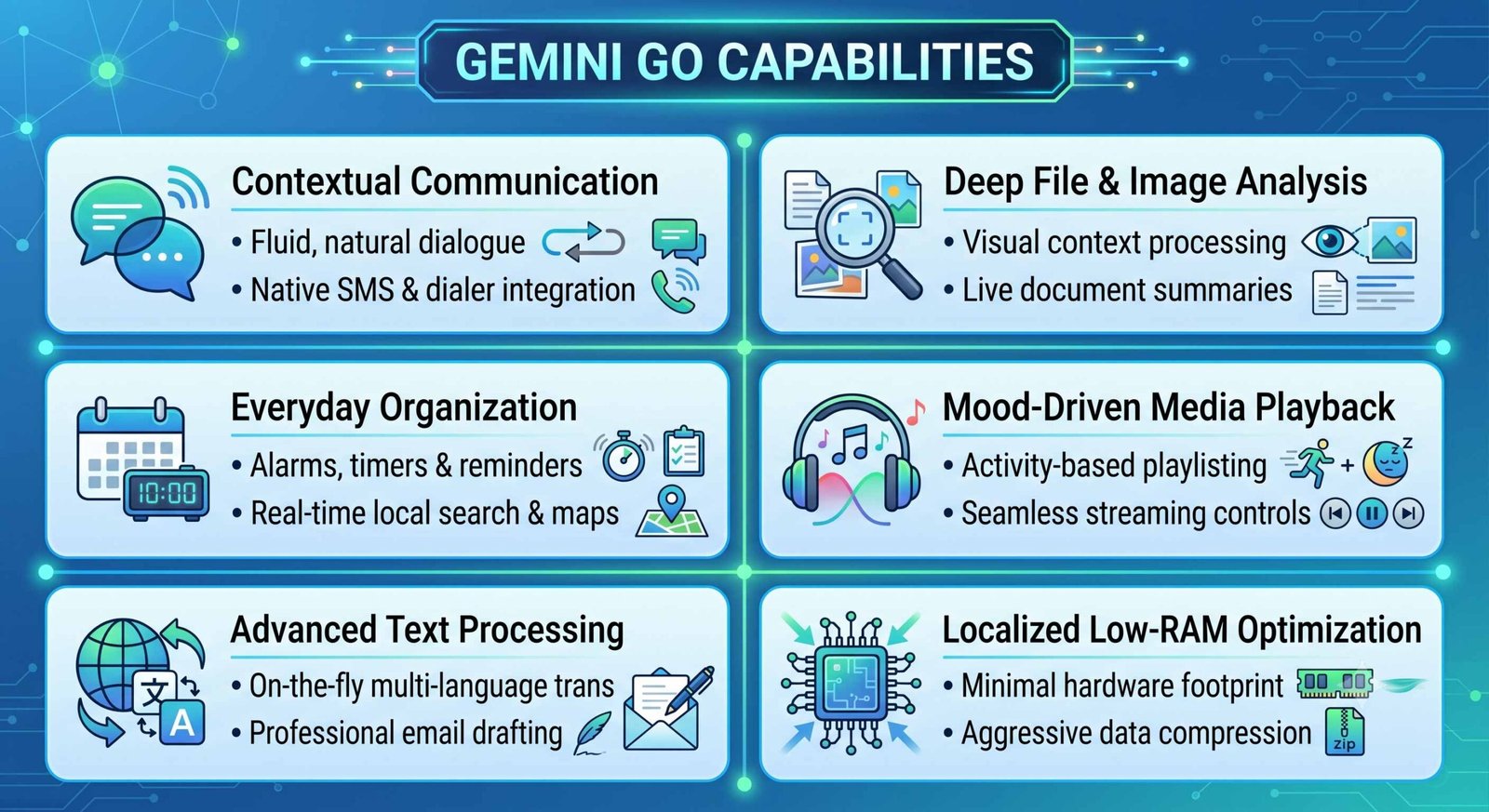
Legacy voice tools required rigid phrases like “Call [Name]” or “Open Weather.” If you strayed from the exact syntax, the system failed. This updated engine understands nuance, slang, and context. You can converse naturally, ask follow-up questions without repeating the subject matter, and request complex assistance, such as drafting formal work emails or translating dense multilingual blocks, directly on your screen.
Comprehensive Local Search and Mapping
The engine leverages deep integration with regional databases to handle highly specific, multi-layered queries. Instead of searching generally for restaurants, you can instruct the assistant: “Find me a local noodle shop open for dinner that has street parking nearby.” The system parses these parameters instantly, cross-references live business directories, and plots the driving route via your navigation apps.
Visual Context and File Analysis
Unlike older lightweight applications that could only read text strings, this upgraded system allows users to upload local files, images, and documents directly into the chat prompt. You can take a photograph of an instructional sign or upload a text document and ask the AI to summarize the contents, extract key dates, or translate the text into your local language instantly.
Intelligent Media Playback and Automation
Entertainment management has received a significant upgrade. Beyond standard song requests, users can issue mood-based instructions such as “Play acoustic music suitable for a quiet dinner” or “Give me upbeat pop tracks for a workout.” The interface connects to your preferred background music applications to curate and stream contextually relevant media without taxing your phone’s processor.
Why Google Is Revolutionizing the Budget Smartphone Market
To appreciate the strategic value of this software update, one must examine the broader landscape of mobile artificial intelligence. The current industry trend is a race to the highest hardware specs. Premium platforms require staggering system resources; competitive AI models frequently demand at least 8GB to 12GB of dedicated RAM and specialized neural processing chipsets to run localized models. This operational barrier effectively locks out a large share of the global population from using entry-level tech.
By deploying this cloud-optimized framework to the Android Go ecosystem, Google is executing a dual-direction market strategy. While they continue to develop high-end local models for flagship phones, they are simultaneously catering to the immense, highly active volume of budget phone owners worldwide, particularly in rapidly growing developing tech markets. This ensures that essential modern tools—such as advanced automated educational assistance, professional text composition, and intuitive digital organization—are made globally accessible, closing the technology gap between premium and entry-level tiers.
Troubleshooting Common Setup Failures
If you have followed the primary installation sequence and still do not see the generative upgrade active on your smartphone, several underlying regional or system variables may be causing the delay.
Gradual Global Rollout Restrictions
Google deploys major system upgrades using a staged server-side distribution model. This means that even if your application file is updated to the latest build, the remote server must activate the feature flag for your specific account or geographic region. If the hardware shortcuts continue to trigger the legacy voice tool, keep your applications updated and wait a few days for the server-side authorization to be applied to your profile.
Minimum System Requirements Check
Ensure your smartphone meets the strict baseline specifications required for execution. Your device must be running a certified version of Android Go and have at least 2GB of system RAM. Devices running older software architectures with less than 2GB of RAM are structurally incompatible with the service and will continue to use legacy voice clients to preserve system stability.
Frequently Asked Questions
Can I download Gemini Go as an APK file from third-party websites?
No, there is no official standalone APK file for this specific version. The software functionality is delivered through system-level updates applied directly to the pre-existing Google app ecosystem on your phone.
Will using this AI model consume more mobile data than old voice search tools?
Because the complex generative processing occurs on secure cloud servers, it does not use mobile data to transmit text and image queries. However, Google has applied data-compression algorithms to optimize transmission sizes for budget network plans.
Does this software completely delete the old Google Assistant Go tool?
Yes, completing the setup process updates your system shortcuts, fully replacing the old assistant utility with the more capable conversational interface.
Can I run this specific lightweight software on a standard Android flagship phone?
No, this version is specifically optimized for entry-level Android Go operating systems. Flagship smartphones use the full-scale standalone application available in the main app marketplace.
Is an active, continuous internet connection required for it to function?
Yes, because the system relies on remote server-side computation to save local memory and battery, your smartphone must be connected to cellular data or a Wi-Fi network to process responses.
What languages are supported on this budget-friendly version?
The platform rolls out with broad multi-language capabilities, supporting major global languages alongside numerous regional dialects, mirroring the language settings configured within your primary device OS.
Can it control local device hardware settings, such as turning on the flashlight?
Yes, it maintains native integration with your phone’s operational framework, allowing you to control hardware functions, set local alarms, open apps, and adjust system volumes via conversational text or voice.
Does this application version contain intrusive monetization or ads?
No, the tool operates as a core, built-in system assistant utility provided directly by Google without adding secondary third-party advertising layers to your interface.
Can I revert to the old voice assistant if I dislike the new interface?
Yes, if you prefer the old layout, you can navigate to your digital assistant settings menu within the app preferences and toggle your default primary system digital assistant back to the classic configuration.
Does uploading local files to the chat prompt compromise my private data?
All data transmissions are thoroughly encrypted during transit. Google processes the uploaded files to provide accurate context for your specific answers, in strict compliance with standard core privacy configurations.

Selva Ganesh is a Computer Science Engineer, Android Developer, and Tech Enthusiast. As the Chief Editor of this blog, he brings over 10 years of experience in Android development and professional blogging. He has completed multiple courses under the Google News Initiative, enhancing his expertise in digital journalism and content accuracy. Selva also manages Android Infotech, a globally recognized platform known for its practical, solution-focused articles that help users resolve Android-related issues.




This information will be useful for people using older Android phones. Nice write-up overall.
The explanation of streamlined AI architecture was interesting. Thanks for making it easy to follow.
The discussion about mobile ecosystems was insightful. I appreciate the broader context provided.
Thanks for breaking down the differences between standard Gemini and Gemini Go. That comparison was helpful.
I was looking for details about Gemini Go availability. This article helped clarify things.
This is a helpful overview of Gemini Go for budget devices. I like how the article explains why lightweight AI matters.
The article does a good job explaining the significance of Gemini Go. Accessibility is important.
The focus on affordability and accessibility stands out. That is a positive direction for technology.
I found the installation information straightforward. Looking forward to seeing real-world performance.
Thanks for sharing this guide about Gemini Go. The accessibility angle is especially interesting.
I appreciate the discussion about resource-efficient AI. It is relevant for a large number of smartphone users.