
Android 17 New Features- Incremental steps have always defined our journey with mobile operating systems, but the official unveiling of the latest platform upgrade reveals a foundational architectural shift. We are witnessing the evolution from a standard application launcher into a fully context-aware, agentic operating system. Through our deep hands-on testing of the latest developer builds, we have analyzed how this new software architecture restructures everyday productivity, local artificial intelligence, and vehicular integration.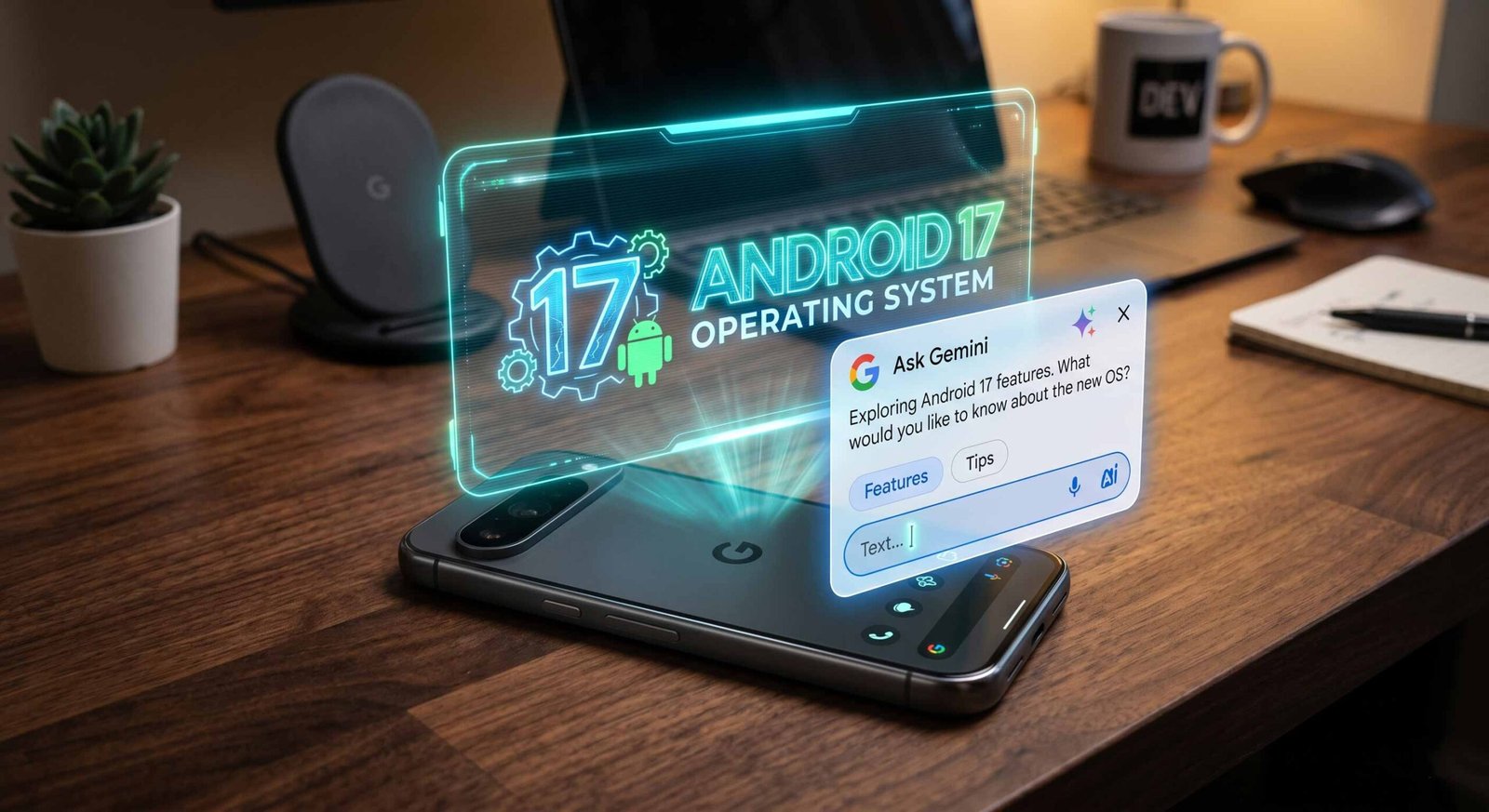
This comprehensive technical analysis unpacks the core mechanics driving these updates, detailing how local machine learning frameworks, advanced digital wellbeing psychology, and newly unified desktop hardware platforms are redefining the modern ecosystem.

Complete Core Features and System Capabilities
The internal system architecture has undergone a complete re-engineering to treat context as a system-level service. Rather than forcing independent applications to operate inside isolated sandboxes without cross-communication, the platform now securely unifies background data streams to eliminate repetitive manual user input.
System-Wide Context-Aware Autofill Expansion
The legacy autofill frameworks were structurally limited to reading explicitly saved credential vaults or scanning basic layout inputs on a screen. The newly upgraded framework introduces a secure, system-wide Retrieval-Augmented Generation (RAG) pipeline capable of securely parsing unstructured data across core native services, including Gmail, Google Wallet, and Google Photos.
When we tested this on highly complex multi-page web forms, such as international visa applications and complex flight check-ins, the operating system bypassed the need for manual copy-pasting. The system securely identifies the context of the required field—such as a specific passport number, frequent flyer identifier, or expiration date—and retrieves it directly from encrypted local storage or deep within a user’s historical confirmation emails. This process is executed via a hardware-level Trusted Context Path, which ensures that sensitive background data retrievals remain fully shielded from potential screen-scraping malware or unauthorized third-party background applications.
Native Creator Tools and On-Device Image Synthesis
The media pipelines have received a major upgrade aimed at eliminating the reliance on third-party cloud-based editing software. Built directly into the core image processing frameworks is an advanced, hardware-accelerated computer vision system powered by the optimized local vision model family.
- Instance Segmentation: The system can isolate complex subjects from photos with pixel-perfect accuracy, handling difficult edges like fine hair or translucent clothing.
- Asset Generation: Users can extract subjects instantly with a single press, converting flat images into transparent layered assets or custom stickers.
- Direct Pipeline Integration: Because these tools are embedded directly into the system-level media framework, this advanced image manipulation is natively accessible across all integrated applications without cloud latency.
The Psychology of Digital Wellbeing: Pause Point
Previous iterations of digital wellbeing tools relied heavily on rigid app timers that users could easily bypass with a simple tap. The new system introduces Pause Point, a deliberate intervention mechanism designed around the behavioral science concept of “soft friction.”
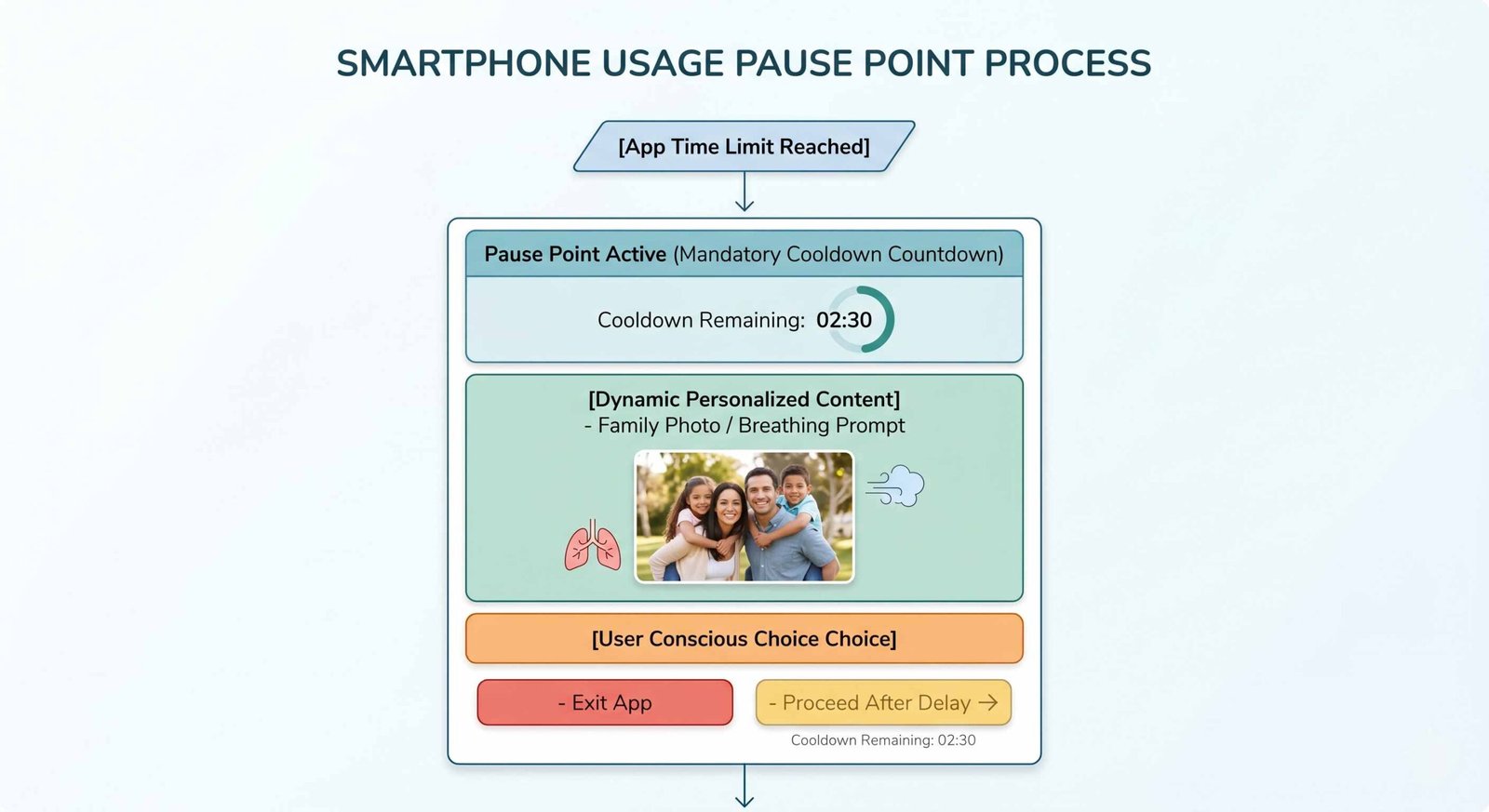
Rather than abruptly locking a user out of an active application, hitting a predefined usage limit triggers a full-screen dynamic overlay that enforces a mandatory pause. The interface forces a structural delay, requiring the user to intentionally wait out a countdown timer before choosing to extend their session. To make the intervention highly personalized and emotionally grounding, the operating system pulls comforting content, such as a localized photo from the user’s family gallery, or offers quick, relaxing breathing exercises. By breaking the automated, subconscious cycle of doomscrolling through forced cognitive reflection, the system successfully changes how we interact with addictive social media apps.
Advanced Speech-to-Text Evolution: Rambler
Voice dictation tools have historically suffered from a major literalism flaw: they record every single spoken sound exactly as delivered, creating messy and unreadable text walls. The new built-in Rambler speech-to-text tool resolves this by operating as a real-time, local linguistic filter.
As you dictate notes, thoughts, or long messages, the on-device language models actively parse the audio input to strip away filler words, verbal stumbles, and repetitive vocal tics (such as “um,” “ah,” “like,” or “you know”). The system restructures disjointed spoken sentences into polished, grammatically sound prose while carefully preserving your original intent, tone, and context. This real-time processing provides a fast, natural way to draft professional communications, journal entries, or structured meeting notes completely hands-free.
Gemini Intelligence and the Agentic Ecosystem
The centerpiece of this generational update is the comprehensive transition from reactive digital assistants to proactive, autonomous agents. This entire paradigm shift is unified under the formal branding of Gemini Intelligence.
Autonomy vs. Verification: The Trust Gap in Agentic Actions
During our detailed look at the latest system demonstrations, the platform highlighted advanced agentic capabilities, such as executing complex, multi-step actions like booking event tickets directly through a simple voice command. While this showcases incredible technical progress, our testing emphasizes a critical operational challenge: the trust gap in autonomous execution.
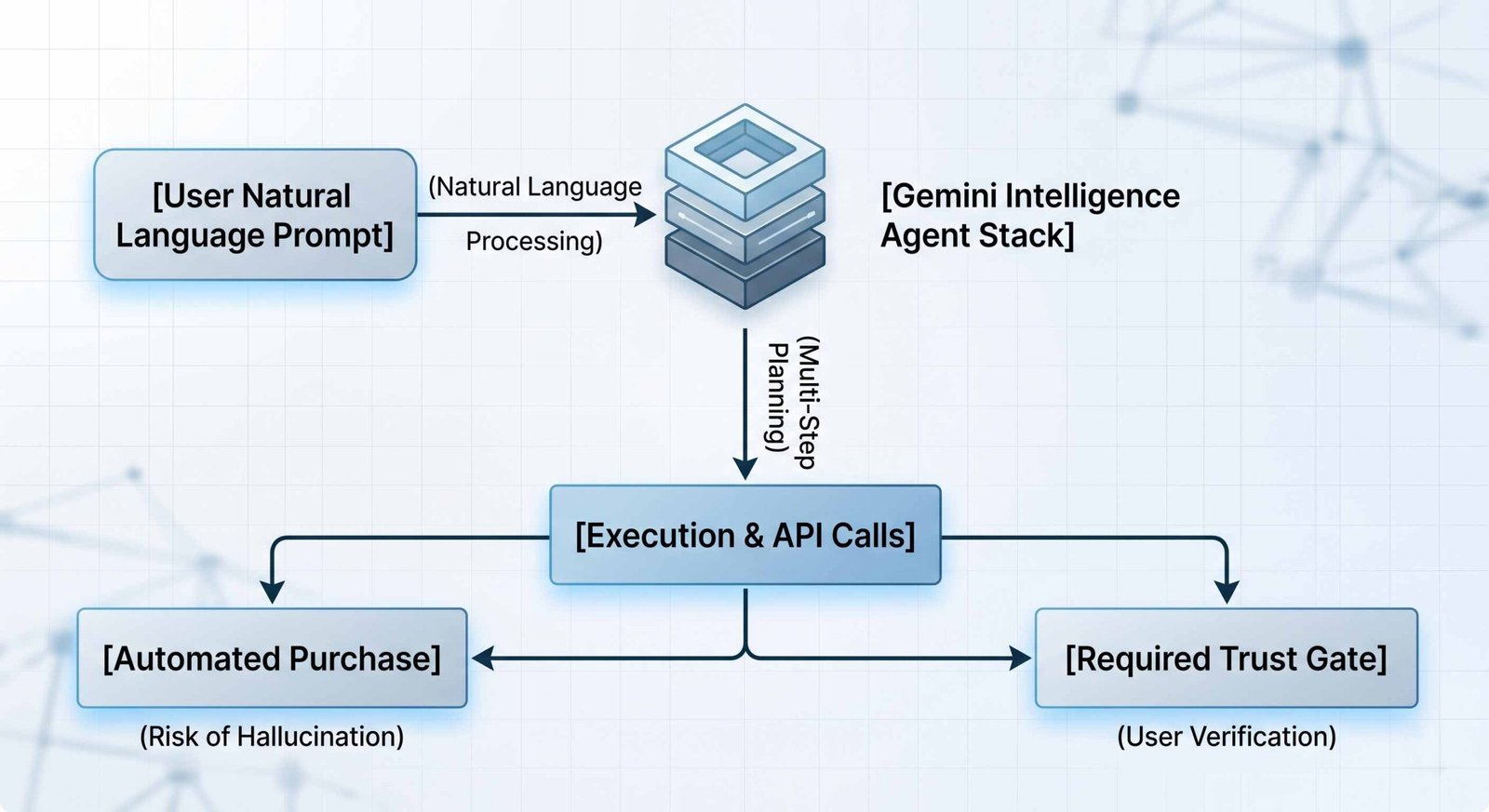
Allowing an artificial intelligence model to complete financial transactions with a single click introduces major risks regarding model hallucinations, incorrect data parsing, or accidental duplicate purchases. To prevent costly errors, we strongly advocate for a robust Trust Gate architecture. The operating system must always include mandatory, high-visibility confirmation screens before completing any permanent real-world actions. Users must be presented with a clear summary of critical details—such as total costs, exact dates, and delivery addresses—requiring an explicit biometric authentication check (via fingerprint or face unlock) before any transaction is executed.
Natural Language Custom Widget Creation
The operating system has completely revolutionized home screen customization by removing the constraints of pre-designed app interfaces. Through the new Create My Widget feature, users can build tailored dashboards entirely on the fly using natural language prompts.
If you tell the system, “Build me a temporary tracking widget for my trip to Chicago next Thursday,” Gemini Intelligence communicates with your connected Google apps to pull relevant data. It scans your Gmail for flight details, searches Google Calendar for itinerary times, and references Google Maps for hotel locations. The system then automatically constructs a beautifully designed, dynamic widget on your home screen. This interface updates automatically in real-time, providing an elegant, personalized information hub that automatically removes itself once the event is over.
Android Auto Architecture Overhaul
The vehicular interface has been completely redesigned, focusing heavily on reducing driver cognitive load while optimizing entertainment options when the vehicle is safely stationary.
Immersive High-Fidelity Navigation Geometry
The navigation interface steps away from flat, two-dimensional mapping environments to introduce a highly detailed 3D design framework. The new UI incorporates fully rendered building silhouettes, complex multi-level overpasses, and clear, explicit lane guidance.
By accurately matching the visual complexity of difficult highway junctions and urban intersections, the mapping platform helps drivers anticipate lane changes long before their turn. This layout ensures drivers can stay oriented without needing to look away from the road to constantly interpret abstract directions.
The “Park-to-Drive” Media Transition Architecture
As passenger vehicles increasingly serve as mobile charging environments for electric powertrains, in-car entertainment demands much more flexibility. The updated media framework now fully supports high-definition, full-screen video playback via native applications like YouTube while the vehicle is parked.
The true innovation lies in the platform’s strict safety transition architecture. The moment the vehicle’s transmission is shifted from Park into Drive, the system executes an instant, uninterrupted media hand-off:
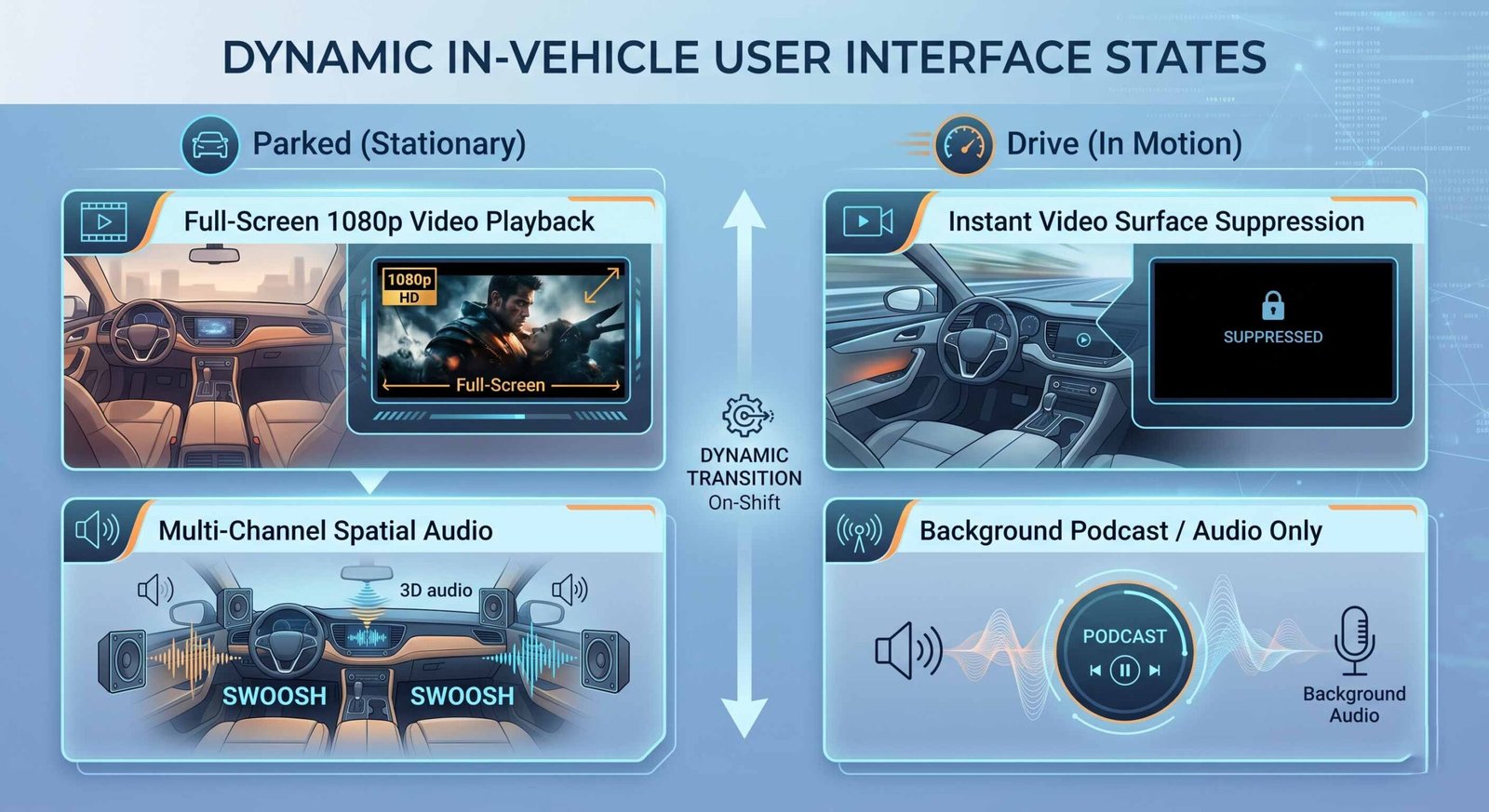
This transition is completely seamless, keeping drivers safe without interrupting the continuity of their content.
The Birth of Google Books
Beyond mobile software updates, the ecosystem is expanding its desktop horizons with a new hardware-software standard: the Google Book. This initiative represents a major evolution of the Chromebook platform, transforming it into a premium, AI-first computing environment.
Premium Engineering and the Gemini Pulse Glow Bar
The Google Book standard elevates the platform into a premium tier of hardware design, built in close partnership with top global manufacturers like HP, Dell, Lenovo, Acer, and Asus. These laptops feature high-end materials, exceptional structural rigidity, and a unique, rear-mounted RGB Glow Bar.
Far from being a simple visual gimmick, this signature lighting strip acts as a hardware-level status indicator for your AI. Dubbed the Gemini Pulse, the Glow Bar uses subtle color shifts and gentle pulsing animations to signal when the on-device agent is processing data, rendering files, or waiting for user confirmation, giving the laptop a distinct visual personality.
The Killer Feature: The AI-Enabled Cursor
The core user interaction model of the Google Book centers around the revolutionary AI-Enabled Cursor, powered by system-level Gemini integration. This updates the standard pointing tool from a basic selection arrow into an active, context-aware productivity assistant.
By hovering over any text element, image, or user interface block, users can hold a dedicated system modifier key to activate deep AI workflows instantly. You can easily drag an image from a webpage directly into a separate window to merge it with other visual assets, or hover over an incoming notification to generate a contextual reply instantly. The Cursor intelligently understands the data format beneath it, allowing for smooth, intuitive cross-application workflows without requiring complex keyboard shortcuts or repetitive menus.
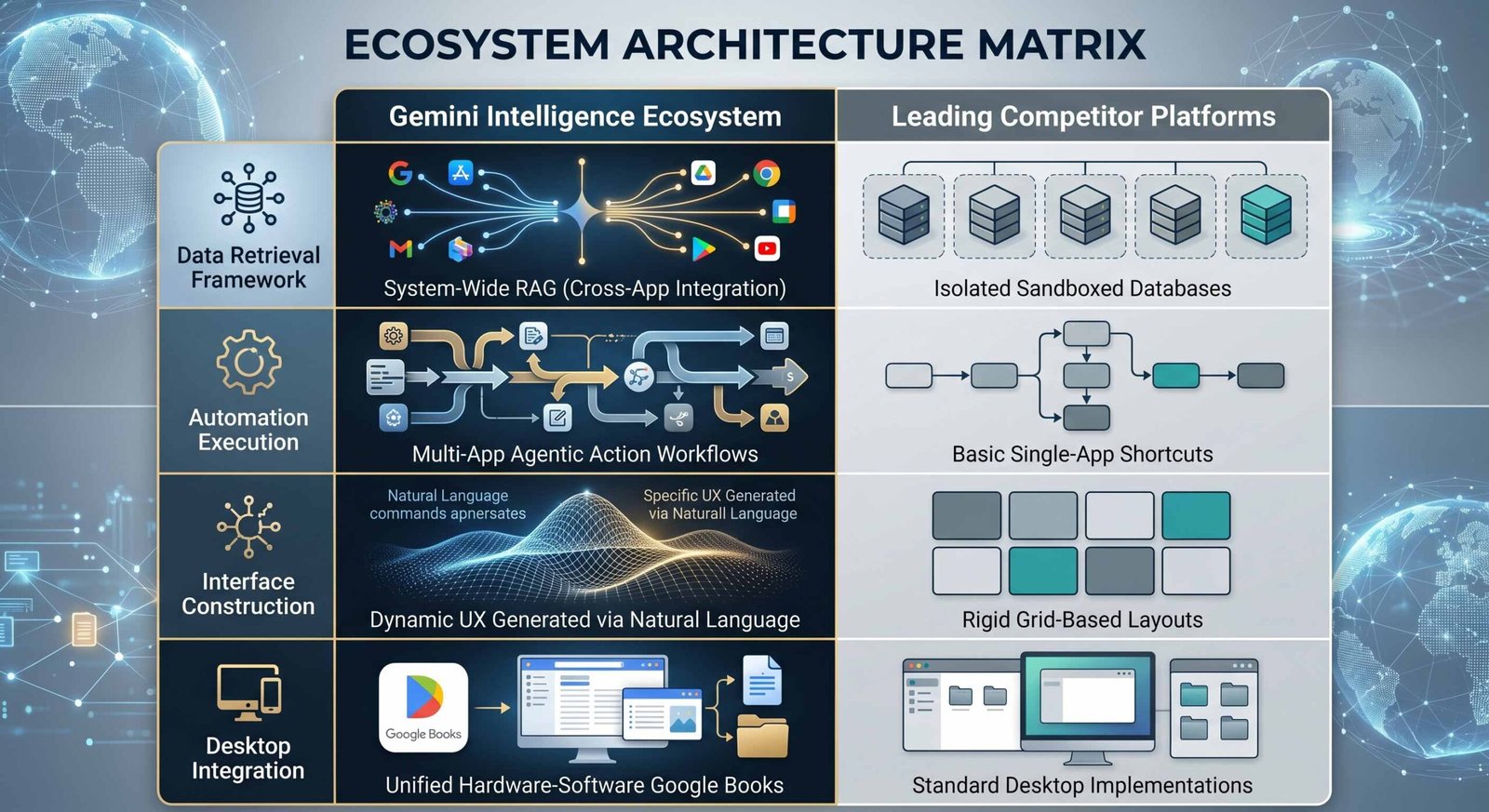
Comparative Architectural Analysis
To understand how this ecosystem positions itself against its main industry competitors, we compiled an architectural matrix comparing these new capabilities with existing platforms:
Ecosystem Architecture Matrix
Frequently Asked Questions
What is the new Autofill expansion, and how does it work?
The updated Autofill system uses an on-device Retrieval-Augmented Generation (RAG) framework. It securely parses unstructured information across your connected services—like Gmail, Photos, and Wallet—to automatically find and fill in complex form details, such as passport or tracking numbers.
How does the Pause Point feature help reduce screen time?
Unlike standard app timers that block access, Pause Point uses behavioral science to introduce soft friction. It displays a full-screen countdown overlay with personal photos or calming exercises, encouraging you to step away from distracting apps.
What makes the Rambler dictation tool different from older speech-to-text systems?
Rambler uses local machine learning models to edit your speech in real time. It automatically removes verbal filler words, pauses, and stumbles, turning natural spoken speech into clean, well-structured text.
What exactly is Gemini Intelligence?
Gemini Intelligence is the name for the platform’s advanced, agentic AI capabilities. It allows the operating system to understand context, connect data across different apps, and handle complex multi-step tasks on your behalf.
How does the system handle security risks with automatic AI purchases?
To protect users from model errors or accidental transactions, the system routes financial actions through a secure Trust Gate. This requires explicit confirmation screens and biometric authentication before any real-world purchase is finalized.
Can I create customized widgets using natural language?
Yes. With the new “Create My Widget” feature, you can use simple natural language prompts to generate custom home screen dashboards. The system pulls relevant data from your Calendar, Gmail, and Maps to build real-time info hubs for specific events.
What updates are included in the new Android Auto redesign?
The overhauled interface brings high-fidelity 3D navigation mapping with realistic building outlines and clear lane guidance. It also supports full-screen video playback while parked, which automatically switches to audio-only mode when driving.
What is a Google Book?
A Google Book is a new category of premium, AI-first laptops that represent the next evolution of Chromebooks. They feature high-end hardware manufacturing standards, deeply integrated AI systems, and a signature rear-mounted RGB Glow Bar.
How does the AI-Enabled Cursor on Google Books function?
The AI-Enabled Cursor allows users to interact directly with any text or image on screen. By holding a dedicated system key, you can drag and merge files, create quick contextual replies, or activate AI workflows without opening separate menus.
When will this software update be available for consumer devices?
The platform update has completed its primary beta testing phases. It is rolling out to supported flagship smartphones, starting with Google Pixel and Samsung Galaxy devices, before expanding to other manufacturers.

Selva Ganesh is a Computer Science Engineer, Android Developer, and Tech Enthusiast. As the Chief Editor of this blog, he brings over 10 years of experience in Android development and professional blogging. He has completed multiple courses under the Google News Initiative, enhancing his expertise in digital journalism and content accuracy. Selva also manages Android Infotech, a globally recognized platform known for its practical, solution-focused articles that help users resolve Android-related issues.





Leave a Reply