
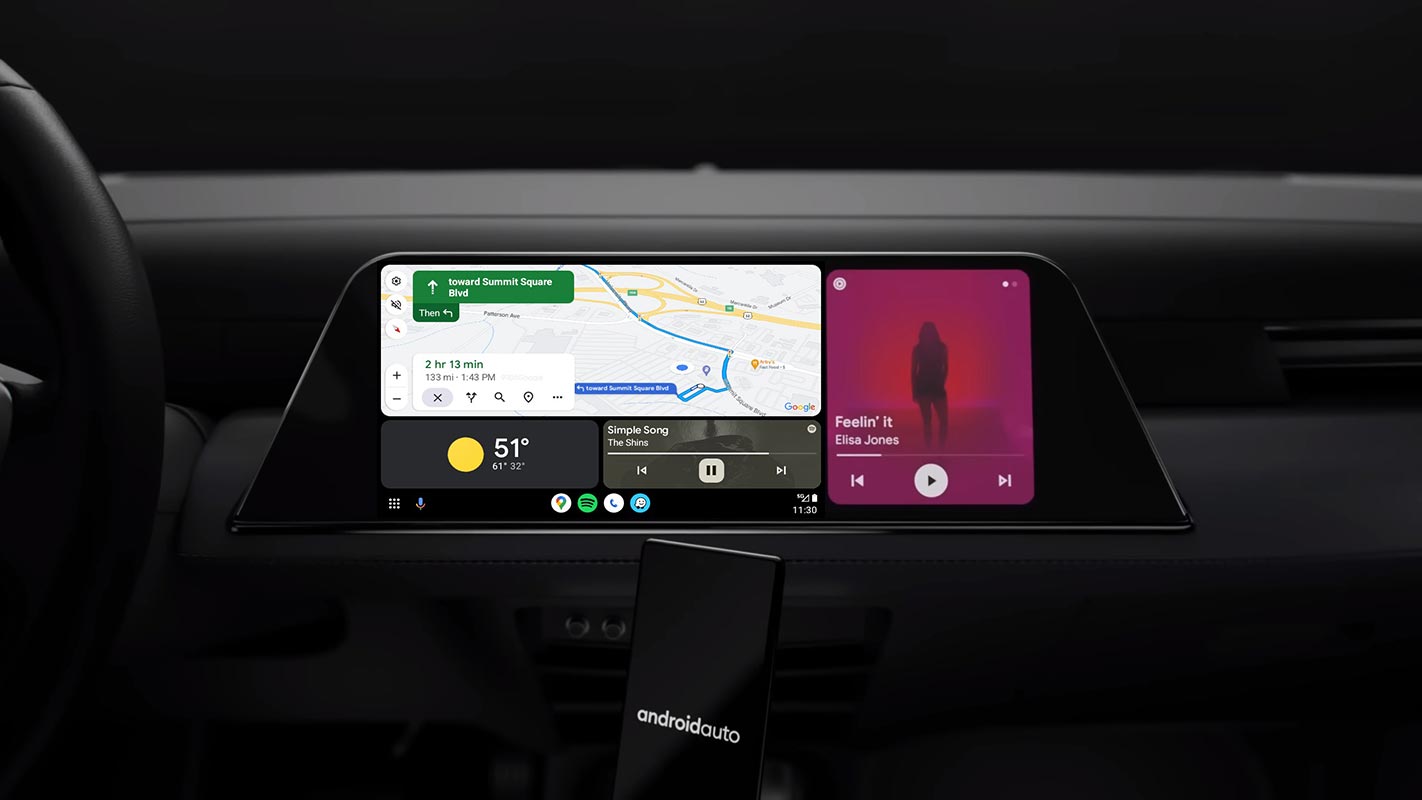
In the rapidly evolving realm of technology, change is the only constant. The most recent development focuses on refining the user interface of Android Auto, particularly within Google Maps. This entails a comprehensive makeover of the navigation screen, introducing fresh button designs and a streamlined, clutter-free presentation of information. The aim is precise: to elevate the overall user experience. This update is a testament to the relentless pursuit of perfection in user interface design, ensuring that every interaction with the system is as seamless and intuitive as possible. Android Auto Google Maps gets a redesigned ETA. It’s a step forward in harnessing technology to make navigation smoother and more enjoyable for all users.
Android Auto Google Maps get Redesigned ETA
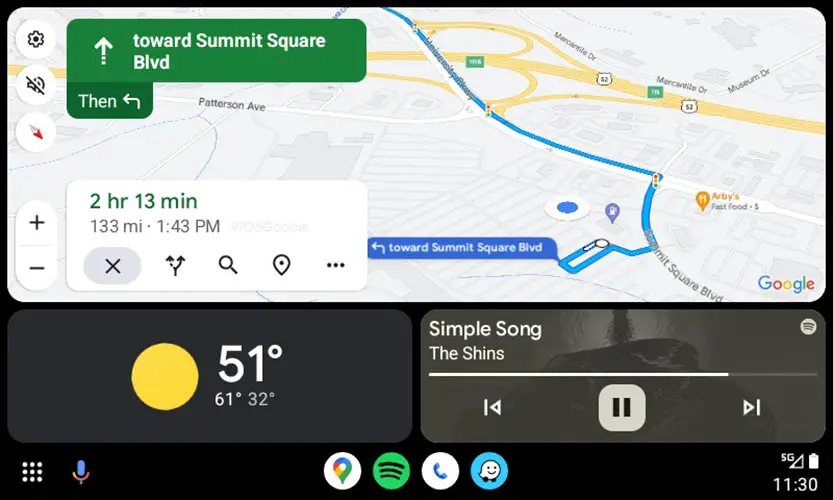
The update introduces a sleeker interface, with the estimated travel time prominently displayed at the top in bold text. Below, users will find the distance and estimated arrival time (ETA). Further down the screen, buttons to stop navigation, explore alternate routes, search for additional locations, view stops on the route, and an overflow button have also been redesigned. Notably, a line divider that once separated these sections has been removed, providing a cleaner aesthetic.

Harmony with the New Sidebar
This revamped look of Google Maps aligns seamlessly with the recently launched sidebar on Android Auto. The modernized design ensures a smoother and more intuitive navigation experience for users.
Version Compatibility
The changes are currently observed in Google Maps v11.104.0100 and Android Auto v10.8, which are gradually rolling out via the Play Store. It’s worth mentioning that recently, Google released the stable version of Android Auto 10.8. While this may be considered a minor update, it does bring noteworthy adjustments, including the return of the classic tilted view over the overhead view.
Focus on Google Maps
While Android Auto hasn’t undergone significant alterations, the show’s star, Google Maps, has quietly received an update. The interface, albeit subtly, has been refined, presenting a more contemporary appearance that directs the user’s attention to what truly matters.
Evolving Interface
This shift is particularly intriguing considering that Google Maps in Android Auto has maintained a consistent look for many years, with only minor tweaks. One notable change was relocating buttons to the left side, offering drivers more access to navigation functions.
A Modernized Experience
The update introduces a tactile and modern feel, featuring more extensive and refined buttons. This means that at a glance, users can quickly identify and interact with elements on the screen. For instance, the panel displaying arrival time and related buttons has been reconfigured. The divider bar has vanished, and the ‘X’ button to conclude the route now rests at the bottom. This results in a less cluttered interface that’s more user-friendly.
Rolling Out Gradually
It’s important to note that this redesign is currently being rolled out, and you may not have experienced it yet, as it’s dependent on server-side deployment. If you find yourself in this situation, await the arrival of the latest version for the update to take effect.
FAQs
Is this update available to all Android Auto users?
The update is only available with a few users. So, it may not be available to all users simultaneously. Keep an eye out for the latest version in your Play Store.
What are the critical changes in the updated version of Google Maps?
The update brings a cleaner interface with redesigned buttons, a prominent display of estimated travel time, and a more intuitive layout for navigation options.
How does this update enhance user experience?
The modernized interface with larger buttons and more precise information presentation makes it easier for users to interact with the navigation screen.
Are there any other significant updates in Android Auto 10.8?
While Android Auto 10.8 primarily addresses minor performance issues, it does reintroduce the tilted view option for users.
What should I do if I haven’t received the update yet?
If you haven’t experienced the redesign yet, it may be due to server-side deployment. Wait for the latest version to arrive on your device.
Wrap Up
In the dynamic world of technology, even the most minor tweaks can have a profound impact on user experience. The recent enhancement in Google Maps on Android Auto exemplifies this concept, introducing a refined interface that exudes a sense of modernity. This transformation goes beyond aesthetics; it fundamentally improves how users interact with the navigation system. The clean, intuitive layout minimizes confusion and ease of use, ensuring that getting from point A to B is a seamless experience.
With clearer visuals, intelligently placed buttons, and a more responsive design, users can navigate with greater efficiency and confidence. This update demonstrates a commitment to continuous improvement, showcasing how even subtle adjustments can elevate the functionality and user-friendliness of a platform. It’s a testament to the dedication to providing the best possible experience for everyone relying on this technology for their daily journeys.

Selva Ganesh is a Computer Science Engineer, Android Developer, and Tech Enthusiast. As the Chief Editor of this blog, he brings over 10 years of experience in Android development and professional blogging. He has completed multiple courses under the Google News Initiative, enhancing his expertise in digital journalism and content accuracy. Selva also manages Android Infotech, a globally recognized platform known for its practical, solution-focused articles that help users resolve Android-related issues.




Leave a Reply