
The perpetual challenge of handling unwanted emails has plagued users on diverse platforms. Yet, the advent of the One Tap Unsubscribe feature within the Google Gmail app for iOS heralds a transformative shift, alleviating the cumbersome nature of unsubscribing. Previously, users grappled with convoluted methods, navigating menus or sifting through extensive content, adding to the frustration of managing their inboxes. This innovative feature redefines the unsubscribing experience, situating the option conveniently at the email’s top and ensuring swift, hassle-free action with a single tap. This thoughtful approach contrasts with prior methodologies, empowering users with an efficient and user-friendly means to curate their inboxes. Google’s quiet integration of this enhancement underscores its commitment to enhancing user experiences seamlessly and signifies a monumental leap toward streamlined email management.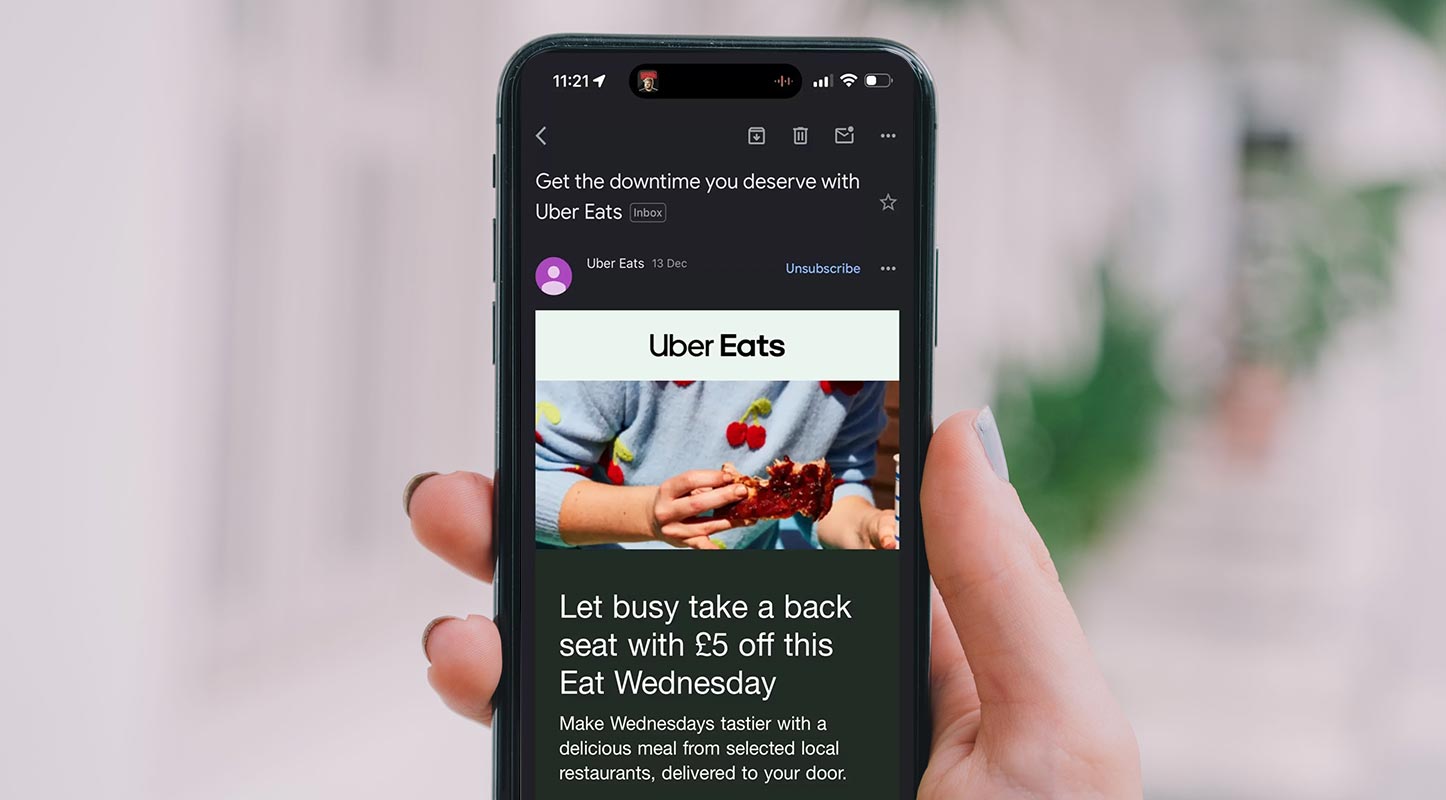
Revolutionizing Email Unsubscribing
She was previously unsubscribing from emails, which often involved navigating menus or scrolling through lengthy content, making it time-consuming and frustrating. But now, the Gmail app revolutionizes this experience by placing the unsubscribe button at the top of every email.

Streamlined Unsubscribing
Google’s implementation of this feature streamlines the unsubscribing process—no more hunting for elusive options buried within emails. The unsubscribe button now resides conveniently at the top, ensuring swift action with a single tap.
Step-by-Step Guide: How to Use the Gmail App’s One Tap Unsubscribe Feature

Accessing Your Inbox
- Open the Gmail app on your iOS device and navigate to your inbox to view your emails.
Identifying Unwanted Email
- Scroll through your emails and locate the message from which you want to unsubscribe
Locating the Unsubscribe Button
- Look for the email subject line where, right at the top, you’ll find the “unsubscribe” button strategically placed.
Tap to Unsubscribe
- With a single tap on the “unsubscribe” button, Gmail swiftly processes your request to unsubscribe from the sender’s mailing list.
Confirmation Prompt
- In some cases, Gmail might display a confirmation prompt to ensure you intend to unsubscribe. Confirm your decision by tapping “Unsubscribe.”
Unsubscribed Successfully
- Once confirmed, Gmail removes you from the sender’s mailing list. You will no longer receive emails from that specific sender.
Repeat as Necessary
- Repeat this process for any emails you wish to unsubscribe from using the One Tap Unsubscribe feature.
Verification
- To ensure a successful unsubscription, check your inbox or spam folder to confirm that you no longer receive emails from the previously selected sender.
Enjoy a Streamlined Inbox
- Benefit from a more curated and organized inbox, free from unwanted emails, thanks to the convenience of the One Tap Unsubscribe feature
Note: Android User Consideration
- For Android users, watch for future updates or releases that may include this feature for your device, enhancing your email management experience.
Utilize this user-friendly feature to effortlessly declutter your inbox and regain control over the content you receive through Gmail on your iOS device.
User-Friendly Design
This user-friendly approach starkly contrasts the previous methods, where users had to delve into menus or search for the sender’s unsubscribe option at the email’s bottom. The innovation promises a hassle-free experience, significantly improving user interaction and efficiency.
Google’s Innovative Approach
The introduction of this feature, initially available exclusively for iOS users, aims to enhance user control and streamline email management. Google’s decision to integrate this quietly underlines its commitment to improving user experience without unnecessary fanfare.
Strategic Positioning
With a prominent “unsubscribe” button, positioned strategically below the subject line but above the email content, Google empowers users with a more straightforward, efficient way of managing their inbox. This thoughtful design minimizes the steps required for unsubscribing, eliminating unnecessary navigation and promoting ease of use.
Comparing Mobile and Web Versions
The significance of this feature becomes more apparent when comparing it to the web version’s similarly placed unsubscribe button. This consistency in design across platforms ensures a seamless experience for users navigating between the app and the web interface.
User Response
Initial user responses have been overwhelmingly positive, with many expressing relief at the newfound simplicity in managing their emails. The streamlined process saves time and lets users control their inboxes, fostering a more satisfying user experience.
Future Possibilities
Currently, the feature remains exclusive to iOS users, prompting curiosity about its potential integration into the Android version and the possibility of further enhancements in the future. The user-friendly design and ease of access underscore Google’s dedication to continually refining the user experience.
FAQs
Is the One Tap Unsubscribe feature available on Android devices?
As of now, the feature is exclusively available on iOS. Google hasn’t announced plans for its integration into the Android version yet.
Does using the unsubscribe button affect privacy or security?
No, the feature facilitates hassle-free unsubscribing without compromising user privacy or security.
Can I use the One Tap Unsubscribe feature for all emails?
The feature is available for emails that offer the unsubscribe option. Some emails may not have this functionality.
Will this feature completely stop all emails from a sender?
Unsubscribing using this feature should prevent further emails from the same sender, but it might not stop all communication if there are multiple email lists.
Can I undo an unsubscribe action performed using this feature?
Once you tap the unsubscribe button, it’s usually an immediate action, and there might not be an undo option.
Wrap Up
Introducing the One Tap Unsubscribe feature within the Gmail app marks a pivotal advancement in email management. Google’s strategic placement of this functionality grants users unparalleled control, revolutionizing how individuals interact with and curate their email inboxes. This innovative addition fundamentally transforms the tedious process of dealing with unwanted emails, streamlining it to a mere tap at the user’s convenience. The seamless integration of this feature redefines the user experience, emphasizing efficiency and user empowerment.
With this enhancement, navigating through an inundated inbox becomes remarkably simplified, ensuring users can swiftly unsubscribe from irrelevant or bothersome content with unparalleled ease. By prioritizing user control and ease of use, Google not only elevates the efficiency of email management but also signifies a commitment to refining the user experience by placing enhanced functionality directly into users’ hands, fundamentally reshaping how individuals interact with their emails.

Selva Ganesh is a Computer Science Engineer, Android Developer, and Tech Enthusiast. As the Chief Editor of this blog, he brings over 10 years of experience in Android development and professional blogging. He has completed multiple courses under the Google News Initiative, enhancing his expertise in digital journalism and content accuracy. Selva also manages Android Infotech, a globally recognized platform known for its practical, solution-focused articles that help users resolve Android-related issues.





Leave a Reply